 clawkwork/clawk
Give coding agents a disposable Linux VM, not your laptop


Give a coding agent its own disposable Linux machine, not yours.



Install · Quickstart · Why a VM? · How it works · Compared to · FAQ · Docs
A coding agent is only useful when you let it actually do things: install
packages, run the code it writes, start servers, use the network. On your own
machine that leaves two bad options. You approve every command (and babysit a
prompt every few seconds), or you run --dangerously-skip-permissions and hope
nothing important is one rm -rf or one leaked token away.
clawk is a third option. cd into a repo, type clawk, and Claude Code (or
Codex, or pi, or a shell) is working inside a disposable Linux VM (your code mounted
in, root in the guest, no permission prompts) while your files, your keychain,
and the rest of your machine stay out of reach. The agent gets its own
machine instead of yours.
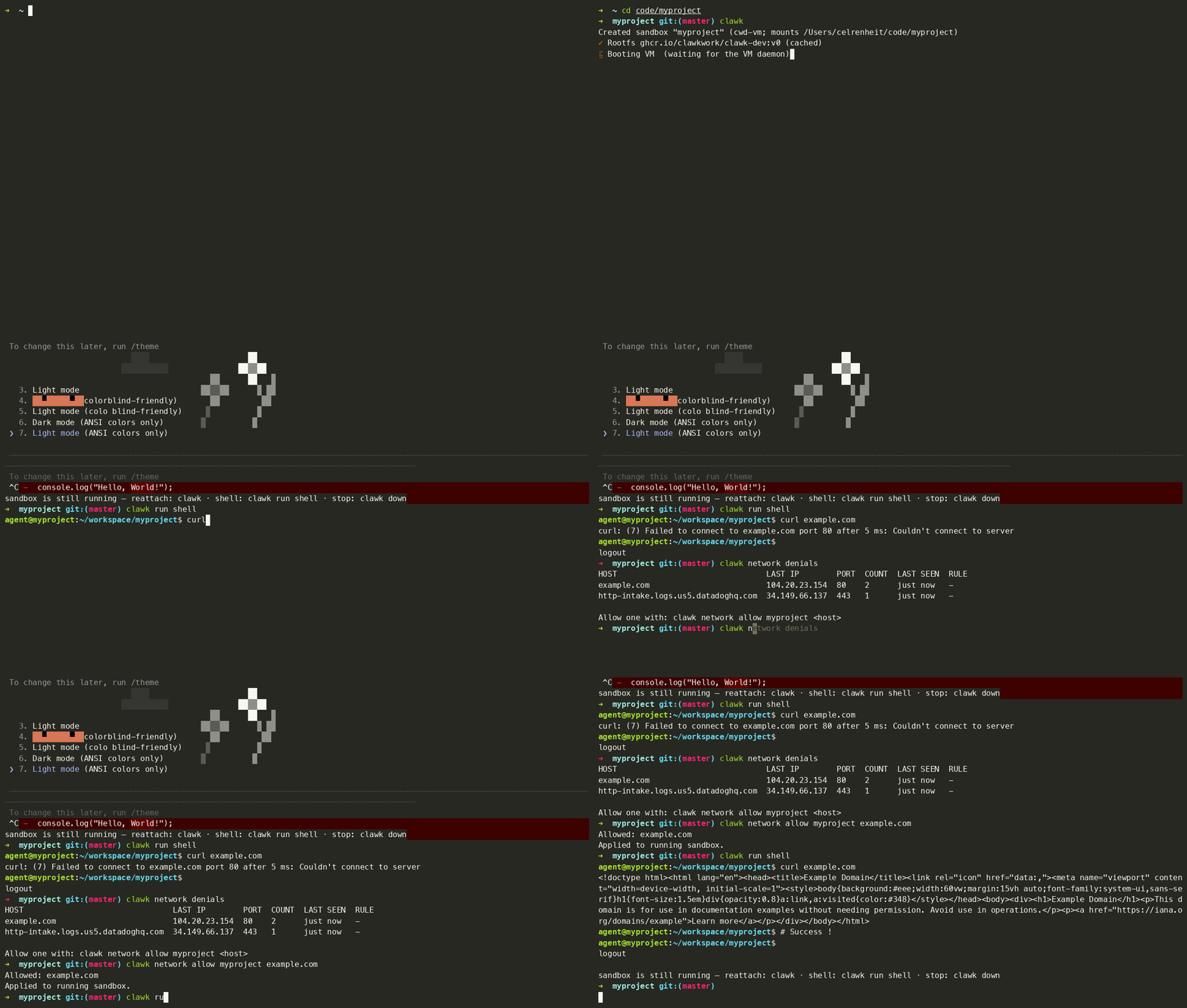
One command to a working agent; an attempt to send data to an
unknown server, blocked by the network allow-list; clawk attach
resumes the session later.
The boundary isn't a rule in a prompt the agent could be talked out of. It's a separate machine, and the only openings are the ones you mounted. From a shell inside a sandbox:
$ curl https://tracker.evil.example   # not on the allow-list: blocked
curl: (7) Failed to connect to tracker.evil.example port 443 after 2 ms: Connection refused

$ cat ~/.ssh/id_rsa                   # your keys never entered the VM
cat: /home/agent/.ssh/id_rsa: No such file or directory

$ git push                            # ...yet this works: ssh-agent is forwarded
Enumerating objects: 5, done.
To be honest about the limits, the allow-list blocks connections to unknown servers, not to ones you've allowed: github.com is pre-allowed and the forwarded ssh-agent can push, so treat anything the agent can read as something it could publish. The security model spells this out.
And if the agent wrecks the VM, run clawk destroy && clawk: a fresh VM, same
repo, and --resume restores the conversation.
[!IMPORTANT] Pre-1.0 and moving fast. Expect breaking changes between releases and the occasional rough edge; things can and will break. Please file issues; that feedback is shaping 1.0.
rm -rf, package installs, and untrusted code can't reach your
host, your files, or anything you didn't explicitly share.cd into a repo and run clawk. No
Dockerfile, devcontainer, or setup file. First boot builds a rootfs from
your image; every boot after takes seconds.git push works without keys entering the VM.clawk is a general-purpose local environment for autonomous coding agents. The VM is the point: it's a whole machine the agent can own, not a process wrapped in policy on the one you're using.
/dev/kvm-shaped expectations, so tools behave the way their docs say,
without a syscall-filter surprise./etc, load a module,
bind a privileged port. It's the agent's box to reconfigure.clawk destroy && clawk away, with your repo and conversations
untouched on the host.That combination runs workloads a restricted process sandbox tends to fight you on:
None of this is the product; clawk is for local agent work in general. Docker and Kubernetes are just the sharpest example of "needs a real machine, not a sandboxed process."
Requires macOS 14+ on Apple silicon. (Linux is supported via firecracker and currently experimental — start with docs/linux-quickstart.md, which covers setup, the workflow, and the gaps. This README is macOS-first.)
brew install clawkwork/tap/clawk
From source (contributors, or if you don't use Homebrew), needs Go 1.26+:
git clone https://github.com/clawkwork/clawk && cd clawk
make install
Either way there's no extra host tooling: no Docker, no qemu, no sudo. The hypervisor is Apple's Virtualization.framework, linked into the binary, and the release binaries carry the in-guest agent prebuilt — so a Go toolchain is only needed if you build from source, in which case you have one. First run probes for anything missing and offers to fix it.
Uninstall: clawk destroy your sandboxes, rm -rf ~/.clawk, then remove
the binary with brew uninstall clawk (or delete it from $GOBIN for a
source install). Nothing else was installed: there are no launchd jobs; the
per-sandbox daemons are ordinary processes that exit with their VMs.
The everyday case, a sandbox for the directory you're in:

-lightgrey)