 claudiugeorgiu/obfuscapk
An automatic obfuscation tool for Android apps that works in a black-box fashion, supports advanced obfuscation features and has a modular architecture easily extensible with new techniques

[!IMPORTANT] This project is archived and no longer maintained.
Some of the most common questions are answered in FAQ and troubleshooting.
A black-box obfuscation tool for Android apps.



Obfuscapk is a modular Python tool for obfuscating Android apps without needing
their source code, since apktool is used
to decompile the original apk file and to build a new application, after applying some
obfuscation techniques on the decompiled smali code, resources and manifest. The
obfuscated app retains the same functionality as the original one, but the differences
under the hood sometimes make the new application very different from the original
(e.g., to signature-based antivirus software).
Obfuscapk is adding support for
Android App Bundles (aab files) by
using BundleDecompiler (see
#121). In order to use this new
feature, download the latest version of BundleDecompiler available from
here,
save it as BundleDecompiler.jar in a directory included in PATH (e.g., in Ubuntu,
/usr/local/bin or /usr/bin) and make sure it has the executable flag set.
[!IMPORTANT] BundleDecompiler doesn't work on Windows yet, so app bundle obfuscation is not supported by Obfuscapk on Windows platform. Also, app bundle support is still in early development, so if you faced any problems or if you want to help us improve, please see contributing.
More details about Obfuscapk can be found in the paper "Obfuscapk: An open-source black-box obfuscation tool for Android apps". You can cite the paper as follows:
@article{aonzo2020obfuscapk,
    title = "Obfuscapk: An open-source black-box obfuscation tool for Android apps",
    journal = "SoftwareX",
    volume = "11",
    pages = "100403",
    year = "2020",
    issn = "2352-7110",
    doi = "https://doi.org/10.1016/j.softx.2020.100403",
    url = "https://www.sciencedirect.com/science/article/pii/S2352711019302791",
    author = "Simone Aonzo and Gabriel Claudiu Georgiu and Luca Verderame and Alessio Merlo",
    keywords = "Android, Obfuscation, Program analysis"
}
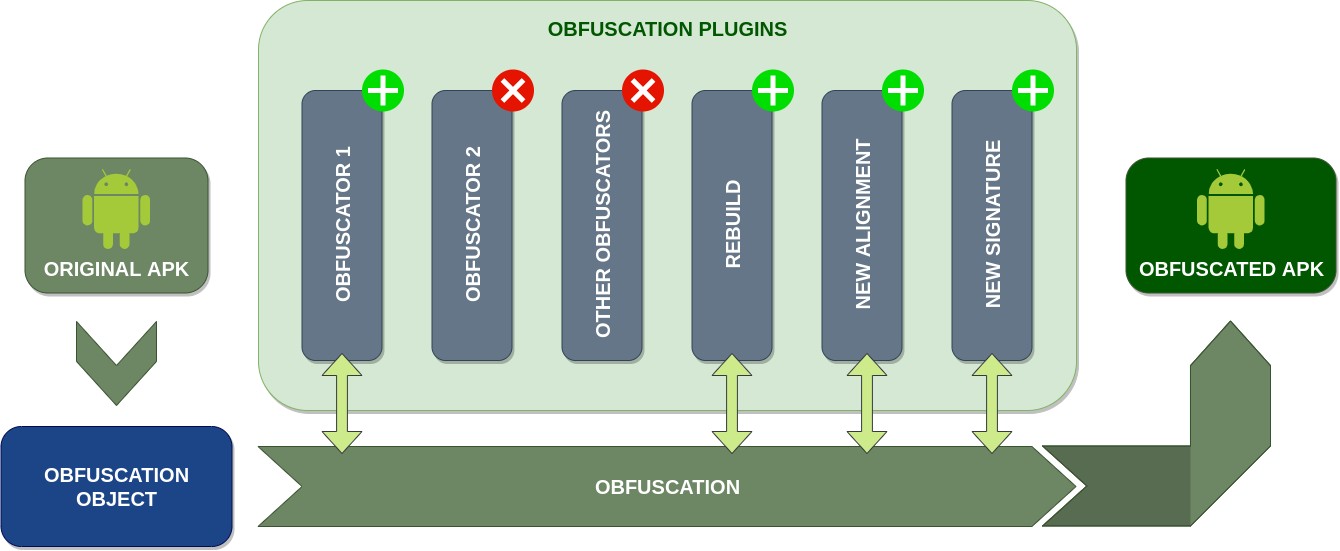
Obfuscapk is designed to be modular and easy to extend, so it's built using a
plugin system. Consequently, every obfuscator is
a plugin that inherits from an abstract
base class
and needs to implement the method obfuscate. When the tool starts processing a new
Android application file, it creates an
obfuscation object
to store all the needed information (e.g., the location of the decompiled smali code)
and the internal state of the operations (e.g., the list of already used obfuscators).
Then the obfuscation object is passed, as a parameter to the obfuscate method, to all
the active plugins/obfuscators (in sequence) to be processed and modified. The list and
the order of the active plugins is specified through command line options.
The tool is easily extensible with new obfuscators: it's enough to add the source code
implementing the obfuscation technique and the plugin metadata (a
<obfuscator-name>.obfuscator file) in the
src/obfuscapk/obfuscators
directory (take a simple existing obfuscator like
Nop
as a starting example). The tool will detect automatically the new plugin, so no
further configuration is needed (the new plugin will be treated like all the other
plugins bundled with the tool).
There are two ways of getting a working copy of Obfuscapk on your own computer: either
by using Docker or by using directly the source code
in a Python 3 environment. In both cases, the first thing to do is to get a local
copy of this repository, so open up a terminal in the directory where you want to save
the project and clone the repository:
$ git clone https://github.com/ClaudiuGeorgiu/Obfuscapk.git
This is the suggested way of installing Obfuscapk, since the only requirement is to have a recent version of Docker installed:
$ docker --version
Docker version 20.10.21, build baeda1f
The official Obfuscapk Docker image is available on Docker Hub (automatically built from this repository):
$ # Download the Docker image.
$ docker pull claudiugeorgiu/obfuscapk
$ # Give it a shorter name.
$ docker tag claudiugeorgiu/obfuscapk obfuscapk
If you downloaded the official image from Docker Hub, you are ready to use the tool so
go ahead and check the usage instructions, otherwise execute the following
command in the previously created Obfuscapk/src/ directory (the folder containing the
Dockerfile) to build the Docker image:
$ # Make sure to run the command in Obfuscapk/src/ directory.
$ # It will take some time to download and install all the dependencies.
$ docker build -t obfuscapk .
When the Docker image is ready, make a quick test to check that everything was installed correctly:
$ docker run --rm -it obfuscapk --help
usage: python3 -m obfuscapk.cli [-h] -o OBFUSCATOR [-w DIR] [-d OUT_APK_OR_AAB]
...
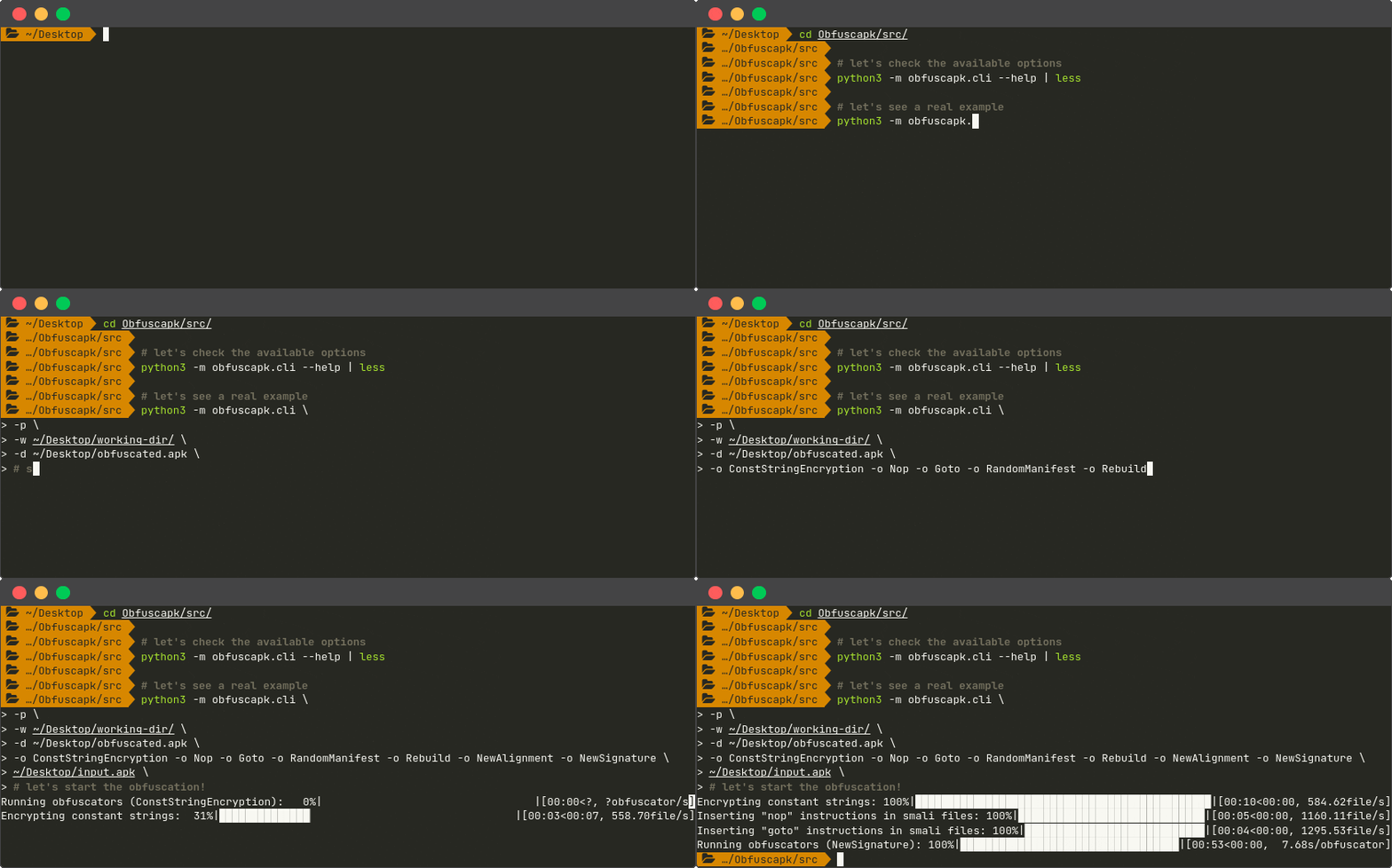
Obfuscapk is now ready to be used, see the usage instructions for more information.
Make sure to have a recent version of
apktool,
apksigner
and zipalign installed
and available from the command line:
$ apktool
Apktool v2.9.0 - a tool for reengineering Android apk files
...
$ apksigner
Usage:  apksigner <command> [options]
        apksigner --version
        apksigner --help
...
$ zipalign
Zip alignment utility
Copyright (C) 2009 The Android Open Source Project
...
