 cisagov/scubagear
Automation to assess the state of your M365 tenant against CISA's baselines


[![GitHub Release][github-release-img]][release] [![PSGallery Release][psgallery-release-img]][psgallery] [![CI Pipeline][ci-pipeline-img]][ci-pipeline] [![Functional Tests][functional-test-img]][functional-test] [![GitHub License][github-license-img]][license] [![GitHub Downloads][github-downloads-img]][release] [![PSGallery Downloads][psgallery-downloads-img]][psgallery] [![GitHub Issues][github-issues-img]][github-issues]
ScubaGear is an assessment tool that verifies that a Microsoft 365 (M365) tenant’s configuration conforms to the policies described in the Secure Cloud Business Applications (SCuBA) Secure Configuration Baseline documents.
[!NOTE] This documentation can be read using GitHub Pages.
ScubaGear is for M365 administrators who want to assess their tenant environments against CISA Secure Configuration Baselines.
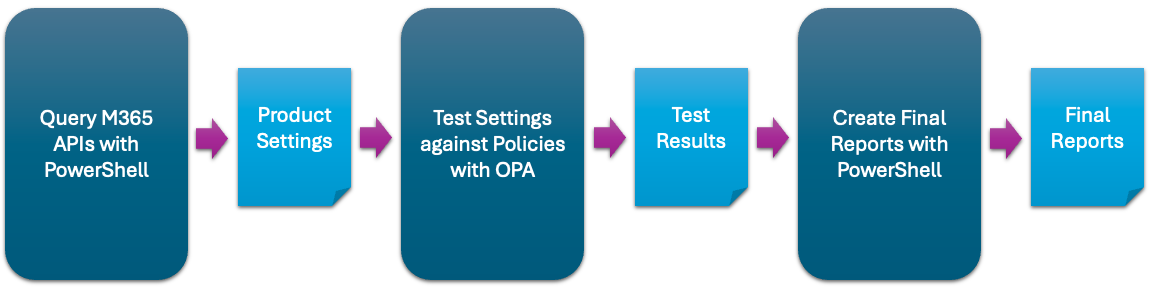
ScubaGear uses a three-step process:
SCuBA controls have been mapped to both NIST SP 800-53 and the MITRE ATT&CK framework.
SCuBA now includes a graphical user interface that makes it easier than ever to create and manage your YAML configuration files. This intuitive tool helps reduce the complexity of manual editing and streamlines the configuration process for your organization. For more information review the Configuration UI documentation.
Start-ScubaConfigAppIdeal for users who prefer a visual interface over command-line tools.
Before launching ScubaGear, it's important to ensure your environment is properly configured. This includes having the necessary dependencies and permissions in place.
Please review the prerequisites section to verify that your system meets all requirements. This will help avoid errors during execution and ensure a smooth experience when using ScubaGear.
[!NOTE] After installing ScubaGear in your environment, we recommend using the built-in update functions and features when you need to update to the latest version. See the Update Guide for more information.
ScubaGear can be run multiple times to properly evaluate baseline settings.
First Run (No Configuration File): Start ScubaGear without a configuration file. This initial run generates a baseline template of your environment's current settings. It does not make changes but helps you understand the default posture.
Subsequent Runs (With Configuration File): After reviewing and editing the generated configuration file, run ScubaGear again with the configuration file as input. This allows ScubaGear to compare your intended settings against the actual environment and elevate discrepancies accordingly.
[!IMPORTANT] ScubaGear has specific prerequisites and relies on defined configuration values to properly evaluate your Microsoft 365 tenant. After your initial assessment run, review the results thoroughly. Address any identified gaps by updating your tenant configuration or documenting risk acceptances in a YAML configuration file using exclusions, annotations, or omissions. Refer to the sections below for detailed guidance.
This iterative approach ensures ScubaGear is aligned with your environment and that all policy evaluations are based on your customized baseline.
To install ScubaGear from PSGallery, open a PowerShell 5 terminal on a Windows computer and install the module:
# Install ScubaGear
Install-Module -Name ScubaGear
# Install the minimum required dependencies
Install-ScubaDependencies
# Check the version
Invoke-SCuBA -Version
[!IMPORTANT] If you are running v2.0.0 with interactive login against a non-commercial tenant such as gcc or gcchigh, include the -M365Environment parameter. In a future release ScubaGear will auto-detect the M365 environment and this won't be necessary.
# Assess all products (basic command)
Invoke-SCuBA -ProductNames *
ScubaGear uses a YAML configuration file to define how your environment should be evaluated. This file serves several important purposes:
