
Skip to content
KitploitKITPLOIT
ToolsBlog
Submit
ToolsBlog
Submit

Hacking, PenTest, and Cybersecurity Tools for Your Security Arsenal!

Kitploit is a directory of hacking, cybersecurity, and pentesting tools. Discover the latest project updates to find vulnerabilities, analyze systems, automate testing, and strengthen your security.

··Feeds·Contact·Privacy·© 2026 Kitploit

Tool Directory

Categories

View all categories
Loading categories
cicd-goat — A deliberately vulnerable CI/CD environment. Learn CI/CD security through multiple challenges. | Kitploit
Tools/GitHubGitHub/cider-security-research/cicd-goat
Vulnerability AnalysisCTFPenetration TestingDevSecOpsLearning & EducationLabs & Practice
GitHubcider-security-research/cicd-goat

cicd-goat

A deliberately vulnerable CI/CD environment. Learn CI/CD security through multiple challenges.
View Repository
2.3k4162 years agoReviewed by Kitploit

Most Popular

View all →

Discover the most used tools by our community.

Explore all tools

Browse our collection of tools

View all tools →
Share

cicd-goat

maintained by top 10 .github/workflows/release.yaml CircleCI Docker pulls Version

Deliberately vulnerable CI/CD environment. Hack CI/CD pipelines, capture the flags. 🚩

Created by Cider Security (Acquired by Palo Alto Networks).

Table of Contents

  • Description
  • Download & Run
    • Linux & Mac
    • Windows (Powershell)
  • Usage
    • Instructions
    • Take the challenge
    • Troubleshooting
  • Solutions
  • Contributing

Description

The CI/CD Goat project allows engineers and security practitioners to learn and practice CI/CD security through a set of 11 challenges, enacted against a real, full blown CI/CD environment. The scenarios are of varying difficulty levels, with each scenario focusing on one primary attack vector.

The challenges cover the Top 10 CI/CD Security Risks, including Insufficient Flow Control Mechanisms, PPE (Poisoned Pipeline Execution), Dependency Chain Abuse, PBAC (Pipeline-Based Access Controls), and more.
The different challenges are inspired by Alice in Wonderland, each one is themed as a different character.

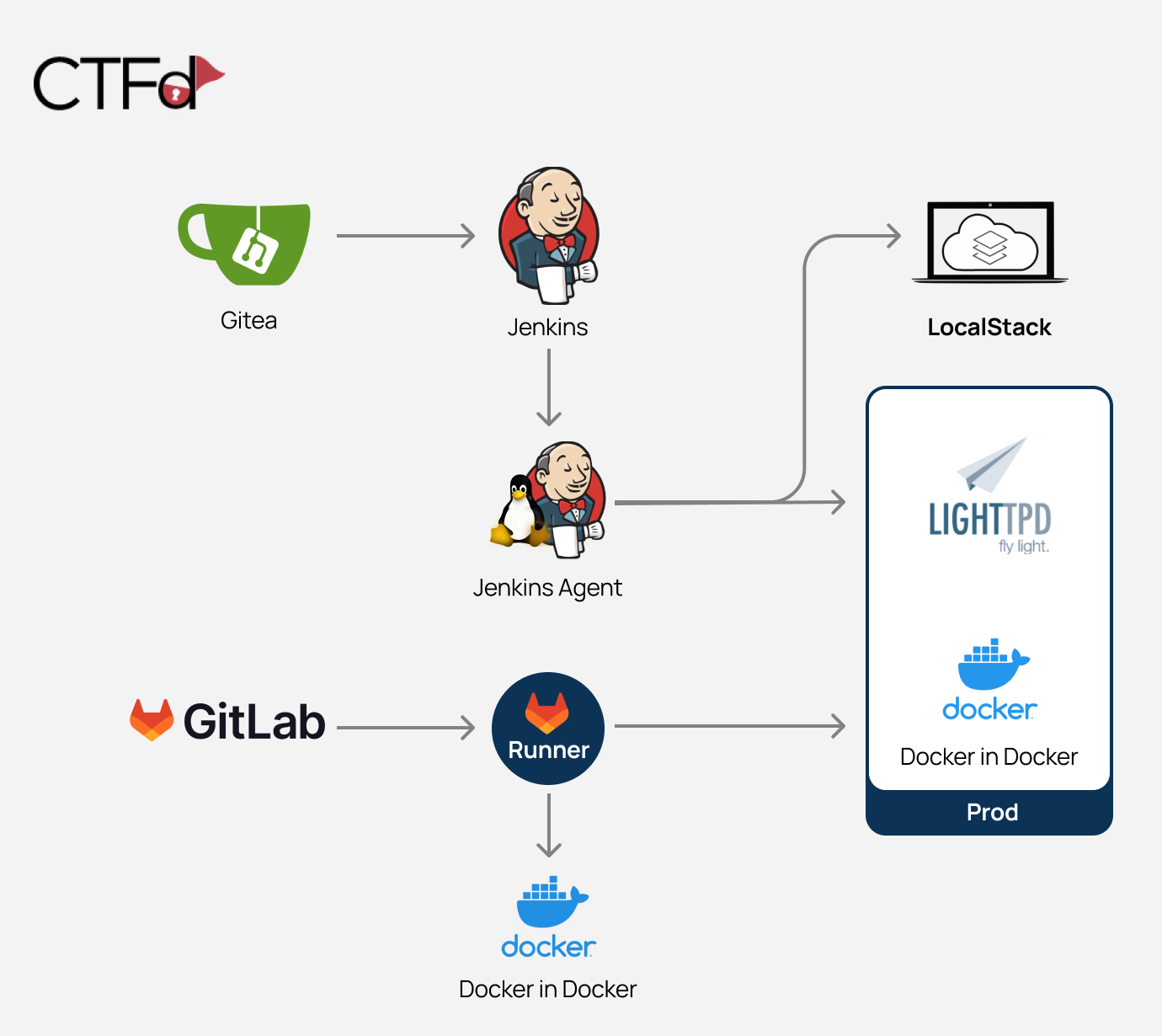
The project’s environment is based on Docker containers and can be run locally. These containers are:

  1. Gitea (minimal git server)
  2. Jenkins
  3. Jenkins agent
  4. LocalStack (cloud service emulator that runs in a single container)
  5. Prod - contains Docker in Docker and Lighttpd service
  6. CTFd (Capture The Flag framework)
  7. GitLab
  8. GitLab runner
  9. Docker in Docker

The images are configured to interconnect in a way that creates fully functional pipelines.
cicd-goat

Download & Run

There's no need to clone the repository.

Linux & Mac

root@kitploit:~
curl -o cicd-goat/docker-compose.yaml --create-dirs https://raw.githubusercontent.com/cider-security-research/cicd-goat/main/docker-compose.yaml
cd cicd-goat && docker compose up -d

Windows (Powershell)

root@kitploit:~
mkdir cicd-goat; cd cicd-goat
curl -o docker-compose.yaml https://raw.githubusercontent.com/cider-security-research/cicd-goat/main/docker-compose.yaml
get-content docker-compose.yaml | %{$_ -replace "bridge","nat"}
docker compose up -d

Usage

Instructions

  • Spoiler alert! Avoid browsing the repository files as they contain spoilers.
  • To configure your git client for accessing private repositories we suggest cloning using the http url.
  • In each challenge, find the flag - in the format of flag# (e.g flag2), or another format if mentioned specifically.
  • Each challenge stands on its own. Do not use access gained in one challenge to solve another challenge.
  • If needed, use the hints on CTFd.
  • There is no need to exploit CVEs.
  • No need to hijack admin accounts of Gitea or Jenkins (named "admin" or "red-queen").

Take the challenge

  1. After starting the containers, it might take up to 5 minutes until the containers configuration process is complete.

  2. Login to CTFd at http://localhost:8000 to view the challenges:

    • Username: alice
    • Password: alice
  3. Hack:

    • Jenkins http://localhost:8080
      • Username: alice
      • Password: alice
    • Gitea http://localhost:3000
      • Username: thealice
      • Password: thealice
    • GitLab http://localhost:4000
      • Username: alice
      • Password: ali12345
  4. Insert the flags on CTFd and find out if you got it right.

Troubleshooting

  • If Gitea shows a blank page, refresh the page.
  • When forking a repository, don't change the name of the forked repository.
  • If any of the services doesn't start or is not configured correctly try adding more cpu and memory to the docker engine and update it to the lateset version.

Solutions

Warning: Spoilers! 🙈

  • See Solutions.
  • BSidesLV talk: Climbing the Production Mountain: Practical CI/CD Attacks Using CI/CD Goat - Featuring solutions of the Caterpillar, Mock Turtle and Dormouse challenges.

Contributing

See Contributing.

Download Tool


