 chinesespeople/cve-2026-52614
There is a SQL injection vulnerability in the backend of Ruoyi v4.8.3

filterKeyword Bypass SQL InjectionAuthorization required / 仅限授权测试
This repository is intended for security research and authorized testing only. Do not use it against systems without explicit permission.
本仓库仅用于安全研究与已获明确授权的测试。请勿对未授权系统使用。
RuoYi v4.8.3 代码生成模块的 /tool/gen/createTable 接口允许后台用户提交建表 SQL。接口调用 SqlUtil.filterKeyword() 进行关键字黑名单过滤,但实现中先删除输入里的全部空白字符,再匹配包含尾随空格的关键字(例如 select 、insert 、drop ),导致相关规则无法命中。
通过 CREATE TABLE ... AS SELECT ...(CTAS)语句,可在通过 Druid MySqlCreateTableStatement 类型检查的同时执行 SELECT。具有有效后台会话的攻击者可据此构造布尔盲注,读取数据库中的敏感信息并创建数据表。
JSESSIONID。验证脚本使用以下逻辑提取 sys_user 表中 admin 用户的密码哈希和 salt:
login_name、password 和 salt 字段。WHERE 中加入 SUBSTRING() 条件。/tool/gen/list 查询到。requests、urllib3安装依赖:
python -m pip install requests urllib3
打开 exp.py,修改顶部配置区中的以下两行:
TARGET = "http://127.0.0.1:8080"
COOKIE = "JSESSIONID=your_session_id"
其中:
TARGET:替换为待测试的 RuoYi URL,例如 http://127.0.0.1:8080。COOKIE:替换为登录后台后获得的有效 JSESSIONID session。修改完成后直接运行:
python exp.py
脚本会在目标数据库中创建中间表和大量布尔判断测试表。请仅在隔离或授权环境中使用,并在测试完成后由数据库管理员清理相关表。
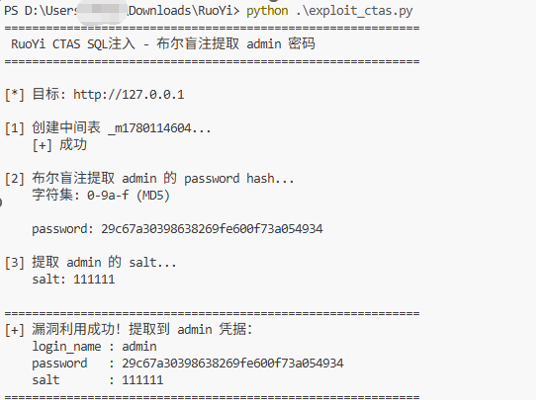
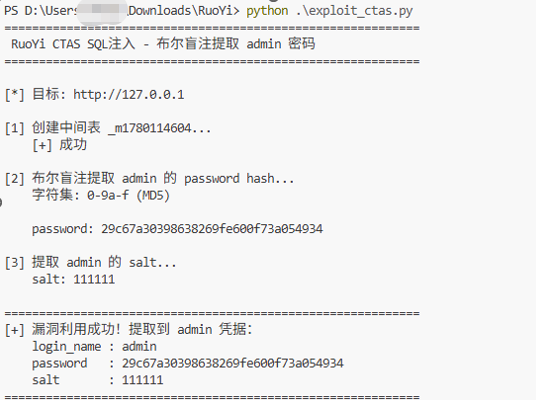
exp.png 为本地授权环境中的成功验证截图:
filterKeyword() 的规范化与匹配逻辑,但不要将其作为唯一防护。The /tool/gen/createTable endpoint in the code-generation module of RuoYi v4.8.3 accepts table-creation SQL from authenticated backend users. The endpoint calls SqlUtil.filterKeyword() to block dangerous SQL keywords. However, the implementation removes all whitespace from the input before checking blacklist entries that contain trailing spaces, such as select , insert , and drop . Those entries therefore cannot match the normalized input.
A CREATE TABLE ... AS SELECT ... (CTAS) statement can pass the Druid MySqlCreateTableStatement type check while still executing a SELECT. An attacker with a valid backend session may use this behavior for boolean-based blind SQL injection, sensitive-data extraction, and table creation.
JSESSIONID.The script recovers the admin password hash and salt from sys_user using the following oracle:
login_name, password, and salt.SUBSTRING() condition./tool/gen/list.requests, urllib3Install dependencies:
python -m pip install requests urllib3
Open exp.py and replace the following two lines in the configuration section near the top of the file:
TARGET = "http://127.0.0.1:8080"
COOKIE = "JSESSIONID=your_session_id"
Where:
TARGET is the RuoYi base URL to test, for example http://127.0.0.1:8080.COOKIE is a valid authenticated backend JSESSIONID session.After replacing the URL and session, run:
python exp.py
The script creates an intermediate table and many boolean-test tables in the target database. Use it only in an isolated or explicitly authorized environment, and have the database administrator remove the generated tables after testing.
exp.png shows a successful verification in an authorized local environment:
filterKeyword(), but do not treat it as the sole security control.exp.py - verification script / 验证脚本exp.png - successful verification screenshot / 验证成功截图README.md - bilingual vulnerability documentation / 中英双语漏洞说明