 chenaotian/cve-2022-0492
Detailed technical analysis and working exploit for CVE-2022-0492 Linux kernel container escape via cgroup release_agent, with step-by-step lab setup and mitigation guidance.

[toc]
Vulnerability ID: CVE-2022-0492
Vulnerable Product: linux kernel - cgroup
Affected Versions: ~linux kernel 5.17-rc3
Vulnerability Impact: When a container does not have additional security measures enabled, an attacker with root privileges inside the container can escape to the host.
Use Docker on a Linux system with a vulnerable kernel version.
# Start docker with all security protections disabled
docker run --rm -it -h cve --name cve --security-opt="seccomp=unconfined" --security-opt="apparmor=unconfined" ubuntu:20.04 /bin/bash
This article uses Docker as the experimental environment.
The exploitation method for this vulnerability is already well-known, but the vulnerability lies in the lack of permission validation when modifying cgroup's release_agent, which further lowers the barrier for escape exploitation (previously requiring CAP_SYS_ADMIN, this vulnerability does not require CAP_SYS_ADMIN). For specific differences in exploitation prerequisites, see "Exploitation Conditions" below.
Analyzing the patch, the cgroup_release_agent_write function was patched to add identity verification. This means the cgroup release_agent can no longer be modified by users without proper permissions:
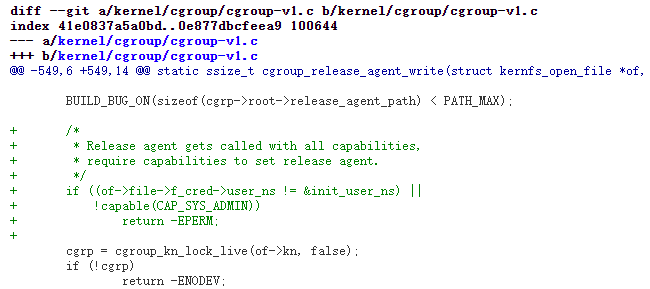
Thus, this vulnerability is identified as a failure of access control.
cgroup stands for Linux Control Group, a feature of the Linux kernel used to limit, control, and isolate resources (such as CPU, memory, disk I/O, etc.) for a group of processes.
cgroup has the following subsystems:
devices - Controls device access for processes within the cgroup.cpuset - Assigns CPUs and memory nodes that processes can use.cpu - Controls CPU utilization.cpuacct - Reports CPU usage statistics such as runtime and throttled time.memory - Limits memory usage.freezer - Suspends processes in the cgroup.net_cls - Works with tc (traffic controller) to limit network bandwidth.net_prio - Sets network traffic priority for processes.huge_tlb - Limits HugeTLB usage.perf_event - Allows Perf tool to monitor performance based on cgroup groups.On the host, cgroup files are located under /sys/fs/cgroup. You can see the various cgroup subsystems:

The cgroup subsystem corresponding to a Docker container is a child node of the host's cgroup. Viewing the memory cgroup inside a Docker container:

The corresponding container name node in the host's docker directory is exactly the same:

cgroup is used through a filesystem interface. By mounting cgroup to a directory, cgroup interacts with us via the VFS virtual filesystem. The cgroup interface appears as files, allowing direct file operations to set parameters.
mount -t cgroup -o memory cgroup /tmp/testcgroup

You can create a cgroup child node by creating a subdirectory under the directory: mkdir /tmp/testcgroup/x.
Each cgroup subsystem has a parameter notify_on_release, which is a Boolean value (1 or 0). It enables or disables the release agent command. If notify_on_release is enabled (set to 1), when the cgroup no longer contains any tasks (i.e., when the last process in the cgroup exits and the tasks file's PID becomes empty), the kernel executes the content of the file specified by the release_agent parameter. The value of notify_on_release is modified by writing to the notify_on_release file.

The vulnerability occurs in the modification of release_agent. Originally, anyone who could operate on cgroup could modify release_agent. However, CAP_SYS_ADMIN was required to use cgroup. Later, researchers found that using the unshare command to create a new namespace grants all capabilities, thus removing the CAP_SYS_ADMIN restriction and significantly lowering the exploitation threshold.
The unshare command cancels sharing of specified namespaces from the parent process, then executes the specified program in the newly created namespace. Relevant to our exploitation: a new namespace created by unshare has all capabilities including CAP_SYS_ADMIN.

This exploitation is the same as the traditional CAP_SYS_ADMIN + cgroup release_agent escape method, but the exploitation conditions differ.
The differences between the exploitation conditions for this vulnerability and the traditional release_agent escape are:
Traditional release_agent: The container needs CAP_SYS_ADMIN and must not have apparmor or selinux enabled.
CVE-2022-0492: The container must be running with minimal security (more specifically, seccomp must not disable unshare, apparmor must not make cgroup read-only, and selinux must be disabled). The attacker needs root privileges inside the container. No need for CAP_SYS_ADMIN.
It is worth noting that Docker's default apparmor profile makes cgroup read-only, and Docker's default seccomp profile disables unshare under non-CAP_SYS_ADMIN privileges. Kubernetes typically runs containers with minimal security. Overall, since exploitation is relatively easy, you can try it in specific scenarios.
After the vulnerability is patched: According to the patch code:
To modify the release_agent file, two conditions must be met:
Therefore, after the patch, the CAP_SYS_ADMIN obtained via unshare can no longer modify release_agent, because the new namespace created by unshare is not the root namespace. However, if the container originally has CAP_SYS_ADMIN privilege, this method can still be used for escape.
If Docker is started with the --cap-add=SYS_ADMIN parameter or --privileged (privileged container), it has CAP_SYS_ADMIN privilege, so no additional acquisition is needed. Example startup command:
# Start docker with SYS_ADMIN, disable apparmor (otherwise cannot mount)
docker run --rm -it --cap-add=SYS_ADMIN --security-opt="apparmor=unconfined" ubuntu:20.04 /bin/bash
A Docker container with CAP_SYS_ADMIN can directly proceed to the next step "Modify release_agent". Command to start Docker without CAP_SYS_ADMIN and reproduce the vulnerability:
# Start docker with all security protections disabled
docker run --rm -it -h cve --name cve --security-opt="seccomp=unconfined" --security-opt="apparmor=unconfined" ubuntu:20.04 /bin/bash
