 chaelsoo/zetsu
A personal RAG system for offensive security knowledge


A personal offline RAG system for offensive security knowledge. Ingest your writeups, lab solutions, bug bounty reports, and security blogs, then query them in natural language during engagements. No cloud, no SaaS, your knowledge stays yours.
ZETSU turns your accumulated knowledge into a queryable assistant. Instead of grepping through markdown files or remembering which writeup had that certipy command, you ask naturally:
how do i escalate with SeImpersonatePrivilege
what did i do after getting ADFS access
sliver socks5 pivot setup
explain ESC8 vs ESC4
It retrieves from your actual notes first, then generates an answer grounded in what you've documented, not generic internet knowledge.
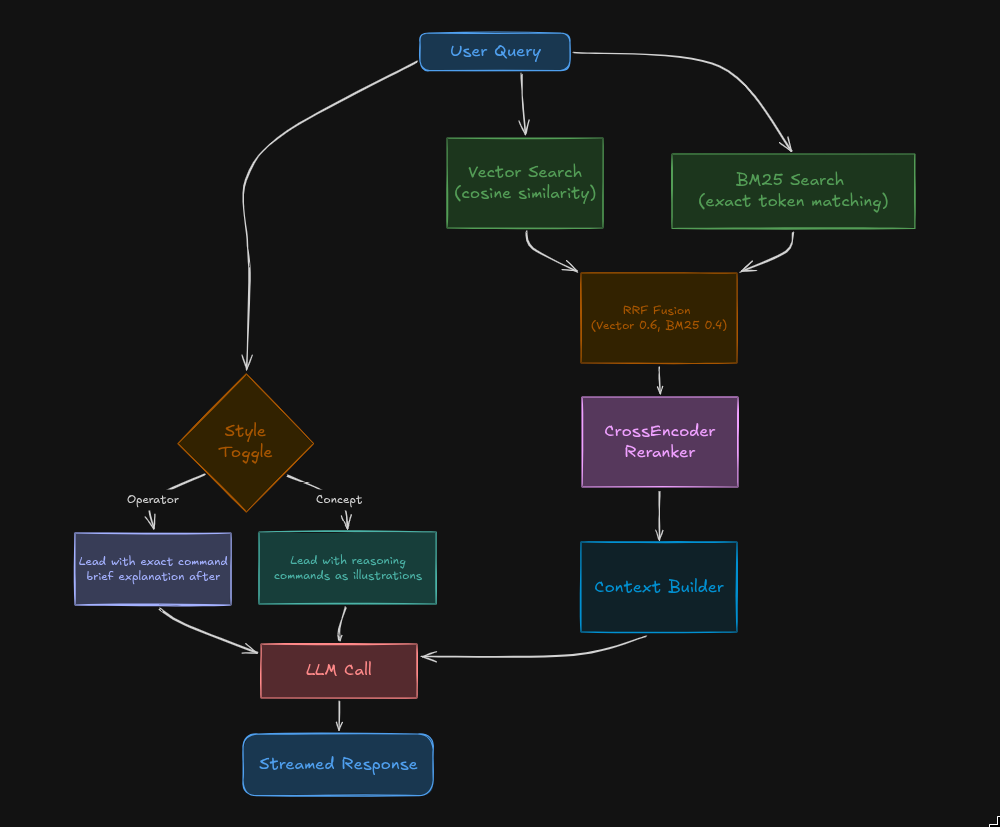
Ctrl+M in TUI.~/.zetsu/history/YYYY-MM-DD.json, browsable with /history.git clone https://github.com/chaelsoo/zetsu
cd zetsu
pip install -r requirements.txt
Set up your API key:
cp .env.example .env
# edit .env and add your key
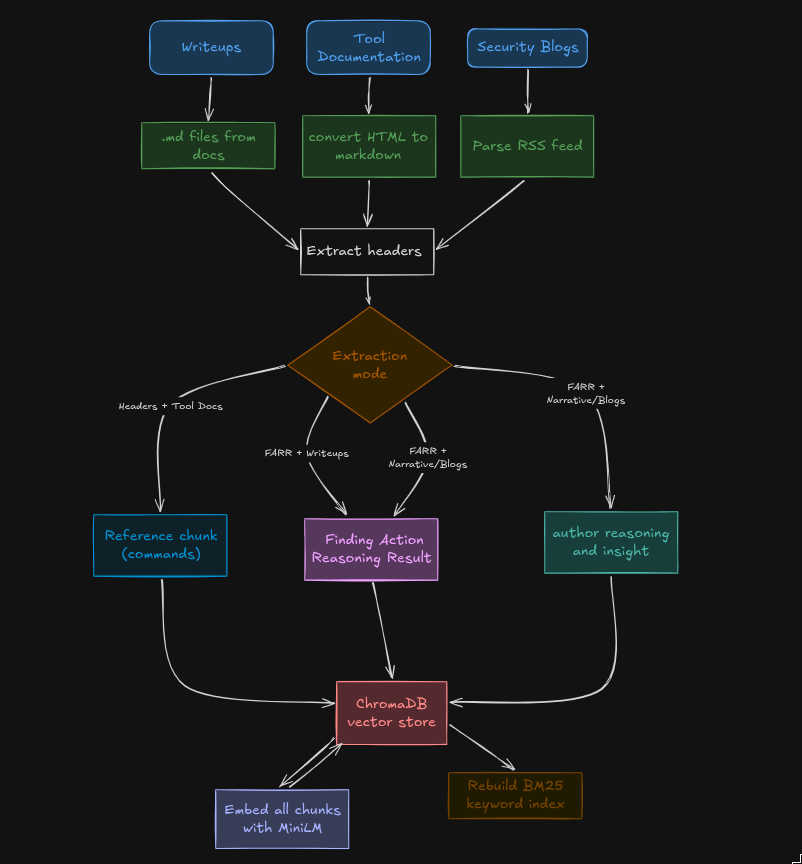
1. Add your writeups
Drop .md files into docs/. Notion exports, Obsidian notes, blog exports, anything markdown works.
2. Configure sources in config.toml
[llm]
backend      = "openai"
openai_model = "deepseek-chat"
base_url     = "https://api.deepseek.com/v1"

[[sources]]
type    = "markdown_dir"
path    = "./docs"
name    = "my_writeups"
extract = "farr"
enabled = true
3. Ingest
python zetsu.py ingest
4. Use it
python zetsu.py tui       # terminal UI
python zetsu.py web       # browser at localhost:8000
python zetsu.py ask "how do i abuse SeImpersonatePrivilege"
python zetsu.py ingest                 # ingest enabled sources
python zetsu.py ingest --force         # wipe and rebuild everything
python zetsu.py ingest --dry-run       # estimate without making LLM calls
python zetsu.py ingest --all-sources   # enable all sources regardless of enabled flag
python zetsu.py tui                    # terminal UI
python zetsu.py web                    # web UI
python zetsu.py ask "query"            # one-shot CLI
python zetsu.py ask "query" --style concept
python zetsu.py stats                  # vector store stats
| Key | Action |
|---|---|
Enter | Send query |
Ctrl+M | Toggle Operator / Concept mode |
Ctrl+Y | Copy last response to clipboard |
Ctrl+L | Clear session |
Ctrl+C | Quit |
/help | Show commands |
/stats | Vector store + history stats |
/history | Today's past queries |
/clear | Clear session |
| Type | Use for | Extract mode |
|---|---|---|
markdown_dir | Your writeups, notes | farr |
markdown_file | Single markdown file | farr |
url | Tool wikis, reference pages | headers |
atom | Security blogs with feeds | farr+narrative |
farr: LLM extracts discrete attack steps as structured JSON (Finding, Action, Reasoning, Result). Best for writeups with clear attack chains.farr+narrative: same as farr, plus a prose summary capturing the author's reasoning. Best for blogs where the thought process matters.headers: no LLM, just split on headers and keep verbatim. Best for command references and tool documentation.Configure in config.toml. Separate backends for ingestion (bulk extraction) and queries (generation):
[llm]                          # query time
backend      = "openai"
openai_model = "deepseek-chat"
base_url     = "https://api.deepseek.com/v1"

[ingest]                       # ingest time
backend      = "openai"
openai_model = "deepseek-chat"
base_url     = "https://api.deepseek.com/v1"
workers      = 8               # parallel files during FARR extraction
Supported backends: anthropic, openai (any OpenAI-compatible API), ollama.
[!IMPORTANT] ChromaDB is run locally by default, which loads the full vector index into RAM. For large corpora (10k+ chunks) or memory-constrained machines, it is strongly recommended to run ChromaDB as a remote server instead. See ChromaDB server docs for setup. Remote support in ZETSU is planned.
Evaluated across 910 questions covering 12 offensive security categories (ADCS, Kerberos, AD enumeration, MSSQL, Sliver C2, privilege escalation, web attacks, credentials, lateral movement, cloud/Entra ID, OPSEC, tools).
| Metric | Result |
|---|---|
| Questions answered | 910 / 910 (100%) |
| Answers with code/commands | 842 / 910 (93%) |
| Context gaps (model admitted missing info) | 66 / 910 (7.3%) |
| Avg retrieval time | 68ms |
| Avg total response time | 3.8s |
Top sources contributing to answers: personal HTB writeups, dirkjanm blog, shenaniganslabs research, HackTricks ADCS, Sliver wiki, netexec cheatsheet.
In simple words, you need to make sure to add good & structured resources that you want the RAG to ingest, this project focueses 100% on using a knowledge base, not trusting the LLM's memory or trained on knowledge.
Full evaluation dataset and results in eval/.
I will be documenting in a blog the usage and how effective it is very soon, stay tuned.
