
Skip to content
KitploitKITPLOIT
ToolsBlog
Submit
ToolsBlog
Submit

Hacking, PenTest, and Cybersecurity Tools for Your Security Arsenal!

Kitploit is a directory of hacking, cybersecurity, and pentesting tools. Discover the latest project updates to find vulnerabilities, analyze systems, automate testing, and strengthen your security.

··Feeds·Contact·Privacy·© 2026 Kitploit

Tool Directory

Categories

View all categories
Loading categories
ClipGuard — A lightweight tool designed to stop clickfix attacks by using clipboard formatting with execution surface checks | Kitploit
Tools/GitHubGitHub/certainlyp/clipguard
Defensive ToolsPhishing ToolsSocial EngineeringPapers & ResearchLearning & EducationAnti-Bot
GitHubcertainlyp/clipguard

ClipGuard

A lightweight tool designed to stop clickfix attacks by using clipboard formatting with execution surface checks

View Repository
124 months agoNot yet reviewed

Most Popular

View all →

Discover the most used tools by our community.

Explore all tools

Browse our collection of tools

View all tools →
Share

ClipGuard

Real-time detection of ClickFix clipboard injection attacks on Windows.

ClipGuard monitors clipboard activity and intercepts suspicious paste operations before they can execute — specifically targeting the ClickFix technique where fake verification pages trick users into pasting malicious commands.

The Problem

ClickFix attacks work like this:

  1. A victim lands on a page showing a fake CAPTCHA or verification prompt
  2. JavaScript silently copies a malicious command (usually PowerShell) to the clipboard
  3. The page instructs the user to press Win+R, paste (Ctrl+V), and hit Enter
  4. The user unknowingly executes the payload themselves — bypassing traditional security controls

The key insight: when JavaScript writes to the clipboard via navigator.clipboard.writeText(), the clipboard contains CF_UNICODETEXT only —When a user manually selects and copies text from a webpage, the browser places both CF_UNICODETEXT and CF_HTML on the clipboard. ClipGuard uses this format difference as one of its primary detection signal.

How It Works

ClipGuard runs in the system tray and layers multiple detection mechanisms:

  1. Clipboard Provenance Tracking — Listens for WM_CLIPBOARDUPDATE messages and records the source process, clipboard formats present (CF_HTML vs CF_UNICODETEXT), content length, and a preview of the content for every clipboard change.

  2. Execution Surface Detection — Identifies when the foreground window is a command execution surface: the Run dialog (Win+R), cmd.exe, powershell.exe, pwsh.exe, or Windows Terminal.

  3. Keyboard Hook (Ctrl+V Interception) — A low-level keyboard hook (WH_KEYBOARD_LL) intercepts Ctrl+V keystrokes. When a paste is attempted into an execution surface with browser-sourced clipboard content, ClipGuard evaluates the threat.

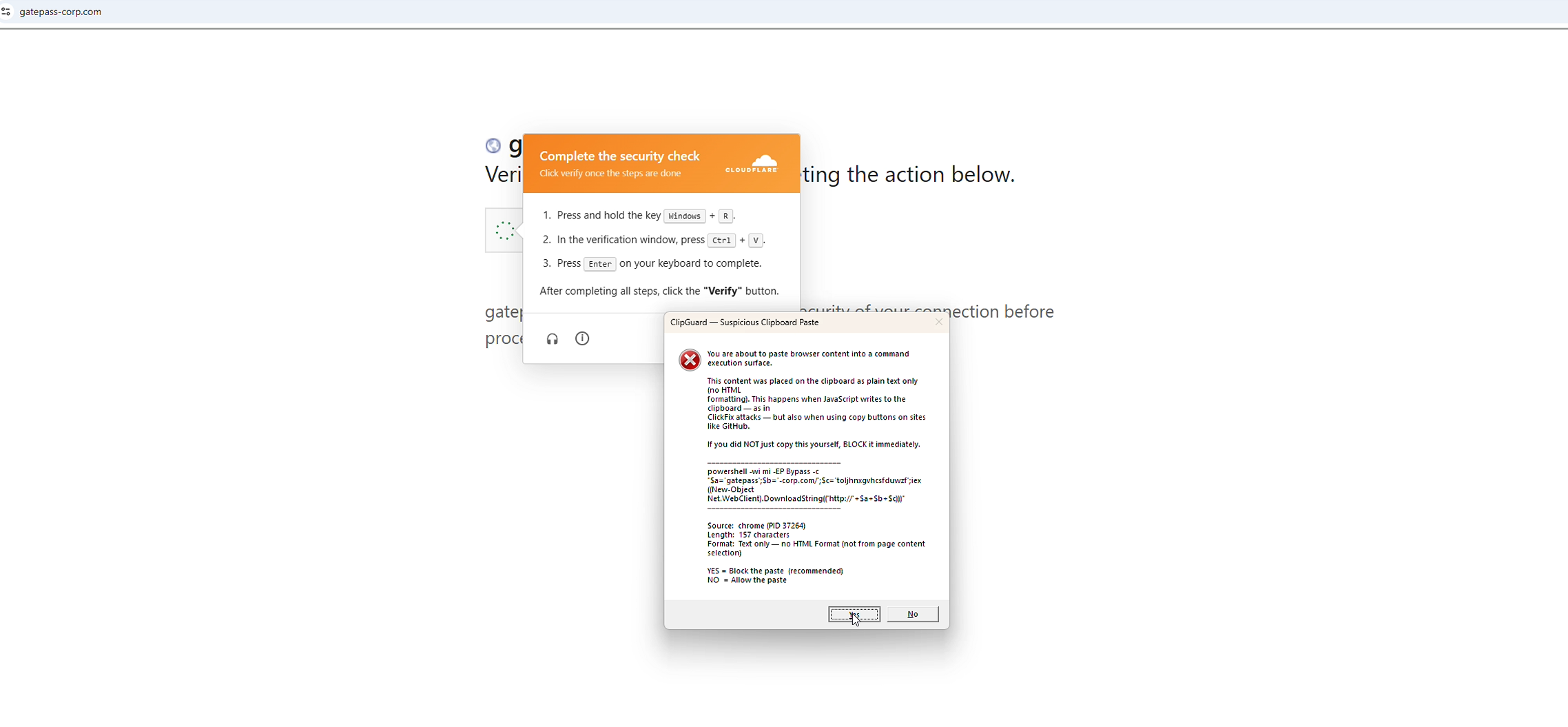
  4. Format-Based Verdict — If the clipboard content came from a browser and contains text only (no CF_HTML), it flags as suspicious — indicating a likely JavaScript clipboard write rather than user-initiated copy( no HTML indicator). The paste is blocked and the user sees an alert with the clipboard contents before deciding to allow or block.
Demo

image

Detection Logic

root@kitploit:~
Clipboard updated by browser?
  -- YES: User pastes (Ctrl+V) into execution surface?
       -- YES: Clipboard has CF_UNICODETEXT only (no CF_HTML)?
            -- YES: BLOCK — Suspected ClickFix (JS clipboard write)
            -- NO:  Strict Mode on?
                 -- YES: WARN — User copy, but going to exec surface
                 -- NO:  ALLOW

Supported Execution Surfaces

  • Run Dialog (Win+R) — detected via window class #32770 + ComboBox child under explorer.exe
  • cmd.exe — process name match
  • powershell.exe / pwsh.exe — process name match
  • Windows Terminal (wt.exe) — process name match

Monitored Browsers

Edge, Chrome, Firefox, Brave, Opera, Vivaldi, Chromium, Arc

Installation

Prerequisites:

  • Windows 10/11
  • .NET 8.0 Runtime (https://dotnet.microsoft.com/download/dotnet/8.0)
  • Run as Administrator (required for the low-level keyboard hook)

Build from source:

root@kitploit:~
git clone https://github.com/CertainlyP/ClipGuard.git
cd ClipGuard
dotnet build -c Release

Or download the compiled binary from the Releases page.

Usage

  1. Run ClipGuard.exe as Administrator
  2. ClipGuard appears in the system tray with a green shield icon
  3. Right-click the tray icon for options: Status, Open Log, Strict Mode, Exit

When a suspicious paste is detected, ClipGuard shows an alert with the clipboard content preview, source process and PID, clipboard format analysis, and the option to block or allow the paste.

Logs are written to %APPDATA%\ClipGuard\shield.log

Limitations

  • Requires Administrator privileges for the keyboard hook
  • Does not block execution — it intercepts the paste and warns the user
  • Copy buttons on legitimate sites (e.g. GitHub code blocks) also use JS clipboard writes and will trigger alerts — by design, since the user should verify before pasting into a terminal
  • Does not currently monitor Win+R followed by manual typing (only Ctrl+V paste)

Research

This tool is based on original research into ClickFix attack mechanics:

  • Clipboard format metadata as a detection signal — CF_HTML presence distinguishes user copies from JavaScript navigator.clipboard.writeText() calls
  • WebDAV-based ClickFix delivery chains — pushd \attacker\share + type payload.bat | cmd variants
  • Execution surface fingerprinting — identifying the Run dialog programmatically via window class and child control enumeration

License

MIT

Download Tool