
Skip to content
KitploitKITPLOIT
ToolsBlog
Submit
ToolsBlog
Submit

Hacking, PenTest, and Cybersecurity Tools for Your Security Arsenal!

Kitploit is a directory of hacking, cybersecurity, and pentesting tools. Discover the latest project updates to find vulnerabilities, analyze systems, automate testing, and strengthen your security.

··Feeds·Contact·Privacy·© 2026 Kitploit

Tool Directory

Categories

View all categories
Loading categories
WordPress-KeepInMind-CVE-2026-9271-Exploit — Authorized stored XSS assessment tool for CVE-2026-9271 in WordPress KeepInMind plugin. Detects vulnerable versions, injects safe test payloads, and supports bulk scanning with SQLite reporting. | Kitploit
Tools/GitHubGitHub/cerberusmrxi/wordpress-keepinmind-cve-2026-9271-exploit
Vulnerability ScannersExploitationWeb Application ExploitationWeb SecurityPenetration TestingLearning & Education
GitHubcerberusmrxi/wordpress-keepinmind-cve-2026-9271-exploit

WordPress-KeepInMind-CVE-2026-9271-Exploit

Authorized stored XSS assessment tool for CVE-2026-9271 in WordPress KeepInMind plugin. Detects vulnerable versions, injects safe test payloads, and supports bulk scanning with SQLite reporting.


View Repository
1161 month agoNot yet reviewed

Most Popular

View all →

Discover the most used tools by our community.

Explore all tools

Browse our collection of tools

View all tools →
Share

KIM-Guardian Pro

CVE-2026-9271 — WordPress KeepInMind Stored XSS Assessment

Python Version CVE Plugin License Platform

Authorized security assessment tool for CVE-2026-9271
Author: Sudeepa Wanigarathna · Tool: KIM-Guardian Pro v1.0
Main script: CVE-2026-9271.py
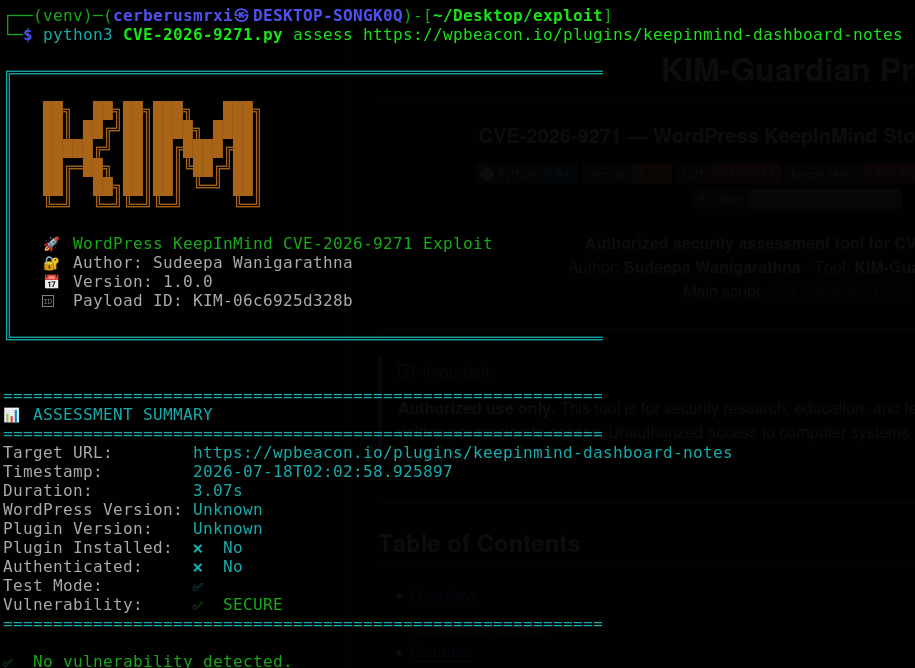
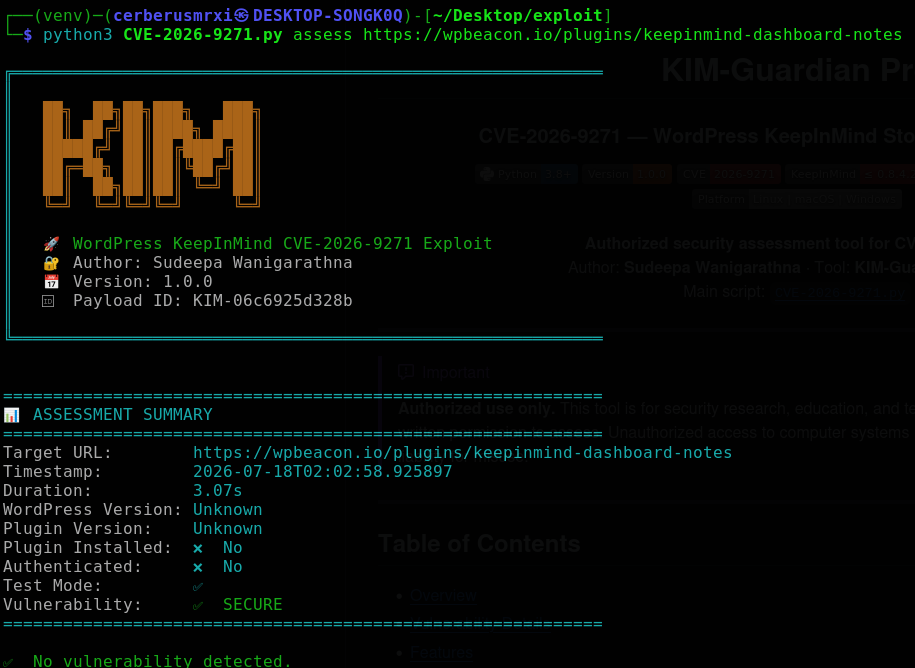
k

[!IMPORTANT] Authorized use only. This tool is for security research, education, and testing systems you own or have explicit written permission to assess. Unauthorized access to computer systems is illegal. The author assumes no liability for misuse.


Table of Contents

  • Overview
  • Vulnerability Details
  • Features
  • Installation
  • Quick Start
  • Usage Guide
  • Command Reference
  • Output & Reporting
  • Troubleshooting
  • Repository Layout
  • Version History
  • Disclaimer
  • Author & Credits
  • License

Overview

CVE-2026-9271 is a stored cross-site scripting (XSS) issue in the WordPress KeepInMind (Dashboard Notes) plugin. Insufficient sanitization of note content allows a low-privileged authenticated user (Contributor+) to store HTML/JS that executes in an administrator’s browser, which can lead to admin session compromise / account takeover.

KIM-Guardian Pro (CVE-2026-9271.py) is a Python assessment tool for authorized testers to:

  • Detect KeepInMind installs and version ranges
  • Run a safe test-mode assessment (overlay marker, no credential capture)
  • Bulk-scan URL lists for plugin presence and vulnerable versions
  • Persist results in SQLite and text reports under reports/
  • Optionally run a local capture / web UI for controlled lab simulations

Vulnerability Details

AttributeValue
CVE IDCVE-2026-9271
Attack VectorAuthenticated (Contributor+) → Stored XSS → Admin impact
ImpactAdmin browser XSS; potential account takeover in vulnerable installs
Affected ProductWordPress KeepInMind / KeepInMind Dashboard Notes
Affected Versions≤ 0.8.4.2 (patched in 0.8.4.3+)
Vulnerability TypeStored Cross-Site Scripting (XSS)
CWECWE-79 (Improper Neutralization of Input During Web Page Generation)

Relevant Surfaces

SurfaceRole
/wp-json/keepinmind/v1/notesREST API used to create/read notes
/wp-admin/Admin dashboard where stored notes may render
Plugin path/wp-content/plugins/keepinmind-dashboard-notes/

Assessment Flow (high level)

  1. Authenticate as a Contributor+ user (when credentials are provided)
  2. Confirm KeepInMind is installed and record WordPress / plugin versions
  3. Inject a test payload via the notes REST API (default)
  4. Verify the marker appears where notes render
  5. Clean up injected notes (unless --no-cleanup)
  6. Save assessment metadata to SQLite and a text report

Features

Core Capabilities

CapabilityDescription
Plugin detectionChecks KeepInMind install paths and version strings
WordPress versionExtracts generator / version metadata when available
Safe test modeDefault overlay marker proving XSS without capturing credentials
Authenticated assessLogs in with Contributor+ credentials for full REST injection
Payload cleanupRemoves injected notes after assessment
Bulk scanningMulti-threaded URL list scan for plugin + vulnerable version
SQLite historyStores assessments in kim_guardian.db
Text reportsWrites timestamped reports under reports/
Capture serverOptional local HTTP listener for lab credential-capture drills
Web UIOptional Flask dashboard (web mode)

Operational Controls

CapabilityDescription
Verbose loggingFile + console debug under logs/
Proxy supportRoute traffic through Burp or other HTTP proxies
Configurable timeoutPer-request timeout (default 30s)
Worker poolTunable concurrency for bulk scans

Installation

Prerequisites

  • Python 3.8+
  • pip
  • Network reachability to authorized target(s)

Setup

root@kitploit:~
cd /path/to/exploit

python3 -m venv venv
source venv/bin/activate          # Windows: venv\Scripts\activate

pip install -r requirements.txt
# Recommended extras used by this script:
pip install colorama beautifulsoup4 requests flask

python3 CVE-2026-9271.py --help

Core Dependencies

root@kitploit:~
requests>=2.31.0
beautifulsoup4>=4.12.0
colorama>=0.4.6
flask>=3.0.0          # optional — web mode only

Quick Start

Replace https://lab.example with a lab or authorized target only.

root@kitploit:~
# Help / modes
python3 CVE-2026-9271.py --help

# Safe single-target assessment (default: test payload)
python3 CVE-2026-9271.py assess https://lab.example \
  -u contributor -p 'password' -v

# Bulk version / plugin scan
python3 CVE-2026-9271.py bulk -f targets.txt -w 8 -o bulk_results.txt

# List recent assessments from SQLite
python3 CVE-2026-9271.py db --list --limit 20

# Local capture server (lab only)
python3 CVE-2026-9271.py capture --port 5000

# Optional web UI
python3 CVE-2026-9271.py web --host 127.0.0.1 --port 8080

Usage Guide

1. Show help

root@kitploit:~
python3 CVE-2026-9271.py --help
python3 CVE-2026-9271.py assess --help

2. Safe assessment (recommended)

Default mode uses a non-capturing test overlay. Provide Contributor+ credentials for injection via the REST API.

root@kitploit:~
python3 CVE-2026-9271.py assess https://lab.example \
  -u contributor \
  -p 'password' \
  -v

Workflow:

  1. Print banner and create a unique payload ID
  2. Authenticate (if -u / -p given)
  3. Detect KeepInMind + WordPress versions
  4. Inject and verify the safe test marker
  5. Clean up notes (unless --no-cleanup)
  6. Persist result to DB + reports/kim_assessment_*.txt

3. Skip cleanup

root@kitploit:~
python3 CVE-2026-9271.py assess https://lab.example \
  -u contributor -p 'password' --no-cleanup

4. Proxy + timeout

root@kitploit:~
python3 CVE-2026-9271.py assess https://lab.example \
  -u contributor -p 'password' \
  --proxy http://127.0.0.1:8080 \
  --timeout 45 \
  -v

5. Lab attack simulation (authorized environments only)

Requires an attacker/capture base URL and --real. Prefer keeping capture on localhost for labs.

root@kitploit:~
# Terminal 1 — capture listener
python3 CVE-2026-9271.py capture --port 5000

# Terminal 2 — assessment with capture endpoint
python3 CVE-2026-9271.py assess https://lab.example \
  -u contributor -p 'password' \
  -a http://127.0.0.1:5000 \
  --real \
  -v

Capture UI (when server is running):

PathPurpose
/Capture server status page
/capturePOST endpoint for form submissions
/capturedRecent captured entries (lab review)

6. Bulk scan

root@kitploit:~
# targets.txt — one URL per line
python3 CVE-2026-9271.py bulk -f targets.txt -w 5 -o bulk_scan_results.txt

# Or comma-separated URLs
python3 CVE-2026-9271.py bulk -u "https://a.example,https://b.example" -w 3

Bulk checks typically include WordPress hints, KeepInMind version, REST reachability, and wp-login.php presence.

7. Database history

root@kitploit:~
python3 CVE-2026-9271.py db --list
python3 CVE-2026-9271.py db --list --limit 50

8. Web interface

root@kitploit:~
python3 CVE-2026-9271.py web --host 127.0.0.1 --port 8080

Bind to localhost by default for safety.


Command Reference

Global

ModeDescription
assessSingle-target KeepInMind assessment
bulkMulti-target plugin / version scan
captureLocal credential-capture HTTP server
webOptional Flask web UI
dbList stored assessments

assess

ArgumentDefaultDescription
urlrequiredTarget WordPress URL
-u, --username—WordPress username (Contributor+)
-p, --password—WordPress password
-a, --attacker—Capture server base URL (lab simulation)
-t, --testonPrefer safe test payload
-r, --realoffEnable lab attack payload (needs --attacker)
--no-cleanupoffLeave injected notes in place
-v, --verboseoffVerbose / debug logging
--timeout30Request timeout (seconds)
--proxy—Proxy URL (e.g. http://127.0.0.1:8080)

bulk

ArgumentDefaultDescription
-f, --file—File of URLs (one per line)
-u, --urls—Comma-separated URLs
-w, --workers5Thread pool size
-o, --outputbulk_scan_results.txtReport path

capture

ArgumentDefaultDescription
--port5000Listen port

web

ArgumentDefaultDescription
--host127.0.0.1Bind address
--port8080Listen port

db

ArgumentDefaultDescription
--listoffList recent assessments
--limit10Max rows to show

Output & Reporting

Console

Colorized status for authentication, plugin detection, injection, verification, and cleanup.

Text reports

Successful assess runs write files like:

root@kitploit:~
reports/kim_assessment_YYYYMMDD_HHMMSS.txt

SQLite

FilePurpose
kim_guardian.dbAssessment history (target, versions, vuln flag, risk, duration)

Logs

PathPurpose
logs/kim_pro_*.logPer-run application logs

Bulk report fields

  • URL
  • WordPress version
  • Plugin version
  • Vulnerable (yes/no by version heuristic)
  • REST accessible
  • WP-Login reachable

Troubleshooting

SymptomWhat to try
Authentication failedConfirm Contributor+ creds; check /wp-login.php; use -v
Plugin not detectedVerify KeepInMind path/name; try verbose mode
REST inject failsConfirm auth + nonce; inspect with --proxy through Burp
Timeout / connection errorsRaise --timeout; check network / TLS / proxy
No vulnerability in test modeConfirm version ≤ 0.8.4.2; ensure notes render for admin
Flask missing in web modepip install flask
BeautifulSoup missingpip install beautifulsoup4

Debug workflow

root@kitploit:~
python3 CVE-2026-9271.py assess https://lab.example \
  -u contributor -p 'password' \
  --proxy http://127.0.0.1:8080 \
  -v

Repository Layout

root@kitploit:~
exploit/
├── CVE-2026-9271.py      # KIM-Guardian Pro (v1.0)
├── requirements.txt      # Python dependencies
├── README.md             # This file
├── kim_guardian.db       # SQLite assessment history (generated)
├── logs/                 # Runtime logs (generated)
├── reports/              # Assessment text reports (generated)
└── venv/                 # Local virtualenv (optional)

Version History

v1.0.0 — Initial Release

  • Single-target KeepInMind assessment for CVE-2026-9271
  • Safe test payload (default) and optional lab capture simulation
  • Plugin / WordPress version detection
  • REST note inject, verify, and cleanup
  • Bulk multi-threaded scanning
  • SQLite persistence + text reports
  • Capture server and optional Flask web UI
  • Proxy, timeout, and verbose logging support

Disclaimer

This project is provided as-is for defensive security research and authorized penetration testing.

By using this software you agree that:

  1. You will only target systems you own or are explicitly authorized to test.
  2. You understand applicable computer-abuse and data-protection laws.
  3. The author and contributors are not responsible for damage, data loss, or legal consequences from misuse.

If you find this issue in production systems you do not own, follow responsible disclosure with the site owner and the plugin maintainer.

Unauthorized access to computer systems is illegal.


Author & Credits

RoleName
Tool AuthorSudeepa Wanigarathna
CVECVE-2026-9271
ToolKIM-Guardian Pro v1.0
Main ScriptCVE-2026-9271.py
LicenseEducational / Defensive Use

License

root@kitploit:~
Educational / Defensive Use Only

Copyright (c) 2026 Sudeepa Wanigarathna

Permission is granted to use this software for authorized security research,
education, and defensive assessment only.

THE SOFTWARE IS PROVIDED "AS IS", WITHOUT WARRANTY OF ANY KIND, EXPRESS OR
IMPLIED, INCLUDING BUT NOT LIMITED TO THE WARRANTIES OF MERCHANTABILITY,
FITNESS FOR A PARTICULAR PURPOSE AND NONINFRINGEMENT.

For authorized security testing only.

Download Tool



