
Skip to content
KitploitKITPLOIT
ToolsBlog
Submit
ToolsBlog
Submit

Hacking, PenTest, and Cybersecurity Tools for Your Security Arsenal!

Kitploit is a directory of hacking, cybersecurity, and pentesting tools. Discover the latest project updates to find vulnerabilities, analyze systems, automate testing, and strengthen your security.

··Feeds·Contact·Privacy·© 2026 Kitploit

Tool Directory

Categories

View all categories
Loading categories
phpMyAdmin-CVE-2020-5504-Exploit — Authorized SQL injection exploitation framework for CVE-2020-5504 in phpMyAdmin, featuring automated database enumeration, blind injection, proxy support, and structured reporting for penetration testing and security research. | Kitploit
Tools/GitHubGitHub/cerberusmrxi/phpmyadmin-cve-2020-5504-exploit
ReconnaissanceVulnerability ScannersExploitationWeb Application ExploitationInformation GatheringWeb SecurityPenetration TestingDatabase Security

Most Popular

View all →

Discover the most used tools by our community.

Explore all tools

Browse our collection of tools

View all tools →
GitHub
cerberusmrxi/phpmyadmin-cve-2020-5504-exploit

phpMyAdmin-CVE-2020-5504-Exploit

Authorized SQL injection exploitation framework for CVE-2020-5504 in phpMyAdmin, featuring automated database enumeration, blind injection, proxy support, and structured reporting for penetration testing and security research.

View Repository
1 day agoNot yet reviewed
Share

CVE-2020-5504 phpMyAdmin Security Assessment Tool

Authorized security testing and research framework for identifying and validating CVE-2020-5504 in phpMyAdmin deployments


VersionPythonLicenseSecurity ResearchCVEPull Requests

Overview · Features · Installation · Usage · Reports · Architecture · Contributing

Responsible-use notice: This project is intended only for systems that you own or are explicitly authorized to assess. Do not use it against public, third-party, or production systems without written permission and a defined testing scope.


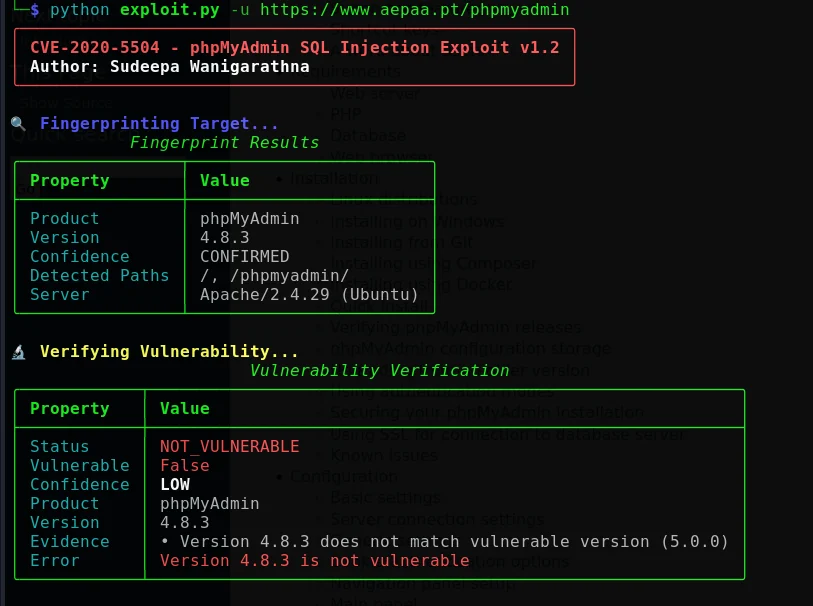
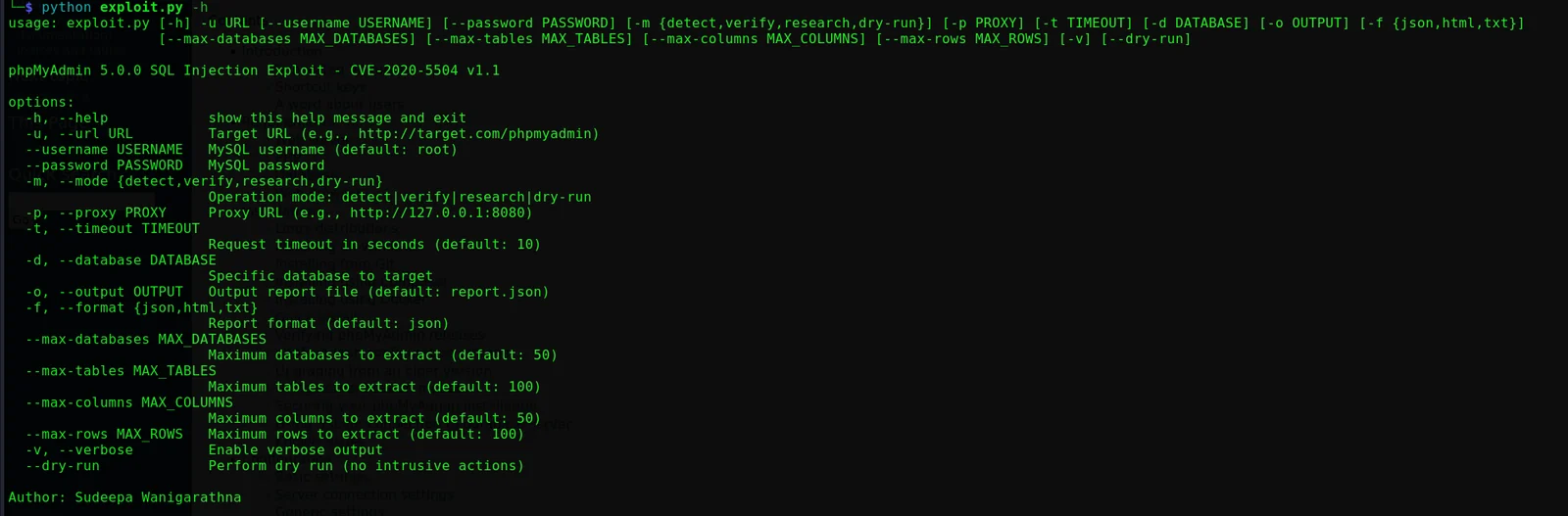
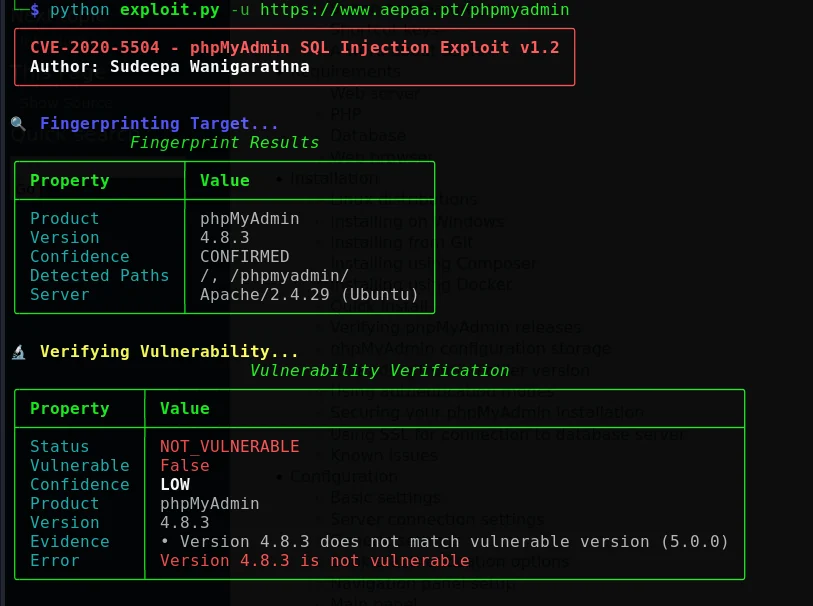
Screenshots

CLI OutputUsage
CLI OutputUsage

Overview

CVE-2020-5504 is a SQL injection vulnerability affecting the phpMyAdmin user accounts page. According to the official phpMyAdmin advisory, phpMyAdmin 4.x versions before 4.9.4 and phpMyAdmin 5.0.0 are affected; the advisory recommends upgrading to 4.9.4 or newer for the 4.x line and 5.0.1 or newer for the 5.x line.[1] The National Vulnerability Database records that exploitation requires a valid MySQL account to access the server.[2]

This project provides a structured workflow for authorized penetration testing, controlled validation, and security research. It is designed to help assessors fingerprint a target, verify whether the target appears affected, document evidence, and produce structured reports for remediation tracking.

Project goals

The framework is organized around four goals:

  1. Identify phpMyAdmin installations and collect version-related indicators.

  2. Validate suspected exposure using controlled, non-destructive checks where possible.

  3. Assess authorized targets using configurable limits, retry behavior, and optional proxying.

  4. Report findings in formats that are easy to review, archive, and integrate into workflows.

What this project is not

This project is not a substitute for patching, vendor guidance, secure configuration, or a formal penetration-testing authorization process. It does not guarantee detection of every deployment, configuration, version, or network condition. All results should be manually reviewed and treated as assessment evidence rather than an automatic security verdict.


Contents

  • Overview

  • Responsible use

  • Features

  • Assessment workflow

  • Requirements

  • Installation

  • Usage

  • Operating modes

  • Command-line options

  • Configuration

  • Reports

  • Architecture

  • Troubleshooting

  • Remediation guidance

  • Development

  • Contributing

  • Changelog

  • License

  • Acknowledgments

  • Contact and support

  • References


Responsible use

Authorization is required

Only run this tool against an asset when you have clear authorization from the asset owner. Authorization should define the target, allowed test window, permitted techniques, source IPs, data-handling requirements, escalation contacts, and stop conditions.

Never test internet-facing systems merely because they are reachable. Reachability is not permission.

Data handling

Assessment modes may produce information about databases, tables, columns, or records. Treat all output as potentially sensitive. Store reports using appropriate access controls, avoid placing secrets in shell history, encrypt reports when required by your engagement rules, and securely delete temporary data after the engagement.

Operational safeguards

Before starting an assessment, confirm that you have a known-good backup or recovery procedure, a communication channel with the system owner, and a documented rollback or stop plan. Prefer an isolated test environment whenever one is available. Use the least intrusive mode that answers the assessment question.


Features


Assessment workflow

The recommended workflow is intentionally staged so that assessors can begin with the lowest-impact activity and increase scope only when authorized.

root@kitploit:~
┌──────────────────┐
│  Define scope    │  Confirm written authorization and test boundaries
└────────┬─────────┘
         │
         ▼
┌──────────────────┐
│     Detect       │  Identify phpMyAdmin and collect version indicators
└────────┬─────────┘
         │
         ▼
┌──────────────────┐
│     Verify       │  Perform controlled vulnerability checks
└────────┬─────────┘
         │
         ▼
┌──────────────────┐
│  Assess, if      │  Continue only when explicitly authorized
│  approved        │
└────────┬─────────┘
         │
         ▼
┌──────────────────┐
│     Report       │  Preserve evidence, limits, timestamps, and conclusions
└──────────────────┘

A positive result should be reviewed against the target version, authentication context, request evidence, and engagement scope. A negative result does not prove that the deployment is secure; it may reflect version differences, access controls, routing, application customization, rate limiting, or insufficient visibility.


Requirements

Runtime requirements

RequirementSupported baseline
Operating system

Python dependencies

The project currently expects the following packages:

root@kitploit:~
requests>=2.31.0
rich>=13.7.0
colorama>=0.4.6
dataclasses>=0.6; python_version < "3.7"

For reproducible installations, prefer the repository's requirements.txt file over installing packages individually.


Installation

Linux and macOS

root@kitploit:~
git clone https://github.com/CerberusMrXi/phpMyAdmin-CVE-2020-5504-Exploit
cd phpMyAdmin-CVE-2020-5504-Exploit

python3 -m venv .venv
source .venv/bin/activate
python -m pip install --upgrade pip
python -m pip install -r requirements.txt

chmod +x start.sh quick.sh exploit.py

Start the guided interface with:

root@kitploit:~
./start.sh

Windows

root@kitploit:~
git clone https://github.com/CerberusMrXi/phpMyAdmin-CVE-2020-5504-Exploit
Set-Location phpMyAdmin-CVE-2020-5504-Exploit

py -m venv .venv
.\.venv\Scripts\Activate.ps1
python -m pip install --upgrade pip
python -m pip install -r requirements.txt

.\start.bat

If PowerShell execution policy prevents the launcher from running, use the repository's documented PowerShell entry point in an authorized environment:

root@kitploit:~
powershell -ExecutionPolicy Bypass -File .\start.ps1

Manual dependency installation

Use this only when requirements.txt is unavailable or when you are intentionally managing dependencies yourself:

root@kitploit:~
python -m pip install "requests>=2.31.0" "rich>=13.7.0" "colorama>=0.4.6"

Usage

The examples below use https://authorized.example/phpmyadmin as a placeholder. Replace it only with a target that is explicitly within your approved scope.

Detection mode

Detection mode is the recommended starting point. It is intended to fingerprint the application and collect version indicators without attempting exploitation.

root@kitploit:~
python exploit.py \
  --url https://authorized.example/phpmyadmin \
  --mode detect

The short-form flags from the original interface are also supported where applicable:

root@kitploit:~
python exploit.py -u https://authorized.example/phpmyadmin -m detect

Verification mode

Verification mode is intended for controlled vulnerability testing. Use only when the engagement explicitly permits validation activity and the required credentials have been provided through an approved method.

root@kitploit:~
python exploit.py \
  --url https://authorized.example/phpmyadmin \
  --mode verify \
  --username "$PMADB_USERNAME" \
  --password "$PMADB_PASSWORD"

Avoid placing real passwords directly in commands because command lines may be stored in shell history or exposed to local process inspection.

Research mode

Research mode may perform broader authorized assessment activity and data enumeration. It should be limited to dedicated test environments or engagements with explicit written approval for the requested scope.

root@kitploit:~
python exploit.py \
  --url https://authorized.example/phpmyadmin \
  --mode research \
  --username "$PMADB_USERNAME" \
  --password "$PMADB_PASSWORD" \
  --max-databases 20 \
  --max-tables 50

Dry-run mode

Dry-run mode is useful for validating command construction, reviewing workflow behavior, and testing configuration without performing intrusive actions.

root@kitploit:~
python exploit.py \
  --url https://authorized.example/phpmyadmin \
  --dry-run

Proxy-assisted assessment

Route traffic through an authorized interception proxy when you need to inspect requests and responses during a test:

root@kitploit:~
python exploit.py \
  --url https://authorized.example/phpmyadmin \
  --mode verify \
  --proxy http://127.0.0.1:8080

Use a proxy only when it is permitted by the engagement rules and configured to avoid collecting or retaining unnecessary sensitive data.

Targeted database assessment

When the scope document identifies a specific database, constrain the assessment to that database where the implementation supports it:

root@kitploit:~
python exploit.py \
  --url https://authorized.example/phpmyadmin \
  --mode research \
  --database target_database \
  --max-tables 25

Verbose diagnostics

Enable verbose output when investigating a failed connection, unexpected response, or configuration issue:

root@kitploit:~
python exploit.py \
  --url https://authorized.example/phpmyadmin \
  --mode verify \
  --verbose

Interactive interface

The interactive launcher is recommended for first-time users because it provides guided prompts, mode selection, progress indicators, and color-coded status output.

root@kitploit:~
# Linux/macOS
./start.sh

# Windows
start.bat

Operating modes

The mode names describe the intended workflow, not a guarantee of behavior under every configuration. Review the implementation and engagement rules before using any mode against a live system.


Command-line options

The following options are represented by the current project interface. Run python exploit.py --help to confirm the exact option names available in your checkout.

Important: Disabling TLS certificate verification weakens transport security and should be limited to controlled test conditions. Never treat it as a production fix.


Configuration

Environment variables

The tool can use standard proxy variables when traffic must be routed through an approved proxy:

root@kitploit:~
export HTTP_PROXY=http://127.0.0.1:8080
export HTTPS_PROXY=http://127.0.0.1:8080

Do not store credentials in a committed .env file. If environment variables are used for test credentials, protect the shell session and clear them after the engagement:

root@kitploit:~
export PMADB_USERNAME='authorized-test-user'
export PMADB_PASSWORD='use-an-approved-secret-source'

# Remove them when finished
unset PMADB_USERNAME PMADB_PASSWORD

YAML configuration

Create config.yaml for persistent, non-secret assessment settings:

root@kitploit:~
scan:
  timeout: 10
  retries: 3
  max_databases: 50
  max_tables: 100
  max_columns: 50
  max_rows: 100
  delay_between_requests: 0.5

report:
  format: json
  output: report.json
  include_sensitive: false

Keep credentials out of this file unless the file is protected by your organization's approved secret-management process. Add local configuration files containing sensitive values to .gitignore.


Reports

The framework supports JSON, HTML, and TXT output. Select the format that matches the audience and retention requirements of the engagement.

JSON report

JSON is suitable for automation, archival, and ingestion into assessment pipelines. A representative report structure is shown below; exact fields may vary by version and mode.

root@kitploit:~
{
  "scan_info": {
    "target": "https://authorized.example/phpmyadmin",
    "timestamp": "2024-01-15T10:30:00Z",
    "mode": "verify",
    "scanner": "CVE-2020-5504 Security Assessment Tool v1.2",
    "author": "Sudeepa Wanigarathna"
  },
  "fingerprint": {
    "is_phpmyadmin": true,
    "version": "5.0.0",
    "confidence": "CONFIRMED"
  },
  "verification": {
    "vulnerable": true,
    "confidence": "CONFIRMED",
    "status": "VULNERABLE_CONFIRMED"
  },
  "authentication": {
    "authenticated": true,
    "user": "authorized-test-user",
    "score": 8
  },
  "extracted_data": {
    "databases": ["information_schema", "mysql", "test"]
  }
}

HTML report

HTML output is intended for human review. It can include styled sections, status indicators, evidence summaries, metadata, and printable layouts. Store generated reports in an access-controlled location.

TXT report

TXT output is useful for terminal review, log collection, ticket attachments, and environments where rich formatting is not desirable.

Report-handling checklist

Before sharing a report, confirm that it contains only information permitted by the engagement. Review URLs, usernames, database names, record values, cookies, tokens, request headers, and debug output for secrets or personal data. Redact or remove sensitive content when it is not necessary to support the finding.


Architecture

The project is organized as a staged assessment pipeline:

root@kitploit:~
Target
  │
  ├── Fingerprinting
  │   ├── Version detection
  │   └── Path discovery
  │
  ├── Vulnerability checks
  │   ├── Controlled verification
  │   └── Confidence analysis
  │
  ├── Authentication
  │   ├── CSRF token extraction
  │   ├── Multi-signal validation
  │   └── Session management
  │
  ├── Authorized assessment
  │   ├── Database enumeration
  │   ├── Table extraction
  │   └── Scoped data requests
  │
  └── Reporting
      ├── JSON
      ├── HTML
      └── TXT

Response analysis layer

The response analysis layer centralizes interpretation of HTTP responses and application behavior. The following conceptual interface illustrates the intended responsibilities:

root@kitploit:~
ResponseAnalyzer
 ├── status_code( )
 ├── content_type()
 ├── authenticated()
 ├── error_detected()
 ├── verification_result()
 └── extract_metadata()

Centralizing these checks helps keep the fingerprinting, authentication, verification, and reporting stages consistent.

Authentication flow

root@kitploit:~
Login request
      │
      ▼
CSRF token extraction
      │
      ▼
Login submission
      │
      ▼
Cookie and session validation
      │
      ▼
Authenticated-page access test
      │
      ▼
Expected-content verification
      │
      ▼
Authenticated result

Troubleshooting

SSL certificate errors

If a controlled test environment uses an internal or self-signed certificate, use the project's TLS option only when the risk is understood and the engagement permits it:

root@kitploit:~
python exploit.py \
  --url https://authorized.example/phpmyadmin \
  --mode detect \
  --no-verify-ssl

The preferred solution is to correct the certificate chain or trust configuration rather than disabling verification.

Connection timeouts

Increase the timeout only after checking routing, DNS, proxy configuration, and target availability:

root@kitploit:~
python exploit.py \
  --url https://authorized.example/phpmyadmin \
  --mode detect \
  --timeout 30

Use conservative request rates and delays to avoid placing unnecessary load on the target.

Authentication failures

Confirm that the test account is valid, that the account is allowed to access the target, and that the supplied URL points to the correct phpMyAdmin installation. Review verbose output for CSRF, cookie, redirect, and content-type indicators without sharing credentials or session values.

Missing rich package

Install the project's dependencies inside the active virtual environment:

root@kitploit:~
python -m pip install -r requirements.txt

If supported by the current version, disable rich formatting for a minimal terminal experience:

root@kitploit:~
python exploit.py \
  --url https://authorized.example/phpmyadmin \
  --mode detect \
  --no-rich

Permission denied on Linux or macOS

Make the launcher executable:

root@kitploit:~
chmod +x start.sh exploit.py

Unexpected results

Treat unexpected results as a reason to stop and investigate. Check the target version, reverse-proxy behavior, authentication state, request/response evidence, configured limits, retry behavior, and whether another security control altered the response. Do not repeatedly rerun a high-impact mode simply to obtain a preferred result.


Remediation guidance

The authoritative phpMyAdmin advisory recommends upgrading affected installations as follows:[1]

Affected lineAffected versionsRecommended action
phpMyAdmin 4.xPrior to 4.9.4Upgrade to 4.9.4 or newer.
phpMyAdmin 5.x5.0.0Upgrade to 5.0.1 or newer.

Organizations should also review MySQL account privileges, restrict administrative interfaces, enforce strong authentication, limit network exposure, monitor administrative activity, and follow the vendor's current release and security guidance. These measures complement patching; they do not replace it.

After remediation, repeat validation in an approved environment and retain evidence showing the installed version, deployment path, test date, and result. Avoid testing production systems unless the authorization explicitly includes post-remediation verification.


Development

Local setup

root@kitploit:~
git clone https://github.com/CerberusMrXi/phpMyAdmin-CVE-2020-5504-Exploit
cd phpMyAdmin-CVE-2020-5504-Exploit

python3 -m venv .venv
source .venv/bin/activate
python -m pip install --upgrade pip
python -m pip install -r requirements-dev.txt

On Windows, activate the environment with:

root@kitploit:~
.\.venv\Scripts\Activate.ps1

Tests

root@kitploit:~
python -m pytest tests/

Code-quality expectations

Contributions should follow PEP 8, use type hints where practical, include descriptive docstrings, preserve clear error handling, and avoid logging credentials, cookies, tokens, or unnecessary extracted data. Changes that affect assessment scope, request behavior, authentication, or reporting should include tests and documentation updates.

Suggested repository layout

root@kitploit:~
.
├── exploit.py
├── requirements.txt
├── requirements-dev.txt
├── config.yaml.example
├── start.sh
├── start.bat
├── start.ps1
├── tests/
├── docs/
│   └── images/
└── reports/

Do not commit generated reports, credentials, session artifacts, or target-specific data. Add them to .gitignore where appropriate.


Contributing

Contributions are welcome when they improve reliability, documentation, test coverage, accessibility, or safe assessment workflows.

  1. Fork the repository.

  2. Create a focused branch, such as feature/improved-fingerprint-parser.

  3. Make the smallest coherent change that solves the problem.

  4. Add or update tests and documentation.

  5. Run the test suite locally.

  6. Commit with a clear message.

  7. Push the branch and open a pull request describing the change, testing performed, and any security or compatibility implications.

root@kitploit:~
git checkout -b feature/improved-fingerprint-parser
git add .
git commit -m "Improve fingerprint result handling"
git push origin feature/improved-fingerprint-parser

Please do not submit changes that add unauthorized targets, weaken safeguards, expose real credentials, include live system data, or encourage testing outside a documented scope.


Changelog

Version 1.2

  • Fixed the FingerprintResult details-attribute error.

  • Added a fallback path when rich terminal formatting is unavailable.

  • Improved version-detection patterns.

  • Strengthened error handling throughout the workflow.

  • Added TLS verification control for controlled testing.

  • Improved cross-platform compatibility.

Version 1.1

  • Added a dedicated fingerprinting module.

  • Implemented safe verification mode.

  • Added multi-signal authentication validation.

  • Added comprehensive report generation.

  • Integrated the rich terminal interface.

Version 1.0

  • Initial release.

  • Added baseline SQL injection assessment functionality.

  • Added database enumeration.

  • Added JSON output.


License

This project is licensed under the MIT License. See the LICENSE file for the complete text.

root@kitploit:~
MIT License

Copyright (c) 2024 Sudeepa Wanigarathna

Permission is hereby granted, free of charge, to any person obtaining a copy
of this software and associated documentation files (the "Software"), to deal
in the Software without restriction, including without limitation the rights
to use, copy, modify, merge, publish, distribute, sublicense, and/or sell
copies of the Software, and to permit persons to whom the Software is
furnished to do so, subject to the following conditions:

The above copyright notice and this permission notice shall be included in all
copies or substantial portions of the Software.

The software is provided without warranty. Review the full LICENSE file before redistributing the project.


Acknowledgments

This project acknowledges the phpMyAdmin team for its security advisory and patches, the researchers who reported the vulnerability, and the open-source maintainers behind the libraries used by the framework.


Contact and support

ChannelLink
AuthorSudeepa Wanigarathna
GitHub profile@sudeepawanigarathna

For vulnerability reports about this project, avoid posting sensitive details publicly. Use a private security contact or the repository's documented security-reporting process once configured.


References

https://www.phpmyadmin.net/security/PMASA-2020-1/ "phpMyAdmin PMASA-2020-1 security advisory"

https://nvd.nist.gov/vuln/detail/CVE-2020-5504 "NIST National Vulnerability Database: CVE-2020-5504"


Security through responsible disclosure.

Back to top

Download Tool
AreaCapabilityDescription
DiscoveryAutomated fingerprintingIdentifies likely phpMyAdmin deployments and gathers version indicators.
ValidationVulnerability verificationPerforms controlled checks with confidence-oriented result handling.
WorkflowMultiple operating modesSupports detection, verification, research, and dry-run workflows.
Session handlingCSRF token managementExtracts and manages CSRF-related values required by the application flow.
AuthenticationMulti-signal validationUses multiple indicators to reduce false authentication results.
AssessmentDatabase enumerationSupports authorized enumeration of databases, tables, columns, and selected data.
Injection researchBlind techniquesSupports boolean-based and time-based research workflows where enabled by the implementation.
ReportingJSON, HTML, and TXTProduces structured, styled, and plain-text output for different audiences.
ReliabilityRetries and backoffRetries transient requests with configurable behavior.
IntegrationsProxy supportCan be used with Burp Suite or another HTTP interception proxy.
UsabilityRich terminal interfaceProvides color-coded output, progress indicators, and readable status messages.
DiagnosticsVerbose loggingExposes additional diagnostic information for authorized troubleshooting.
Linux, macOS, or Windows
Python3.6 or newer, subject to dependency compatibility
Package managerpip
Version controlGit, when installing from the repository
Network accessConnectivity to an explicitly authorized assessment target
ModePurposeExpected impactRecommended use
detectFingerprint the application and identify version indicators.None or minimalInitial reconnaissance in an approved scope.
verifyTest whether the target appears vulnerable using controlled checks.LowConfirmation during an authorized assessment.
researchConduct broader assessment and authorized enumeration.HighDedicated labs or engagements with explicit approval.
dry-runSimulate workflow behavior without performing intrusive actions.NoneConfiguration and command validation.
OptionDescriptionExample
-u, --urlAuthorized phpMyAdmin base URL.--url https://authorized.example/phpmyadmin
-m, --modeSelects detect, verify, or research.--mode verify
--dry-runSimulates the workflow without intrusive actions.--dry-run
--usernameUsername for an approved test account.--username "$PMADB_USERNAME"
--passwordPassword for an approved test account.--password "$PMADB_PASSWORD"
-p, --proxyHTTP proxy URL.--proxy http://127.0.0.1:8080
-f, --formatReport format such as json, html, or txt.--format html
-o, --outputOutput file path.--output report.html
-d, --databaseLimits activity to a named database where supported.--database target_database
-t, --timeoutRequest timeout in seconds.--timeout 30
--max-databasesMaximum databases to enumerate.--max-databases 20
--max-tablesMaximum tables to enumerate.--max-tables 50
--max-columnsMaximum columns to enumerate.--max-columns 50
--max-rowsMaximum rows to request where supported.--max-rows 100
-v, --verboseEnables diagnostic output.--verbose
--no-verify-sslDisables TLS certificate verification for controlled testing only.--no-verify-ssl
--no-richDisables rich terminal formatting.--no-rich
Issue trackerRepository issues
Email[email protected]