 center2055/onionhop
Privacy-first Desktop app that routes your traffic through Tor - Anonymous browsing made simple

# OnionHop V3
<div align="center">
<img src="https://assets.kitploit.com/production/public/readmes/13108/80a8bbe598d747699c1a29ea1e403b417c61ccd0a27abb29ed3f62b8d204ceed.png" alt="OnionHop Logo" width="200"/>
</div>
<div align="center">
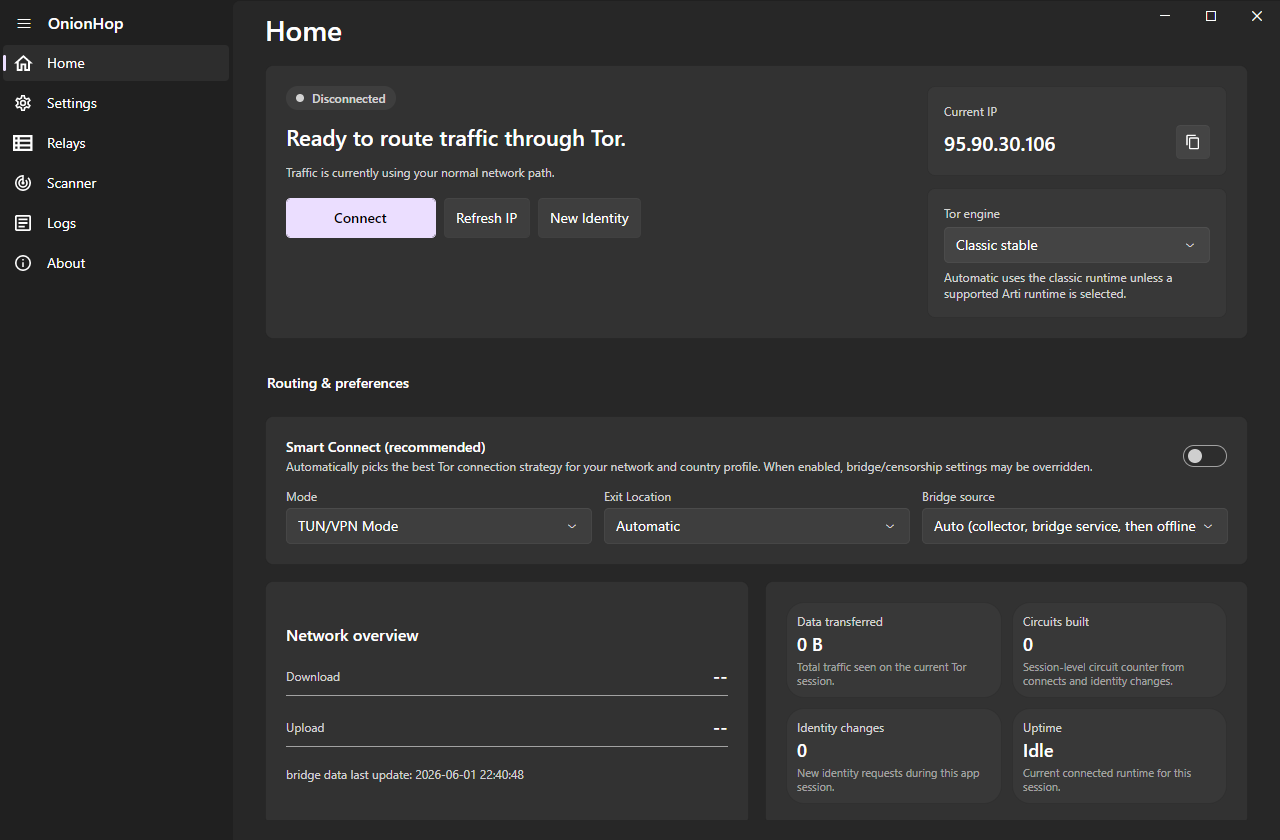
<a href="https://github.com/center2055/onionhop/blob/master/assets/onionhop-v3-ui.png"><img src="https://assets.kitploit.com/production/public/readmes/13108/9aca447fc44246b2a536fd6d3d8ce7eada8a6bb128f6b207463903c219b18d79.png" alt="OnionHop V3 UI Screenshot" width="800"/></a>
</div>
<div align="center">
<a href="https://github.com/center2055/OnionHop/releases/latest">
<img src="https://img.shields.io/badge/Download-Latest%20Release-blue?style=for-the-badge&logo=github" alt="Download Latest Release"/>
</a>
<a href="https://ko-fi.com/center2055">
<img src="https://img.shields.io/badge/Support-Ko--Fi-ff5f5f?style=for-the-badge&logo=kofi&logoColor=white" alt="Support on Ko-Fi"/>
</a>
</div>
<div align="center">
<img src="https://img.shields.io/badge/Windows-0078D6?style=flat&logo=windows&logoColor=white" alt="Windows"/>
<img src="https://img.shields.io/badge/macOS-000000?style=flat&logo=apple&logoColor=white" alt="macOS"/>
<img src="https://img.shields.io/badge/Linux-FCC624?style=flat&logo=linux&logoColor=black" alt="Linux"/>
</div>
**OnionHop V3** is a modern, **cross-platform** desktop app (Windows, macOS and Linux) that routes your traffic through **Tor**. It can run Tor as a local SOCKS proxy or as a system-wide tunnel, automatically pick a working connection strategy for your network with **Smart Connect**, scan and apply working bridges for censored networks across every transport, and even let you volunteer as a Snowflake proxy.
> **Disclaimer**
> OnionHop is provided "as-is". Tor usage can be illegal or restricted in some jurisdictions. You are responsible for complying with local laws and regulations.
---
## What's new in V3 (since v2.7)
V3 is a ground-up rebuild on a new cross-platform UI stack, with a much smarter connection engine and a far wider set of censorship-resistant transports.
- **Now cross-platform** — native desktop builds for **Windows**, **macOS** (signed & notarized universal app) and **Linux** (AppImage). Same app, native look on each OS.
- **Redesigned UI** — Fluent/native look (FluentAvalonia), light/dark/follow-system themes, an accent picker, an integrated chromeless title bar on Windows and native window chrome on macOS, and **8 languages** (English, German, French, Chinese, Russian, Persian, Azerbaijani, and Sorani Kurdish).
- **Smart Connect** — an offline censorship "brain" that auto-picks the best connection strategy for your network and country: it knows where Tor is blocked, prefers transports that survive there, pre-tests bridge reachability, races strategies in parallel, fails fast off dead paths, and remembers what worked on each network so the next connect is instant.
- **Three Tor engines** — **Classic** (`tor.exe`, full control: bridges, country/entry/exit pinning, control-port New Identity), **Arti** (the Rust Tor implementation with native bridge/PT config), and **ArtiHop** (shortened 2-hop Guard→Exit circuits for lower latency).
- **More censorship-resistant transports** — obfs4, **snowflake** (with optional AMP-cache fronting), **webtunnel**, **conjure**, meek, and **dnstt** (a DNS tunnel that gets Tor through when only DNS is allowed).
- **Bridge Scanner** — fetch and reachability-test bridges of every transport, see color-coded latency, and one-click apply the ones that actually work on your network.
- **More bridge sources** — the official Tor bridge service, the censorship-resistant [OnionHop Bridges Collector](https://github.com/center2055/OnionHop-Bridges-Collector) (derived from [Delta-Kronecker/Tor-Bridges-Collector](https://github.com/Delta-Kronecker/Tor-Bridges-Collector)), built-in community bridges, and a thin-set top-up so a tiny live fetch is automatically backed by bundled bridges.
- **Relays browser** — search the live Tor relay list by nickname, country, role, flags and bandwidth, and pin a preferred entry/middle/exit.
- **Command-line interface** — a full-featured TUI (`OnionHopV3.Cli`) with a live status dashboard, connect/scan/bridges/snowflake/relays commands and settings persistence. Windows, Linux and macOS packages are built by CI.
- **Stronger leak protection** — optional full DNS-over-Tor, a kill switch, UDP blocking in TUN mode, and an in-app WebRTC/UDP privacy notice.
- **Volunteer as a Snowflake proxy** — help censored users reach Tor, straight from Settings.
- **Quality-of-life** — decoupled system-proxy toggle (turn it off while Tor stays connected), an opt-in persistent admin helper to skip repeat UAC prompts in TUN mode (off by default), an in-app changelog, and Bitcoin donations.
---
## Download
Grab the latest build for your platform from **[Releases](https://github.com/center2055/OnionHop/releases/latest)**:
| Platform | File | Notes |
| :--- | :--- | :--- |
| **Windows** | `OnionHop-Setup-v3.exe` | Installer (self-contained, .NET runtime bundled) |
| **Windows** | `OnionHopV3-Portable-…win-x64.zip` | Portable, no install |
| **Linux** | `OnionHop-x86_64.AppImage` | `chmod +x` and run |
| **macOS** | `OnionHop-3.x-macOS.dmg` | Signed & notarized; universal (Apple Silicon + Intel) — from the [macOS repo](https://github.com/rana-gmbh/onionhopMac/releases/latest) |
| **Windows CLI** | `OnionHop-CLI-Setup-3.x.exe` / portable ZIP | Terminal interface |
| **Linux CLI** | `OnionHopCLI-…linux-x64.tar.gz` | Terminal interface |
| **Linux CLI (ARM)** | `OnionHopCLI-…linux-arm64.tar.gz` (64-bit) / `…linux-arm.tar.gz` (32-bit ARMv7) | Raspberry Pi and other ARM boards; see [Headless use](#headless-use-cli) |
| **macOS CLI** | `OnionHopCLI-…macos-arm64.tar.gz` (Apple Silicon) / `…macos-x64.tar.gz` (Intel) | Terminal interface; signed & notarized — from the [macOS repo](https://github.com/rana-gmbh/onionhopMac/releases/latest) like the DMGs |
> The macOS `.dmg` is published from the dedicated, code-signing [rana-gmbh/onionhopMac](https://github.com/rana-gmbh/onionhopMac/releases/latest) repository.
---
## Getting started
1. **Install** the build for your OS (above). The Windows installer and the macOS/Linux bundles are self-contained — the .NET 9 runtime is bundled.
2. **Choose a mode**
- **Proxy Mode (recommended, no admin):** runs Tor locally and points the OS system proxy at Tor's local SOCKS5 endpoint. Best compatibility for proxy-aware apps.
- **TUN/VPN Mode (admin):** system-wide routing via **sing-box** (Wintun on Windows, the system TUN on macOS/Linux); needed for apps that ignore proxy settings. Leak-resistant (DNS through Tor, UDP blocked).
3. **Connect**
- Leave **Smart Connect** on to let OnionHop pick the best strategy automatically, **or** pick a **Tor engine** / **Exit Location** / **Bridges** yourself.
- In a censored network, enable **Bridges** or open the **Scanner** to find bridges that work in your region.
- Click **Connect**.
Notes
- `.onion` sites require a Tor-aware client (Tor Browser recommended) or SOCKS remote DNS (e.g., Firefox "Proxy DNS when using SOCKS v5").
- Country/relay pinning and control-port New Identity require the **Classic** engine. Arti and ArtiHop support OnionHop bridge/PT configuration, but Classic remains the most complete choice for manual circuit control.
---
## Tor engines
| Engine | Hops | Admin | Bridges / pinning / NEWNYM | Notes |
| :--- | :--- | :--- | :--- | :--- |
| **Classic** (`tor.exe`) | 3 | no (Proxy) | bridges, pinning, NEWNYM | Most features; recommended for censorship + manual circuit control |
| **Arti** | 3 | no | bridges/PT | Rust Tor implementation (SOCKS runtime) |
| **ArtiHop** | 2 (Guard→Exit) | no | bridges/PT | Lower latency, weaker anonymity |
Use **Classic** when you need country pinning, relay pinning, or control-port New Identity. Use **Arti** or **ArtiHop** when you want the Rust runtime and do not need those Classic-only controls.
---
## Modes explained
### Proxy Mode (recommended)
Runs Tor locally and sets the OS proxy to Tor's SOCKS5 endpoint. No admin required. You can toggle the system proxy off without disconnecting Tor.
### TUN/VPN Mode (admin)
Runs Tor + **sing-box** and routes traffic at the OS level (Wintun on Windows, system TUN on macOS/Linux). Requires Administrator. Most leak-resistant.
### Hybrid (split tunneling)
Only in TUN/VPN Mode — route selected apps through Tor while others stay direct.
---
## Headless use (CLI)
The CLI runs without a desktop, e.g. on a Raspberry Pi that shares Tor with your home network. Use `linux-arm64` on a 64-bit OS and `linux-arm` on a 32-bit one (Pi 2 and newer); `dpkg --print-architecture` prints `arm64` or `armhf`. It needs Debian 12/13 or a similar distribution (glibc 2.35+, `ca-certificates`).
```bash
sudo mkdir -p /opt/onionhop
sudo tar -xzf OnionHopCLI-<version>-linux-arm.tar.gz -C /opt/onionhop
/opt/onionhop/OnionHopV3.Cli connect --proxy-scope local --lan-interface wlan0
```
- `connect` keeps running until it is stopped. Ctrl+C, SIGTERM (systemd, Docker, `kill`) and SIGHUP (a closed SSH session) all disconnect cleanly and stop Tor.
- `--proxy-scope local` leaves the system proxy alone, which a headless box does not have.
- `--lan-interface <name|ip>` shares the SOCKS and HTTP proxy on that one interface (here `wlan0`, a router's LAN side) as well as on 127.0.0.1. `--lan on` shares it on every interface instead, and lists their addresses; on a router that includes the internet-facing side, so prefer `--lan-interface` there or block the ports on that side. Anyone who can reach the shared ports can use them.
- Smart Connect remembers what worked and what failed on your network, so the next connect skips the routes that keep failing. `--bridge-type obfs4` makes it try obfs4 first; `plan` shows the order it will use, and each attempt reports how long it took.
- The kill switch only exists in TUN mode and only when it is turned on; the CLI never turns it on, so Proxy Mode leaves your firewall rules alone.
To start it at boot, create `/etc/systemd/system/onionhop.service`:
```ini
[Unit]
Description=OnionHop (Tor with Smart Connect)
Wants=network-online.target
After=network-online.target
[Service]
User=onionhop
ExecStart=/opt/onionhop/OnionHopV3.Cli connect --proxy-scope local --lan-interface wlan0
# Only the CLI gets SIGTERM, so it stops Tor itself before exiting.
KillMode=mixed
TimeoutStopSec=30
Restart=on-failure
RestartSec=30
[Install]
WantedBy=multi-user.target
```
```bash
sudo useradd --system --create-home --home-dir /var/lib/onionhop onionhop
sudo systemctl daemon-reload
sudo systemctl enable --now onionhop
journalctl -u onionhop -f
```
Settings and Smart Connect's memory of your network live in the service user's `~/.config/OnionHop`, Tor and its state in `~/.local/share/OnionHop`.
---
## Permissions
- **Network access** — IP checks, Onionoo relay/country data, GitHub release metadata, bridge sources, and dependency downloads.
- **Administrator / root** — only for features that change system networking: **TUN/VPN mode**, **kill switch**, or system **DNS/proxy** changes.
- **Folder access** — store settings, logs, runtime data, downloaded Tor/transport binaries, the bridge cache, and any log export location you choose.
Settings and runtime data live in the OS application-data folders, e.g. `%AppData%\OnionHop\settings.json` (Windows) or `~/Library/Application Support/OnionHop/` (macOS).
---
## Building (Dev)
Prerequisites:
- .NET SDK 9
- Inno Setup 6 (Windows installer)
- *(optional)* Rust toolchain to build the **ArtiHop** engine, and Go to build the **Snowflake proxy** / **webtunnel** / **dnstt** clients — these are fetched/built by the dependency scripts; if a toolchain is missing, that engine/feature is simply skipped.
Fetch runtime dependencies (Tor, pluggable transports, sing-box, Wintun, ArtiHop, Snowflake proxy):
```powershell
# Windows
powershell -NoProfile -ExecutionPolicy Bypass -File download-deps.ps1
```
```bash
# Linux (this machine's architecture, or pass x64, arm64 or arm)
./download-deps.sh
```
For `arm64` and `arm`, Tor (with OpenSSL, libevent and zlib) and the transports are built from source, since the Tor Project publishes no stable Linux ARM bundle. That needs Go, plus the cross compiler when building on an x86_64 machine (`gcc-aarch64-linux-gnu` or `gcc-arm-linux-gnueabihf`).
Build & run:
```powershell
# Windows installer (self-contained, x64) -> installer/output/OnionHop-Setup-v3.exe
powershell -NoProfile -ExecutionPolicy Bypass -File installer/build-installer-v3.ps1
# Run from source
dotnet run --project OnionHop/src/OnionHopV3.App -c Release
```
The ArtiHop 2-hop engine is built from its own public repo, [center2055/ArtiHop](https://github.com/center2055/ArtiHop) — only the compiled binary is bundled; its source is not vendored.
## License
Copyright (C) 2025 OnionHop Authors
This program is free software: you can redistribute it and/or modify it under the terms of the GNU General Public License as published by the Free Software Foundation, either version 3 of the License, or (at your option) any later version.
This program is distributed in the hope that it will be useful, but WITHOUT ANY WARRANTY; without even the implied warranty of MERCHANTABILITY or FITNESS FOR A PARTICULAR PURPOSE. See the GNU General Public License for more details.
The full license text is in [LICENSE](https://github.com/center2055/onionhop/blob/master/LICENSE).