
将文件隐写进MP4/MKV文件中 (Embed files into MP4/MKV files.)
Hide files into MP4/MKV files
Please make sure you understand what "file extension" means before watching the following tutorial. If you don't understand, first search "how to change a file extension"
If it still shows as MP4 after changing the extension, that means file extension display is not enabled; please search the above content again.
Can't extract (|why is it a video|wrong password|file corrupted|split volumes needed|etc.)
Change the MP4 extension to .zip and extract with WinRAR
Brief usage guide for Steganographer
This software can turn a file or folder into an archive and then "hide" it inside an MP4/MKV video, disguising it as a video. This operation is called steganography, and the archive disguised as a video is called a steganographic file.
When played with a media player, the generated steganographic video looks like an ordinary video; but if you change the extension to .zip, you can use extraction software to extract the hidden files inside.
Two operation modes are supported:
Common extraction methods:
.zip, then extract (WinRAR 6 is recommended).# mode, or extract via command line.Additional features:
modules/PW.txt, and the program will automatically try to match them when revealing, saving you from manual input.Other ways to reveal steganographic files (choose the one that matches your extraction software)
2025/06/28 Update: v1.3.1
Added a new working mode, mp4(zarchiver). Steganographic files generated in this mode can be extracted by extraction tools that scan for archives from the beginning, such as zarchiver and 解TMD压, but cannot be extracted by WinRAR, which scans archives from the end. Use it according to your situation.
Author: 层林尽染
This program can steganographically embed files or folders into video files, or extract steganographic files or folders from video files. The program supports two modes: command-line interface (CLI) and graphical user interface (GUI).
GUI mode: [Recommended] Double-click to run the program directly, without any parameters. For details on using the GUI, see the demo video.
CLI mode: Run the program with the following parameters:
-i, --input Specify the path to the input file or folder. If no parameter flag is used, the program treats the first unknown argument as the input path.
-o, --output 1. Specify the output file name (including the extension) [or] 2. Specify the output path (defaults to the original filename + "_hidden.mp4/mkv").
-p, --password Set a password (no password if not specified).
-t, --type Set the output file type (defaults to mp4); both mp4 and mkv are supported.
-c, --cover Specify the shell MP4 video (if not specified, the program searches in the following order:
- the cover_video folder in the same directory as the program
- the directory where the program is located
- the directory where the input file or folder is located)
-r, --reveal Perform reveal (does nothing if the input file is not a steganographic file)
Hide a file:
python Steganographier.py -i "input.txt" -o "output.mp4" -p "password" -t "mp4" -c "cover.mp4"
python Steganographier.py -i "input.txt" -o "outputFolder" -p "password" -t "mp4" -c "cover.mp4"
Hide a folder:
python Steganographier.py -i "inputFolder" -o "outputFolder" -p "password" -t "mp4"
python Steganographier.py -i "inputFolder" -o "output.mp4" -p "password" -t "mp4"
Reveal and extract files:
python Steganographier.py -i "input.mp4" -r -p "password"
If only the input file is specified, default settings are used:
python Steganographier.py "input.txt"
_hidden.mp4/mkv._hidden.mp4/mkv.cover_video folder in the same path as the programcover_video folder in the same path as the program. If the folder exists, the program searches for .mp4 files within it. If the folder does not exist, the program skips this step and continues searching in other locations.Full Changelog: https://github.com/cenglin123/SteganographierGUI/compare/v1.1.0...v1.1.1
To explore the security issues of sharing resources on domestic cloud storage after the failure of instant transfer (秒传) links, this article recommends a file steganography method that uses MP4 files as the shell, and conducted stress tests that preliminarily prove the method's effectiveness. It also shares some experience and usage suggestions when using steganography. Through further controlled experiments, it explores the mechanism behind the blanket link takedowns in comment sections, concludes that the cause is malicious reports, and proves the advantages of steganographic files: ① they cannot be extracted online, and ② violations can be appealed. It then discusses Baidu Netdisk's review mechanism and the principles behind reporting. It also proposes some strategies for dealing with malicious reports.
The source code of this program is open-sourced on GitHub. If you have any suggestions, feel free to open an issue.
Nowadays, the review policies of major domestic cloud storage services are becoming increasingly strict, and the chance of shared links being taken down is growing.
Traditionally, we used password-protected multi-layer archives / split-volume archives to deal with review issues. This approach is very troublesome, and when there are many layers and large files, the wear and tear on hard drives from frequent extraction is hard to ignore. Around this problem, various instant transfer solutions leveraging cloud storage features emerged in the past, but as cloud storage policies tightened, most of these solutions have failed or exist in name only.
After instant transfer solutions failed, resource sharing on domestic cloud storage reverted to encrypted archives. Sharers inevitably had to deal with cloud storage's sharing and review systems. On top of that, resource resellers (倒狗) who report shared links run rampant, and link takedowns began to appear frequently again, sometimes even occurring in a blanket manner. The sharing environment has become increasingly harsh.
In summary, this makes researching and developing more covert and secure data transmission methods particularly important. Under such difficult circumstances, the file steganography technique introduced in this article is expected to become a new secure sharing solution for the post-instant-transfer era.
This program is inspired by the repository article (hereinafter referred to as article [1]) and uses file steganography to hide data and bypass routine review.
Steganography embeds data into other media files, making the existence of the data invisible to ordinary observers, thus enabling information transmission without attracting attention.
Steganography has many precedents. The traditional approach is mainly image seeding (图种)[X7], which embeds data into an image. On the surface it looks like an image, but after changing the file extension, it can be extracted to obtain the hidden data.
The principle of image seeding is as follows:
copy /b "图片.jpg" + "压缩包.zip" "生成目标.jpg"
But this approach easily arouses suspicion: after all, an image with neither high resolution nor high definition that is several gigabytes in size, and with very high download/save records, is just too suspicious [1].
Therefore, considering the effectiveness of disguise, it is more reasonable to use MP4 files as the steganographic shell; large videos are clearly less likely to arouse suspicion than large images.
Our goal is to reduce suspiciousness through steganographic disguise, so as to achieve secure sharing at the lowest possible cost. Because if a file is frequently reported, no matter how many archive layers there are or how complex the password is, once it is under strong suspicion, there is probably no way to save it. For cloud storage, the most convenient way to deal with a file that cannot be decrypted and has been heavily reported is to simply rule it in violation across the board (see this experiment [5]).
The best defense in nature is not stacking armor, but camouflage.
In terms of implementation: a ZIP archive is embedded into an ordinary MP4 video file, such as a SpongeBob video. When the file is opened as MP4, only the SpongeBob video is visible and the ZIP portion is invisible; but when the filename is changed to ZIP, extraction software (such as WinRAR) can locate the ZIP portion and extract it normally. This achieves low-cost secure sharing of files.
Although article [1] provides an effective code implementation for file steganography, it lacks a simple and easy-to-use interface, which limits its promotion and popularization.
This program simplifies the approach of article [1] and develops a steganography program with a graphical user interface (GUI), allowing users to steganograph and reveal files through simple drag-and-drop and click operations.
Added on 2024.4.24: Based on the method proposed in article [2], files can also be embedded into MKV files as attachments. This logic was added in v1.0.2.
This program allows you to directly steganograph and reveal files by entering a password and dragging files in.
The program has the following features:
(1) All-in-one: You can perform both steganography and reveal operations in the same interface, improving overall efficiency and convenience.
(2) Drag-and-drop: Supports dragging files or folders into the designated area, simplifying the file selection process.
(3) Universality: The generated steganographic MP4 files can be extracted by manually changing the extension; it is not mandatory to use this program.
(4) Password protection: Mustenter a password to perform steganography or reveal operations. As of v1.0.6, leaving the password unspecified is allowed.
(5) CLI invocation: Can be operated with commands in a terminal window, or invoked by other applications as a third-party program (updated in v1.1.0)
(6) Right-click menu integration: Can be integrated into the mouse right-click menu and operated with logic similar to common compression software (updated in v1.2.0)
Demo video
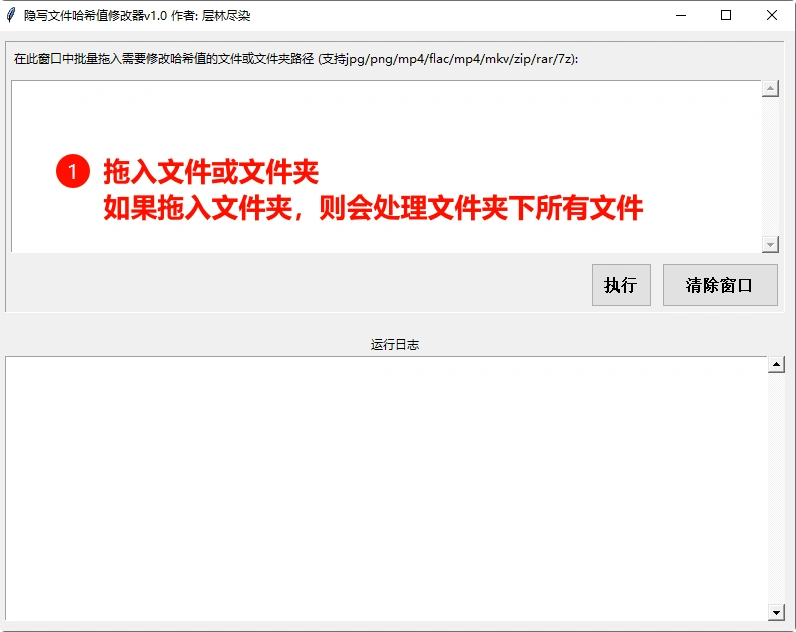
GUI interface
The hash modifier is intended for preprocessing work for relay sharing (传火) and restoring taken-down links (补档) or uploading "harmonized" files to cloud storage. You need to modify the hash value before uploading to prevent a link takedown from implicating the original shared file.
Note that Steganographer itself automatically randomizes the hash: even if the original file is the same, every generated steganographic file has a different hash, so during normal steganography operations you don't need to worry about hash values.
Use the CAPTCHA generator to process extraction codes, which prevents crawlers from scraping the links.
Example:
In v1.2.0, installation and uninstallation scripts that integrate the software into the right-click menu were added. Run 01-安装隐写者到右键菜单.cmd as administrator; to remove it, run 02-移除隐写者右键菜单.cmd. The scripts support installation paths containing spaces, Chinese characters, and special characters such as !. This feature is based on CLI mode (by default, it selects the first video in the cover_video folder). Currently it cannot handle detailed operations such as passwords or video selection; if you need such operations, you can choose Right-click → Open Steganographer GUI.
Version 20240801-v1.2.0.1 further integrates the hash modifier feature.
The following is a detailed operation demonstration:
Version 20240828-v1.2.1: The reveal logic adds a password book feature. Simply enter passwords line by line in modules/PW.txt, and when revealing, the program will search the password book and try to extract with them (CLI mode and the right-click menu are also supported). It supports password books in the format of 解TMD压, as shown below:
(1) Direct upload & share: True warriors always dare to face the bleak life and dripping blood, as well as a series of setbacks such as link takedowns and account bans.
(2) Single-layer/multi-layer archives: A password with encrypted filenames can prevent cloud storage from scanning the contents of the archive, resisting review to some extent. However, it cannot prevent online extraction (mobile clients can extract archive formats including 7z online; archives larger than 20GB currently cannot be extracted online, but uploading such large files is not recommended). If there is no password, see (1).
(3)-1 Split-volume archives: Since split-volume archives cannot be extracted online, security is much higher than (2) (whether you change the extension or include decoy files makes little difference). (3)-2 Self-extracting archives: EXE-format archives that require no extraction software to be installed - just run them to extract. Self-extracting files also cannot be extracted online, so their security is at the same level as split-volume archives.
(4) Encrypted files in other proprietary formats: Including but not limited to proprietary encrypted formats such as Cryptomator and VeraCrypt. Compared with the more universal archives, cloud storage is unlikely to ship with features that can decrypt these proprietary formats, so their security is higher than the former. However, they cannot cope with forced violation rulings caused by mass reports.
(5) Steganographic files: This refers to steganographic files such as JPG/PNG/MP4/MKV. From an encryption-technique perspective, steganographic files belong to level 3 (steganographic files also cannot be extracted online - it will prompt that the archive is corrupted). Thanks to their strong disguise capability, they can effectively confuse review. They are not afraid of forced violation rulings caused by reports and can be appealed (see Section 5.3). Therefore their security is higher than all of the above.
(6) BT, IPFS, self-hosted cloud storage: Decentralized sharing generally cannot be reported, so security is top-tier; the same applies to self-hosted cloud storage. Reporting-related topics will be discussed in detail in Sections 5.3 and 5.6.
In general, based on the three points 【1. Can it be encrypted?】 【2. Can it be extracted online?】 【3. Can it be reported?】, sharing methods can be roughly divided into 3 major security levels.
For a ranking of security levels for cloud storage sharing, see this article[8] if interested.
When selecting files and steganographic content, you need to choose an appropriate shell file based on the size of the shared resource - it should look reasonable and not arouse suspicion.
For example, if your resource is around 3GB, you'd better not choose a 1- or 2-minute short video, because that is unreasonable and easily arouses suspicion; it is best to choose a long video of 1 to 2 hours. You can choose low-definition movies or long lecture-style videos from Bilibili; at 360P, such videos are usually within 300MB.
I have also included a few long videos in the program for your reference; you can choose them as needed. In my opinion, spending a little extra traffic in exchange for security is a good deal.
Below is my personal reference table of resource size vs. recommended shell duration.
It is recommended to download Bilibili videos as the steganographic shell. Bilibili's video encoding is quite professional - a 3-minute video can be kept within 10MB. Be careful not to download videos that may involve copyright issues, such as anime (番剧), UP-exclusive paid videos, etc. If you're not assured, you can search for the keyword "public domain" to find videos; public domain videos do not involve copyright issues.
Steganographic shell download tool (Bilibili video downloader) https://github.com/leiurayer/downkyi
Recommended download parameters: choose 480P or below for video quality, which is usually not too blurry; but choose medium quality for audio, otherwise the obvious degradation will easily arouse suspicion; choose H.265 for video encoding for a higher compression ratio and smaller file size.

For oversized resources (>4GB), you can process them by splitting into folders or volumes. The embedded shell videos can be an animation series in sequential episodes, which makes it less suspicious. Currently, since version 1.1.2, the program has added a warning for unreasonable steganographic configurations.
The main features that distinguish steganographic files from other cloud storage sharing methods: not easily taken down, and violations can be appealed.
The so-called "not easily taken down" means that even if a steganographic file is reported a certain number of times (referred to here as "a small number"), it will briefly enter a review state, shown as 【temporarily frozen】 or 【under review】, and will automatically return to normal after 5-10 minutes. It is immune to a small number of reports or fewer.
For proof of this feature, see this experiment [5]
This is something no previous encryption method could achieve. As mentioned above, cloud storage tends to directly rule files that cannot be decrypted and are heavily reported as violations.
However, although steganographic files are not easily taken down, they can still be taken down after being reported in large or massive numbers (showing "this file is prohibited from sharing" or "the file is in violation and has been blocked in accordance with relevant laws and regulations", respectively).
When a share is taken down, re-filing it usually requires recompressing and uploading again. The reason you can't simply re-share directly is that the hash value of the violating file has already been recorded by the cloud storage - whether you re-upload or re-share, the cloud storage recognizes the file (a file's hash value can be compared to a human fingerprint). This is undeniably time-consuming and laborious; especially when the file is very large, it becomes a nightmare.
The appealability of steganographic files gives us another, more convenient solution: we can directly appeal the violating file and then simply re-share it, without having to recompress and re-upload again and again for re-filing. If you have been targeted by reports recently, you can wait a while for the heat to pass, then appeal to bring the file "back to life" and continue sharing.

In addition, when facing mass malicious reports, it is not recommended to share with your main account. Instead, use the main account only for uploading and appealing, and use an alt account for sharing, to avoid possible losses from an account ban. For details, refer to this article:
[Tip Sharing] How to transfer from a main account to an alt account for sharing on Baidu Netdisk
For more details on appeal techniques, see this article [10]
On the other hand, content that is completely problem-free may not be good either.
If a file is heavily reported, it may trigger a manual review. A video that looks completely fine at first glance but keeps being reported as pornographic is also suspicious.
A suggestion for this: if your resource may face the risk of mass reports, you can use videos that are borderline (擦边) but not enough to get banned, such as sexology-related videos or censorship-passable 哲♂学/银梦 meme videos.
In this way, when facing mass reports, you can minimize the risk of exposure; and if you are unfortunately banned, you can also rationalize the appeal grounds.

You can use your imagination; these are just examples. In short:
The purpose of disguise is not to give people nothing to nitpick, but to make the other side misjudge, turning big matters into small ones and small ones into nothing.
Although steganography can increase file security, you should still consider your personal cybersecurity and anonymity when sharing. For example, use a VPN or proxy during uploads; do not use videos containing personal information, and do not always use the same video as the steganographic shell, so as to reduce the risk of being tracked and identified.
Certain resources considered valuable may be targeted by malicious groups such as resource resellers. A resource reseller is someone who takes freely shared resources and resells them for profit, colloquially known as "倒狗" (reselling dogs).
In order to ensure a monopoly on profits, resellers report other shared files so their links get taken down, maintaining their sole-source status (in plain words: keeping all the food for themselves). The result is that submissions and the relay (传火) links beneath them get taken down in a blanket manner. (Examples: example 1, example 2, example 3)
Specifically, resellers use automated scripts to report shared files. Note that what is reported is the file, not the link. Resellers save a copy of the file they want to be ruled as violating, share it with their own account, and then run a reporting script to keep reporting until the file is ruled in violation.
Reports on this scale cannot be handled by steganographic files. Not only steganographic files - no normal file can handle them either. Even a normal file will be forcibly ruled in violation by cloud storage. In other words, this kind of violation has nothing to do with whether the file actually contains violating content; it is an attack behavior similar to a DDoS (which also means even instant transfer cannot help). Although steganographic files can be appealed, if reporters cannot completely kill the file, they will want to kill the sharer instead. Rather than reporting files one by one, it is more convenient to just have the sharer's account banned.
Therefore, if your resource has already been targeted by resellers (the criterion is that the steganographic file's link goes down quickly after sharing, and goes down quickly again after a successful appeal and unblocking), it is not recommended to continue sharing via common cloud storage. Instead, switch to IPFS, magnet links, self-hosted cloud storage[X5], and other sharing methods that will not be "harmonized" by reports.
For more analysis on secure sharing and the principles behind reseller reporting, see this article
Because a steganographic file is both a video and an archive, we can upload steganographic files to certain video platforms and use the video platform as cloud storage.
Traditional video sites (such as Bilibili) compress the quality and cause the steganographic content to be lost, but some IPFS-based sites allow direct download of the original file (e.g., sol.media). This feature makes it possible to freeload storage space. At the same time, since the site actually hosts files on Pinata (Pinata is fairly stable), the content can be publicly retrieved by the IPFS network. When sharing, you don't need the site's video link; you can use the video's CID for content addressing and download the file through the IPFS network (the sharing feel is very similar to instant transfer).
The fact that steganographic files are playable also brings good security; as shown below, at first glance it looks quite normal:

The site has an NSFW (Not Safe For Work) category. You can select this category when uploading, which allows you to upload some lewd content directly, and it will not be shown in the Trending section in the top-left corner, avoiding being watched by passersby. As for where the boundary lies, you can take a look at the site's NSFW section; roughly speaking, it's AV-level content (content involving minors is not recommended, and anime-style content involving minors is also hard to say; in such cases, it is best to handle it with steganography).
Since we are freeloading the site's space, it is best to uphold the consistent principle of steganographic files: 【don't arouse suspicion】. When uploading, it's best to look like a 【normal user】 (uploading dozens of GB of Never Gonna Give You Up every day would look weird no matter how you look at it). Please bear with it and treat yourself as a video uploader. Go find a few valuable videos on Bilibili and treat it as contributing to the diversity of videos on this site. One for all, all for one, and while at it, grab some free perks as creative incentives for a win-win or even a triple win! (Downloaders watch the videos and learn knowledge, the site enriches its video content and user activity, and sharers get free perks - a triple win!)
In addition to sol.media, the following sites can also be used for hosting:
https://odysee.com/ (This site has a maximum equivalent bitrate of 16Mbps for uploaded videos, so note that the steganographic video should be longer.)
https://gleev.xyz/ (This site can directly host steganographic files.)
For more hosting platforms, refer to this article:
I guess friends who can read this far all understand, but allow me to emphasize one point anyway.
When using this program, please comply with the necessary laws and ethics. You can share resources as a hobby, but do not bring niche-community stuff to the surface, and do not go provoke anywhere officials can see. Historical experience has told us countless times that when niche circles break out, the result is often a mess. (You! Don't make steganography unusable for everyone!)
We do not encourage the use of steganography for illegal activities; rather, we hope to enhance personal data protection and privacy security through technology.
The current program still has some problems. For example, the merging method simply appends the ZIP file to the end of the video file, embeds it in the MP4 file's moov box, or adds it as an attachment to the MKV file. Although this method is easy to implement, it is also easy to detect.
In the future, a more covert approach may be considered, such as embedding the ZIP content into some less critical parts of the video file, inserting a small piece of data after each I-frame, etc. Such approaches require analyzing the encoding details of the video file and may require other libraries such as FFmpeg; this is left for future research.
Nevertheless, according to the test results of article [1] and the results of this test, steganography has the advantages of ① not easily ruled in violation ② even if ruled in violation, it can be appealed ③ convenient re-filing, etc. As long as it is not specifically targeted by reports, such a steganography method can already be regarded as a solution worth promoting.
In the future, as the technology is further improved, such steganography methods may become an effective means of secure sharing after instant transfer.
This program is offered as a modest spur to induce abler contributions; you are all welcome to actively participate in the research.
One-click copy of the steganographic file description info;
1. The shell MP4 file is a disguise video; the resource is hidden inside the MP4 file.
2. Extraction method: change the MP4 extension to ZIP with WinRAR, then extract.
This article introduced the history of resource sharing methods up to instant transfer links, proved that reports are the main cause of link takedowns, proposed adopting steganography as a secure resource sharing solution for the new era, and shared some experience and suggestions when using steganography, hoping to help resource sharers make better use of it.
With technological progress and the popularity of digital media, steganography may see new breakthroughs. In addition to the frame-insertion steganography mentioned earlier, there may also be deep-learning AI-driven steganographic systems, all of which may provide new solutions to resource sharing security issues.
The contest between spear and shield never ends; the new era calls for new solutions.
Everyone is welcome to participate in the testing and research of steganography and jointly promote its development. If you have any further improvement requirements or suggestions for this program, please leave a comment or open an issue on GitHub.
Source code: https://github.com/cenglin123/SteganographierGUI
This program is only for protecting personal information security. Do not use it for any illegal or criminal activities.
copy /b "input.mp4" + "input.zip" "output.mp4"
Python code
import subprocess
cmd = [
'copy', '/b',
'input.mp4','+',
'input.zip',
'output.mp4',
]
subprocess.run(cmd, check=True)
mkvmerge -o "output.mkv" "input.mp4" --attach-file "input.7z"
Python code
import subprocess
cmd = [
'mkvmerge', '-o',
'output.mp4',
'input.mp4',
'--attach-file',
'input.7z',
]
subprocess.run(cmd, check=True)
In addition to those mentioned in this article, there are some other file processing methods that also count as steganography:
The security principles of these methods are similar, as discussed in Section 5.1. However, the above methods are not as easy to use as the method mentioned in this article, because decoding them requires specialized software, whereas the copy /b method mentioned in this article can be extracted by common extraction software. In terms of convenience, it is superior.
Main content
[1] [Tip] Using file steganography to avoid cloud storage harmonization
Further reading
[X0] [1] [Tip Sharing] Anti-takedown tutorial: how to share resources safely?
[X2] [Misc] A simple primer for new drivers (Author's note: This article is a primer on secure sharing)
[X4] [Tip] Using cloud storage offline download for sharing to evade review
[X5] [Tip Sharing] [Self-hosted cloud] Self-hosted cloudreve + offline download
[X6] [Advanced Article] Thoughts on file sharing mechanisms in the new era (Author's note: This article introduces sharing solutions other than cloud storage)
[X7] [Tip Sharing] Making and using image seeds (图种)
[X8] [Tip Sharing] Anti-takedown tutorial (Author's note: This article introduces common cloud storage sharing methods, though the author may have to eat their monitor.)
[X9] [Tutorial] BitTorrent (torrent files) 101 [Gentleman's Warehouse tracker update] [2020 Rev] (Author's note: This article is a tutorial on creating magnet/torrent seeds.)
[X10] [Tip Sharing] [IPFS] CRUST IPFS operation guide PART.I - a file-sharing artifact that cannot be reported (IPFS hosting platform tutorial)
[X11] Regarding Baidu's recent account-ban measures (This article is also the beginning of the instant-transfer era)
[X2] [South+] Let's see how much impact a simple reporting act can have on Baidu Netdisk resources
| Resource size | Recommended video duration |
|---|
| 0-200MB | 1-3 minutes |
| 200-400MB | 3-15 minutes |
| 400-500MB | 15-30 minutes |
| 500MB-1GB | 30 minutes - 1 hour |
| 1GB-3GB | 1 hour |
| 3GB-4GB | 2 hours |
| 4GB+ | 2 hours or more |