
 cddmp/enum4linux-ng
A next generation version of enum4linux (a Windows/Samba enumeration tool) with additional features like JSON/YAML export. Aimed for security professionals and CTF players.

A next generation version of enum4linux


enum4linux-ng.py is a rewrite of Mark Lowe's (former Portcullis Labs now Cisco CX Security Labs) enum4linux.pl, a tool for enumerating information from Windows and Samba systems, aimed for security professionals and CTF players. The tool is mainly a wrapper around the Samba tools nmblookup, net, rpcclient and smbclient.
I made it for educational purposes for myself and to overcome issues with enum4linux.pl. It has the same functionality as the original tool (though it does some things differently). Other than the original tool it parses all output of the Samba tools and allows to export all findings as YAML or JSON file. The idea behind this is to allow other tools to import the findings and further process them. It is planned to add new features in the future.
Some things are implemented differently compared to the original enum4linux. These are the important differences:
-Gm-A) but can be enabled with -R-A instead of -a)I'd like to thank and give credit to the people at former Portcullis Labs (now Cisco CX Security Labs), namely:
In addition, I'd like to thank and give credit to:
It was lots of fun reading your code! :)
Last but not least, I’d like to thank the various people who contributed code, reported issues, and provided helpful suggestions on how to improve the tool.
If you use the tool: Don't use it for illegal purposes.
An example run could look like that:
enum4linux-ng.py -As <target> -oY out
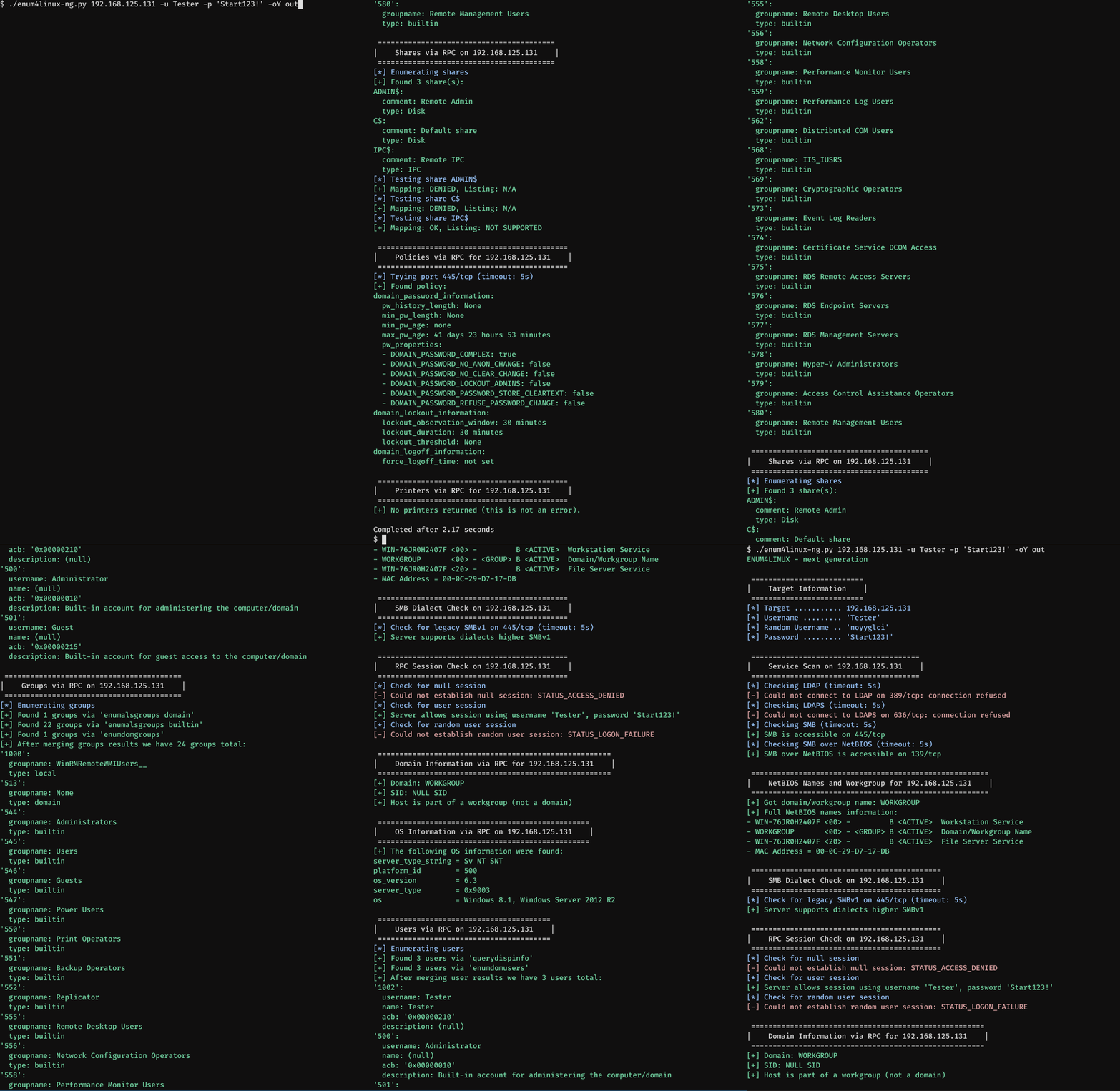
This demonstrates a run against Windows Server 2012 R2 standard installation. The following command is being used:
enum4linux-ng.py 192.168.125.131 -u Tester -p 'Start123!' -oY out
A user 'Tester' with password 'Start123!' was created. Firewall access was allowed. Once the enumeration is finished, I scroll up so that the results become more clear. Since no other enumeration option is specified, the tool will assume -A which behaves similar to enum4linux -a option. User and password are passed in. The -oY option will export all enumerated data as YAML file for further processing in out.yaml. The tool automatically detects at the beginning that LDAP is not running on the remote host. It will therefore skip any further LDAP checks which would normally be part of the default enumeration.
The second demo shows a run against Metasploitable 2. The following command is being used:
enum4linux-ng.py 192.168.125.145 -A -C
This time the -A and -C option are used. While the first one behaves similar to enum4linux -a option, the second one will enable enumeration of services. This time no credentials were provided. The tool automatically detects that it needs to use SMBv1. No YAML or JSON file is being written. Again I scroll up so that the results become more clear.

usage: enum4linux-ng.py [-h] [-A] [-As] [-U] [-G] [-Gm] [-S] [-C] [-P] [-O] [-L] [-I] [-R [BULK_SIZE]] [-N] [-w DOMAIN] [-u USER]
                        [-p PW | -K TICKET_FILE | -H NTHASH] [--local-auth] [-d] [-k USERS] [-r RANGES] [-s SHARES_FILE] [-t TIMEOUT] [-v] [--keep]
                        [-oJ OUT_JSON_FILE | -oY OUT_YAML_FILE | -oA OUT_FILE]
                        host

This tool is a rewrite of Mark Lowe's enum4linux.pl, a tool for enumerating information from Windows and Samba systems. It is mainly a wrapper around the Samba
tools nmblookup, net, rpcclient and smbclient. Other than the original tool it allows to export enumeration results as YAML or JSON file, so that it can be
further processed with other tools. The tool tries to do a 'smart' enumeration. It first checks whether SMB or LDAP is accessible on the target. Depending on the
result of this check, it will dynamically skip checks (e.g. LDAP checks if LDAP is not running). If SMB is accessible, it will always check whether a session can
be set up or not. If no session can be set up, the tool will stop enumeration. The enumeration process can be interupted with CTRL+C. If the options -oJ or -oY
are provided, the tool will write out the current enumeration state to the JSON or YAML file, once it receives SIGINT triggered by CTRL+C. The tool was made for
security professionals and CTF players. Illegal use is prohibited.

positional arguments:
  host
