 cartosys/domestic-system
Using @charmbracelet to create an Ethereum browser with style

A beautiful, terminal-based Ethereum wallet and smart contract browser built for sovereignty, security, and style.
━━━━━━━━━━━━━━━━━━━━
 domestic system
━━━━━━━━━━━━━━━━━━━━
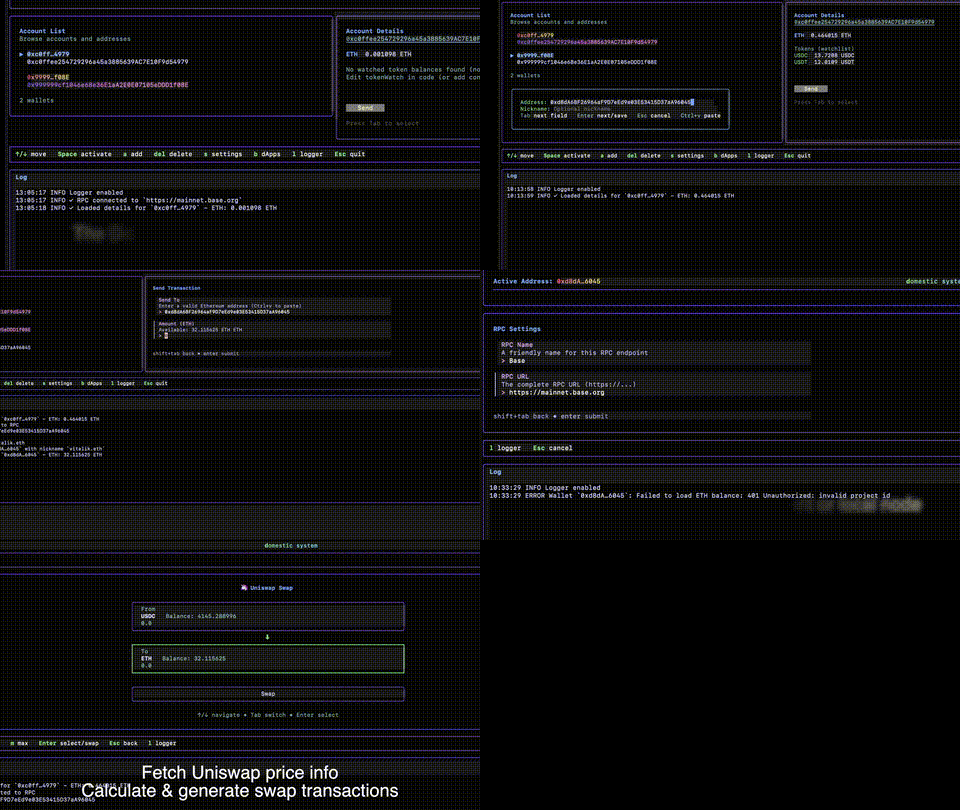
The Domestic System is a terminal user interface (TUI) designed for browsing Ethereum (EVM) accounts and smart contracts. It brings together three core principles that make terminal-based blockchain interaction not just practical, but preferable.
Client-side only. No centralized servers. Just you and the blockchain.
The Domestic System connects directly to Ethereum RPC endpoints of your choosing. No intermediaries. No analytics. No tracking. Your interaction with the blockchain is direct and unmediated. This is how Web3 was meant to work.
No private key management. Hardware wallet ready.
Your private keys never touch this application. All transactions are generated as QR codes following EIP-4527, designed specifically for signing with hardware wallet devices. View your accounts, prepare transactions, and sign them safely on your hardware wallet.
Built with Charm.sh. Terminal interfaces, beautifully done.
Using the gorgeous Charm.land ecosystem (Bubble Tea, Lip Gloss, Huh), The Domestic System proves that CLIs don't have to be austere. Rich colors, smooth interactions, and thoughtful UI design bring a retro-future aesthetic to blockchain interaction.
These three principles—sovereignty, security, and aesthetics—converge perfectly in the terminal. Terminal applications are:
The Domestic System occupies a unique intersection of niche use cases, serving those who value control, security, and craft.
git clone https://github.com/yourusername/domestic-system.git
cd domestic-system
go build
go run .
The Domestic System stores its configuration in ~/.charm-wallet-config.json.
Add Ethereum RPC endpoints in the "s" settings page or by setting the ETH_RPC_URL environment variable:
export ETH_RPC_URL="https://eth.llamarpc.com"
go run .
Customize which ERC-20 tokens to display by editing the token watchlist in main.go (UI configuration coming soon).
x from Accounts): Manage signing keys, scan EIP-4527 QR codes via webcam, and sign transactionsa to add a new walletThe active account (marked with ★) determines which wallet is used for transactions. To switch accounts:
Alternatively, navigate to the Wallets page and press Enter on any wallet to view its details and activate it.
The Domestic System includes a full EIP-4527 transaction signing workflow usable both inside the TUI and independently from the terminal.
TUI (any page)  →  packages unsigned tx  →  displays EIP-4527 QR code
                                                        ↓
                                          Signer page scans QR via webcam
                                                        ↓
                                          Decodes UR → signs with stored key
                                                        ↓
                                          Displays raw signed transaction hex
Keys are stored in ~/.charm-wallet-private-keys.json (mode 600, outside the repo). On first run a NotForProduction demo key is bootstrapped automatically and its address is registered in ~/.charm-wallet-config.json.
{
  "private_keys": [
    {
      "address": "0x29c73B201bEE86C4d1Fe4f598C4355Bb210251e3",
      "name": "NotForProduction",
      "private_key": "0xc0054..."
    }
  ]
}
Press x from the Accounts page to open the Signer. From there:
| Key | Action |
|---|---|
↑/↓ | Select signing key |
s | Open webcam — auto-signs the first EIP-4527 QR detected |
a | Reload keys from disk |
c | Clear current result |
Esc | Return to Accounts |
The signed transaction (raw hex, tx hash, r/s/v) is shown immediately after scanning.
signer/eth_signer.py)The Python signer runs independently without the TUI. Install dependencies once:
pip install -r requirements.txt
| Command | Description |
|---|---|
python signer/eth_signer.py --generate-keys | Generate a new ECDSA keypair |
python signer/eth_signer.py --derive-address 0x... | Derive address from private key |
python signer/eth_signer.py --private-key 0x... --to 0x... --value 1000000000000000000 | Sign a transaction |
python signer/eth_signer.py --scan | Webcam scan: detect and sign EIP-4527 QR codes |
python signer/eth_signer.py --add-key --private-key 0x... --name "Wallet" | Add a key to the store |
python signer/eth_signer.py --list-keys | List stored addresses |
All output is JSON. The --scan mode opens an OpenCV window showing the live camera feed and emits signed transactions to stdout as they are detected.
cmd/txtest)