 c6fc/warcannon
High speed/Low cost CommonCrawl RegExp in Node.js


WARCannon was built to simplify and cheapify the process of 'grepping the internet'.
With WARCannon, you can:
WARCannon leverages clever use of AWS technologies to horizontally scale to any capacity, minimize cost through spot fleets and same-region data transfer, draw from S3 at incredible speeds (up to 100Gbps per node), parallelize across hundreds of CPU cores, report status via DynamoDB and CloudFront, and store results via S3.
In all, WARCannon can process multiple regular expression patterns across 400TB in a few hours for around $30.
The fastest and easiest way to get up and running is to use the AWS CloudShell. Just paste this one-liner:
source <(curl https://raw.githubusercontent.com/c6fc/warcannon/master/cloudshell/deploy.sh)
If you want to use a non-master branch of WARCannon, just type:
export GIT_BRANCH=branch_name
source <(curl https://raw.githubusercontent.com/c6fc/warcannon/$GIT_BRANCH/cloudshell/deploy.sh)
Note: CloudShell deployment uses ephemeral storage, which means custom regex patterns will be lost when the CloudShell exits. If you are going to use WARCannon frequently, I recommend using the 'Local Installation' below.
WARCannon requires that you have the following installed:
ProTip: To keep things clean and distinct from other things you may have in AWS, it's STRONGLY recommended that you deploy WARCannon in a fresh account. You can create a new account easily from the 'Organizations' console in AWS. By 'STRONGLY recommended', I mean 'seriously don't install this next to other stuff'.
First, clone the repo and copy the example settings.
$ git clone [email protected]:c6fc/warcannon.git
$ cd warcannon
warcannon$ cp settings.json.sample settings.json
Edit settings.json to taste:
Required settings
nodeInstanceType: An array of instance types to use for parallel processing. 'c'-types are best value for this purpose, and any size can be used. ["c5n.18xlarge"] is the recommended value for true campaigns.nodeCapacity: The number of nodes to request during parallel processing. The resulting nodes will be an arbitrary distribution of the nodeInstanceTypes you specify.nodeParallelism: The number of simultaneous WARCs to process per vCPU. 2 is a good number here. If nodes have insufficient RAM to run at this level of parallelism (as you might encounter with 'c'-type instances), they'll run at the highest safe parallelism instead.nodeMaxDuration: The maximum lifespan of compute nodes in seconds. Nodes will be automatically terminated after this time if the job has still not completed. Default value is 24 hours.Optional settings (leave them out entirely if unused)
sshKeyName: The name of an EC2 SSH Key that already exists in us-east-1.allowSSHFrom: A CIDR mask to allow SSH from. Typically this will be <yourpublicip>/32To install, run this:
$ npm install
$ npm link
$ warcannon deploy
Running a campaign in WARCannon uses a simple, easy-to-follow workflow that can be best described in these few steps:
warcannon deploywarcannon testLocal -swarcannon testwarcannon list 2022warcannon populate 2022-21warcannon firewarcannon syncResultsRead on for a more detailed understanding of each step.
WARCannon is fed by Common Crawl via the AWS Open Data program. Common Crawl is unique in that the data retrieved by their spiders not only captures website text, but also other text-based content like JavaScript, TypeScript, full HTML, CSS, etc. By constructing suitable Regular Expressions capable of identifying unique components, researchers can identify websites by the technologies they use, and do so without ever touching the website themselves. The problem is that this requires parsing hundreds of terabytes of data, which is a tall order no matter what resources you have at your disposal. Fortunately WARCannon has several tools you can use to get this done!
Grepping the internet isn't for the faint of heart, but starting with an effective seive is the first start. WARCannon supports this by enabling local verification of regular expressions against real Common Crawl data. First, open lambda_functions/warcannon/matches.js and modify the regex_patterns object to include the regular expressions you wish to use in name: pattern format. Here's an example from the default search set:
exports.regex_patterns = {
	"access_key_id": /(\'A|"A)(SIA|KIA|IDA|ROA)[JI][A-Z0-9]{14}[AQ][\'"]/g,
};
Strings matching this expression will be saved under the corresponding key in the results; access_key_id in this case. Protip: Use RegExr with the 'JavaScript' format to build and test regular expressions against known-good matches.
You also have the option of only capturing results from specified domains. To do this, simply populate the domains array with the FQDNs that you wish to include. It is recommended that you leave this empty [] since it's almost never worthwhile (the processing effort saved is very small), but it can be useful in some niche cases.
exports.domains = ["example1.com", "example2.com"];
Once the matches.js is populated, run the following command:
warcannon$ warcannon testLocal -s
You can optionally add a path to a WARC in the commoncrawl S3 bucket if you'd like, but a hardcoded default will be used otherwise.
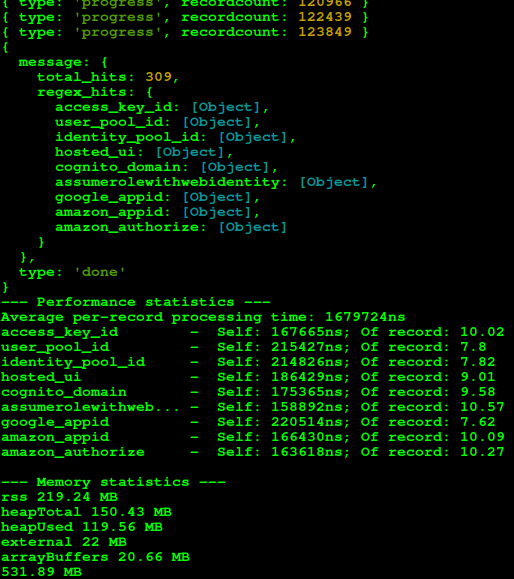
WARCannon will stream process the WARC file (or download it entirely if you omit -s) to find your configured matches. WARCannon will save the results to the ~/.warcannon/ folder when you interrupt with ctrl+c or when the processing finishes. This makes it easy to test common matches very rapidly with minimal bandwidth.
On top of everything else, WARCannon will attempt to evaluate the total compute cost of your regular expressions when run locally. This way, you can be informed if a given regular expression will significantly impact performance before you execute your campaign.
Sometimes a simple regex pattern isn't sufficient on its own, and you need some additional steps to ensure you're returning the right information. In this case, simply adding a function to the exports.custom_functions object with the same key name allows you to perform any additional processing you see fit.
exports.regex_patterns = {
	"access_key_id": /(\'A|"A)(SIA|KIA|IDA|ROA)[JI][A-Z0-9]{14}[AQ][\'"]/g,
};

exports.custom_functions = {
	"access_key_id": function(match) {
		// Ignore matches with 'EXAMPLE' in the text, since this is common for documentation.
		if (match.text(/EXAMPLE/) != null) {
			// Returning a boolean 'false' discards the match.
			return false
		}
	}
}
