
Skip to content
KitploitKITPLOIT
ToolsBlog
Submit
ToolsBlog
Submit

Hacking, PenTest, and Cybersecurity Tools for Your Security Arsenal!

Kitploit is a directory of hacking, cybersecurity, and pentesting tools. Discover the latest project updates to find vulnerabilities, analyze systems, automate testing, and strengthen your security.

··Feeds·Contact·Privacy·© 2026 Kitploit

Tool Directory

Categories

View all categories
Loading categories
SCRAPPER — Scrap the web way to easy | Kitploit
Tools/GitHubGitHub/bunelysiareact/scrapper
OSINT (Open Source Intelligence)ReconnaissanceReverse EngineeringAPI Security TestingDebuggersInformation GatheringWeb SecurityPenetration TestingCrawler
GitHubbunelysiareact/scrapper

SCRAPPER

Scrap the web way to easy

1345 months agoNot yet reviewed

Most Popular

View all →

Discover the most used tools by our community.

Explore all tools

Browse our collection of tools

View all tools →
Share
View Repository
Website

🕷️ SCRAPPER by BertUI

The Session Observer for Web Automation

SCRAPPER isn't a scraper — it's a SESSION OBSERVER that captures your real browser data for use in any automation tool.
Built on the BertUI React Framework
GitHub: BunElysiaReact/SCRAPY
No domain. No cloud. All local. All yours.
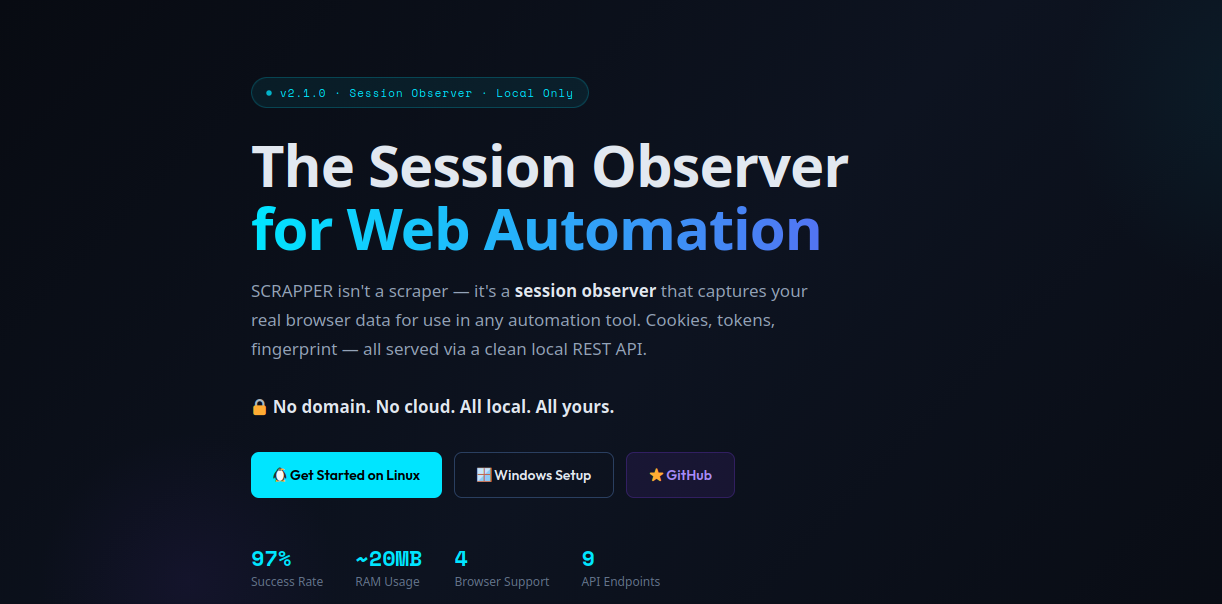
SCRAPPER Dashboard


📋 Table of Contents

  • The Problem SCRAPPER Solves
  • What SCRAPPER Is (And Isn't)
  • How SCRAPPER Works
  • What SCRAPPER Captures
  • Advantages & Disadvantages
  • Universal Data API
  • Quick Start — Linux / macOS
  • Quick Start — Windows
  • Browser Extensions
  • Using Captured Data in Your Tools
  • Dashboard Overview
  • Production Use & Automation
  • Contributing

🤔 The Problem SCRAPPER Solves

Every web automation tool — Puppeteer, Playwright, Selenium, even curl — shares the same challenges:

The real issue: All these tools are trying to imitate a human. But they're guessing at what a real human looks like.


💡 What SCRAPPER Is (And Isn't)

SCRAPPER doesn't scrape. It gives you the REAL data YOU need to scrape successfully.


🔄 How SCRAPPER Works

Phase 1: Capture (Browser Open, You Browse)

root@kitploit:~
YOU                                              SCRAPPER
  │                                                  │
  ├── Open Brave/Chrome/Firefox with extension ──────►│
  │                                                  │
  ├── Log into sites you want to automate ───────────►│ captures:
  │                                                  │  • Cookies
  ├── Browse normally, click buttons ────────────────►│  • Tokens
  │                                                  │  • Fingerprint
  └── Done browsing ─────────────────────────────────►│  • API requests
                                                     │  • DOM structure

Phase 2: Automate (Browser Can Close, You Code)

root@kitploit:~
YOUR SCRIPT ──── GET /api/v1/session/all ────► SCRAPPER API (localhost:8080)
              ◄── { cookies, tokens, fingerprint } ────────────────────────┘
                │
                ▼
         Puppeteer / Playwright / Selenium / Python requests / curl
                │
                ▼
         ✅ Authenticated requests with YOUR real session
🎬 See It In Action

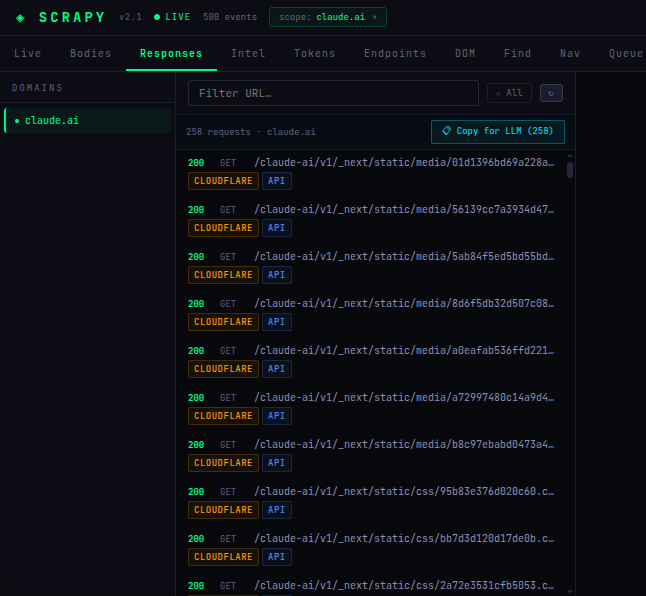
The Dashboard — 258 captured claude.ai requests

SCRAPPER Dashboard Responses

The Extension Popup — Live feed, quick capture, real-time stats

SCRAPPER Extension

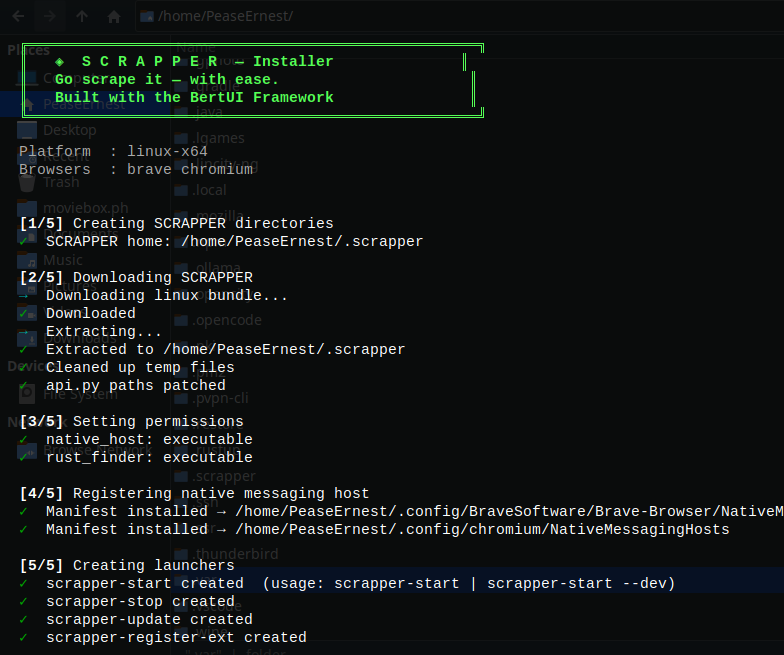
The Installer — One command, 5 steps, done

SCRAPPER Installer

Register Extension ID — One command after loading extension

Register Extension

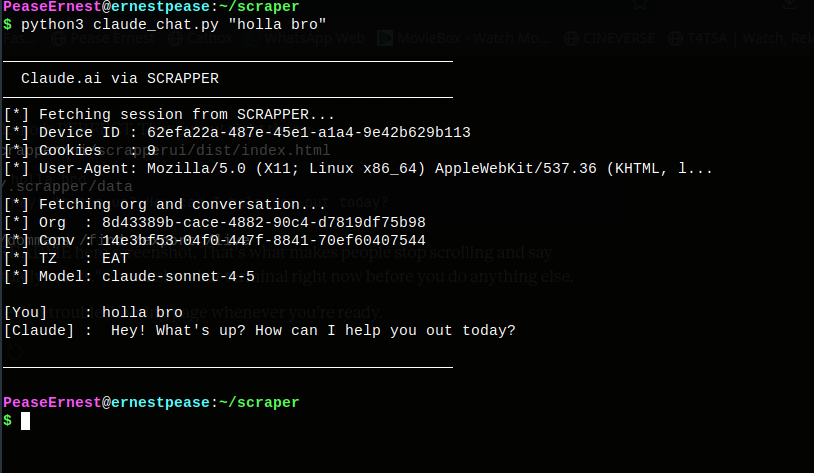
Real World Example — Talking to Claude.ai from the terminal via SCRAPPER

Claude Chat via SCRAPPER

The script above used SCRAPPER to capture a real claude.ai session, then sent messages directly via the API — zero login code, zero Puppeteer, zero browser automation.


📦 What SCRAPPER Captures

root@kitploit:~
📦 Session Data
   ├── 🍪 Cookies (including HttpOnly, Secure, all domains)
   ├── 💾 localStorage & sessionStorage
   ├── 🔑 Auth tokens (Bearer, JWT, CSRF, custom)
   └── 📨 All HTTP headers

🖥️ Browser Fingerprint
   ├── 📱 User Agent
   ├── 🖼️ Screen resolution & color depth
   ├── 🌍 Timezone & language settings
   └── 📨 Full header set (Accept, Accept-Language, etc.)

📡 Network Traffic
   ├── 📤 All HTTP requests (URLs, methods, headers, POST data)
   ├── 📥 All HTTP responses (status, headers, bodies)
   └── 🔄 WebSocket frames

🌳 DOM State
   ├── 📄 DOM snapshots
   ├── 🎯 Live selector testing
   └── 🗺️ DOM maps (all tags, classes, IDs)

⚖️ Advantages & Disadvantages

✅ Advantages

❌ Disadvantages


📡 Universal Data API

Once captured, SCRAPPER serves everything via a simple REST API at http://localhost:8080.

Core Endpoints


🚀 Quick Start — Linux / macOS

One-Line Install

root@kitploit:~
curl -fsSL https://raw.githubusercontent.com/BunElysiaReact/SCRAPY/main/install.sh | bash

After Install — Complete Setup

root@kitploit:~
# Step 1 — Load extension in Brave:
# brave://extensions → Developer mode ON → Load unpacked
# → select: ~/.scrapper/extension/brave/

# Step 2 — Register your extension ID
scrapper-register-ext YOUR_EXTENSION_ID

# Step 3 — Start SCRAPPER
scrapper-start

# Step 4 — Open dashboard
# http://localhost:8080

Requirements

  • Python 3 (any recent version)
  • Bun or Node.js (for the Bun dashboard — optional)
  • Brave / Chrome / Firefox browser

Manual Setup

root@kitploit:~
# Clone the repo
git clone https://github.com/BunElysiaReact/SCRAPY.git ~/scrapper
cd ~/scrapper

# Build the C native host
gcc -O2 -o linux/c_core/native_host/debug_host linux/c_core/native_host/debug_host.c -lpthread

# Build the Rust selector engine
cd linux/rust_finder && cargo build --release && cd ../..

# Start the API server
cd linux/python_api && python3 api.py

Open http://localhost:8080 → Dashboard ready.


🪟 Quick Start — Windows

One-Line Install (PowerShell)

root@kitploit:~
irm https://raw.githubusercontent.com/BunElysiaReact/SCRAPY/main/install.ps1 | iex

⚠️ Run PowerShell as Administrator for native messaging registration to work correctly.

Windows Folder Structure After Install

root@kitploit:~
%USERPROFILE%\.scrapper\
├── bin\
│   ├── debug_host.exe         ← C native messaging host
│   ├── scraper_cli.exe        ← CLI client
│   ├── rust_finder.exe        ← Fast HTML selector engine
│   ├── scrapper-start.bat     ← Start everything
│   └── scrapper-stop.bat      ← Stop everything
├── data\                      ← All captured session data
├── logs\                      ← Host logs
├── python_api\
│   └── api.py                 ← REST API server
├── extension\
│   ├── brave\                 ← Load in Brave / Chrome / Edge
│   └── firefox\               ← Load in Firefox
└── ui\scrapperui\             ← Dashboard source

🧩 Browser Extensions

Brave & Chrome (Recommended)

  1. Open brave://extensions or chrome://extensions
  2. Enable Developer mode (top right)
  3. Click Load unpacked
  4. Select: ~/.scrapper/extension/brave/
  5. Copy the Extension ID
  6. Run: scrapper-register-ext YOUR_ID

Microsoft Edge

Same as Brave/Chrome — Edge is Chromium-based, use the extension/brave/ folder.

Firefox

  1. Open about:debugging → This Firefox
  2. Click Load Temporary Add-on...
  3. Select: ~/.scrapper/extension/firefox/manifest.json

⚠️ Firefox captures cookies, headers, localStorage — but not CDP-level request bodies.


🔧 Using Captured Data in Your Tools

Python + curl_cffi (Recommended)

root@kitploit:~
from curl_cffi import requests

API = "http://localhost:8080"
domain = "example.com"

cookies_raw = requests.get(f"{API}/api/v1/session/cookies?domain={domain}").json()
fp = requests.get(f"{API}/api/v1/fingerprint?domain={domain}").json()

session = requests.Session(impersonate="chrome120")
for c in cookies_raw:
    session.cookies.set(c["name"], c["value"], domain=c.get("domain", domain).lstrip("."))
session.headers.update({"User-Agent": fp.get("userAgent", "")})

response = session.get(f"https://{domain}/api/data")
print(response.json())

Python requests

root@kitploit:~
import requests

session_data = requests.get('http://localhost:8080/api/v1/session/all').json()

s = requests.Session()
s.cookies.update({c['name']: c['value'] for c in session_data['cookies']})
s.headers.update({'User-Agent': session_data['fingerprint']['userAgent']})

response = s.get('https://api.example.com/data')

curl

root@kitploit:~
source <(curl -s http://localhost:8080/api/v1/export/env)

curl -X POST "https://api.example.com/upload" \
  -H "Authorization: Bearer $SCRAPPER_BEARER_TOKEN" \
  -b "$SCRAPPER_COOKIES" \
  -F "[email protected]"

Playwright (Python)

root@kitploit:~
import requests
from playwright.async_api import async_playwright

session = requests.get('http://localhost:8080/api/v1/session/all').json()

async with async_playwright() as p:
    context = await p.chromium.launch_persistent_context(
        user_data_dir="./profile",
        user_agent=session['fingerprint']['userAgent'],
    )
    await context.add_cookies(session['cookies'])
    page = await context.new_page()
    await page.goto('https://example.com')

Puppeteer (Node.js)

root@kitploit:~
const session = await fetch('http://localhost:8080/api/v1/session/all').then(r => r.json());

const browser = await puppeteer.launch();
const page = await browser.newPage();
await page.setCookie(...session.cookies);
await page.setUserAgent(session.fingerprint.userAgent);
await page.goto('https://example.com/dashboard');

📊 Dashboard Overview

SCRAPPER Live Dashboard

Open http://localhost:8080:


⚠️ Realistic Expectations

What SCRAPPER CAN Do

  • ✅ Capture your REAL cookies, tokens, and fingerprint
  • ✅ Save them for reuse (days to months depending on site)
  • ✅ Export in JSON, JSONL, HAR, CSV, TXT formats
  • ✅ Serve everything via a clean local REST API
  • ✅ Help you understand how sites really work at the network level

What SCRAPPER CANNOT Do

  • ❌ Scrape websites automatically without you browsing first
  • ❌ Guess what cookies or tokens look like
  • ❌ Extend cookie lifetimes beyond what the site allows
  • ❌ Work without the native host and extension running

🏭 Production Use & Automation

root@kitploit:~
# Export latest session data
curl -s "http://localhost:8080/api/v1/bulk/all?format=jsonl" > session.jsonl

# Use in your scraper
python3 my-scraper.py --session session.jsonl
root@kitploit:~
# session_refresh.py — Weekly session refresh pipeline
import requests, schedule, time

def refresh_session():
    notify_user("Please log into target sites in your browser")
    time.sleep(300)  # 5 minutes for user to browse
    data = requests.get('http://localhost:8080/api/v1/bulk/all?format=json').json()
    with open(f'session_{int(time.time())}.json', 'w') as f:
        import json; json.dump(data, f)

schedule.every().monday.at("09:00").do(refresh_session)
while True:
    schedule.run_pending()
    time.sleep(60)

🛠️ Implementation Status

Current (v2.1.0)

  • ✅ Request/response/body capture (Brave/Chrome via CDP)
  • ✅ Cookie tracking (all browsers)
  • ✅ DOM snapshots and selector testing
  • ✅ Bearer token + task token extraction
  • ✅ Browser fingerprint capture
  • ✅ Live event feed (SSE)
  • ✅ Bulk export (JSON/JSONL/TXT/HAR/CSV)
  • ✅ URL queue with human-like delays
  • ✅ "Copy for LLM" on every request and endpoint
  • ✅ Brave, Chrome, Edge, Firefox extensions
  • ✅ Linux + Windows installers

Coming Soon

  • 🔜 Chrome Web Store listing
  • 🔜 Firefox Add-ons listing (signed)
  • 🔜 WebSocket frame capture
  • 🔜 Session sharing across machines

🤝 Contributing

Open an issue


🙏 Built With

  • BertUI React Framework — Dashboard UI
  • Bun + ElysiaJS — Fast JavaScript runtime
  • Rust + scraper crate — Blazing-fast CSS selector engine
  • C — Ultra-low-latency native messaging host (Linux)
  • C + WinAPI — Native messaging host (Windows named pipes)
  • Python 3 — Zero-dependency REST API server

SCRAPPER by BertUI — The Session Observer for Web Automation
🔍 Watching your browser so you don't have to

⭐ Star the repo if SCRAPPER helps you — it helps others find it!

root@kitploit:~
Download Tool
ChallengeWhy It's Hard
AuthenticationManually scripting logins for every site is tedious and fragile
Session stateCookies expire, tokens rotate, localStorage gets cleared
Reverse engineeringHours spent in DevTools understanding API patterns
Bot detectionTLS fingerprints, browser entropy, Cloudflare, hCaptcha
Setup complexityFighting with headless browsers, proxies, and stealth plugins
SCRAPPER IS...SCRAPPER IS NOT...
🔍 A session observer that watches YOUR real browser❌ A replacement for Puppeteer/Playwright/Selenium
💾 A data capture tool that saves your actual session❌ A tool that scrapes websites for you
📡 A local API server serving your captured data❌ A hosted service or cloud platform
🧠 A reverse engineering assistant revealing hidden APIs❌ A magic "scrape anything" button
🎯 A visual debugger for understanding site structure❌ A no-code automation builder
AdvantageWhy It Matters
Bypasses Advanced Bot DetectionUses curl_cffi to impersonate a real browser's TLS fingerprint (e.g., Chrome 120) — not flagged as automated
97% Success RateTargets internal API routes, not visual UI — immune to CSS changes, moving buttons, or layout updates
Low Resource Usage~20MB RAM vs 500MB+ for Puppeteer/Selenium. No browser engine running
Invisible AuthenticationPiggybacks off your existing human-verified session — no login flow, no CAPTCHAs
Syncs With Real BrowserMessages/actions from scripts appear in your real browser tab when you refresh
Language AgnosticSession API works with Python, Go, Rust, Node, curl — anything that can make HTTP requests
DisadvantageWhat It Means
Brittle Session LifespanEntirely dependent on an active browser session — expires if you log out
Depends on Internal APIsUses undocumented endpoints that can change without notice
Requires Setup InfrastructureNot standalone — needs native host + browser extension running simultaneously
Account RiskUses your real identity. Aggressive rate-limit hitting can get your real account banned
Learning CurveMust read network traffic to understand correct API payloads
Single Device Bindingdevice-id is tied to one captured session — can't easily share across machines
EndpointDescription
GET /api/v1/session/cookies?domain=example.comAll cookies for a domain
GET /api/v1/session/localstorage?domain=example.comlocalStorage data
GET /api/v1/session/allComplete session dump
GET /api/v1/fingerprintBrowser fingerprint
GET /api/v1/tokens/allAll extracted tokens
GET /api/v1/requests/recent?limit=50Recent network requests
GET /api/v1/dom/snapshot?url=example.comDOM snapshot
GET /api/v1/export/envEnvironment variables format
GET /api/v1/bulk/all?format=[json|jsonl|har|csv|txt]Everything, your format
TabWhat It Does
LiveReal-time stream of all captured network events
BodiesHTTP response bodies — JSON, HTML, SVG, images, with preview
ResponsesAll HTTP responses by domain, filterable by flags
IntelPer-domain summary — tokens, cookies, endpoints, DOM map
TokensBearer tokens, task tokens, auth cookies, curl snippets
EndpointsAll discovered API endpoints with "Copy for LLM"
DOM MapFull tag/class/ID tree — click any item to auto-scrape
FindTest CSS selectors against real rendered HTML
NavNavigate + track tabs, dump cookies, capture HTML
QueueBatch-process lists of URLs with configurable delays
AreaWhat's Needed
TestingTry SCRAPPER on different sites, report bugs
FirefoxHelp improve Firefox extension CDP workarounds
WindowsTest Windows installer edge cases
DocsWrite tutorials for specific sites or use cases
CodePRs welcome — especially bug fixes