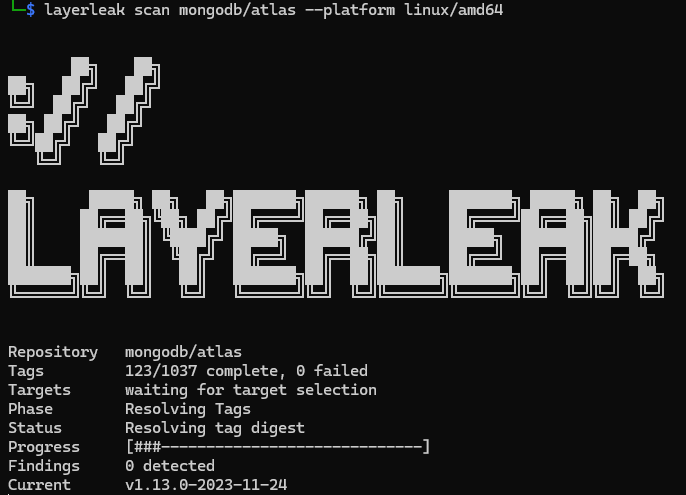

layerleak the Docker Hub Secret Scanner
Check CONTRIBUTING.md for contribution guidelines.
The published site is built from web/ on main by .github/workflows/pages.yml. The docs source and the simulated browser demo both live under that directory.
Prerequisites:
Install with Go:
go install github.com/brumbelow/layerleak@latest
layerleak --help
The canonical install target is the module root. To pin a release explicitly:
go install github.com/brumbelow/[email protected]
Replace v1.0.0 with the published v1.x.y tag you want.
Make sure your GOBIN or GOPATH/bin directory is on PATH.
The module path is github.com/brumbelow/layerleak, so go install @latest resolves to the highest published v1.x.y tag. A v2.x.y module release would require the module path to change to github.com/brumbelow/layerleak/v2. Module-installed binaries report the resolved module version through layerleak --version; local checkout builds report the version Go embeds for the checkout, falling back to dev when no module version is available.
Build from source:
git clone https://github.com/brumbelow/layerleak.git
cd layerleak
go build -o layerleak .
./layerleak --help
Run the API with a container image:
docker pull ghcr.io/brumbelow/layerleak:latest
docker run --rm \
-p 8080:8080 \
-e LAYERLEAK_DATABASE_URL='postgres://<user>:<password>@<host>:5432/layerleak?sslmode=disable' \
ghcr.io/brumbelow/layerleak:latest
The container image runs the API by default and sets LAYERLEAK_API_ADDR=0.0.0.0:8080.
Optional environment configuration:
cp .env.example .env
Result and database configuration:
export LAYERLEAK_LOG_LEVEL=info
export LAYERLEAK_FINDINGS_DIR=findings
export LAYERLEAK_API_ADDR=127.0.0.1:8080
export LAYERLEAK_PERSIST_RAW_SECRETS=0
export LAYERLEAK_TAG_PAGE_SIZE=100
export LAYERLEAK_HTTP_TIMEOUT=30s
export LAYERLEAK_MAX_FILE_BYTES=1048576
export LAYERLEAK_MAX_LAYER_BYTES=536870912
export LAYERLEAK_MAX_LAYER_ENTRIES=50000
export LAYERLEAK_MAX_MANIFEST_BYTES=0
export LAYERLEAK_MAX_CONFIG_BYTES=0
export LAYERLEAK_MAX_TAG_RESPONSE_BYTES=8388608
export LAYERLEAK_MAX_REPOSITORY_TAGS=0
export LAYERLEAK_MAX_REPOSITORY_TARGETS=0
export LAYERLEAK_REGISTRY_REQUEST_ATTEMPTS=2
# Optional registry overrides; usually leave unset.
export LAYERLEAK_REGISTRY_BASE_URL=
export LAYERLEAK_REGISTRY_AUTH_URL=
export LAYERLEAK_DATABASE_URL=postgres://postgres:postgres@localhost:5432/layerleak?sslmode=disable
The same variables and their defaults live in .env.example, which is the source of truth for default values.
When any of the MAX_* limits is set to a positive value, exceeding it fails the scan with a clear error instead of silently truncating work.
Result behavior:
findings and drive the non-zero scan exit status.total_findings.disposition, disposition_reason, and line_number to make triage and false-positive review easier.1 because the scan is incomplete.Layerleak ships versioned SQL migrations under migrations/.
Migrations are manual on purpose. The scanner does not auto-create or auto-upgrade the schema.
Layerleak requires PostgreSQL server >= 16.13 for DB-backed API and scanner persistence.
Apply the migrations with psql in order:
psql "$LAYERLEAK_DATABASE_URL" -f migrations/0001_initial.up.sql
psql "$LAYERLEAK_DATABASE_URL" -f migrations/0002_finding_occurrence_metadata.up.sql
psql "$LAYERLEAK_DATABASE_URL" -f migrations/0003_scan_runs.up.sql
Or apply migrations using the container helper command:
docker run --rm \
-e LAYERLEAK_DATABASE_URL="$LAYERLEAK_DATABASE_URL" \
ghcr.io/brumbelow/layerleak:latest \
layerleak-migrate-up
layerleak-migrate-up is safe to rerun when migrations are already applied.
If it detects a partial migration state, it exits non-zero and asks for manual intervention.
The helper also enforces server version >= 16.13 and validates that the bundled postgresql-client-16
uses Ubuntu PGDG 24.04 packaging (.pgdg24.04+) at version >= 16.13-1.pgdg24.04+1.
Rollback the migrations in reverse order:
psql "$LAYERLEAK_DATABASE_URL" -f migrations/0003_scan_runs.down.sql
psql "$LAYERLEAK_DATABASE_URL" -f migrations/0002_finding_occurrence_metadata.down.sql
psql "$LAYERLEAK_DATABASE_URL" -f migrations/0001_initial.down.sql
Operational defaults:
first_seen_at and last_seen_at, and also stores append-only scan history in scan_runs.(manifest_digest, fingerprint), and repeated identical context snippets are collapsed before persistence.Secret-safety note:
LAYERLEAK_PERSIST_RAW_SECRETS=1, Postgres also stores raw finding values and raw snippets.scan_runs.result_json snapshot stays redacted.Show the CLI help:
layerleak --help
layerleak scan --help

Run a scan against a public OCI image on any supported registry:
./layerleak scan ubuntu
./layerleak scan library/nginx:latest --format json
./layerleak scan alpine:latest --platform linux/amd64
./layerleak scan mongo
./layerleak scan ghcr.io/homebrew/core/hello:latest
./layerleak scan quay.io/prometheus/busybox:latest
./layerleak scan gcr.io/distroless/static:nonroot
./layerleak scan public.ecr.aws/docker/library/alpine:3.20
./layerleak scan mcr.microsoft.com/hello-world:latest

Every scan writes a JSON findings file to the findings output directory.
If LAYERLEAK_FINDINGS_DIR is not set, the default output directory is findings/ under the nearest parent directory containing go.mod (typically the repo root), with a fallback to the current working directory when no repo root is found.
Those saved findings files contain finding records with redacted_value, redacted context_snippet, exact source location, disposition metadata, and line number for each finding.
If LAYERLEAK_PERSIST_RAW_SECRETS=1, the saved findings files also include raw value and raw_context_snippet.
If Postgres persistence is enabled, raw findings.value and finding_occurrences.raw_snippet stay empty unless LAYERLEAK_PERSIST_RAW_SECRETS=1.
For multi-arch images, layerleak skips attestation and provenance manifests such as application/vnd.in-toto+json instead of counting them as failed platform scans.
Bare repository sweeps:
mongo enumerates every public tag in that repository, resolves each tag to a digest, groups duplicate digests, and scans the distinct targets.mongo:latest or mongo@sha256:....Command syntax:
layerleak [command]
layerleak scan <image-ref> [flags]
Scope flags for repository sweeps (each overrides the matching environment variable for a single command):
Layerleak also ships a minimal JSON API under cmd/api.
The API is Postgres-backed and requires LAYERLEAK_DATABASE_URL; it does not serve from the findings files on disk.
Start it with:
go run ./cmd/api
Or run the API container:
docker run --rm \
-p 8080:8080 \
-e LAYERLEAK_DATABASE_URL='postgres://<user>:<password>@<host>:5432/layerleak?sslmode=disable' \
ghcr.io/brumbelow/layerleak:latest
Current endpoints:
GET /healthPOST /api/v1/scansGET /api/v1/scans/{id}GET /api/v1/repositoriesGET /api/v1/repositories/{repository}/scansGET /api/v1/repositories/{repository}/findingsGET /api/v1/findings/{id}GET /health returns {"status":"ok"} and does not require a configured store or scanner.
It is suitable for Kubernetes readiness probes and Docker Compose healthcheck targets.
POST /api/v1/scans stays synchronous. It accepts a JSON body with reference and optional platform, and returns scan_run_id whenever Postgres persistence is enabled.
API scan responses reuse the same redacted result schema as the CLI JSON output.
GET /api/v1/scans/{id} returns the persisted run metadata plus the stored redacted result snapshot.
Repository and finding endpoints also stay redacted: they return redacted_value and redacted context_snippet, never raw secret values or raw snippets from Postgres.
GET /api/v1/repositories/{repository}/scans and GET /api/v1/repositories/{repository}/findings accept an optional registry query parameter (for example ?registry=ghcr.io). When omitted, the registry defaults to docker.io for backward compatibility. Use this to fetch scans of repositories on GHCR, Quay, GCR, MCR, Amazon ECR Public, or any self-hosted registry.
List endpoints (/repositories, /repositories/{repository}/scans, /repositories/{repository}/findings) accept ?limit= and ?offset= for pagination. limit defaults to 50 and is capped at 200. /repositories/{repository}/findings also accepts ?disposition=actionable|suppressed|all; when omitted the response only includes actionable findings.
The API does not include authentication. For org deployments, keep it on a private network and front it with your own authn/authz gateway or reverse proxy policy.
This repo ships a Compose stack in docker-compose.yml with db, migrate, and api services.
The db service baseline is pinned to postgres:16.13-alpine.
If you use a different Postgres image, keep the server version at 16.13 or newer.
Set deployment variables (export in shell or place in a .env file next to docker-compose.yml):
export LAYERLEAK_IMAGE=ghcr.io/brumbelow/layerleak:latest
export LAYERLEAK_DB_NAME=layerleak
export LAYERLEAK_DB_USER=layerleak
export LAYERLEAK_DB_PASSWORD=replace-me
export LAYERLEAK_API_PORT=8080
Validate the rendered Compose configuration before deployment:
docker compose config
Run migrations once before starting the API:
docker compose --profile manual run --rm migrate
Start the API service:
docker compose up -d api
In Dockge or Komodo, import the same Compose file and run the migrate service once before enabling the long-running api service.
Released under the MIT License — see LICENSE.
If this repo saved you time or helped you out, you can support future updates here:
Thank you :) it genuinely helps keep the project maintained.
| Variable | Default | Purpose |
|---|
LAYERLEAK_LOG_LEVEL | info | Log level: debug, info, warn, or error. |
LAYERLEAK_FINDINGS_DIR | unset | Where to write JSON findings files. If unset, defaults to findings/ under the nearest parent containing go.mod, falling back to the current working directory. |
LAYERLEAK_API_ADDR | 127.0.0.1:8080 | Bind address for the API server. The container image overrides this to 0.0.0.0:8080. |
LAYERLEAK_PERSIST_RAW_SECRETS | 0 | Set to 1 to write raw secret values and raw context snippets to disk and Postgres. Findings stay redacted by default. |
LAYERLEAK_HTTP_TIMEOUT | 30s | Per-request timeout for every registry call (manifests, blobs, tag pages, auth tokens). Accepts any Go duration (30s, 2m, 1h). |
LAYERLEAK_MAX_FILE_BYTES | 1048576 (1 MiB) | Max decompressed bytes buffered per file inside a layer. Files larger than this are skipped as oversize. Must be greater than zero. |
LAYERLEAK_MAX_LAYER_BYTES | 536870912 (512 MiB) | Max decompressed layer stream bytes per layer. 0 disables the limit. |
LAYERLEAK_MAX_LAYER_ENTRIES | 50000 | Max tar entries per layer. 0 disables the limit. |
LAYERLEAK_MAX_MANIFEST_BYTES | 0 | Max manifest body bytes. 0 disables the limit. |
LAYERLEAK_MAX_CONFIG_BYTES | 0 | Max image config body bytes. 0 disables the limit. |
LAYERLEAK_MAX_TAG_RESPONSE_BYTES | 8388608 (8 MiB) | Max bytes per registry tag-list response page. 0 disables the limit. |
LAYERLEAK_TAG_PAGE_SIZE | 100 | Registry tag-list page size for repository-wide scans. |
LAYERLEAK_MAX_REPOSITORY_TAGS | 0 | Max tags enumerated per repository scan. 0 disables the limit. |
LAYERLEAK_MAX_REPOSITORY_TARGETS | 0 | Max distinct targets resolved per repository scan. 0 disables the limit. |
LAYERLEAK_REGISTRY_REQUEST_ATTEMPTS | 2 | Number of attempts (including the first) for each registry request. |
LAYERLEAK_REGISTRY_BASE_URL | unset | Optional override. Normally layerleak derives this from each image reference; set only to force scans through a proxy or alternate endpoint. |
LAYERLEAK_REGISTRY_AUTH_URL | unset | Optional override. Normally discovered from the registry's WWW-Authenticate challenge. |
LAYERLEAK_DATABASE_URL | unset | If set, layerleak writes scans to Postgres and fails the command if persistence does not succeed. |
| Flag | Purpose |
|---|
--tag-page-size | Registry tag-list page size for repository sweeps. Must be greater than zero. Overrides LAYERLEAK_TAG_PAGE_SIZE. |
--max-repository-tags | Maximum tags enumerated per repository sweep. 0 disables the limit. Overrides LAYERLEAK_MAX_REPOSITORY_TAGS. |
--max-repository-targets | Maximum distinct targets resolved per repository sweep. 0 disables the limit. Overrides LAYERLEAK_MAX_REPOSITORY_TARGETS. |