
Skip to content
KitploitKITPLOIT
ToolsBlog
Submit
ToolsBlog
Submit

Hacking, PenTest, and Cybersecurity Tools for Your Security Arsenal!

Kitploit is a directory of hacking, cybersecurity, and pentesting tools. Discover the latest project updates to find vulnerabilities, analyze systems, automate testing, and strengthen your security.

··Feeds·Contact·Privacy·© 2026 Kitploit

Tool Directory

Categories

View all categories
Loading categories
Loki — 🧙‍♂️ Node.js Command & Control for Script-Jacking Vulnerable Electron Applications | Kitploit
Tools/GitHubGitHub/boku7/loki
Persistence MechanismsExploitationIDS/IPS EvasionShellcodePost-ExploitationCommand and ControlRed TeamingPayload Development
GitHubboku7/loki

Loki

🧙‍♂️ Node.js Command & Control for Script-Jacking Vulnerable Electron Applications

View Repository
1.4k2204 months agoReviewed by Kitploit

Most Popular

View all →

Discover the most used tools by our community.

Explore all tools

Browse our collection of tools

View all tools →
Share

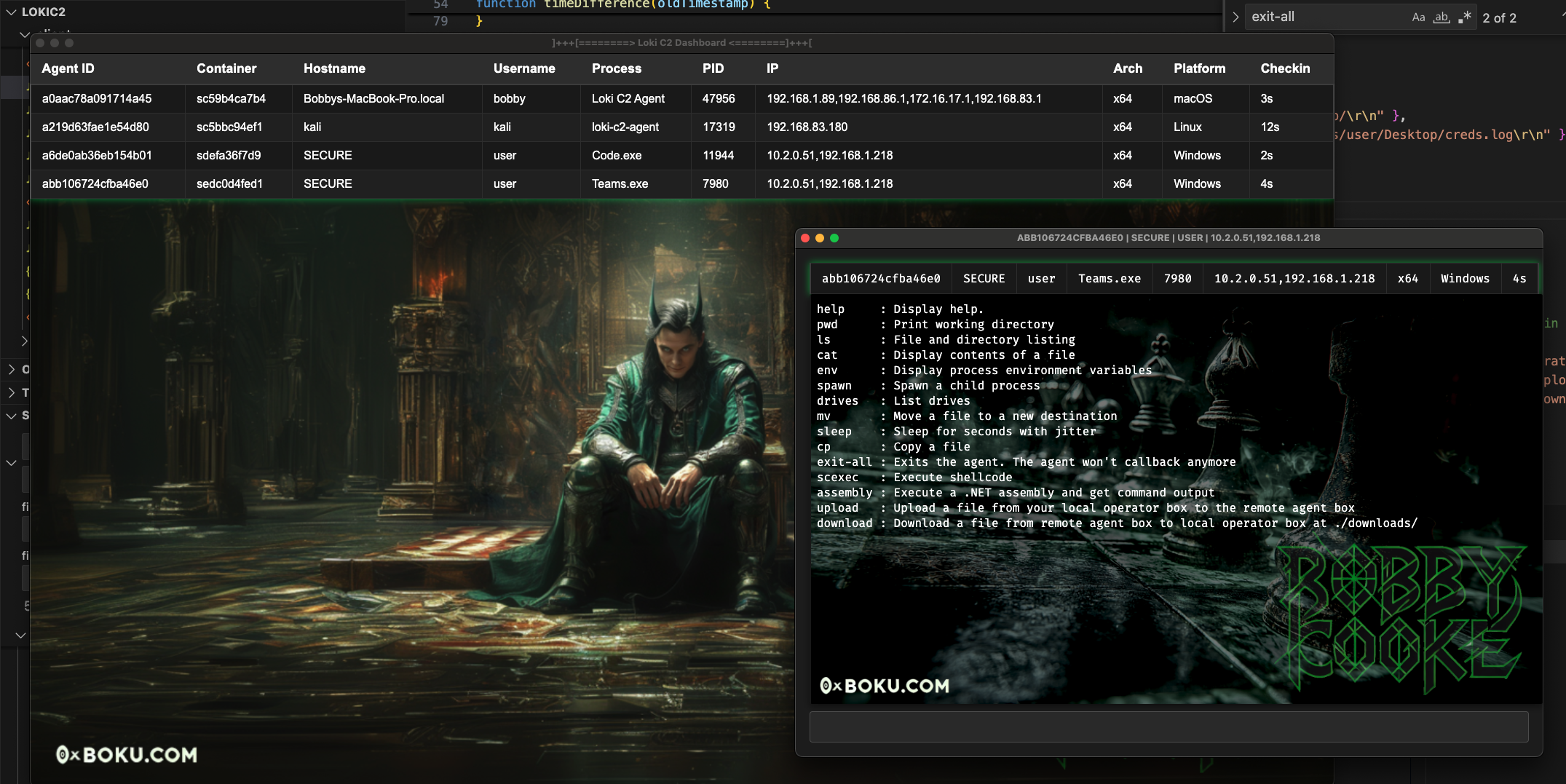
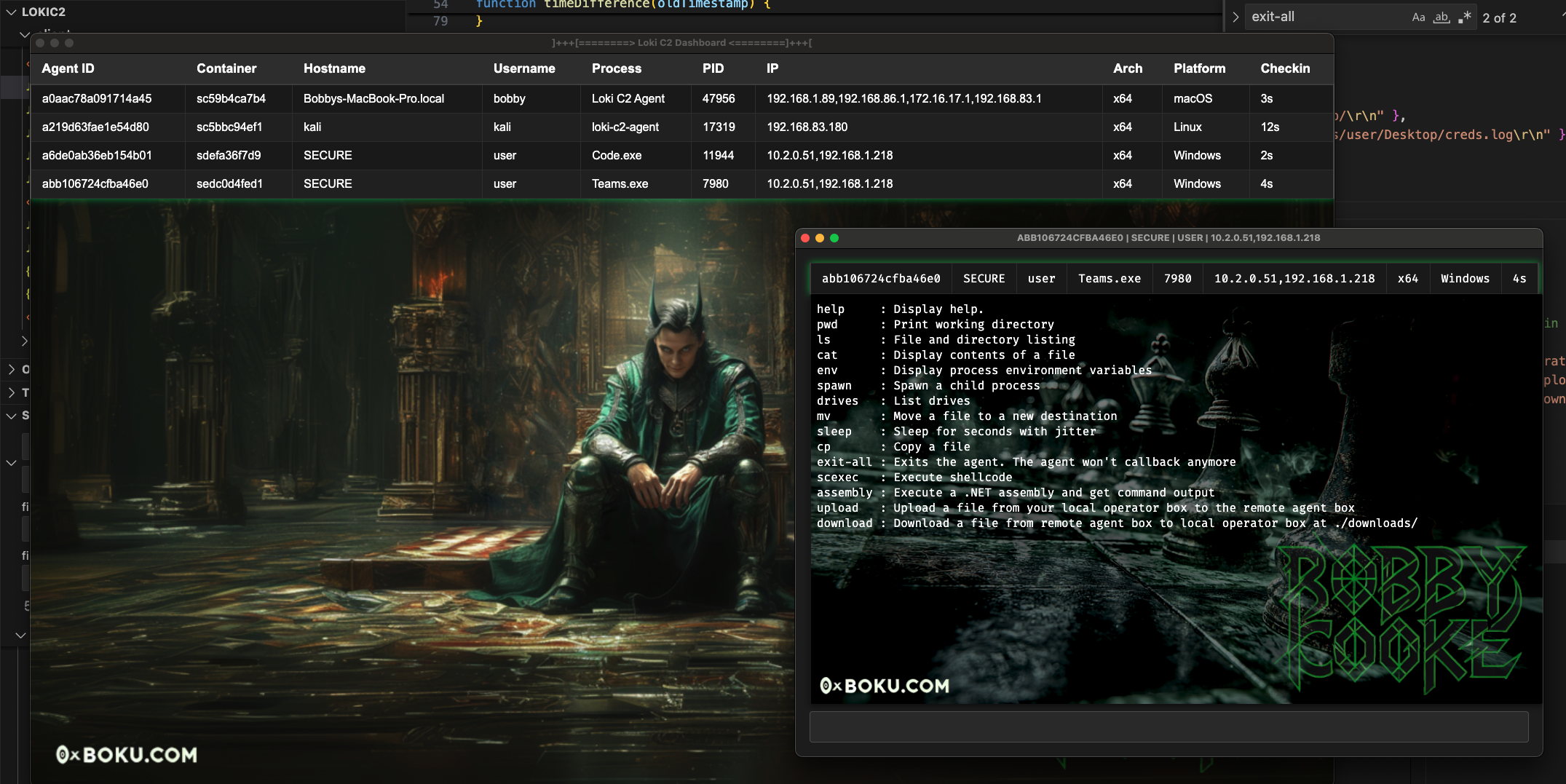
🧙‍♂️ Loki Command & Control

Loki is a stage-1 command and control (C2) framework written in Node.js, built to script-jack vulnerable Electron apps MITRE ATT&CK T1218.015. Developed for red team operations, Loki enables evasion of security software and bypasses application controls by exploiting trusted, signed Electron apps.

Script-jacking hijacks the execution flow of an Electron app by modifying JavaScript files loaded in at runtime with arbitrary Node.js code. This technique can be leveraged to:

  • Backdoor Electron app
  • Hollow Electron app
  • Chain execution to another process

While several tools already address leveraging script-jacking to chain execution to another process, Loki is the first to enable backdooring and hollowing of signed Electron apps without invalidating their code signing signature.

For more details on how Loki works, checkout this blog post:
  • Bypassing Windows Defender Application Control with Loki C2

🚀 Contributors

NameContributions
Bobby CookeCreator & Maintainer
Dylan TranCreator
Ellis SpringeAlpha Tester
Shawn JonesAssembly Execution Code
Trusted SecCOFFLoader Code
Simon ExleyVideo Creator
Clinton ElvesVideo Creator
John HammondVideo Creator

Videos

Check out this video by John Hammond on backdooring Cursor AI with Loki C2! 🎩
  • In the video he walks through discovering a new vulnerable Electron application, backdooring it with Loki C2, getting setup with the client GUI, and we even came up with two ways to keep the app running persistently in the background 🪄 -- Cursor runs normally from the end users perspective! 🥷

I Backdoored Cursor AI

Check out this video by Simon Exley & Clinton Elves on getting up and running with Loki C2! 🧙‍♂️

Bypassing Windows Defender Application Control with Loki C2

Features & Details

  • Azure Storage Blob C2 channel
    • SAS Token to protect C2 storage account
  • AES encrypted C2 messages
  • Proxy-aware agent
    • Uses Chromium renderer child processes for agent, shellcode execution, and assembly fork-n-run style execution -- inherits proxy-aware capabilities of Chromium.
  • Teamserver-less
    • Unlike traditional C2's where agents send messages to a Teamserver, there is no Teamserver
    • The GUI client & agents both checkin to the same data-store
  • Hidden exection -- runs in the background

Commands

All agent commands are written in native Node.JS and do not require additional dependencies or library load events. With the exception of the scexec and assembly commands which do a library load on keytar.node and assembly.node

  • All commands accept paths using /, \ in paths will not work.

Set - Loading Nodes from Application Control Exclusion Paths

  • If there are application control rules preventing library loads for the node files you can use the set command to change the load paths for assembly.node and scexec.node.
  • By using ls, cat, cp and mv you may be able to enumerate the application control rules to discover a writable directory that is an exclusion.
  • With this you can put the node files in the exclusion directory and use the set command to change their load path to the exclusion directory to bypass the application control.
  • For more details on this attack vector see the CRTO2 course by Daniel Duggan (@_RastaMouse)
root@kitploit:~
[04-04-2025 8:50AM MST] advsim$ help set
Set the Node load paths for assembly node and scexec nodes
	set scexec_path C:/Users/user/AppData/ExcludedApp/scexec.node
	set assembly_path C:/Users/user/AppData/ExcludedApp/assembly.node
[04-04-2025 8:51AM MST] advsim$ set scexec_path C:/Users/user/AppData/ExcludedApp/scexec.node
SCEXEC Node Load Path Set to : C:/Users/user/AppData/ExcludedApp/scexec.node

Agent Features

For more information on Agent features click here

Client Features

For more information on Client features click here

🧙‍♂️ Deploy Illusions

First you need to identify a vulnerable Electron application which does not do ASAR security integrity checks such as Microsoft Teams. Newer applications may have integrity checks preventing backdooring. Older versions of the target app are more likely to be vulnerable.

  • Guide for Discovering Vulnerable Electron Apps

Simple Instructions

You don't need to compile the agent when backdooring Electron apps. Just replace the contents of {ELECTRONAPP}/resources/app/ with the Loki agent files.

Detailed Instructions

Step 1 : Create Azure Storage Blob Account and get SAS Token

  • Create Azure Storage Account via Azure Portal
  • Create Azure Storage Account via Azure CLI

Step 2 : Create Obfuscated Loki Payload

  • Clone this repo and cd into it
  • Install Node.JS
  • Install javascript-obfuscator module
root@kitploit:~
npm install --save-dev javascript-obfuscator
  • Run create_agent_payload.js script to create a Loki payload with your Storage Account info
root@kitploit:~
bobby$ node create_agent_payload.js 
[+] Provide Azure storage account information:
        - Enter Storage Account  : 7f7584ty218ba5dba778.blob.core.windows.net
        - Enter SAS Token        : se=2025-05-28T23%3A14%3A48Z&sp=rwdlac&spr=https&sv=2022-11-02&ss=b&srt=sco&sig=5MXQzJ6FDZK8yYiBSgJ6FDZKgQzJMXBSgg6qE4ydrJ6FDZKSgg%3D

[+] Configuration:
        - Storage Account : 7f7584ty218ba5dba778.blob.core.windows.net
        - SAS Token       : se=2025-05-28T23%3A14%3A48Z&sp=rwdlac&spr=https&sv=2022-11-02&ss=b&srt=sco&sig=5MXQzJ6FDZK8yYiBSgJ6FDZKgQzJMXBSgg6qE4ydrJ6FDZKSgg%3D
        - Meta Container  : mllyi2zjmafjm

[+] Updated /Users/bobby/apr2/LokiC2/config.js with storage configuration. 
 - Enter into the Loki Client UI
        Loki Client > Configuration

[+] Modifying PE binaries to have new hashes...
        - Payload assembly.node hash : e9d126407264821d3c2d324da0e2d1bc13cbc53e7c56340fe12b07f69b707f02
        - Payload keytar.node   hash : 292c14ffebd6cae3df99d9fbee525e29a5a704f076b82207eb3e650de45b075d

[+] Payload ready!
         - Obfuscated payload in the ./app directory

Step 3 : Backdoor Electron Application

  • Your obfuscated Loki payload is output to ./app/
  • Change directory to the {ELECTRONAPP}/resources/
  • Delete everything
  • Copy the Loki ./app/ folder to {ELECTRONAPP}/resources/app/
  • Click the Electron PE file and make sure Loki works

Step 4 : Configure Loki Client

  • Launch the Loki GUI client

  • From the menubar click Loki Client > Configuration to open the Settings window

  • Enter in your Storage Account details and click Save

  • The agent should now render in the dashboard

  • Click the agent from the dashboard table to open the agent window

  • Test to ensure Loki works properly

Backdooring Electron Apps and Keeping the real Application Working as Normal

The most straightforward way to use Loki is to replace the files in {ELECTRONAPP}/resources/app/ with the Loki files. This hollows out the app, meaning the app won't function normally -- Loki replaced its functionality.

If you really want to keep the Electron application running and have it also deploy Loki in the background all hope is not lost! John Hammond and I figured out a way to keep the real Electron application running. We've added the file you will need to /loki/backdoor/init.js in this repo.

It is currently setup to work for Cursor, discovered to be vulnerable by John Hammond.

For doing this you will need to:

  • Download the Cursor app
  • Paste all Loki files except package.json to cursor/resources/app/
    • Don't replace the real package.json
  • Copy /loki/backdoor/init.js to cursor/resources/app/
  • Modify contents of cursor/resources/app/package.json to:
    • set "main":"init.js",
    • delete "type":"module",
    • delete "private":true,

How this works

  • With these changes Cursor.exe will load in init.js on click / execution
  • init.js reads in package.json
  • init.js changes "main":"init.js", -> "main":"main.js",
    • main.js is Loki
  • init.js spawns and disowns a new Cursor.exe which points to Loki
  • Loki is spawned in the background
  • init.js reads in package.json again
  • init.js changes "main":"main.js", ->

This way the app is persistently backdoored and operates as normal. If the cursor app is exited loki will continue to run in the background.

Future

I'll make a script to automate this in the future.

Opsec Recommendations

  • Opsec Recommendations

Compilation Guides

These are the compile instructions for building the agents & clients. The instructions cover multiple platforms, including Windows, Linux, and macOS. It is recommended to compile the client on the target platform and architecture.

Client

  • Windows
  • macOS
  • Linux

Agents

If you are backdooring an Electron application then you don't need to compile agents.

I do not recommend compiling the agent and using it for operations. Agent compile instructions are for development.

  • Windows
  • Linux
  • macOS

Detection Guidance

  • Review the information provided by MITRE for more details, examples, and information about this TTP :
    • MITRE ATT&CK T1218.015: Electron Applications
  • Execution of an electron app from a abnormal directory such as ~/Downloads/Teams/Teams.exe
  • Electron apps beaconing to an Azure Storage Blob *.blob.core.windows.net
  • SAS token usage in network traffic
  • Electron apps spawning child processes such as netstat.exe or whoami.exe
  • A directory with the name in the Loki package.json will be created in ~/AppData/Roaming/{NAME} when the Loki JavaScript executes in the Electron process.
  • This LOLBAS Teams entry covers detections for Electron application backdooring. The detection information has been copied below.
  • IOC: %LOCALAPPDATA%\Microsoft\Teams\current\app directory created
  • IOC: %LOCALAPPDATA%\Microsoft\Teams\current\app.asar file created/modified by non-Teams installer/updater
  • SIGMA rule to detect established Loki C2 from electron app

References || Acknowledgements || Offensive Electron Research

  • Dylan Tran (@d_tranman)
    • Cocreator of the Loki agent. Created node modules for shellcode and assembly execution.
  • Valentina Palmiotti (@chompie1337), Ellis Springe (@knavesec), and Ruben Boonen for their previous internal work on backdooring Electron applications for persistence
  • Ruben Boonen
    • Wild West Hackin’ Fest talk Statikk Shiv: Leveraging Electron Applications for Post-Exploitation
  • Andrew Kisliakov
    • Microsoft Teams and other Electron Apps as LOLbins
  • Shawn Jones
    • For Loki assembly execution Dylan ported Shawn’s public InlineExecute-Assembly code
  • mr.d0x (@mrd0x) for their prior work about leveraging the Teams Electron application to execute arbitrary Node.JS code and publishing their findings to the LOLBAS project.
  • Michael Taggart
    • quASAR project, a tool designed for modifying Electron applications to enable command execution
    • Quasar: Compromising Electron Apps
  • Raphael Mudge for inspiring me to dive deep into red teaming and supporting the release of this tool
    • The Security Conversation
  • Fletcher Davis
    • BSides : Abusing Electron Applications
  • Pavel Tsakalidis

License

This project is licensed under the Business Source License 1.1. Non-commercial use is permitted under the terms of the license. Commercial use requires the author's explicit permission. On April 3, 2030, this license will convert to Apache 2.0. See LICENSE for full details.

Download Tool
CommandDescription
helpDisplay help. Usage: help or help scan
pwdPrint working directory
lsFile and directory listing
catDisplay contents of a file
envDisplay process environment variables
spawnSpawn a child process
drivesList drives
mvMove a file to a new destination
sleepSleep for seconds with jitter
cpCopy a source file to a destination
exit-allExits the agent, agent won't callback anymore
loadLoad a node PE file from disk into the process
scexecExecute shellcode
assemblyExecute a .NET assembly and get command output
uploadUpload a file from your local operator box to the remote agent box
downloadDownload a file from remote agent box to local operator box
scanPerform TCP network scan across CIDR range with selected ports
dnsDNS lookup. Leverages systems DNS configuration
setSet the Node load paths for assembly node and scexec nodes
bofExecute a COFF file and return output
"main":"./out/main.js",
  • ./out/main.js" is the real Cursor application
  • init.js spawns and disowns a new Cursor.exe which points to the real Cursor
  • Real Cursor app is spawned, visible and operates as normal
  • When Cursor is exited by the user:
    • init.js catches the exit
    • init.js reads in package.json for a third time
    • init.js changes "main":"./out/main.js", -> "main":"init.js",
  • SIGMA rule to detect hijacking of Electron's app folder (Teams, VS Code, RingCentral, Postman) to load C2 framework
  • BEEMKA - Electron Exploitation Toolkit