 blst-security/cherrybomb
CLI tool that audits OpenAPI specifications, validates them against best practices, and runs automated security tests to detect vulnerabilities and undefined behavior in APIs.

cherry_bomb_v1.0.png)

Cherrybomb is an CLI tool written in Rust that helps prevent incorrect code implementation early in development. It works by validating and testing your API using an OpenAPI file. Its main goal is to reduce security errors and ensure your API functions as intended.
Cherrybomb makes sure your API is working correctly. It checks your API's spec file (OpenAPI Specification) for good practices and makes sure it follows the OAS rules. Then, it tests your API for common issues and vulnerabilities. If any problems are found, Cherrybomb gives you a detailed report with the exact location of the problem so you can fix it easily.
DEPRECATED FOR NOW
The script requires sudo permissions to move the cherrybomb bin into /usr/local/bin/.
(If you want to view the shell script(or even help to improving it - /scripts/install.sh)
You can get Cherrybomb through its containerized version which is hosted on AWS ECR, and requires an API key that you can get on that address(the loading is a bit slow) - DEPRECATED FOR NOW
docker run --mount type=bind,source=[PATH TO OAS],destination=/home public.ecr.aws/blst-security/cherrybomb:latest cherrybomb -f /home/[OAS NAME] --api-key=[API-KEY]
cargo install cherrybomb
If you don't have cargo installed, you can install it from here
You can also build Cherrybomb from sources by cloning this repo, and building it using cargo.
git clone https://github.com/blst-security/cherrybomb && cd cherrybomb
The main branch's Cargo.toml file uses cherrybomb-engine and cherrybomb-oas from crates.io.
if you want build those from source too, you can change the following files:
(remove the version number and replace with the path to the local repo)
cherrybomb/Cargo.toml:
cherrybomb-engine = version => { path = "cherrybomb-engine" }
cherrybomb/cherrybomb-engine/Cargo.toml:
cherrybomb-oas = version => { path = "../cherrybomb-oas" }
cargo build --release
sudo mv ./target/release/cherrybomb /usr/local/bin # or any other directory in your PATH
Profiles allow you to choose the type of check you want to use.
- info: only generates param and endpoint tables
- normal:  both active and passive
- intrusive: active and intrusive [in development]
- passive: only passive tests
- full: all the options
With a configuration file, you can easily edit, view, Cherrybomb's options. The config file allows you to set the running profile, location of the oas file, the verbosity and ignore the TLS error.
Config also allows you to override the server's URL with an array of servers, and add security to the request [in development].
Notice that CLI arguments parameter will override config options if both are set.
You can also add or remove checks from a profile using passive/active-include/exclude. [in development]
cherrybomb --config <CONFIG_FILE>
Structure of config file:
{
"file" : "open-api.json",
"verbosity" : "normal,
"profile" : " "Normal",
"passive_include" : ["check1, checks2"],
"active_include": ["check3, check4"],
"servers_override" , ["http://server/"],
"security":  [{
    "auth_type": "Basic",
    "auth_value" : token_value,
    "auth_scope" : scope_name
    }],
"ignore_tls_errors" : true,
"no_color" : false,
}
After installing, verify it's working by running
cherrybomb --version
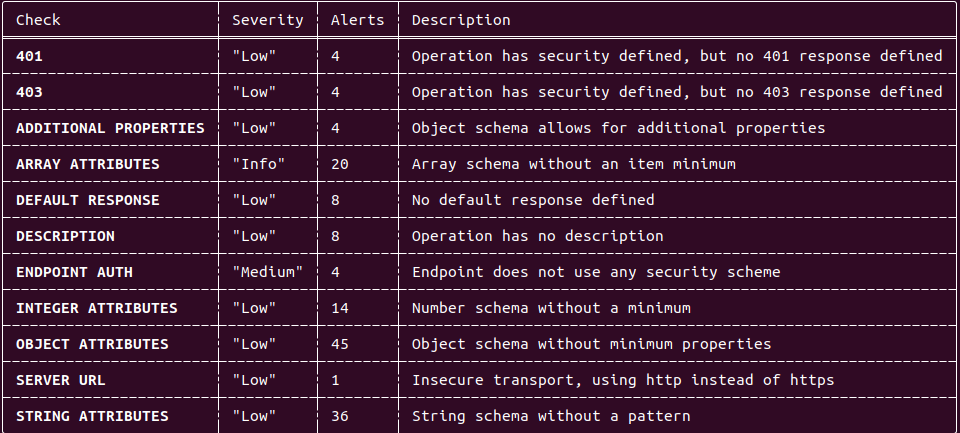
cherrybomb --file <PATH> --profile passive
Passive Output example:
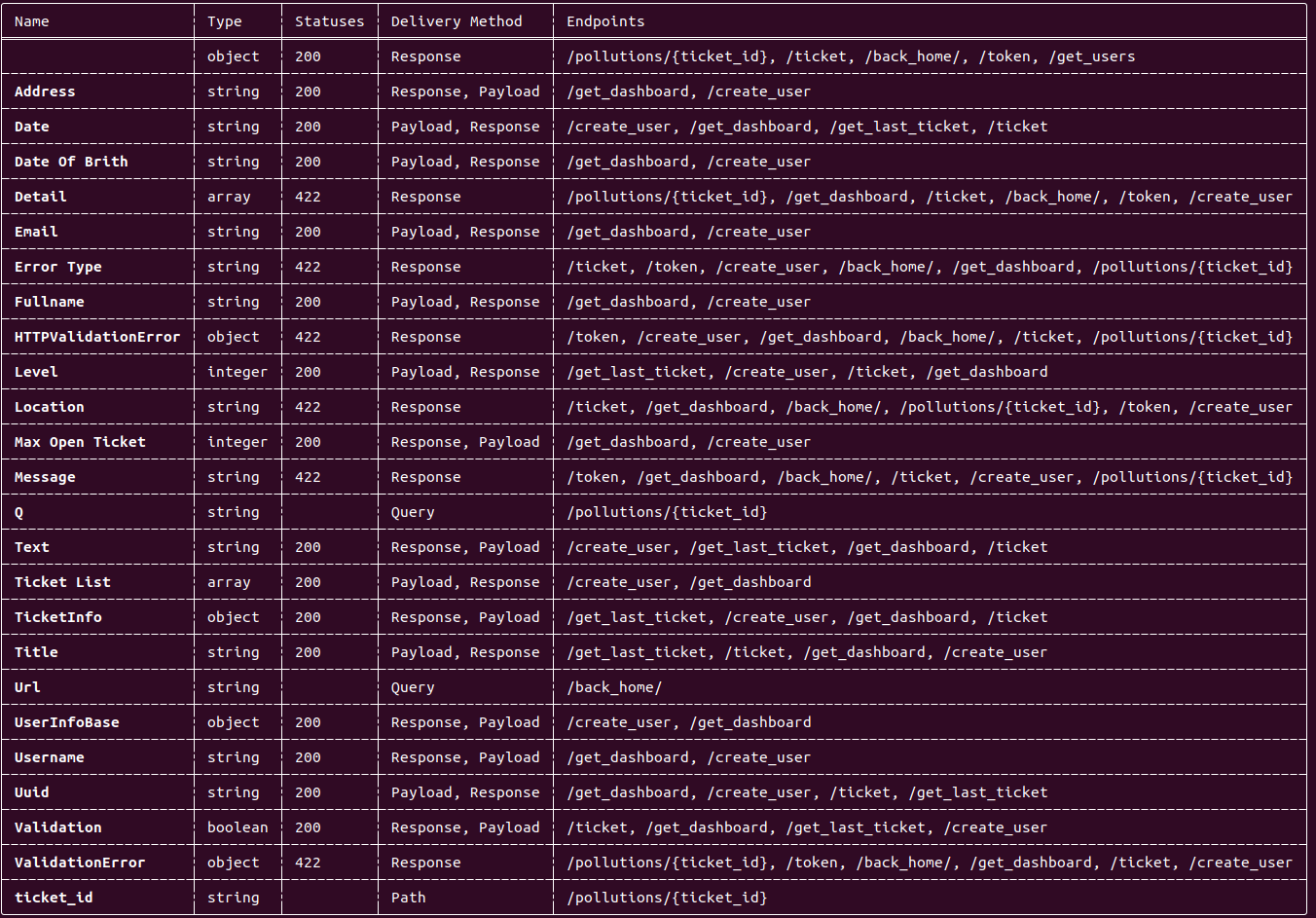
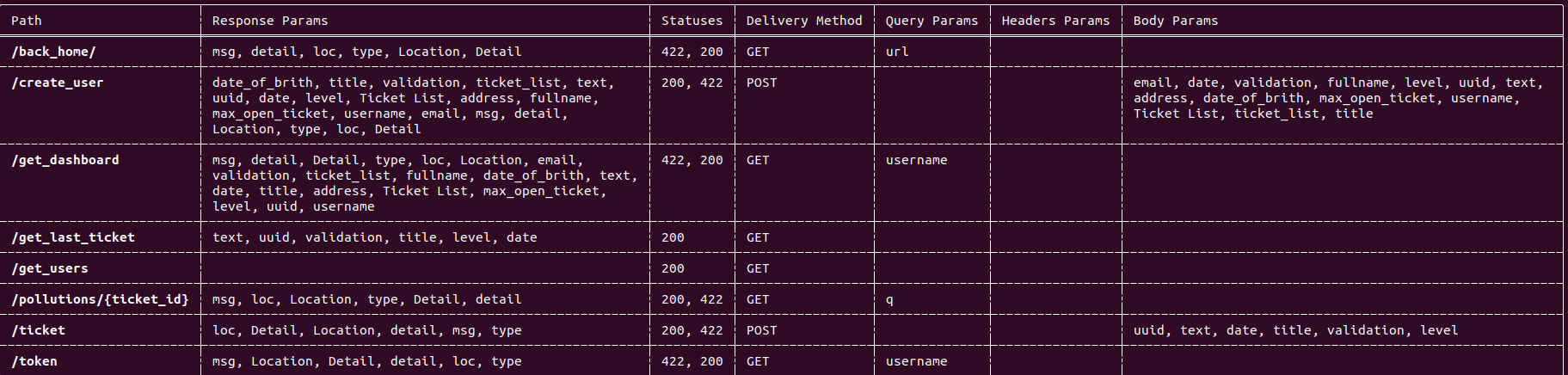
cherrybomb --file <PATH> --profile info
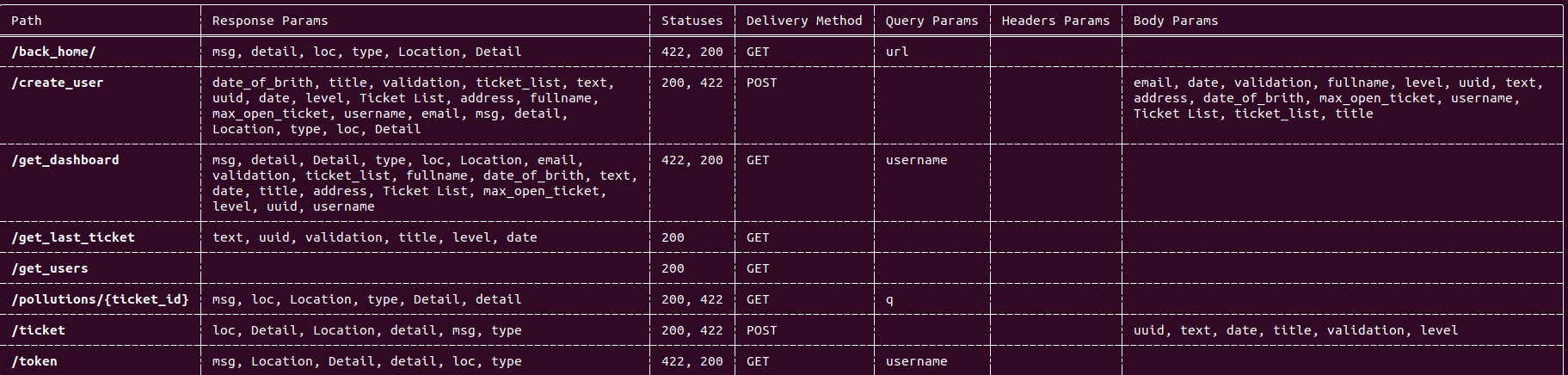
Parameter table output:
Endpoint table output:
DEPRECATED FOR NOW - WILL BE REPLACED SOON
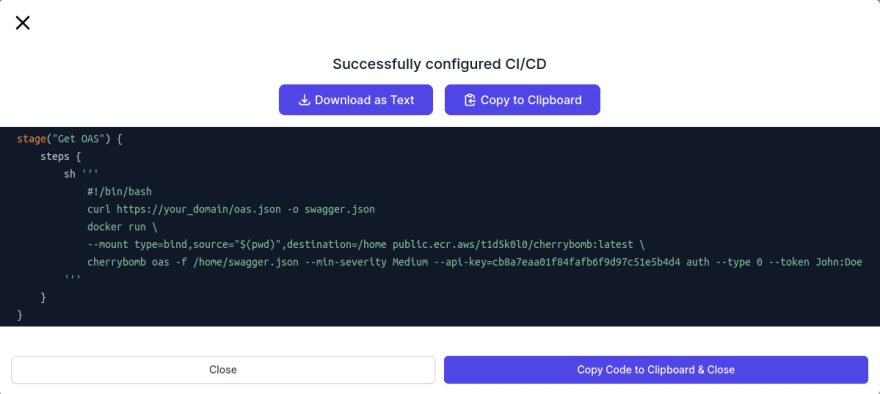
You can embed it into your CI pipeline, and If you plan on doing that I would recommend that you go to our website, sign up, go through the CI pipeline integration wizard, and copy the groovy/GitHub actions snippet built for you.
Example:
If you have any questions you can ask us on our discord server.
You are also welcome to open an Issue here on GitHub.


