 black-scorp10/email-vulnerability-checker
Automated SPF and DMARC configuration checker that identifies email spoofing vulnerabilities across single or bulk domains using DNS lookups.

Verify whether the domain is vulnerable to spoofing by Email-vulnerablity-checker
Email Vulnerability Checker
This script checks the SPF and DMARC configurations of email domains to determine their vulnerability status. It's useful for system administrators or security professionals to assess email infrastructure security.
To run the script, execute it with the following command:
./spfvuln.sh [options]
Clone the Repository:
git clone https://github.com/BLACK-SCORP10/Email-Vulnerability-Checker.git
Navigate to the Directory:
cd Email-Vulnerability-Checker
Make the Script Executable:
chmod +x spfvuln.sh
Install Requirements:
For Ubuntu or Debian:
sudo apt update
sudo apt install dnsutils
For CentOS or RHEL:
sudo yum install bind-utils # CentOS, RHEL
or
sudo dnf install bind-utils # Fedora
Verify Installation:
nslookup example.com
or
nslookup -version
Checking a single domain:
./spfvuln.sh -d example.com
Checking multiple domains from a file:
./spfvuln.sh -t domains.txt
Saving results to an output file:
./spfvuln.sh -d example.com -o output.txt
To update your tool after a new version has been released, follow these steps:
Navigate to the Tool Directory:
cd Email-Vulnerability-Checker
Pull the Latest Changes from the Remote Repository:
git pull origin main
example.com with the domain you want to check.spfvuln.sh is executable (chmod +x spfvuln.sh) before use../spfvuln.sh -h or ./spfvuln.sh --help.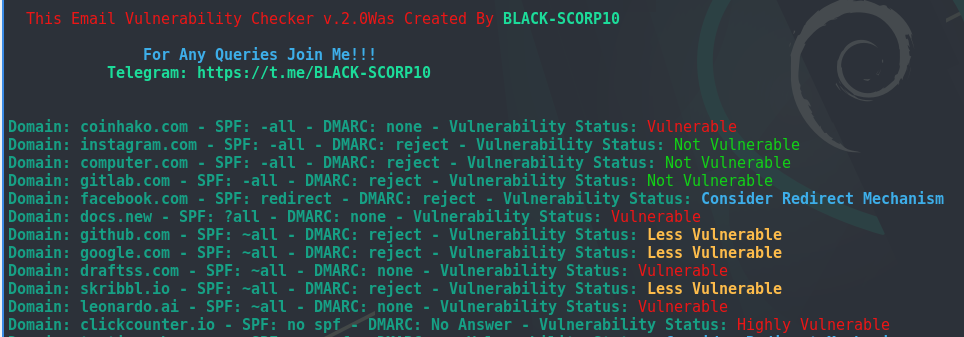
| SPF Configuration | DMARC Configuration | Vulnerability Status | Explanation |
|---|---|---|---|
| -all | Reject | Not Vulnerable | SPF (-all) with DMARC reject policy ensures that unauthorized emails are rejected outright, minimizing spoofing risks. |
| -all | Quarantine | Less Vulnerable | SPF (-all) with DMARC quarantine policy sends unauthorized emails to spam or a designated folder, reducing risks. |
| -all | None | Vulnerable | SPF (-all) without DMARC leaves some vulnerability, as DMARC can enhance email authentication and alignment. |
| -all | No Answer | Vulnerable | The presence of "redirect" or other mechanisms not explicitly defined can lead to vulnerabilities, depending on the redirected domain's SPF configuration. |
| ~all | Reject | Less Vulnerable | SPF soft fail (~all) with DMARC reject policy may allow unauthorized emails but rejects those failing DMARC alignment. |
| ~all | Quarantine | More Vulnerable | SPF soft fail (~all) with DMARC quarantine policy may allow unauthorized emails but sends them to spam or a designated folder. |
| ~all | None | Vulnerable | SPF soft fail (~all) without DMARC leaves more vulnerability, as DMARC can enhance email authentication and alignment. |
| ~all | No Answer | Vulnerable | The presence of "redirect" or other mechanisms not explicitly defined can lead to vulnerabilities, depending on the redirected domain's SPF configuration. |
| +all | Reject | Vulnerable | SPF pass (+all) with DMARC reject policy is vulnerable as it accepts all emails without proper authentication or alignment. |
| +all | Quarantine | More Vulnerable | SPF pass (+all) with DMARC quarantine policy may allow all emails but sends unauthorized ones to spam or a designated folder. |
| +all | None | Vulnerable | SPF pass (+all) without DMARC leaves vulnerability, as DMARC can enhance email authentication and alignment. |
| +all | No Answer | Vulnerable | The presence of "redirect" or other mechanisms not explicitly defined can lead to vulnerabilities, depending on the redirected domain's SPF configuration. |
| ?all | Reject | Vulnerable | SPF neutral (?all) with DMARC reject policy doesn't provide strong protection, potentially allowing unauthorized emails. |
| ?all | Quarantine | More Vulnerable | SPF neutral (?all) with DMARC quarantine policy may allow unauthorized emails but sends them to spam or a designated folder. |
| ?all | None | Vulnerable | SPF neutral (?all) without DMARC leaves vulnerability, as DMARC can enhance email authentication and alignment. |
| ?all | No Answer | Vulnerable | The presence of "redirect" or other mechanisms not explicitly defined can lead to vulnerabilities, depending on the redirected domain's SPF configuration. |
| N/A | Reject | Vulnerable | Without SPF, DMARC reject policy doesn't provide strong protection against unauthorized emails, potentially allowing spoofing and phishing. |
| N/A | Quarantine | More Vulnerable | Without SPF, DMARC quarantine policy may allow unauthorized emails but sends them to spam or a designated folder. |
| N/A | None | Highly Vulnerable | Without SPF, DMARC none policy leaves the domain highly vulnerable to various email-based threats, including spoofing and phishing attacks. |
| N/A | No Answer | Highly Vulnerable | The absence of both SPF and DMARC records leaves the domain highly vulnerable to various email-based threats, including spoofing and phishing attacks, especially if "redirect" or other mechanisms not explicitly defined are present. |
