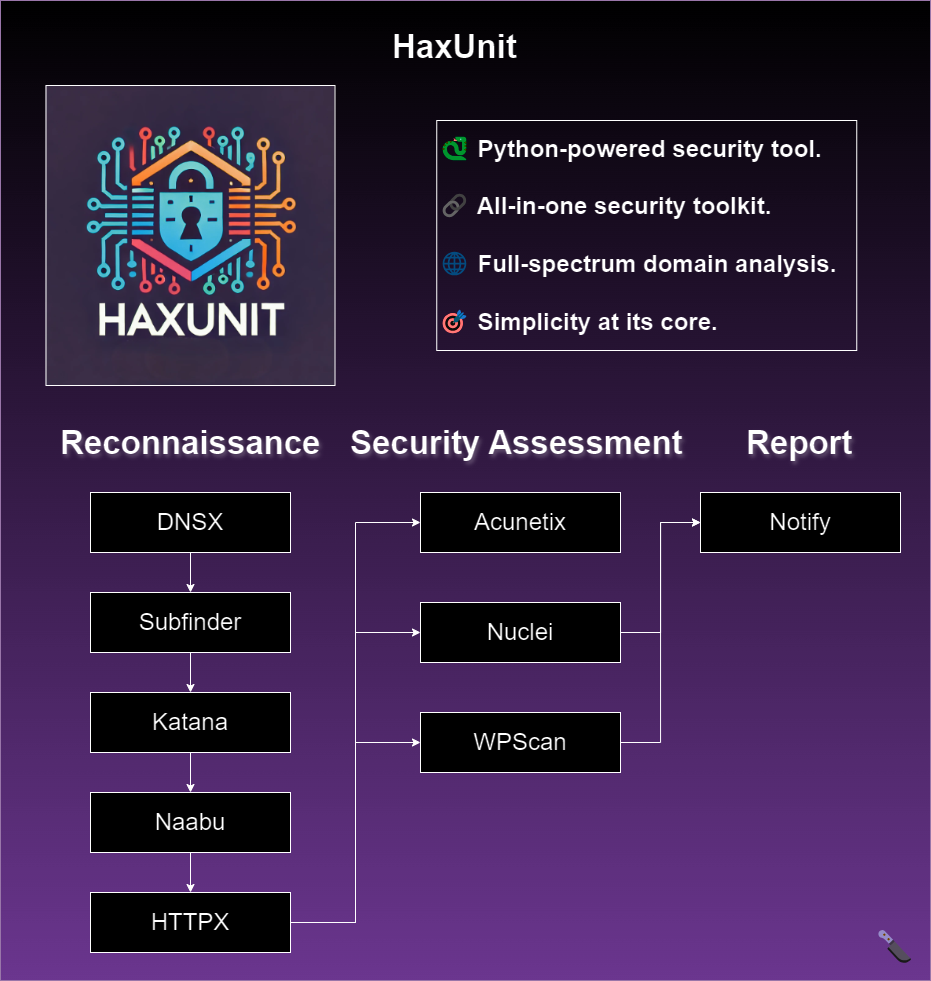

Automated web domain reconnaissance and security assessment tool integrating subdomain enumeration, port scanning, vulnerability scanning, and AI-powered discovery for penetration testing workflows.

Intro • Installation • Usage • Running HaxUnit • Functions
HaxUnit is a Python-based comprehensive reconnaissance and security assessment tool for web domains. It integrates various tools for subdomain enumeration, port scanning, vulnerability scanning, and more.
HaxUnit is focused on simplicity and aims to be the best and most complete solution for web security assessments.
For a reliable installation, it's recommended to use HaxUnit with Docker Compose.
This initial setup may take a few minutes:
git clone https://github.com/Bandit-HaxUnit/haxunit && cd haxunit
.env.example to .env and fill in the API keys.ACUNETIX_THRESHOLD=30
ACUNETIX_API_KEY=
NUCLEI_API_KEY=
WPSCAN_API_KEY=
PDCP_API_KEY=
chmod +x rebuild-compose.sh open-bash.sh
./rebuild-compose.sh
Once the installation completes successfully, you'll be inside the Docker container, ready to execute HaxUnit:
🎉 Installation Complete! 🎉
HaxUnit is now ready to rock!
Time to find those vulnerabilities and patch them like a pro! 🕵️♂️🔍
🚀 To start scanning, run the following command:
haxunit -d <domain>
That's it, you're all set to start scanning domains with HaxUnit!
To open a bash shell inside the HaxUnit container, run the following command:
./open-bash.sh
Make sure you have the following software installed on your system:
python3 (>=3.10)go (>=1.22)docker.io (>=20.10.7)Clone the Repository:
Open a terminal and run the following command to clone the repository and navigate into the project directory:
git clone https://github.com/Bandit-HaxUnit/haxunit && cd haxunit
Install python3.11-venv (if needed):
If you don't have the venv module installed, you may need to install it. Run one of the following commands depending on your Python version:
sudo apt update
sudo apt install python3.11-venv
Or for Python 3.10:
sudo apt update
sudo apt install python3.10-venv
Create a Virtual Environment:
Create a virtual environment named haxunit-venv:
python3 -m venv haxunit-venv
Activate the Virtual Environment:
Activate the virtual environment using the following command:
source haxunit-venv/bin/activate
Note: To deactivate the virtual environment later, you can simply run deactivate.
Install the Required Packages:
With the virtual environment activated, install the necessary packages:
python3 -m pip install -r requirements.txt
Run the Installation Script:
Finally, run the main script with the --install flag:
python3 main.py --install
If everything is installed correctly you should see the following output:
[HaxUnit] [Init] All tools are successfully installed - good luck!
The installation process now uses pdtm (ProjectDiscovery Tool Manager) for efficient tool management and includes intelligent checks to avoid reinstalling already present tools.
haxunit -h
This will display help for the tool. Here are all the switches it supports.
usage: main.py [-h] [-d DOMAIN] [-m {quick,extensive}] [-v] [-b BIN] [-is ISERVER] [-it ITOKEN] [-acu] [-y] [-u] [-i] [--wpscan-api-token WPSCAN_API_TOKEN]
               [--use-notify] [--cloud-upload] [--htb] [--fuzz] [--use-gpt] [--skip-installers]

HaxUnit - Web Domain Reconnaissance Tool

optional arguments:
  -h, --help            show this help message and exit
  -d DOMAIN, --domain DOMAIN
                        the website to recon: example.com
  -m {quick,extensive}, --mode {quick,extensive}
                        set scan mode
  -v, --verbose         print more information
  -b BIN, --bin BIN     set which python bin to use
  -is ISERVER, --iserver ISERVER
                        interactsh server URL for self-hosted instance
  -it ITOKEN, --itoken ITOKEN
                        authentication token for self-hosted interactsh server
  -acu, --use-acunetix  Enable Acunetix integration
  -y, --yes             yes to all prompts
  -u, --update          update all tools
  -i, --install         install all tools
  --wpscan-api-token WPSCAN_API_TOKEN
                        The WPScan API Token to display vulnerability data
  --use-notify          Run notify on completion
  --cloud-upload        Upload results to ProjectDiscovery cloud
  --htb                 HackTheBox mode
  --fuzz                Enable ffuf fuzzing
  --use-gpt             Enable GPT suggestions
  --skip-installers     Skip tool installation checks
Run a quick scan on example.com:
haxunit -d example.com
Run a quick scan on example.com saying yes to adding domains by default:
haxunit -d example.com -y
Run an extensive scan on example.com using Acunetix and uploading results to ProjectDiscovery cloud:
haxunit -d example.com -m extensive --use-acunetix --cloud-upload
Skip installation checks for faster startup (when you know tools are installed):
haxunit -d example.com --skip-installers
Results from the scan will be saved in the following directory structure:
scans/
└── example.com/
    └── timestamp/
Replace example.com with your target domain and timestamp with the date and time when the scan was conducted.
This structure organizes scan results chronologically under the respective domain folder within the scans directory.
This repository includes a sample Apache Airflow DAG that automates the HaxUnit scanning process.
dags directory of your Apache Airflow installation. git clone https://github.com/Bandit-HaxUnit/haxunit && cd haxunit
.env.example to .env and fill in the API keys.ACUNETIX_THRESHOLD=30
ACUNETIX_API_KEY=
NUCLEI_API_KEY=
WPSCAN_API_KEY=

