 aperocky/bepr
A minimal authenticated reverse shell framework for reaching hosts with outbound internet access.

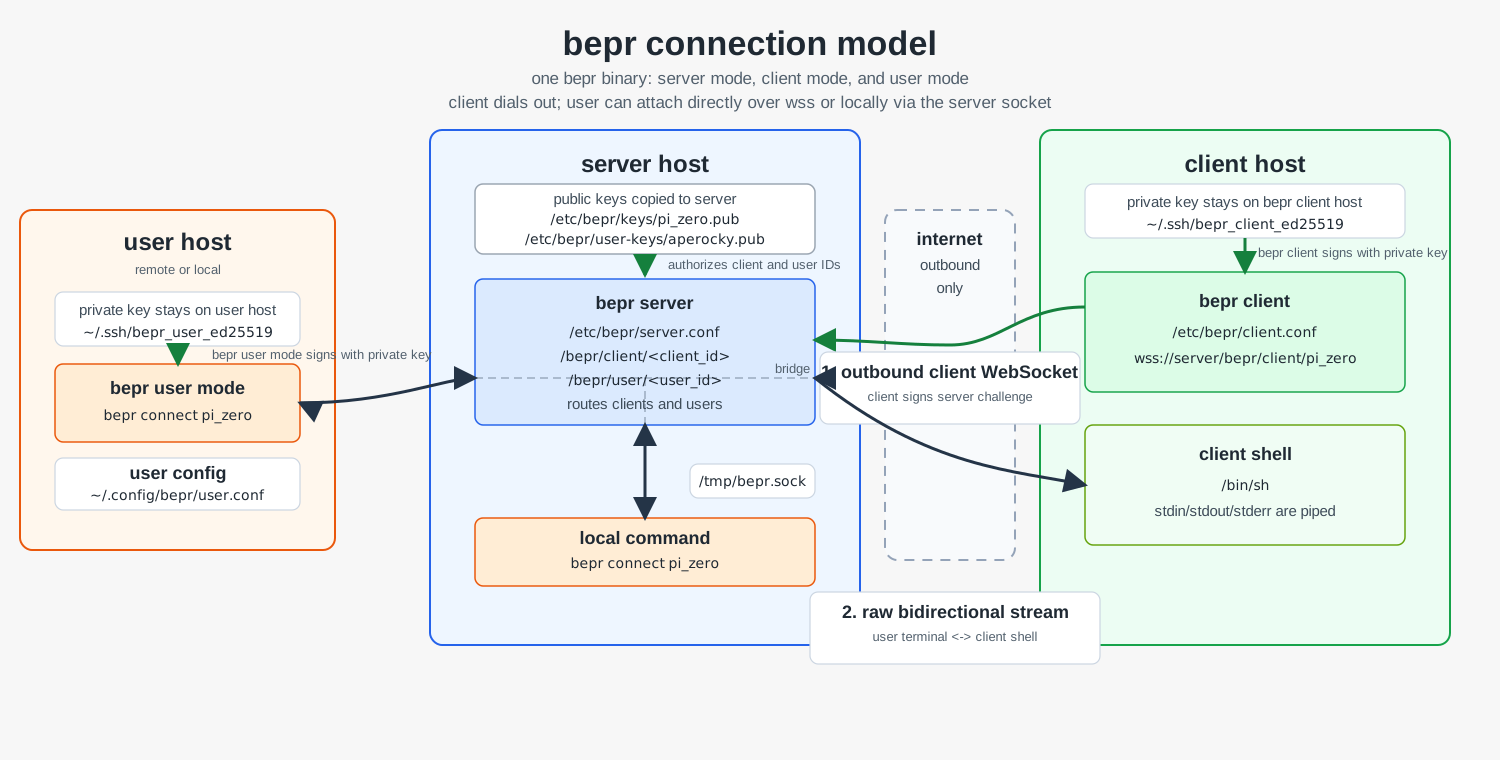
bepr is a tiny authenticated client/server reverse shell program over outbound WebSocket connections.
A single binary cover all 3 mode: server mode, client mode, and user mode. It is packaged with installation direction for rpm, deb, and pkg, it comes in 1MB.
I created bepr because I'm traveling and would like to control computers at home without exposing them to the public internet. This only requires a domain (for TLS), and a server to get working.
Go to https://github.com/Aperocky/bepr/releases to find the version of the package for your platform. download it and use these command to install
sudo installer -pkg bepr-<version>.pkg -target /
sudo dpkg -i bepr_<version>_<arch>.deb
sudo rpm -i bepr-<version>-<arch>.rpm
Or use update scripts to automatically install it by running the script:
curl -fsSL https://raw.githubusercontent.com/Aperocky/bepr/main/packaging/scripts/update-deb.sh | sh
curl -fsSL https://raw.githubusercontent.com/Aperocky/bepr/main/packaging/scripts/update-macos.sh | sh
curl -fsSL https://raw.githubusercontent.com/Aperocky/bepr/main/packaging/scripts/update-rpm.sh | sh
And now, depending on what your machine is for, configure each host. The binary works in all three modes but does not sync automatically — set up before you leave!
You need your own TLS cert and domain; that part is not covered by bepr. Create the server config:
# cat /etc/bepr/server.conf
bind = 0.0.0.0:443
key_dir = /etc/bepr/client-keys
tls_cert = /etc/bepr/tls/cert.pem
tls_key  = /etc/bepr/tls/privkey.pem
Start the service:
linux:
sudo systemctl enable --now bepr
From the server you can list registered clients and connected users, this goes through a local socket.
[email protected]:~# bepr list
aperocky    user      disconnected
laptop      client    disconnected
mac_m1      client    connected
pi_zero     client    connected
You may also connect to a client directly with this local socket, this behave the same as the user mode.
bepr connect laptop
This offers user and client paths on your domain:
$domain/bepr/client/mac_m1 # Connect from client
$domain/bepr/user/aperocky # Connect from user
Once attached, the bepr connect terminal stdin/stdout is piped to the selected client shell. Client shells run inside a PTY, while the server is a raw pass-through byte router. Multiple clients may be connected to the server at the same time, but a single client can only have one user attached at a time.
On each client host, generate a key pair:
ssh-keygen -t ed25519 -f /etc/bepr/client-keys/pi_zero
Copy the public key to the server's key_dir:
/etc/bepr/client-keys/pi_zero.pub -> client ID pi_zero on server
Create the client config. The client ID in the URL must match the public key filename on the server:
# cat /etc/bepr/client.conf
server = wss://server.example/bepr/client/pi_zero
private_key_path = /etc/bepr/client-keys/pi_zero
shell = /bin/sh
Start the service/daemon:
linux:
sudo systemctl enable --now bepr
mac:
sudo launchctl bootstrap system /Library/LaunchDaemons/com.bepr.plist
sudo launchctl enable system/com.bepr
sudo launchctl kickstart -k system/com.bepr
The legacy path domain/bepr/$name is also accepted for backwards compatibility with older clients. Start the service the same way as the server.
Note: the client spawns a shell immediately on connecting to the server, not when a user attaches. The shell runs persistently in the background. If you attach and find the terminal in a bad state, run stty sane. If the shell itself is unresponsive, kill it by PID on the client machine — the client will automatically reconnect and spawn a fresh shell within 10 seconds.
To operate from a remote machine without SSH-forwarding the server socket, use user mode. On the server, add a user_key_dir to the server config:
# cat /etc/bepr/server.conf
bind = 0.0.0.0:443
key_dir = /etc/bepr/client-keys
user_key_dir = /etc/bepr/user-keys
tls_cert = /etc/bepr/tls/cert.pem
tls_key  = /etc/bepr/tls/privkey.pem
Copy the user's public key to the server:
/etc/bepr/user-keys/aperocky.pub -> user ID aperocky
On the user machine, create a user config:
# cat ~/.config/bepr/user.conf
server = wss://server.example/bepr/user/aperocky
private_key_path = ~/.ssh/aperocky_user_ed25519
bepr list and bepr connect will use this config automatically with no extra flags. Your commands bridge from the server directly into client hosts.
bepr binary can be manually ran without service/packaging with direct commands and arguments:
./bepr server --config $server_config_path
./bepr client --config $client_config_path
./bepr connect --socket $socket_file_path $destination
