 anuththara2007-w/cve-2025-55182-exploit-extension
A Chrome extension for detecting React2Shell vulnerabilities (CVE-2025-55182 & CVE-2025-66478) in web applications

A Chrome extension for detecting React Server Components (RSC) and Next.js App Router fingerprints on web pages.
This extension is intended for educational and security research purposes only. It includes functionality that may be used to test for potential security weaknesses. Use it only on systems you own or have explicit permission to test. Unauthorized use may be illegal and unethical.
Content-Type headersVary headers containing RSCThe extension uses several complementary techniques:
text/x-component responseswindow.__next_f and other RSC patternsVary headers for RSC indicatorsClone the repository:
git clone https://github.com/mrknow001/RSC_Detector.git
cd RSC_Detector
Load the extension in Chrome:
chrome://extensions/RSC_Detector folder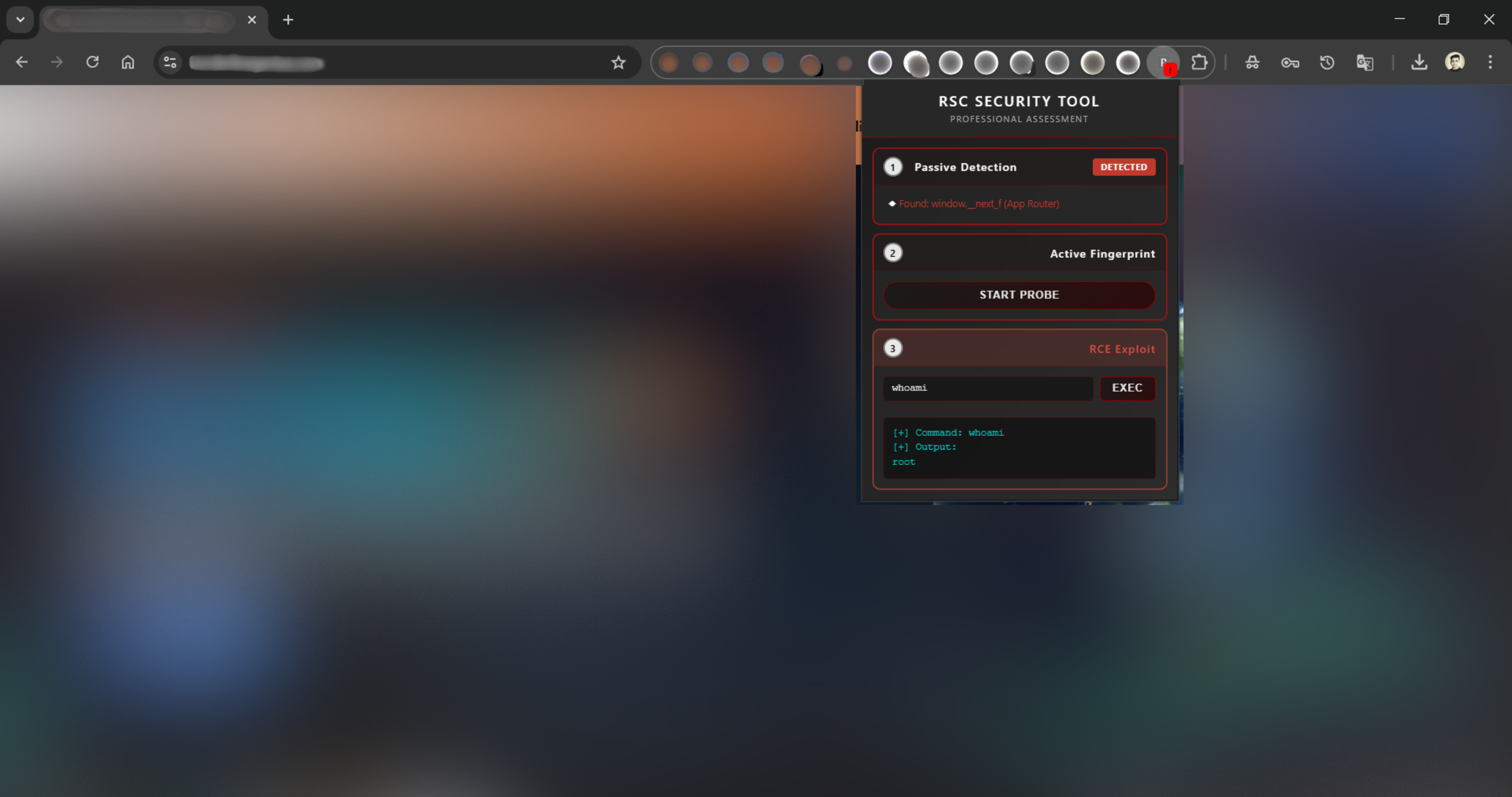
The screenshot shows the extension detecting RSC usage, including passive indicators and active probe results.
RSC_Detector/
├── manifest.json          # Extension configuration
├── content.js             # Main detection logic
├── popup.html             # Popup UI
├── popup.js               # Popup logic
├── background.js          # Background worker
├── rules.json             # Network request rules
├── images/
│   └── img1.png           # Screenshot
├── README.md              # English documentation
└── README_cn.md           # Chinese documentation
This extension looks for:
text/x-componentwindow.__next_freact-server-dom-webpackVary: RSCRequired Chrome permissions:
activeTab — Access current tab’s contentscripting — Execute scripts on pagesdeclarativeNetRequest — Inspect/modify network requests<all_urls> — Enable detection across all sitesContributions are welcome. Please ensure that updates:
This project is provided strictly for educational use. Use responsibly and comply with all applicable laws and regulations.
This tool is designed exclusively for legitimate security research and educational purposes. You are responsible for ensuring you have proper authorization before testing any system. The authors assume no liability for misuse.
⚠️ For authorized security testing only.
A Chrome extension for detecting React Server Components (RSC) and Next.js App Router fingerprints on web pages.
This extension is intended for educational and security research purposes only. It includes functionality that may be used to test for potential security weaknesses. Use it only on systems you own or have explicit permission to test. Unauthorized use may be illegal and unethical.
Content-Type headersVary headers containing RSCThe extension uses several complementary techniques:
text/x-component responseswindow.__next_f and other RSC patternsVary headers for RSC indicatorsClone the repository:
git clone https://github.com/mrknow001/RSC_Detector.git
cd RSC_Detector
Load the extension in Chrome:
chrome://extensions/RSC_Detector folder
The screenshot shows the extension detecting RSC usage, including passive indicators and active probe results.
RSC_Detector/
├── manifest.json          # Extension configuration
├── content.js             # Main detection logic
├── popup.html             # Popup UI
├── popup.js               # Popup logic
├── background.js          # Background worker
├── rules.json             # Network request rules
├── images/
│   └── img1.png           # Screenshot
├── README.md              # English documentation
└── README_cn.md           # Chinese documentation
This extension looks for:
text/x-componentwindow.__next_freact-server-dom-webpackVary: RSCRequired Chrome permissions:
activeTab — Access current tab’s contentscripting — Execute scripts on pagesdeclarativeNetRequest — Inspect/modify network requests<all_urls> — Enable detection across all sitesContributions are welcome. Please ensure that updates:
This project is provided strictly for educational use. Use responsibly and comply with all applicable laws and regulations.
This tool is designed exclusively for legitimate security research and educational purposes. You are responsible for ensuring you have proper authorization before testing any system. The authors assume no liability for misuse.
⚠️ For authorized security testing only.
