Run TTPs, with AI!
Autonomous TTP execution agent for purple team operations
Feed it a threat report. It builds the attack plan. You approve. It executes.





| Feature | Description |
|---|---|
| Multi-Format Parsing | PDF (LLM-powered), STIX 2.1, Markdown, URLs - paste a threat report and go |
| LLM Analysis | Extracts MITRE ATT&CK techniques, maps to targets, generates execution commands |
| Execution Graph | Interactive Cytoscape DAG - steps grouped by target, colored by mode (execute/simulate) |
| Autonomous Execution | Agent runs approved commands via QMP guest agent, WinRM, or SSH with live log streaming |
| VECTR Integration | Auto-deploy VECTR to Proxmox, sync campaigns, test cases, and encrypted artifacts |
| Multi-LLM Support | Anthropic Claude, OpenAI GPT-4o, OpenRouter, Ollama (local) |
| Environment Checks | Pre-flight validation of Proxmox, VMs, targets, LLM, VECTR, and system tools |
| Execution Notes | Auto-generated Markdown notes with screenshots, browsable from the UI |
| Setup Wizard | Guided first-run setup: Proxmox bootstrap, VM discovery, credential config |
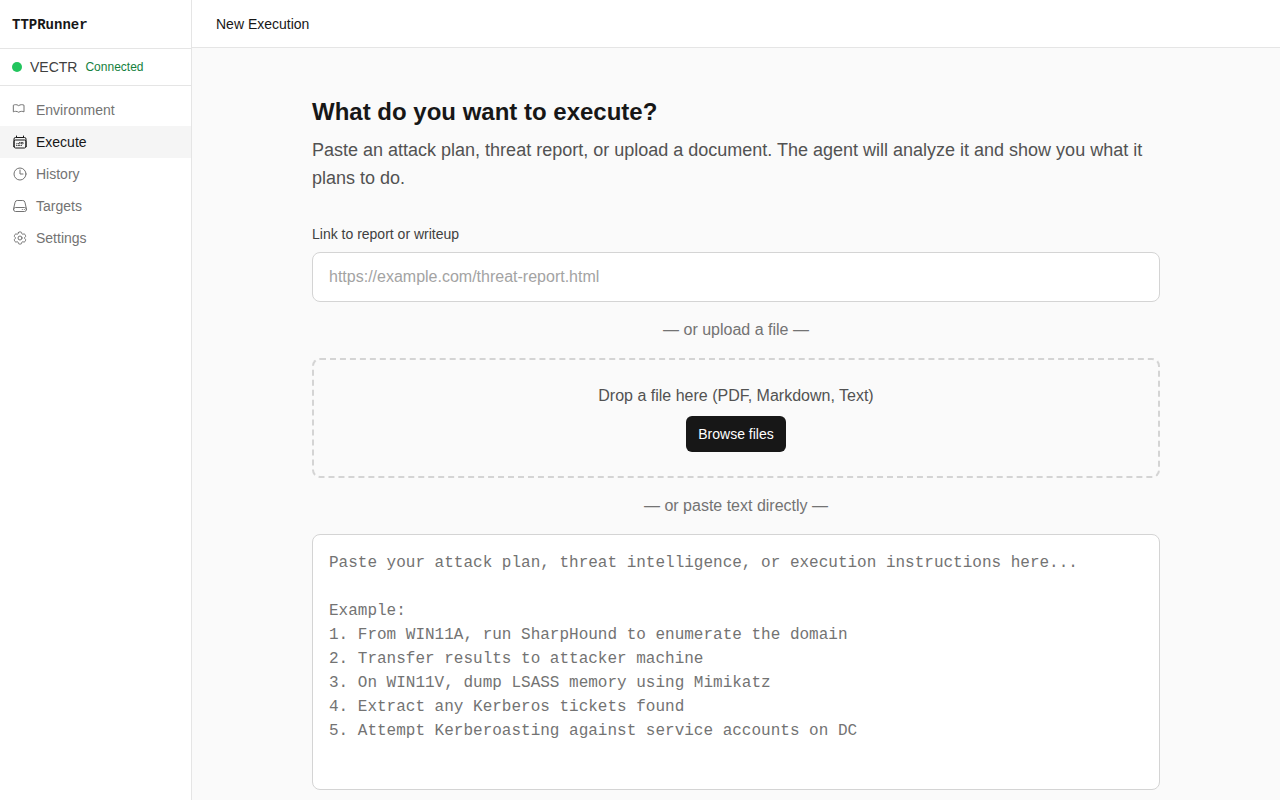
| Dashboard Input | Execution Plan Graph |
|---|---|
 |  |
| Step Edit Modal | Execution Detail |
|---|---|
 |  |
| Targets | VECTR Integration |
|---|---|
 |  |
| Execution History | Settings |
|---|---|
 |  |
git clone https://github.com/Antonlovesdnb/TTPRunner.git
cd TTPRunner
docker compose up -d --build
Open http://localhost:4000 — the setup wizard will guide you through initial configuration.
git clone https://github.com/Antonlovesdnb/TTPRunner.git
cd TTPRunner
npm run install:all
npm run dev
API runs on port 4000, UI on port 3000.
| Document | Description |
|---|---|
| Installation | Docker setup, dev environment, Proxmox prerequisites, VM preparation |
| Usage Guide | Full walkthrough from setup wizard to VECTR sync |
| Configuration | All config.yaml fields, environment variables, LLM provider options |
| Architecture | Technical deep-dive: execution engine, QMP, LLM integration, output layer |
| Troubleshooting | Common issues: Proxmox, WinRM, QMP, VECTR, Docker |
| Development | Dev environment, project structure, code conventions |
| Use Cases | Real-world examples and walkthroughs |
  Threat Report                    LLM Analysis              User Review
  (PDF, STIX, MD, URL)            (Extract TTPs,            (Cytoscape graph,
        │                          map to targets,           edit steps,
        │                          gen commands)             set modes)
        ▼                               ▼                        ▼
  ┌──────────┐    ┌──────────────┐    ┌──────────────┐    ┌──────────┐
  │  Parser  │───▶│  LLM Engine  │───▶│  Plan Graph  │───▶│  Agent   │
  └──────────┘    └──────────────┘    └──────────────┘    └────┬─────┘
                                                               │
                       ┌───────────────────────────────────────┤
                       │               │               │       │
                       ▼               ▼               ▼       ▼
                  ┌─────────┐    ┌──────────┐    ┌─────────┐  ┌──────────┐
                  │   QMP   │    │  WinRM   │    │   SSH   │  │  Output  │
                  │ (guest  │    │(Windows) │    │ (Linux) │  │          │
                  │  agent) │    │          │    │         │  │ Attire   │
                  └────┬────┘    └────┬─────┘    └────┬────┘  │ Notes    │
                       │              │               │       │ VECTR    │
                       └──────────────┼───────────────┘       └──────────┘
                                      ▼
                            ┌───────────────────┐
                            │   Proxmox Lab     │
                            │                   │
                            │  Windows & Linux  │
                            │   Target VMs      │
                            └───────────────────┘
| Layer | Technology |
|---|---|
| API | Bun + Hono, SQLite |
| Frontend | Vue 3, Vite, Tailwind CSS, Cytoscape.js |
| Execution | QMP (QEMU Monitor Protocol), WinRM via pywinrm, SSH |
| LLM | Anthropic Claude, OpenAI, OpenRouter, Ollama |
| Output | Attire JSON, Markdown notes, VECTR API (GraphQL + REST) |
| Infrastructure | Proxmox VE, Docker, LXC containers |
Note: TTPRunner has been tested with the Constructing Defense Lab environment. Other Proxmox lab configurations may behave differently.
See CONTRIBUTING.md for guidelines on how to contribute.