Kubebot
A security testing Slackbot built with a Kubernetes backend on the Google Cloud Platform

NOTE: I am not actively maintaining this project anymore. I am working on v2 of Kubebot along with a couple other folks which will likely be presented at one of the upcoming security conferences.
Architecture
Demo
Please watch this video - https://youtu.be/RKvtyU3CcZk
Data Flow
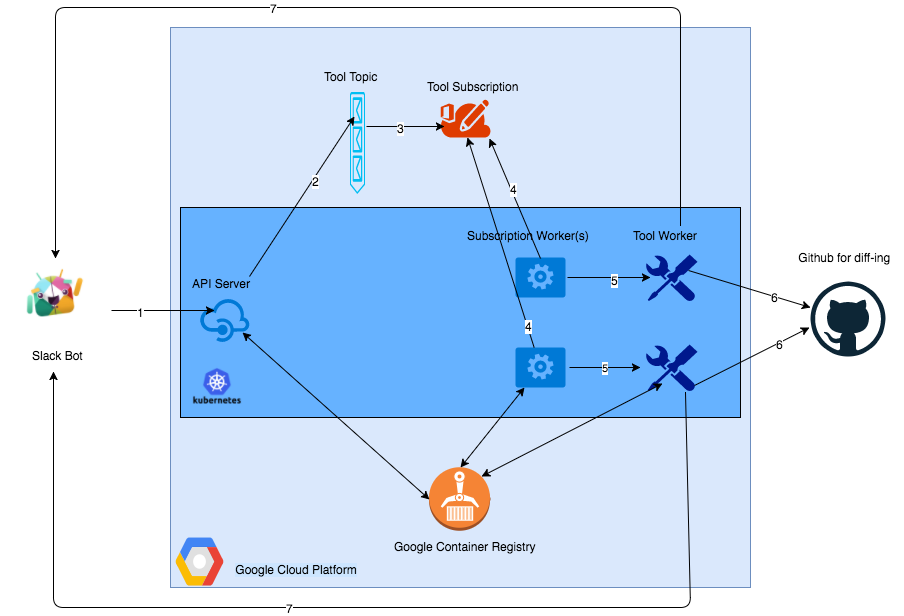
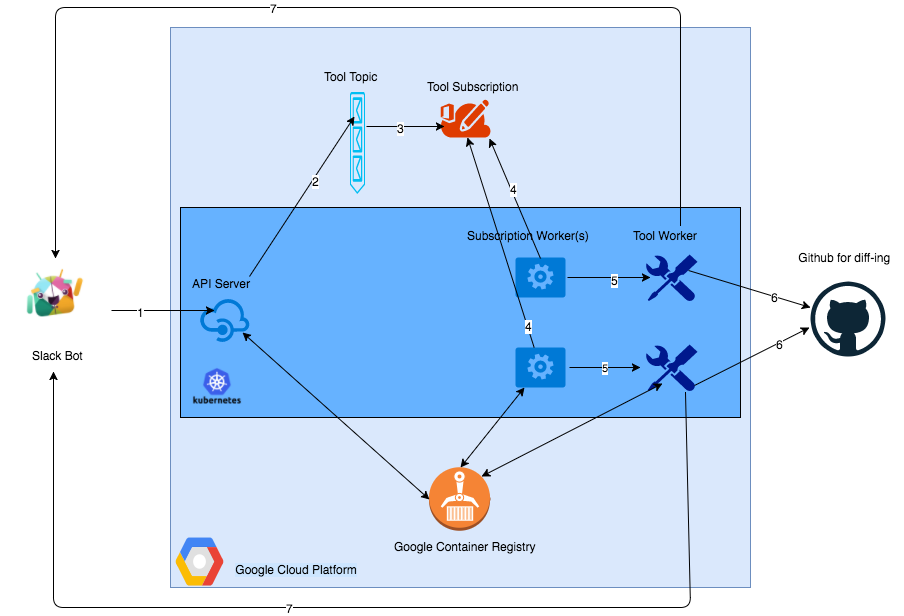
- 1 - API request (tool, target, options) initiated from Slackbot, sent to the API server, which is running as a Docker container on a Kubernetes (K8s) cluster and can be scaled.
- 2 - API server drops the request received as a message to a PubSub Tool Topic.
- 3 - Messages are published to the Tool Subscription.
- 4 - Subscription Worker(s), running as Docker container(s) on the K8s cluster, consumes the message from the subscription. The number of these workers can be scaled as well.
- 5 - Depending upon the tool, target and options received from the end user, appropriate Tool Worker(s) are initiated in the same K8s cluster as Docker containers. Results are stored temporarily on a local directory of that container. Github directory of that tool is cloned.
- 6 - A check is made to see if the generated results file existed or not. If it did not exist, it gets added and changes are pushed to Github. If it exists, files are compared, new file is pushed to Github and only changes are pushed forward to the next step.
- 7 - A webhook from the Tool Worker(s) sends back the changes to Slack. The tool worker(s) are deleted because they are no longer needed.
PS - All the Docker images of the API server, Subscription Worker(s) and Tool Worker(s) are downloaded from Google Container Registry of that GCP account before getting deployed on the K8s cluster.
List of automated workflows integrated so far (This list will keep getting updated as more workflows are added)
Folder layout
- api - Contains all the code for the Kubebot API server.
- config - Contains the configuration files to deploy Kubebot components.
- cronjobs - Contains a sample deployment (.yaml) file to setup cronjobs of running a specific tool at a specific interval and have the results sent back to Slack via a Webhook.
- docs - Documentation
- imgs - Images
- setup scripts - Some scripts that are used for setting up Kubebot.
- subscriptionworker - Contains the code for the Subscription worker.
- tools - All the tools that Kubebot can run. Some are still being worked on.
- utils - Utilities folder.
- A utility container called
checkfile is used to perform the diff operation on github files to identify any changes from the previous run of a tool with the latest run. This container is run after every tool container.
- A utility called
converttobq is used to convert data from tools into BigQuery ingest-able format. This utility is run in automation workflows where the results from each tool are stored in BQ to be able to consumed by other tools.
- A utility called
wfuzzbasicauthbrute is used to bruteforce the basic authentication mechanism of endpoints stored in a BQ table with all the secrets stored in another BQ table
- .env.sample - Rename this file to
.env and make sure the values in there are accurate when you want to deploy Kubebot locally.
- Makefile - makefile to build your Kubebot environment.
Getting Started
- Pre-requisites - Please ensure all these pre-requsities are met.
- Running Kubebot locally - This is a good place to start to get used to Kubebot before running it remotely.
- Integrating your own tools - If you want to integrate your own tools into Kubebot, it is pretty easy to do so!
- TODOS - Please help me in making Kubebot better!
Running Kubebot remote - Once you are confident Kubebot works as expected locally (using Minikube) and now want to unleash it and use it to its full potential on the cloud, it can be deployed on a Google Container Engine (GKE) cluster. However, I can't provide instructions for remote deployment just yet. Having said that, if there is interest, I will be more than happy to assist. And, if you wish to just use Kubebot as a Slack app and not worry about the backend infrastructure, that can be arranged as well for a small monthly subscription plan since I will be hosting the backend in my personal GCP account and you'd just be responsible for the normal costs that go with hosting a VPS on a cloud provider. Please feel free to reach out to discuss those options.
Demo Videos
Sample Slash commands in Slack
Notice how you can run a slash command with the name of the tool, options and the target(s). I say target(s) because you can run one slash command to run one tool with a set of options against multiple targets. Example, the gitrob command below is being run against test and abc.
- /runtool nmap|-Pn -p 1-1000|google.com
- /runtool sublist3r|-t 50|test.com
- /runtool gobuster|-m dns -w fierce_hostlist.txt -t 10 -fw|google.com
PS - Wordlist to choose from:
 anshumanbh/kubebot
