
Skip to content
KitploitKITPLOIT
ToolsBlog
Submit
ToolsBlog
Submit

Hacking, PenTest, and Cybersecurity Tools for Your Security Arsenal!

Kitploit is a directory of hacking, cybersecurity, and pentesting tools. Discover the latest project updates to find vulnerabilities, analyze systems, automate testing, and strengthen your security.

··Feeds·Contact·Privacy·© 2026 Kitploit

Tool Directory

Categories

View all categories
Loading categories
Tools/GitHubGitHub/ancaferro/mynetwork
ReconnaissanceNetwork MappingPort ScanningInformation GatheringNetwork Security
GitHubancaferro/mynetwork

myNetwork

Cross-platform network & port scanner with a desktop GUI.

View Repository
16414 days agoNot yet reviewed

Most Popular

View all →

Discover the most used tools by our community.

Explore all tools

Browse our collection of tools

View all tools →
Share
myNetwork — Cross-platform network & port scanner with a desktop GUI. | Kitploit

myNetwork

myNetwork

Cross-platform LAN & port scanner with a Windows XP–style desktop GUI.

Discovers hosts on your segment, resolves names, MAC and vendor, and reports open TCP + UDP ports — with live monitoring and export.

Electron Node No root Platforms License

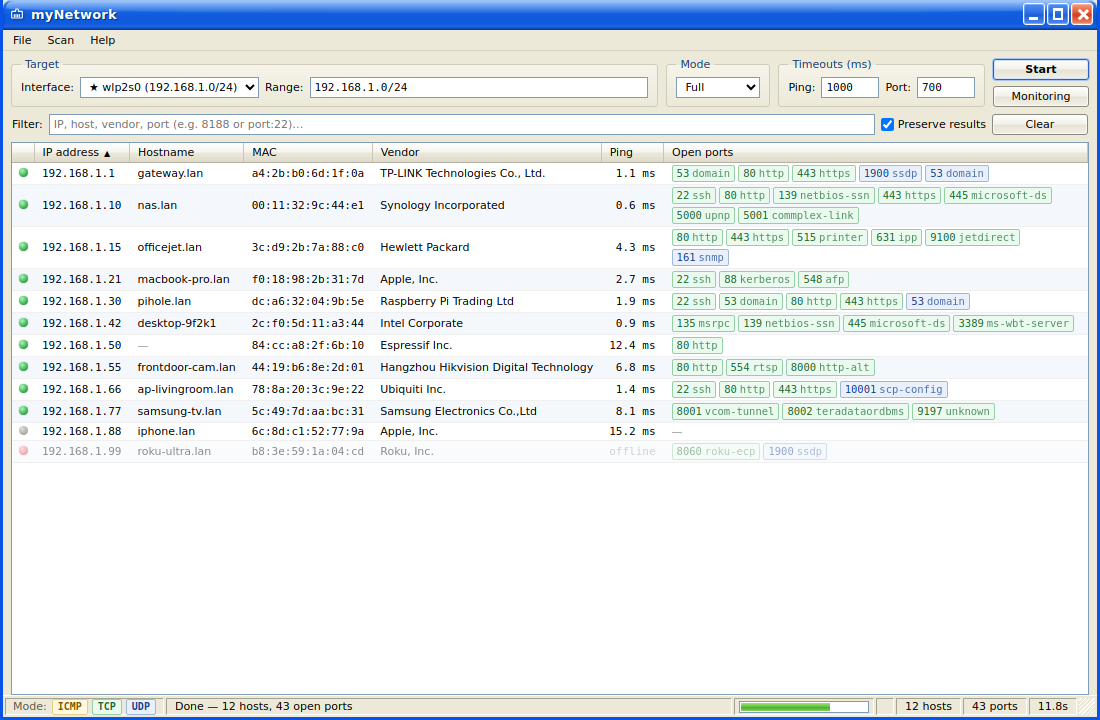
myNetwork screenshot

Screenshot shows synthetic demo data.

Download

Download for Windows Download for macOS Download for Linux

Direct download of the latest release — Windows .exe, macOS .dmg, Linux .AppImage or .deb.


✨ Features

  • Auto-detected segment. Interfaces and their subnets are listed automatically; the one holding the default gateway is first (★). If an interface has several addresses, Range is pre-filled as a comma-separated list.
  • Comma-separated ranges — 10.0.0.0/24, 192.168.1.0/24, single IPs or a.b.c.d-a.b.c.e.
  • Layered scanning: first ICMP (discovery), then popular ports (fast feedback), then all TCP (1–65535) and UDP. Hosts and ports stream in as they are found; the progress bar reflects the layers.
  • Modes: Fast (default) — ICMP + popular; Full — TCP + UDP + ICMP, all ports; Custom — separate TCP and UDP ranges.
  • Colour = protocol: TCP green, UDP blue, ICMP yellow (legend in the status bar).
  • Vendor by MAC — full offline IEEE OUI database (~39,700 entries).
  • Monitoring: pings known hosts every minute with online/offline notifications and re-checks ports every 5 minutes; unreachable hosts fade out.
  • Preserve (default) — results from previous scans are kept and merged by IP. A Clear button sits next to it.
  • Copy from a row: click IP → IP, click MAC → MAC, click anywhere else → the whole host record as JSON. Export to CSV / JSON from the File menu.
  • Cache — the last scan is restored on the next launch.
  • Windows XP (Luna) GUI — frameless window, menu bar, sortable ListView and a status bar.

🚀 Run

root@kitploit:~
npm install
npm start          # or: make start   (background, no sudo)

make help lists the targets (start / stop / restart / status).

On Linux, Electron needs its Chromium sandbox configured. If you hit a chrome-sandbox error, use npm run start:nosandbox (or make start), or run once: sudo chown root node_modules/electron/dist/chrome-sandbox && sudo chmod 4755 ….

📦 Build installers

root@kitploit:~
npm run dist:linux   # AppImage + deb
npm run dist:win     # NSIS installer
npm run dist:mac     # dmg

Releases are built automatically: pushing a v* tag triggers GitHub Actions, which builds installers for Windows/macOS/Linux and attaches them to the GitHub Release.

🧭 How it works

Everything runs on plain Node — no native dependencies and no root — so it builds identically on Linux, macOS and Windows.

⚠️ Responsible use

This tool is meant for auditing your own networks. Only scan segments you are authorised to.

License

MIT

Download Tool
LayerFilePurpose
CIDR / interfacesnet-utils.jstarget parsing, comma ranges, interface detection
Discoverydiscovery.jsping, ARP table, reverse DNS, default route
Portsports.jsTCP connect, UDP probes, service names
OUI vendorsoui.js · oui-db.txtvendor by MAC
Orchestrationindex.jslayers, socket pool, streamed events
Electron / IPCmain.js · preload.jswindow, monitoring, export, notifications
Rendererrenderer/UI, table, filter