
Skip to content
KitploitKITPLOIT
ToolsBlog
Submit
ToolsBlog
Submit

Hacking, PenTest, and Cybersecurity Tools for Your Security Arsenal!

Kitploit is a directory of hacking, cybersecurity, and pentesting tools. Discover the latest project updates to find vulnerabilities, analyze systems, automate testing, and strengthen your security.

··Feeds·Contact·Privacy·© 2026 Kitploit

Tool Directory

Categories

View all categories
Loading categories
morf — Mobile Reconnaissance Framework is a powerful, lightweight and platform-independent offensive mobile security tool designed to help hackers and developers identify and address sensitive information within mobile applications. | Kitploit
Tools/GitHubGitHub/amrudesh1/morf
Android SecurityStatic AnalysisiOS SecurityVulnerability AnalysisPenetration TestingMobile SecuritySecret Detection
GitHubamrudesh1/morf

morf

Mobile Reconnaissance Framework is a powerful, lightweight and platform-independent offensive mobile security tool designed to help hackers and developers identify and address sensitive information within mobile applications.

View Repository
81926 days agoReviewed by Kitploit

Most Popular

View all →

Discover the most used tools by our community.

Explore all tools

Browse our collection of tools

View all tools →
Share

MORF

MORF Logo

Mobile Reconnaissance Framework

A powerful offensive security toolkit for mobile application analysis

License Last Commit Language BlackHat Arsenal

Find Secrets. Protect Apps. Stay Secure.

📋 Table of Contents

  • 💡 Overview
  • 🚀 Quick Start
  • 🔍 Key Features
  • 🏗️ Architecture
  • 📋 Common Use Cases
  • 📦 Installation
    • Prerequisites
    • Method 1: Docker (Recommended)
    • Method 2: Run Script
    • Environment Configuration
  • 🖥️ Usage
    • Web Interface
    • Command Line Interface
  • 🏆 Conference Recognition
  • 🛣️ Development Roadmap
  • 👨‍💻 Authors
  • 📄 License
  • 🙏 Acknowledgments

💡 Overview

MORF is an advanced mobile security analysis tool that automatically discovers sensitive information within Android and iOS applications. Designed for security professionals, penetration testers, and developers, MORF provides comprehensive insights into mobile app security posture.
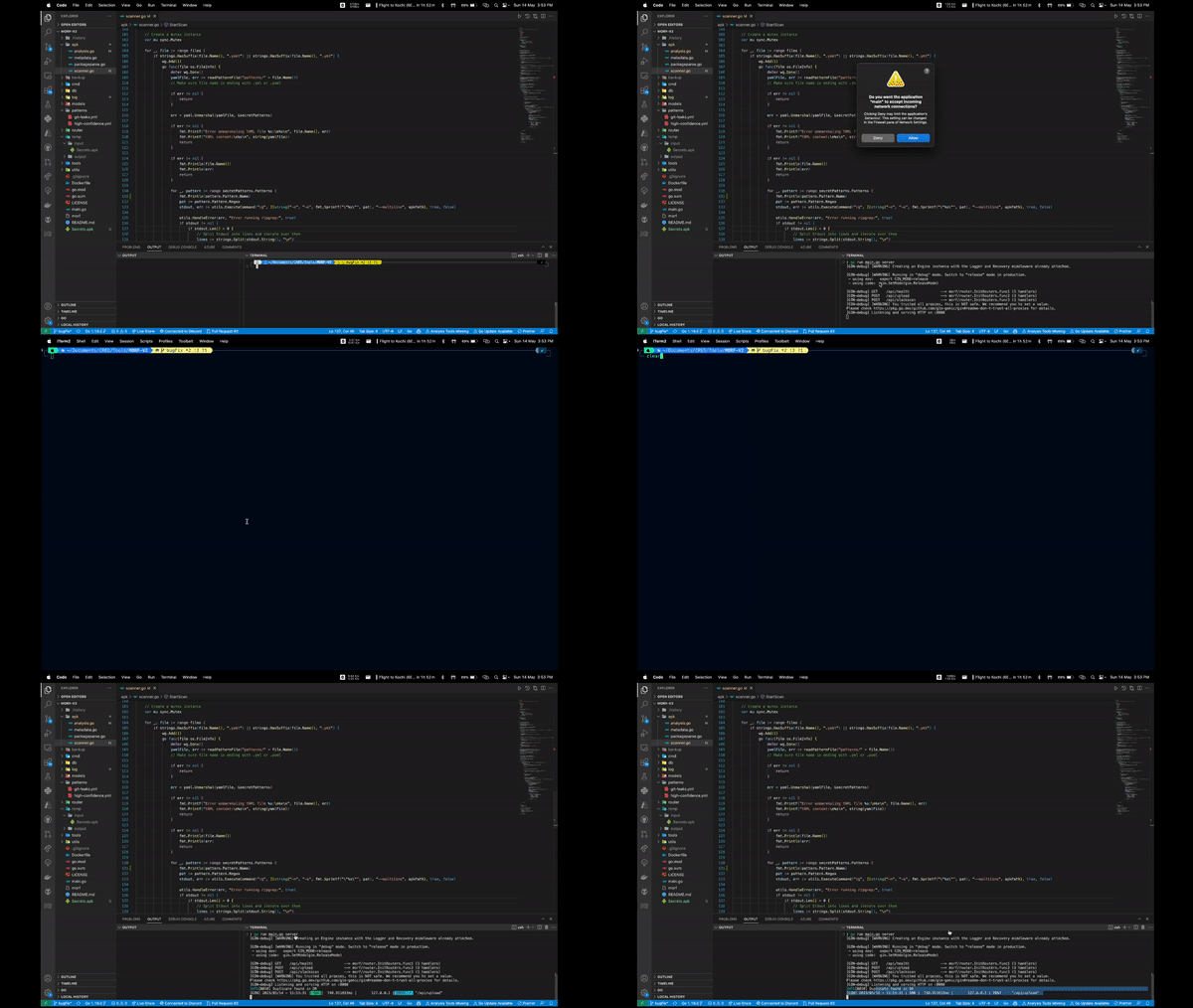
MORF Demo

🚀 Quick Start

MORF can be up and running in seconds using Docker or the included run script:

root@kitploit:~
# Clone the repository and enter directory
git clone https://github.com/amrudesh1/morf && cd morf

# Option 1: Using the run script (recommended)
chmod +x run.sh && ./run.sh

# Option 2: Using Docker Compose
docker-compose up --build

Then simply visit http://localhost in your browser and upload an APK or IPA file to begin analysis!


🔍 Key Features

MORF offers comprehensive security analysis capabilities for mobile applications:


🏗️ Architecture

MORF combines a Go backend with an Angular frontend for powerful analysis with an intuitive interface:
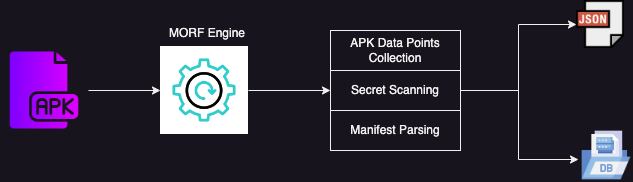
MORF Architecture


📋 Common Use Cases

Use CaseDescription

📦 Installation

Prerequisites

  • Docker (recommended for simplest installation)
  • Alternatively: Go and Node.js for development setup

Method 1: Docker (Recommended)

For macOS users, see README-LOCAL.md for detailed local development guide.

root@kitploit:~
# Clone the repository
git clone https://github.com/amrudesh1/morf
cd MORF

# Start all services (MySQL, Redis, Backend, Frontend)
./run-local.sh start

# Or using docker-compose directly
docker-compose up -d

Services will be available at:

  • Frontend: http://localhost
  • Backend API: http://localhost:9092/api
  • Health Check: http://localhost:9092/api/health

Common commands:

root@kitploit:~
./run-local.sh start    # Start all services
./run-local.sh stop     # Stop all services
./run-local.sh status   # Check service status
./run-local.sh logs     # View logs

Method 2: Run Script

root@kitploit:~
git clone https://github.com/amrudesh1/morf
cd morf
chmod +x run.sh
./run.sh

Environment Configuration

MORF requires the DATABASE_URL environment variable to connect to your database:

root@kitploit:~
# macOS/Linux
export DATABASE_URL="root@tcp(localhost:3306)/Secrets?charset=utf8mb4&parseTime=True&loc=Local"

# Windows (CMD)
set DATABASE_URL=root@tcp(localhost:3306)/Secrets?charset=utf8mb4&parseTime=True&loc=Local

# Windows (PowerShell)
$env:DATABASE_URL = "root@tcp(localhost:3306)/Secrets?charset=utf8mb4&parseTime=True&loc=Local"

Note: Docker Compose will automatically use the environment variables set on your host machine.


🖥️ Usage

Web Interface

After starting MORF, access the intuitive web interface at http://localhost and follow these steps:

  1. Upload your APK or IPA file using the drag-and-drop interface
  2. Wait for MORF to process and analyze the application
  3. Explore the detailed results, including:
    • Discovered secrets and API keys
    • Component security analysis
    • Permission assessment
    • Deeplink mapping
    • Comprehensive metadata

Command Line Interface

MORF also provides a powerful CLI for automation and integration:

root@kitploit:~
# Basic scan with console output
./morf cli --apk-path=/path/to/app.apk


🏆 Conference Recognition

Conference Appearances


🛣️ Development Roadmap

✅ v1.0 - Initial Release

  • APK scanning and analysis
  • Secret detection
  • Basic web interface

⏳ v1.1 - Enhanced iOS Support

  • Improved IPA analysis
  • iOS-specific pattern detection
  • Swift/Objective-C code scanning

⏳ v1.2 - Reporting Enhancements

  • PDF export functionality
  • Compliance reporting
  • Historical comparison views

⏳ v2.0 - Advanced Analysis

  • Machine learning-based vulnerability detection
  • Dynamic code analysis
  • Advanced threat modeling

👨‍💻 Authors


@amrudesh1

📄 License

MORF is released under the MIT License. See the LICENSE file for more details.


🙏 Acknowledgments

  • Secrets Patterns Database - Pattern database used by MORF for secret detection
  • Open Source Security Community - For inspiration, feedback and support
  • All Contributors - Everyone who has contributed code, feedback, and ideas to the MORF project

Back to top
Download Tool
FeatureDescription
🔐 Secret & API Key DetectionAutomatically discovers hardcoded credentials, API keys, and tokens throughout the application code and resources
📱 Component AnalysisExtracts activities, services, receivers, and content providers, highlighting security risks in app structure
🛡️ Permission AnalysisIdentifies overprivileged applications and highlights dangerous permission combinations
🔗 Deeplink InspectionMaps URL schemes and deeplink patterns that could potentially be exploited
📊 Metadata CollectionGathers extensive app metadata for security assessment and threat modeling
📜 Version ComparisonTracks security changes between app versions to identify fixes and regressions
🕵️ Security Audits
Pre-release scanning to identify security issues before apps reach production
🔍 Competitive AnalysisUnderstand security implementations in competitor applications
⚙️ CI/CD IntegrationAutomate security checks in your build pipeline with MORF's CLI capabilities
👨‍🏫 Security EducationTrain developers on secure mobile development using real-world examples

BlackHat Asia 2023

MORF was presented at the Arsenal section, showcasing its capabilities in mobile application security analysis and secret detection.

View Presentation

BlackHat US 2023

MORF was featured at BlackHat US 2023 Arsenal, demonstrating advanced mobile security reconnaissance techniques to security professionals.

View Presentation

BlackHat Europe 2024

MORF continues to gain recognition with its selection for BlackHat Europe 2024 Arsenal, highlighting its ongoing development and relevance in mobile security.

View Presentation

BlackHat Asia 2025

Looking ahead, MORF has been selected for BlackHat Asia 2025 Arsenal, demonstrating its continued evolution and importance in the mobile security landscape.

View Presentation


@abhi-r3v0

@himanshudas