 allinurl/goaccess
GoAccess is a real-time web log analyzer and interactive viewer that runs in a terminal in *nix systems or through your browser.


GoAccess is an open source, real-time web log analyzer and interactive viewer that runs in a terminal on *nix systems or directly in your browser. Designed with system administrators, DevOps engineers, and security professionals in mind, it delivers fast, actionable HTTP statistics and visual server reports on the fly. GoAccess parses your web server logs in real time and presents the data directly in the terminal or via a live HTML dashboard, making it easy to monitor traffic, detect anomalies, and troubleshoot issues instantly.
More info at: https://goaccess.io.
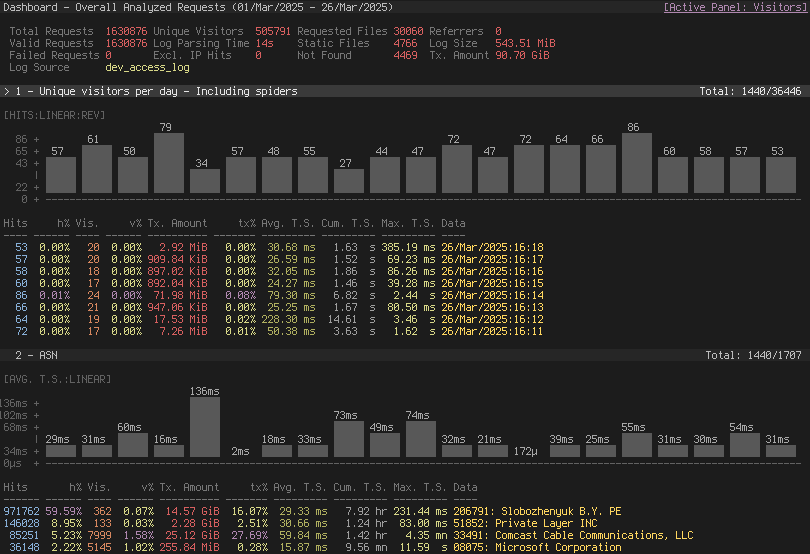
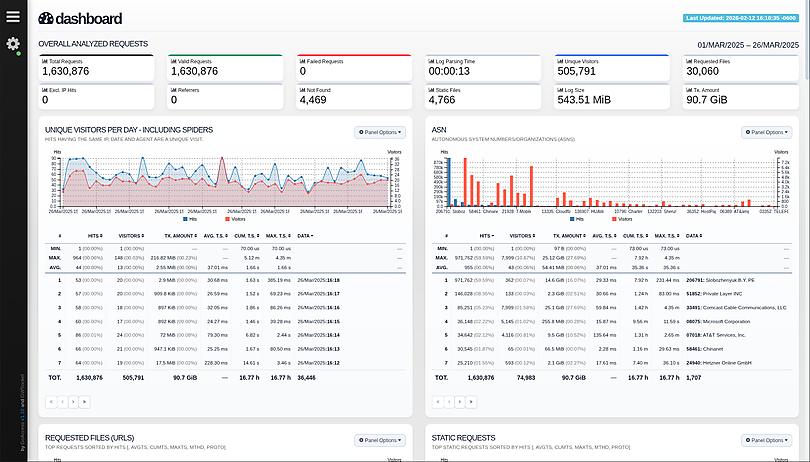
GoAccess parses the specified web log file and outputs the data to the X terminal. Features include:
Completely Real Time
All panels and metrics are timed to be updated every 200 ms on the terminal
output and every second on the HTML output.
Minimal Configuration needed
You can just run it against your access log file, pick the log format and let
GoAccess parse the access log and show you the stats.
Track Application Response Time
Track the time taken to serve the request. Extremely useful if you want to
track pages that are slowing down your site.
WebSocket Authentication:
GoAccess offers enhanced WebSocket authentication, supporting local and
external JWT verification, with secure token refresh capabilities and seamless
integration with external authentication systems.
Nearly All Web Log Formats
GoAccess allows any custom log format string. Predefined options include,
Apache, Nginx, Amazon S3, Elastic Load Balancing, CloudFront, etc.
Incremental Log Processing
Need data persistence? GoAccess has the ability to process logs incrementally
through the on-disk persistence options.
Only one dependency
GoAccess is written in C. To run it, you only need ncurses as a dependency.
That's it. It even features its own Web Socket server — http://gwsocket.io/.
Visitors
Determine the amount of hits, visitors, bandwidth, and metrics for slowest
running requests by the hour, or date.
Metrics per Virtual Host
Have multiple Virtual Hosts (Server Blocks)? It features a panel that
displays which virtual host is consuming most of the web server resources.
ASN (Autonomous System Number mapping)
Great for detecting malicious traffic patterns and block them accordingly.
Color Scheme Customizable
Tailor GoAccess to suit your own color taste/schemes. Either through the
terminal, or by simply applying the stylesheet on the HTML output.
Support for Large Datasets
GoAccess features the ability to parse large logs due to its optimized
in-memory hash tables. It has very good memory usage and pretty good
performance. This storage has support for on-disk persistence as well.
Docker Support
Ability to build GoAccess' Docker image from upstream. You can still fully
configure it, by using Volume mapping and editing goaccess.conf. See
Docker section below.
There is also documentation how to use docker-compose.
GoAccess allows any custom log format string. Predefined options include, but not limited to:
GoAccess was designed to be a fast, terminal-based log analyzer. Its core idea is to quickly analyze and view web server statistics in real time without needing to use your browser (great if you want to do a quick analysis of your access log via SSH, or if you simply love working in the terminal).
It also serves as a practical tool for security monitoring, making it easy to spot suspicious activity, unusual traffic patterns, brute-force attempts, scanners, bots, and anomalous requests directly from your logs.
While the terminal output is the default output, it has the capability to
generate a complete, self-contained, real-time HTML
report, as well as a JSON, and
CSV report.
You can see it more of a monitor command tool than anything else.

GoAccess can be compiled and used on *nix systems.
Download, extract and compile GoAccess with:
$ wget https://tar.goaccess.io/goaccess-1.10.2.tar.gz
$ tar -xzvf goaccess-1.10.2.tar.gz
$ cd goaccess-1.10.2/
$ ./configure --enable-utf8 --enable-geoip=mmdb --with-zlib
$ make
# make install
$ git clone https://github.com/allinurl/goaccess.git
$ cd goaccess
$ autoreconf -fiv
$ ./configure --enable-utf8 --enable-geoip=mmdb
$ make
# make install
It is easiest to install GoAccess on GNU+Linux using the preferred package manager of your GNU+Linux distribution. Please note that not all distributions will have the latest version of GoAccess available.
# apt-get install goaccess
Note: It is likely this will install an outdated version of GoAccess. To make sure that you're running the latest stable version of GoAccess see alternative option below.
$ wget -O - https://deb.goaccess.io/gnugpg.key | gpg --dearmor | sudo tee /usr/share/keyrings/goaccess.gpg >/dev/null
$ echo "deb [signed-by=/usr/share/keyrings/goaccess.gpg arch=$(dpkg --print-architecture)] https://deb.goaccess.io/ $(lsb_release -cs) main" | sudo tee /etc/apt/sources.list.d/goaccess.list
$ sudo apt-get update
$ sudo apt-get install goaccess
Note:
.deb packages in the official repo are available through HTTPS as well. You may need to install apt-transport-https.# yum install goaccess
# pacman -S goaccess
# emerge net-analyzer/goaccess
# brew install goaccess
# cd /usr/ports/sysutils/goaccess/ && make install clean
# pkg install sysutils/goaccess
# cd /usr/ports/www/goaccess && make install clean
# pkg_add goaccess
# zypper ar -f obs://server:http http
# zypper in goaccess
# pkg install goaccess
# pkgin install goaccess
GoAccess can be used in Windows through Cygwin. See Cygwin's packages. Or through the GNU+Linux Subsystem on Windows 10.
