
Evidence-oriented DAST scanner in Go that crawls web apps and APIs, then runs adaptive SQLi, XSS, RCE, SSRF, and auth checks with replayable proof.
Advanced Web Security Scanner
Discover endpoints. Test web applications. Inspect the evidence.
Installation · Usage · Workflow · Profiles · Coverage · Reports · Support · Features · Changelog
AKCA is an open-source, evidence-oriented Dynamic Application Security Testing (DAST) scanner written in Go. It combines HTTP and browser-assisted crawling, JavaScript analysis, API imports, adaptive active testing, passive inspection, and replayable evidence in one command-line workflow.
Many scanners crawl an application and then send a broad payload set to every discovered endpoint. That strategy can create unnecessary traffic, trigger defensive systems, and produce weak signals that require substantial manual triage. AKCA takes a more contextual approach: it first learns about the target, models the discovered attack surface, and then selects tests according to the technology stack, parameters, authentication state, WAF behavior, and available verification capabilities.
AKCA is designed to:
The goal is not to exhaust or overwhelm the target. It is to find real weaknesses with deliberate requests and useful evidence.
AKCA does not claim feature or detection parity with mature commercial platforms such as Acunetix, Invicti/Netsparker, or Burp Suite Professional. Those products are built by experienced teams over many years. AKCA is independently maintained by one developer in available personal time, inspired by established security tools and shaped by original ideas and community feedback. The current priority is a simple, useful, and transparent scanner. A graphical interface is planned when the engine is sufficiently stable and dependable.
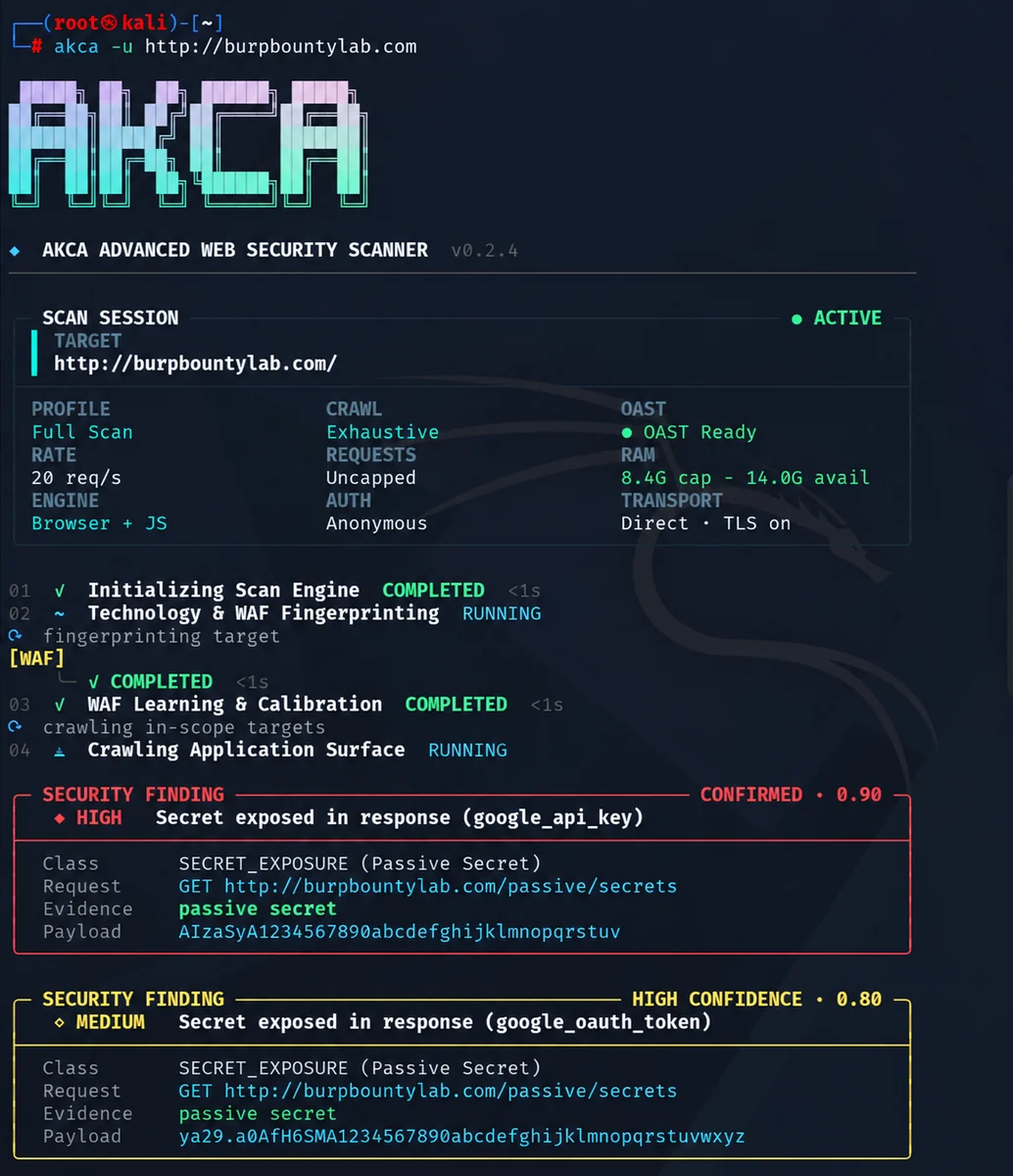
AKCA v0.2.4 scan session with live engine status, resource telemetry, and confirmed findings.
Requires Go 1.25 or newer.
go install github.com/akha-security/akca/engine/cmd/akca@latest
akca --version
For the default Go installation, add the Go binary directory to your current terminal's PATH.
Linux / macOS
export PATH="$(go env GOPATH)/bin:$PATH"
Add that line to your shell configuration to keep it across sessions.
Windows PowerShell
$env:Path += ";$(go env GOPATH)\bin"
For future sessions, add the same directory to your user Path environment variable. If you configured GOBIN, use that directory instead.
Download your build from GitHub Releases. Releases include SHA256SUMS.txt for checksum verification.
| Platform | Architecture | Asset |
|---|---|---|
| Linux | x64 / ARM64 | akca-linux-amd64 / akca-linux-arm64 |
| macOS | Intel / Apple Silicon | akca-darwin-amd64 / akca-darwin-arm64 |
| Windows | x64 | akca-windows-amd64.exe |
On Linux or macOS, make the downloaded file executable. For Linux x64:
chmod +x akca-linux-amd64
./akca-linux-amd64 --help
On Windows, rename the download to akca.exe and run .\akca.exe --help in PowerShell. The examples below assume akca is available on your PATH.
Browser-backed checks require Chrome, Chromium, or Edge.
Use AKCA only on systems you own or have permission to test. Replace the example URL with your authorized target.
akca -u https://example.com
The default profile is full. To save an HTML report:
akca -u https://example.com -f html -o report.html
Run SQL injection, XSS, and server-side injection checks, including SSTI:
akca -u https://example.com -m sql,xss,rce
Run passive checks:
akca -u https://example.com -m passive
Passive scans still send requests for discovery and inspection.
Supply a session cookie:
akca -u https://example.com -c "session=YOUR_SESSION_COOKIE"
Or an authorization header:
akca -u https://example.com -H "Authorization: Bearer YOUR_TOKEN"
Some authorization checks require additional identities or state configuration beyond a single session.
akca -u https://api.example.com --api-spec ./openapi.yaml -m api
Discovery supports OpenAPI/Swagger, RAML, Postman, HAR, GraphQL, WSDL, protobuf, and AsyncAPI inputs, including supported ZIP bundles. Testing coverage depends on the imported protocol and operation.
akca -u https://example.com -p http://127.0.0.1:8080
Run akca --help for all available options.
Use akca -h for concise everyday help, or akca --help for the complete option reference. Scan targets must be supplied explicitly with -u or --url.
Select a profile with -m, or combine several with commas.
| Profile | Checks |
|---|---|
full | All enabled active and passive modules; the default |
sql | SQL and NoSQL injection |
xss | Reflected, stored, DOM, and blind XSS; related client-side checks |
rce | Command injection, SSTI, deserialization, and related checks |
api | API exposure, BOLA/IDOR, BFLA, mass assignment, and token checks |
graphql | GraphQL schema and operation checks |
ssrf | SSRF, XXE, and related out-of-band checks |
auth | Authentication, authorization, CSRF, and cookie/header checks |
passive | Metadata, TLS, security headers, secrets, and component analysis |
fuzz | Paths, exposed artifacts, traversal, and related checks |
Execution depends on discovered endpoints, configuration, available verification capabilities, and scan limits. See FEATURES.md for the full capability guide.
AKCA uses a staged pipeline so later checks can benefit from facts learned earlier:
Coverage is explicit. A skipped, failed, budget-limited, or unfinished target is recorded as incomplete coverage; it is not silently treated as a clean security result.
The following list describes implemented discovery engines and security-test families. Individual checks run only when the discovered surface, scan profile, configuration, safety policy, and verification prerequisites make them applicable. A listed capability is not a guarantee that every variant of a vulnerability will be detected.
Set a total request budget and maximum duration:
akca -u https://example.com --request-budget 5000 --time-budget 30m
Or calculate the module budget from discovered URL/method combinations:
akca -u https://example.com --requests-per-target 200
AKCA distributes bounded module budgets across modules, URLs, and parameters. Unused allocations move forward to later work. A positive --request-budget takes precedence over --requests-per-target.
| Option | Purpose |
|---|---|
--request-budget 5000 | Cap total requests, including discovery, retries, and redirects |
--requests-per-target 200 | Derive the module budget from discovered URL/method combinations |
--crawler-budget 1000 | Limit discovery requests |
--time-budget 30m | Limit scan duration |
--rate-limit 5 | Limit requests per second |
--concurrency 4 | Limit concurrent workers |
By default, the module scan has no request quota. Budget interruptions are reported as incomplete coverage. Interrupted targets are not automatically resumed when later work returns unused budget. No budget setting guarantees detection of every vulnerability.
Linked API/service subdomains are outside the default target scope. To include linked subdomains under the same root:
akca -u https://www.example.com --include-linked-api-subdomains
AKCA's default Full Scan is designed around coverage and evidence quality, not the shortest possible completion time. Its runtime is therefore not directly comparable to tools that stop after a shallow HTTP crawl or report a vulnerability from a single response difference.
A comprehensive run may take longer because AKCA:
Scan duration also depends on application size, response latency, authentication flows, defensive controls, and the configured scope. For faster feedback, select only the relevant modules with -m or apply explicit crawl, request, and time budgets. Increase rate and concurrency only when the authorized target can safely handle the additional traffic. A shorter scan is not necessarily a more complete scan.
Choose an output format with -f and a file path with -o:
akca -u https://example.com -f html -o report.html
Supported formats: HTML, JSON, Markdown, CSV, and SARIF. Each invocation starts a new scan.
HTML reports are self-contained and include the AKCA logo, risk and severity summaries, vulnerability statistics, structured finding details, and expandable HTTP evidence. Request and response tabs support a combined view, full-content expansion, and copying. Where a finding preserves a matching response value, AKCA highlights it in yellow, helping you locate a reflected payload or exposed secret. Passive secret findings retain an excerpt around the match.
Depending on the module, findings include:
Timing findings, missing headers, and external callbacks may have no response text to highlight. Their verification context supplies the relevant evidence.
When the scanner stored a complete raw transaction, the report preserves it exactly. Older or structured-only evidence is rendered in a conventional Burp-style HTTP layout with a request line, ordered headers, a header/body separator, and standard HTTP response reason phrases. If the transport capture limit truncated a response, the report says so explicitly; it never presents the stored portion as the unavailable complete response.
Replay a stored finding:
akca replay --finding 42
Reports mask recognized credentials by default. Raw stored evidence is preserved for replay. Set redact_reports to false in scan configuration, or use redact=false on the report API, only when raw exports are needed. Review reports before sharing: automatic masking cannot recognize every application-specific secret.
The crawler retains one browser session throughout each crawl phase, including cookies and browser storage. It explores explicit non-form tabs and expandable panels; it does not auto-fill or submit forms. Browser requests still obey scope and request budgets. For required third-party static dependencies, configure exact hostnames separately:
{
"browser_resource_domains": ["cdn.example.com"],
"redact_reports": true
}
This permits only GET/HEAD script, stylesheet, image, font and media requests to those hosts, stripping credential and custom headers. It does not add those hosts to the active scan scope or permit cross-origin API calls. Blocked browser dependencies produce coverage-gap events.
Discovered URLs are retained even when they cannot be visited. A crawl that exhausts its budget with queued work produces a partial scan and a nonzero CLI exit code. Module preflight messages distinguish missing identity/state policies from configured verification capabilities.
Unconfigured rate-limit checks produce observations, not vulnerability findings. A configured threshold proof also requires window_seconds; if the requests do not fit inside that window, the check is inconclusive. SQLi does not treat a 400 response or arithmetic evaluation alone as proof. New vendor-specific SQL errors in 400/422 responses must pass the replay and control verification path.
See CHANGELOG.md for release details.
AKCA does not accept sponsorships or personal donations. Code contributions, testing, documentation, and thoughtful feedback are always welcome.
Projeye maddi olarak destek olmak istiyorsanız, bana göndermek yerine Mehmetçik Vakfı, AFAD, Türk Kızılay veya Çocuk Hizmetleri Genel Müdürlüğü aracılığıyla desteklenen güvenilir sosyal yardım çalışmalarından birine bağış yapmanızı rica ediyorum. Mümkünse bağışınızı kızım Akça Aktaş adına yapın. Bağıştan sonra X üzerinden @caneraktas_ hesabına mesaj göndermeniz beni gerçekten çok mutlu eder.
If you would like to support the project financially, please donate to a reputable charity in your country that helps children, disaster-affected communities, veterans, or people in urgent need. When possible, make the donation in the name of my daughter, Akça Aktaş. You are welcome to share it with me on X at @caneraktas_; knowing that this project inspired a helpful act would mean a great deal to me.
Build from source:
git clone https://github.com/akha-security/akca.git
cd akca/engine
go build -buildvcs=false -trimpath -o ../akca ./cmd/akca
On Windows, use -o ../akca.exe for the executable name.
Run checks from the engine directory:
go test ./... -count=1
go vet ./...
go run ./cmd/akca benchmark --strict
The benchmark measures its observed corpus. For implementation details and verification limitations, read the architecture guide and verification audit.
Contributions are welcome. Read CONTRIBUTING.md and the Code of Conduct before opening a pull request. Report vulnerabilities in AKCA through SECURITY.md.
Apache License 2.0 · Copyright 2026 AKHA Security contributors.
