 ahmedkhlief/ninja
Open source C2 server created for stealth red team operations

More information : https://www.linkedin.com/posts/ahmed-khlief-499321a7_i-just-pushed-a-quick-update-to-ninjac2-to-activity-6937661951007170560-Tmps
New feature including : check URL for more info on features and how to use AWS EC2 automation :
check the new features here : https://shells.systems/ninjac2-v2-1-new-webshell-agent-more-features-and-updated-av-bypass/
Ninja V2.0 rebuilt to use python3 with new features :
Ninja C2 is an Open source C2 server created by Purple Team to do stealthy computer and Active directoty enumeration without being detected by SIEM and AVs , Ninja still in beta version and when the stable version released it will contains many more stealthy techinques and anti-forensic to create a real challenge for blue team to make sure all the defenses configured correctly and they can detect sophisticated attacks.
Ninja use python to server the payload and control the agents . the agents are based on C# and powershell which can bypass leading AVs . Ninja comunicate with the agents in secure channel encrpyted with AES-256 and the key is not hard coded but randomly generated on the campaign start , every agent connect to the C2 get the key and if the C2 restarted a new key will be used by all old agents and the new. Ninja also randomize the callback URLs for every campaign to bypass static detection.
Ninja is designed to be easy to setup and to add more commands and do automation for boring tasks. you can find many short commands that a red teamer struggle to memorize and search for them. please check this article to know more about ninja : https://shells.systems/introducing-ninja-c2-the-c2-built-for-stealth-red-team-operations/
Ninja is packed with a number of features that allows you to gain an insight into your upcoming engagement before you actually need to deploy your full aresenal or tools and techniques, such as:
please note that compling C# depends on the System.Management.Automation.dll assembly with SHA1 hash c669667bb4d7870bc8bb65365d30071eb7fb86fe.
Some Ninja Commands require below modules ( already exist in modules ) which you need to get updates from their repo :
Invoke-Kerberoast : https://raw.githubusercontent.com/xan7r/kerberoast/master/autokerberoast.ps1
Invoke-Mimikatz : https://github.com/PowerShellMafia/PowerSploit/blob/master/Exfiltration/Invoke-Mimikatz.ps1
Sharphound : https://github.com/BloodHoundAD/BloodHound/blob/master/Ingestors/SharpHound.ps1
PowerView : https://github.com/PowerShellEmpire/PowerTools/blob/master/PowerView/powerview.ps1
First of all make sure to download the latest version of Ninja using the following command :
git clone https://github.com/ahmedkhlief/Ninja/
You need to setup Ninja by running install.sh script :
chmod +x ./install.sh
sudo ./install.sh
After that you need to initialize the campagin :
python3 start_campaign.py
Now you can start the Ninja server :
python3 Ninja.py
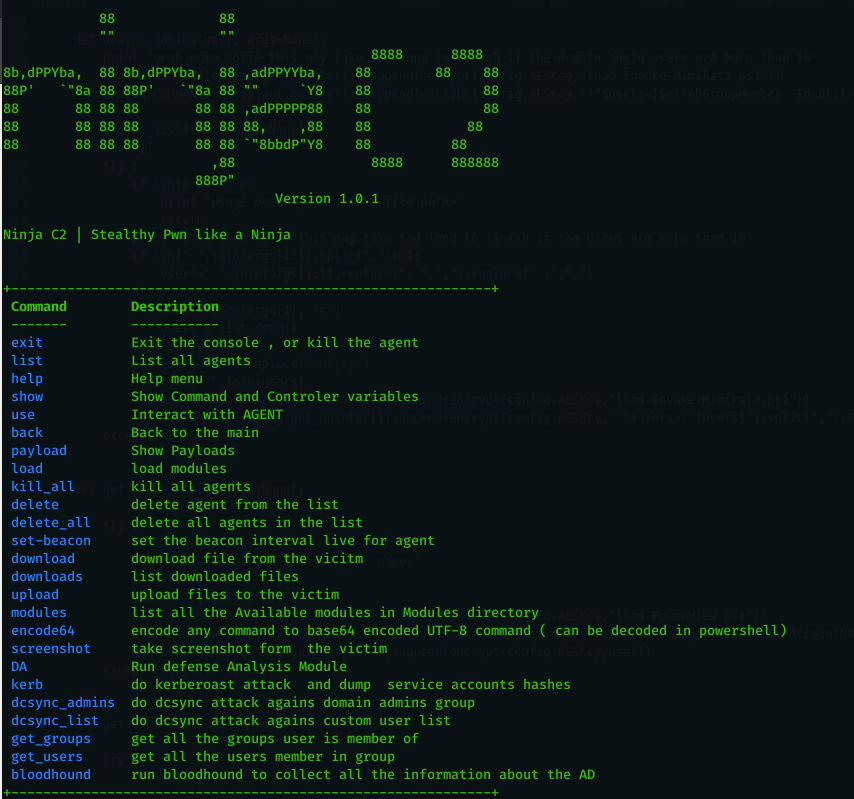
You will by greeted with the following once you run it :
            88             88
            ""             ""
                                              88888      8888
8b,dPPYba,  88 8b,dPPYba,  88 ,adPPYYba,    88        88    88
88P'   `"8a 88 88P'   `"8a 88 ""     `Y8    88              88
88       88 88 88       88 88 ,adPPPPP88    88              88
88       88 88 88       88 88 88,    ,88    88            88
88       88 88 88       88 88 `"8bbdP"Y8    88          88
                          ,88                 88888      888888
                        888P"
					    V2.0


 Ninja C2 | Stealthy Pwn like a Ninja
