 ahmed-alnassif/androsh
AndroSH No-Root Multi-Distro Linux on Android via Shizuku/ADB - Run Arch, Fedora, Alpine, Debian, Ubuntu, Kali, Void, Manjaro, OpenSUSE & Chimera with full system integration, proot isolation & Termux:X11 GUI.

# AndroSH - Run Linux Distributions on Android (No Root, ADB/Shizuku Powered)
<div align="center">
**Run and manage full Linux distributions on your Android device - no root required.**
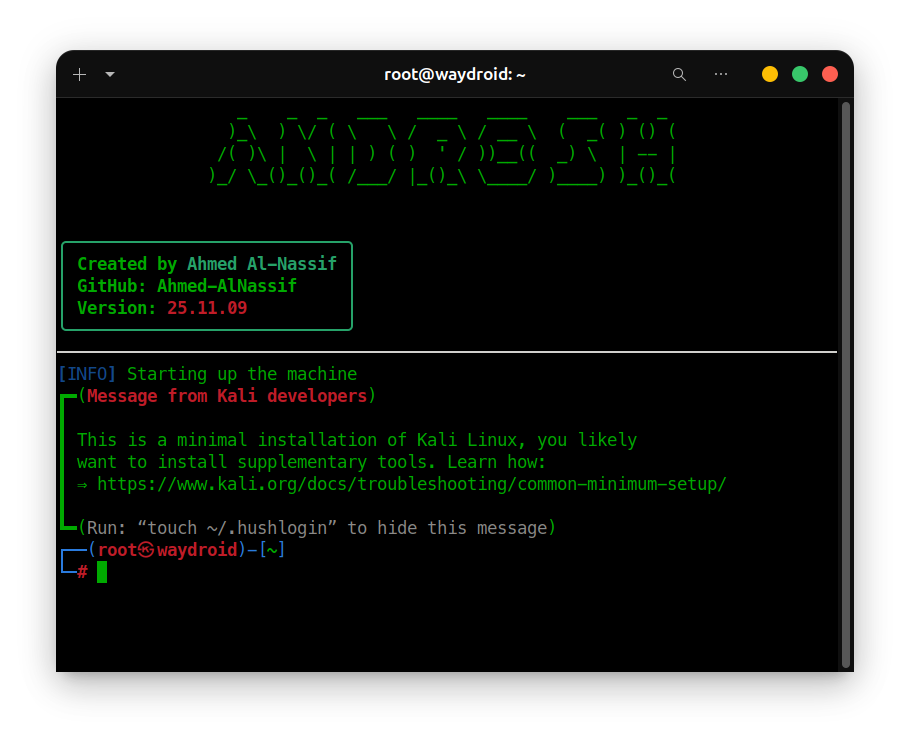
<img src="https://raw.githubusercontent.com/ahmed-alnassif/androsh/main/Assets/docs/AndroSH.png" alt="AndroSH" width="98%" />
[](https://github.com/ahmed-alnassif/AndroSH/actions/workflows/tests.yml)
[](https://github.com/ahmed-alnassif/AndroSH/stargazers)
[](https://github.com/ahmed-alnassif/AndroSH/releases)
[](https://python.org)
[](/LICENSE)
[](https://www.android.com)
<img src="https://assets.kitploit.com/production/public/readmes/9438/a4edb8815ebca0fde7738d96503897a680bcd0aaf4c21f1b329f30c3a56b6ec3.png" alt="AndroSH Mobile Showcase" width="90%" />
</div>
## Table of Contents
- [Quick Start](#quick-start)
- [Features](#features)
- [Supported Distributions](#supported-distributions)
- [Overview](#overview)
- [Screenshots](#screenshots)
- [Architecture](#architecture)
- [Installation](#installation)
- [Updating](#updating)
- [Usage](#usage)
- [Use Cases](#use-cases)
- [Security & Privacy](#security--privacy)
- [Components & Sources](#components--sources)
- [Troubleshooting](#troubleshooting)
- [Contributing](#contributing)
- [License](#license)
- [Author](#author)
- [Support](#support)
## Quick Start
> [!Important]
> **Before you start:** install and run [Shizuku](https://github.com/RikkaApps/Shizuku/releases/latest) first. If you're new to AndroSH, read the full [Installation](#installation) section below - it covers Shizuku setup and troubleshooting.
```bash
# In Termux
apt update && apt install -y python git
git clone --depth 1 https://github.com/ahmed-alnassif/AndroSH.git
cd AndroSH
pip install -r requirements.txt
python main.py install
androsh setup demo --distro debian --type stable
androsh launch demo
```
## Features
- **Multi-distro**: run several Linux distributions side by side (Arch, Fedora, Alpine, Debian, Ubuntu, Kali, Void, Manjaro, Chimera, openSUSE)
- **ADB/Shizuku-powered Linux**: run full Linux distributions through Android's elevated Shell layer, with direct Android system integration - no root required
- **SQLite-backed**: fast, reliable tracking of your environments
- **Isolated**: each Linux environment runs through PRoot with userspace filesystem/process isolation
- **GUI support**: works with Termux:X11 for a full desktop environment - [setup guide](https://github.com/ahmed-alnassif/AndroSH/discussions/6#discussioncomment-15720947)
## Supported Distributions










Every distribution above ships from a verified rootfs source and runs in an isolated proot environment - no root required.
## Overview
AndroSH lets you deploy and manage multiple full Linux distributions on Android by running PRoot through the ADB/Shizuku execution layer. This provides elevated Android-side execution without root while retaining direct Android system integration from inside the Linux environments.
| Capability | AndroSH | Typical Alternatives |
|---|---|---|
| Multiple distros at once | Yes | Usually one distro only |
| Environment management | SQLite + CLI | Manual file handling |
| Android system integration | ADB/Shizuku execution | Varies by solution |
| Multiple isolated instances | Yes | Single instance |
| Root required | No (ADB/Shizuku) | Often requires bootloader unlock |
## Screenshots
| Command | Preview | What it shows |
|---|:---:|---|
| `androsh launch kali` | [View](https://github.com/ahmed-alnassif/androsh/blob/main/Assets/Screenshots/launch-kali.png) | Launching the Kali NetHunter environment |
| `androsh list` | [View](https://github.com/ahmed-alnassif/androsh/blob/main/Assets/Screenshots/list-available.png) | All available distributions |
| `androsh lsd` | [View](https://github.com/ahmed-alnassif/androsh/blob/main/Assets/Screenshots/list-installed.png) | Environments you've already installed |
## Architecture
```
Android Device → ADB/Shizuku Execution Context→ Proot Virtualization → Linux Environment(s)
```
```mermaid
graph TD
A[Android Device] --> B[ADB / Shizuku]
B --> C[Android Shell Execution Context]
C --> D[PRoot]
D --> E[Alpine]
D --> F[Debian]
D --> G[Ubuntu]
D --> H[Kali NetHunter]
E --> I[Android System Integration]
F --> I
G --> I
H --> I
I --> K[Android Command Execution]
I --> L[Android Filesystem Access]
I --> M[Android Network Access]
style D fill:#FF6B00,color:white
style I fill:#4CAF50,color:white
```
From inside any distro, you can reach into the Android system directly:
```bash
# List installed Android packages
pm list packages -f
# Kernel info
cat /proc/version
# Android system properties
getprop | grep version
# Network routes
ip route show
```
## Installation
### Requirements
- Android device with [Shizuku](https://github.com/RikkaApps/Shizuku/releases/latest) installed and running
- Python 3.8+
- [Termux](https://github.com/termux/termux-app/releases/latest) or a compatible terminal emulator
- At least 2 GB free storage
### Setup
```bash
# Install prerequisites in Termux
apt update && apt install -y python git
# Get AndroSH
git clone --depth 1 https://github.com/ahmed-alnassif/AndroSH.git
cd AndroSH
# Install dependencies
pip install -r requirements.txt
# Make the `androsh` command available globally
python main.py install
```
> [!Tip]
> when you run `androsh setup`, AndroSH automatically checks whether Shizuku is configured correctly and walks you through fixing it if not.
## Updating
```bash
cd AndroSH
git pull
pip install -r requirements.txt
```
## Usage
### Deploy an environment
```bash
androsh setup production --distro debian --type stable
```
### Launch it
```bash
androsh launch production
# You're now root inside the Debian environment
root@localhost:~# apt update && apt install python3 git
```
### Manage environments
```bash
androsh list # See what's available to install
androsh lsd # See what's already installed
androsh clean production # Free up space / remove temp files
androsh remove production --force # Delete an environment
```
### Manage distributions directly
```bash
androsh distro list # List available distros
androsh distro info ubuntu # Get details on a distro
androsh distro download alpine --type alpine-minirootfs --file alpine-edge.tar.gz
```
### Full command reference
See [AndroSH_Help.md](https://github.com/ahmed-alnassif/androsh/blob/main/Assets/docs/AndroSH_Help.md) for every command and flag, including verbosity control (`--verbose` / `--quiet`) and timestamp formatting (`--time-style`).
## Use Cases
**Learning Linux**
```bash
androsh setup classroom --distro ubuntu --type stable
apt install gcc python3-dev git curl wget
```
**Security research / penetration testing**
```bash
androsh setup pentest --distro kali-nethunter --type full
apt install nmap metasploit-framework wireshark
```
**Lightweight dev environments**
```bash
androsh setup devops --distro alpine --type alpine-minirootfs
apk add build-base git nodejs npm docker-cli
```
**On-the-go workstation**
```bash
androsh setup field --distro debian --type stable
apt install vim tmux htop net-tools
```
**Running several environments at once**
```bash
androsh setup frontend --distro ubuntu -t stable
androsh setup backend --distro debian -t stable
androsh setup security --distro kali-nethunter -t nano
androsh lsd
```
## Security & Privacy
- **Android privilege boundary**: Android-side operations run within the permissions available to the ADB/Shizuku execution context; no Android root is required.
- **Process isolation**: each environment runs sandboxed via proot
- **Integrity checks**: SHA-256 checksums validate every download
- **No telemetry**: zero data collection, everything stays local on your device
- **Open source**: every component is auditable
## Components & Sources
| Component | Source | Purpose |
|---|---|---|
| PRoot | [ahmed-alnassif/proot](https://github.com/ahmed-alnassif/proot) | Statically linked, Android-optimized automated builds |
| BusyBox NDK | [Magisk-Modules-Repo/busybox-ndk](https://github.com/Magisk-Modules-Repo/busybox-ndk) | Core Unix utilities (tar, grep, awk, etc.) for Android |
Build pipelines: [PRoot builder](https://github.com/ahmed-alnassif/proot) · [BusyBox NDK sources](https://github.com/ahmed-alnassif/busybox) · [AndroSH core](https://github.com/ahmed-alnassif/AndroSH)
All dependencies are traceable to their upstream sources and kept in sync with security updates.
## Troubleshooting
**Reset a broken environment**
```bash
androsh setup <distro> --distro debian -t stable --resetup
```
**Clean up temp files**
```bash
androsh clean <distro>
```
**Reinstall the global `androsh` command**
```bash
cd AndroSH
python main.py install
```
**Shizuku issues**
- Confirm Shizuku is running and AndroSH is authorized in it
- If problems persist, reboot the device to restore the Shizuku service
## Contributing
Contributions of all kinds are welcome - code, documentation, bug reports, feature ideas, translations, testing, or just sharing feedback. Whether you're fixing a typo or adding support for a new distro, every contribution helps.
Ways to get involved:
- **Code**: fix bugs, add features, improve performance
- **Documentation**: improve the README, write guides, add examples
- **Testing**: try AndroSH on different devices/Android versions and report what you find
- **Bug reports**: open an issue with clear steps to reproduce
- **Feature requests**: suggest ideas or workflows you'd like to see supported
- **Community support**: help answer questions in issues/discussions
No contribution is too small - if you're not sure where to start, open an issue and ask.
Set up a dev environment:
```bash
git clone https://github.com/ahmed-alnassif/AndroSH.git
cd AndroSH
python -m venv venv
source venv/bin/activate
pip install -r requirements.txt
```
## Contributors
[](https://github.com/ahmed-alnassif/AndroSH/graphs/contributors)
## License
GPLv3 - free for commercial and research use.
## Author
**Ahmed Al-Nassif**
- GitHub: [@ahmed-alnassif](https://github.com/ahmed-alnassif)
## Support
- **Star the repo** if you find it useful - it helps others discover the project
- **Share it** with friends, communities, or on social media if AndroSH has been useful to you
- **Open an issue** to report bugs
- **Start a discussion** to suggest features or ask questions
- **Share your use case** - tell us how you're using AndroSH, it helps shape future development
- **Spread the word** by writing about it, making a video, or recommending it wherever Android/Linux enthusiasts hang out
Every bit of support, big or small, helps keep the project growing.
---
<div align="center">
*Professional Linux environments in your pocket - without requiring Android root.*
</div>