
Skip to content
KitploitKITPLOIT
ToolsBlog
Submit
ToolsBlog
Submit

Hacking, PenTest, and Cybersecurity Tools for Your Security Arsenal!

Kitploit is a directory of hacking, cybersecurity, and pentesting tools. Discover the latest project updates to find vulnerabilities, analyze systems, automate testing, and strengthen your security.

··Feeds·Contact·Privacy·© 2026 Kitploit

Tool Directory

Categories

View all categories
Loading categories
screenscrub — Find credentials in screenshots, save them to your secret manager, and irreversibly redact them from the image — local, offline, OCR-based. | Kitploit
Tools/GitHubGitHub/adversis/screenscrub
OSINT (Open Source Intelligence)Password CrackingData ExfiltrationInformation GatheringPenetration TestingSecret Detection
GitHubadversis/screenscrub

screenscrub

Find credentials in screenshots, save them to your secret manager, and irreversibly redact them from the image — local, offline, OCR-based.


View Repository
61 month agoNot yet reviewed

Most Popular

View all →

Discover the most used tools by our community.

Explore all tools

Browse our collection of tools

View all tools →
Share
screenscrub

screenscrub

Find credentials in screenshots, extract them to a secret manager, and irreversibly redact them from the images — so secrets don't rot in your notes, screenshots, and ~/Desktop.

Local. Offline. Silent. No network, no telemetry by default.

screenscrub bridges two existing tool categories: GUI redactors (Xnapper, Shhshot, macshot) blur PII by hand but can't tell a secret from an address or capture what they hide; secret scanners (gitleaks, TruffleHog) find real credentials but only in text, never in a PNG. screenscrub brings gitleaks-grade detection — plus a red-team pack and entropy analysis — to pixels, headlessly: it captures each secret to your manager, irreversibly redacts the image, and re-OCRs the result to prove the secret is gone.

A safety net, not a guarantee — screenscrub never claims an image is "guaranteed clean"; OCR and detection both miss things, so always eyeball the results. Read this before you rely on it.

root@kitploit:~
screenscrub scan   ~/Screenshots                 # dry run: detect + report, no writes
screenscrub clean  ~/Screenshots --out ~/clean \ # extract, redact, verify, quarantine
    --sink file://./secrets.age --yes
screenscrub verify ~/clean                       # prove a folder is clean (exit≠0 if not)

screenscrub clean --keep-originals ./tmp
Cleaning 7 image(s) in ./tmp (7 worker(s))…
[1/7] tmp/ssh.jpg — 6 region(s) → tmp/ssh.redacted.jpg ✓ verified
[2/7] tmp/key.jpg — 13 region(s) → tmp/key.redacted.jpg ✓ verified
[3/7] tmp/test2.jpg — 12 region(s) → tmp/test2.redacted.jpg ✓ verified
[4/7] tmp/test5.jpg — 13 region(s) → tmp/test5.redacted.jpg ✓ verified
[5/7] tmp/test3.jpg — error: verification failed: 4 secret region(s) still detectable in tmp/test3.redacted.jpg; original preserved
[6/7] tmp/test4.jpg — error: verification failed: 9 secret region(s) still detectable in tmp/test4.redacted.jpg; original preserved
[7/7] tmp/test6.jpg — error: verification failed: 7 secret region(s) still detectable in tmp/test6.redacted.jpg; original preserved

7/7 file(s) flagged, 382 region(s) total, 3 file(s) errored/unverified.
By kind:
   high-entropy             343
   keyword-secret           15
   db-connection-uri        10
   github-pat               6
   unix-crypt-hash          6
   aws-access-key           1
   stripe-key               1
Needs manual attention (3):
   tmp/test3.jpg — error: verification failed: 4 secret region(s) still detectable in tmp/test3.redacted.jpg; original preserved
   tmp/test4.jpg — error: verification failed: 9 secret region(s) still detectable in tmp/test4.redacted.jpg; original preserved
   tmp/test6.jpg — error: verification failed: 7 secret region(s) still detectable in tmp/test6.redacted.jpg; original preserved
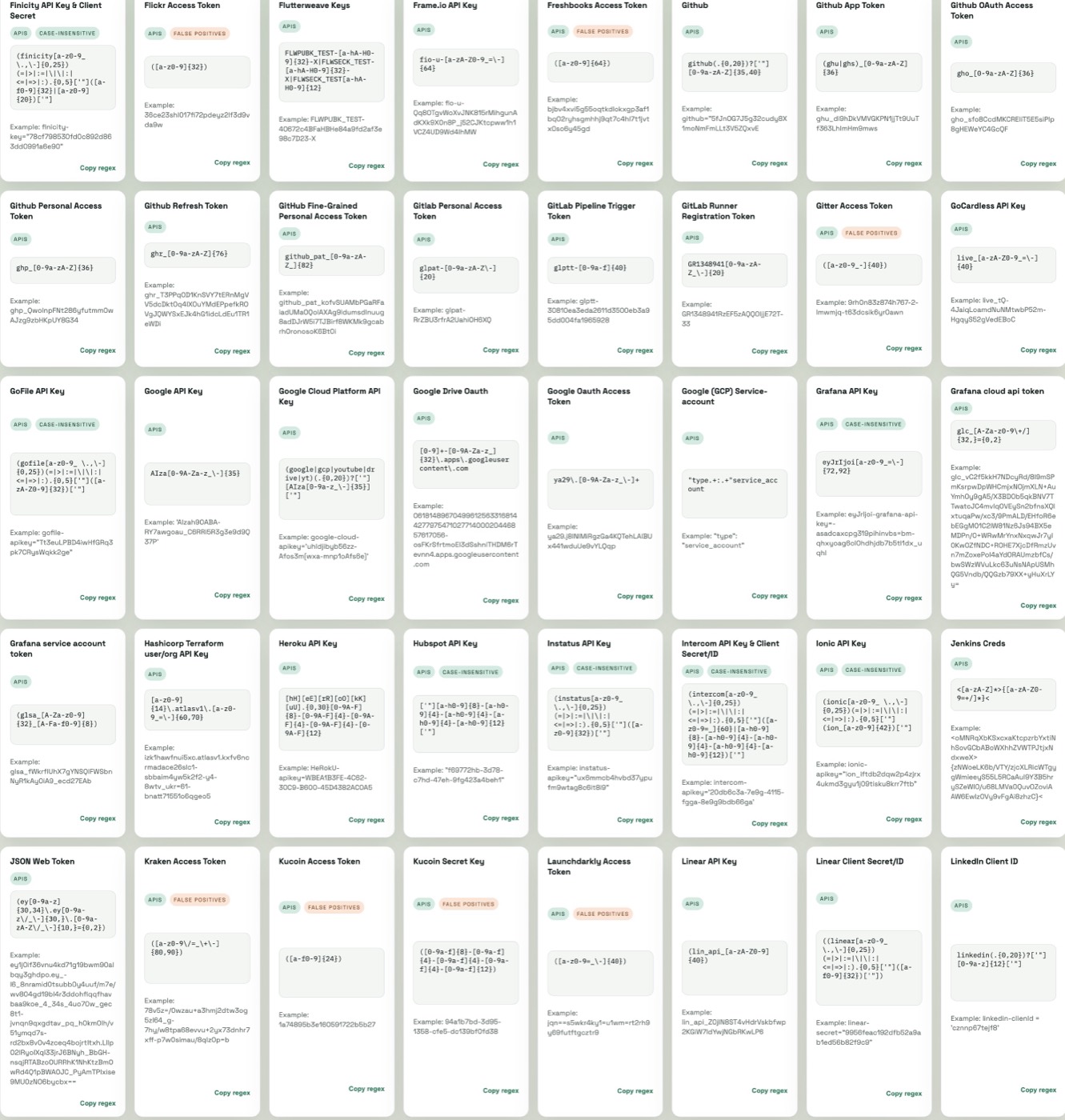
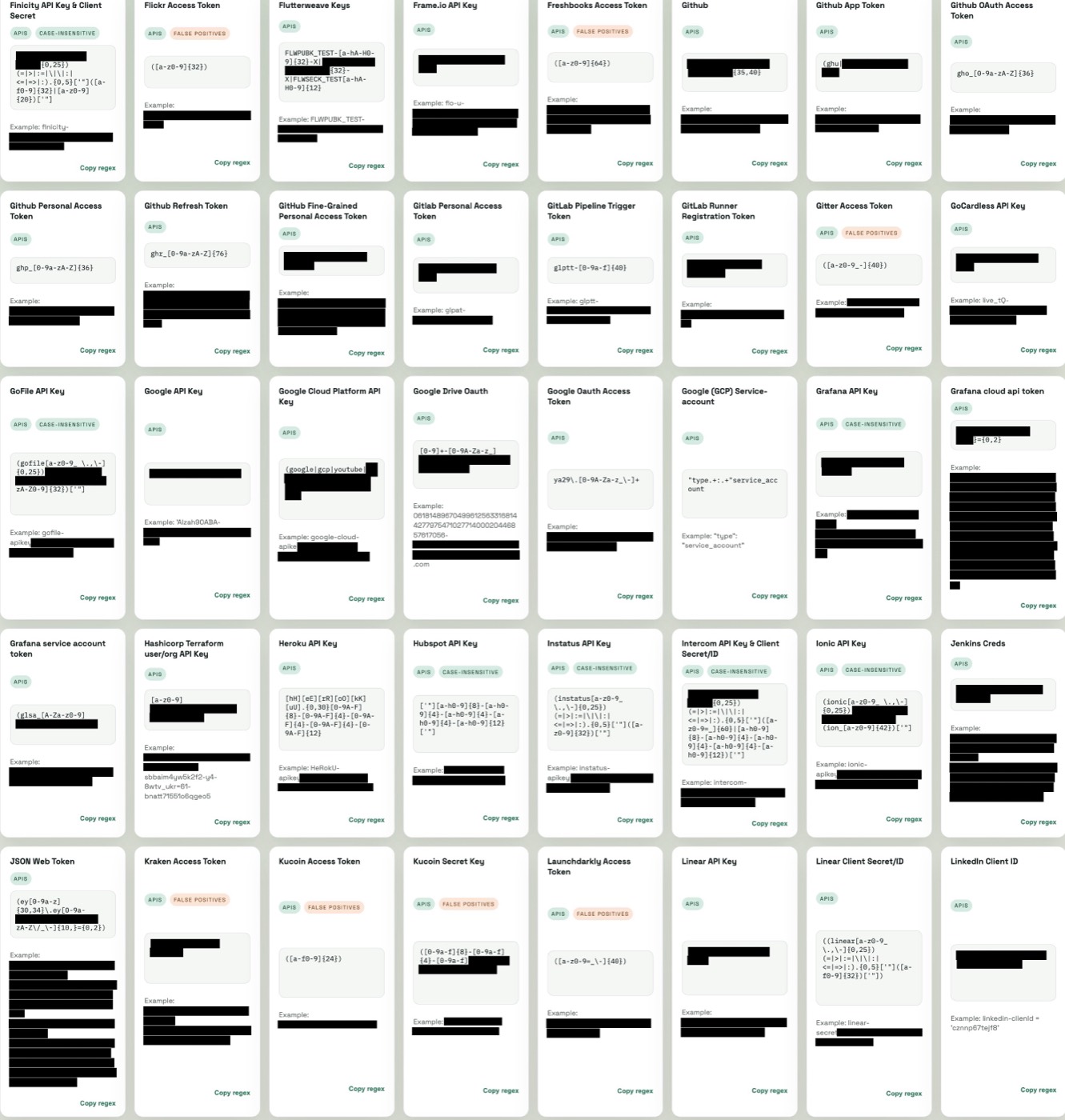
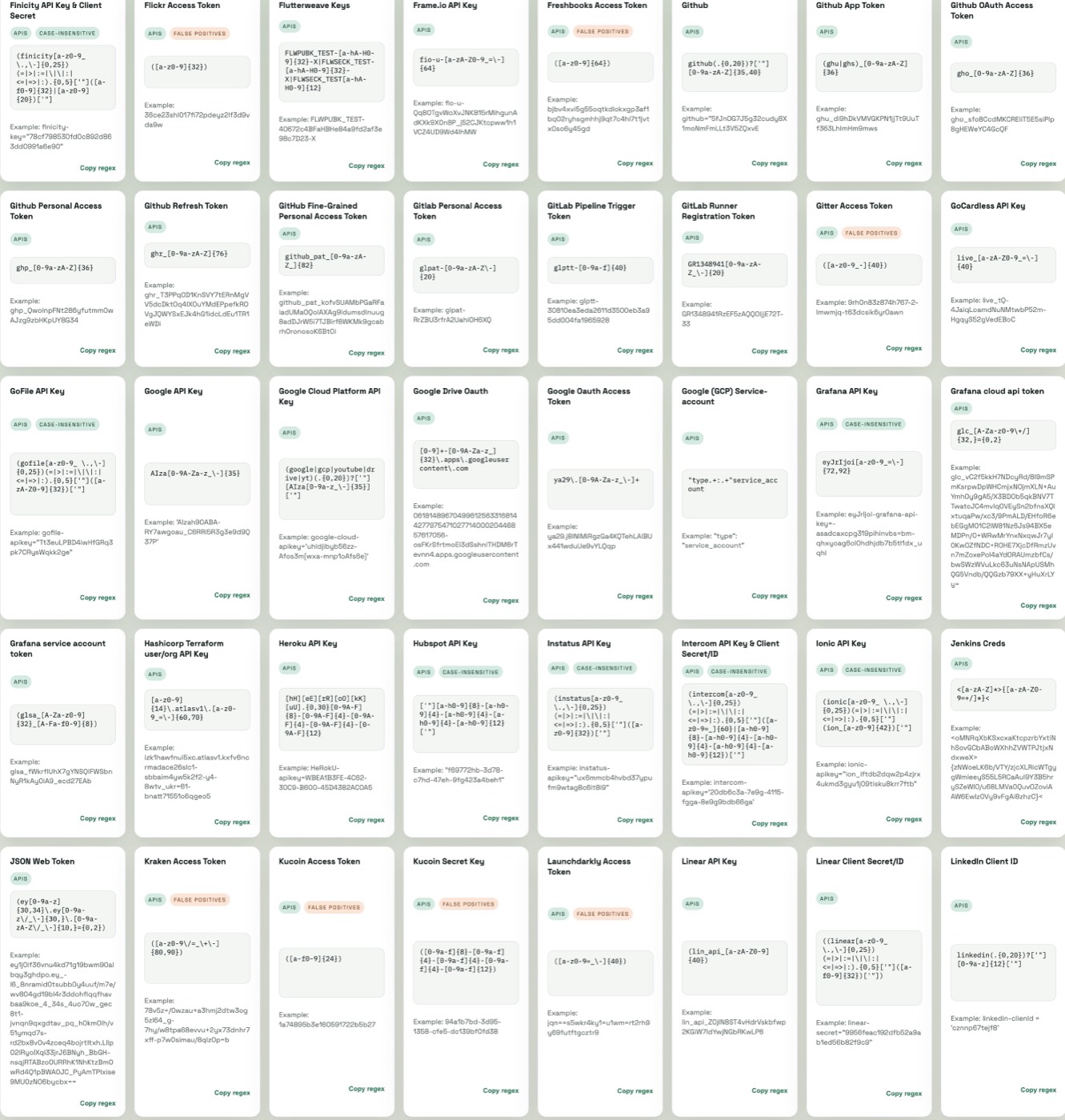
Before — secret values visibleAfter clean — irreversibly redacted
original screenshot: dozens of API-key example values visible

The same screenshot before and after clean: every secret value is decoded to pixels, boxed, and re-encoded to a new image (irreversible) — labels and structure stay readable.


Install

Requires the tesseract OCR binary on PATH:

  • macOS: brew install tesseract
  • Windows: winget install UB-Mannheim.TesseractOCR (or the UB Mannheim installer)
  • Debian/Ubuntu: apt-get install tesseract-ocr

Then build:

root@kitploit:~
go build -o screenscrub ./cmd/screenscrub

Cross-compiles to macOS (arm64/amd64) and Windows (amd64) — it shells out to tesseract rather than using cgo. Only tested on macOS.

Usage

scan <dir|file> — dry run

Detects and reports; writes nothing.

root@kitploit:~
screenscrub scan ~/Screenshots --ignore 'node_modules/**' --ignore '*.thumb.png'
screenscrub scan shot.png --json            # machine-readable report
screenscrub scan ~/Screenshots --preview ~/review   # eyeball what clean would redact

--preview <dir> writes a non-destructive copy of each flagged image with every detected region outlined (not filled), so you can confirm what clean would redact before committing. ⚠️ These copies still contain the secrets — the dir is created 0700 and must not be shared.

The report ends with a rollup: a per-kind breakdown and an explicit "Needs manual attention" list — files that errored, failed verification, or produced no OCR text on what should be a screenshot (a silent OCR miss reads identically to a clean image, so it's surfaced rather than trusted).

scan --fail-on-findings exits non-zero when anything is detected — a pre-commit/CI gate.

clean <dir|file> — extract, redact, quarantine

root@kitploit:~
SCREENSCRUB_PASSPHRASE=… screenscrub clean ~/Screenshots \
    --out ~/Screenshots/clean \
    --sink file://./secrets.age \
    --yes

For each image with findings, clean:

  1. stores every secret in the sink,
  2. writes <name>.redacted.png to --out (or beside the source),
  3. moves the original into <out>/quarantine/ encrypted with age.

Secrets go to whichever sink you pass to --sink: age file (default), 1Password (op://), KeePassXC (keepassxc://), macOS Keychain (keychain://), or HashiCorp Vault (vault://) — or hardware-backed age recipients (YubiKey, Touch ID). See Secret sinks.

Flags:

--exclude-kind and --min-confidence are local (no network) precision knobs for a noisy corpus — the offline counterpart to --llm. They trade recall for a quieter report, so use them deliberately. Both also work on scan/verify and can be set in --config (exclude_kinds, min_confidence).

Passphrase resolution order: --passphrase, then the config file, then SCREENSCRUB_PASSPHRASE. Avoid --passphrase on the command line — argv is visible to other processes.

verify <dir|file> — prove a folder is clean

Re-OCRs each image, re-runs detection, and exits non-zero if any secret region is still found — use it as a deliverable/CI gate before shipping screenshots to a client. (It proves OCR can't read the secret, not that a human never could.)

root@kitploit:~
screenscrub verify ~/deliverable/screenshots
echo $?   # 0 = clean, non-zero = a secret is still detectable

clean runs this same check automatically on every redacted copy and won't quarantine or shred an original whose redacted copy fails; --no-verify skips it (not recommended).

open <store> — recover secrets or a quarantined original

Get your data back: open decrypts the age sink (the stored secret records) or a quarantined original to --out, never stdout. See Decrypting stores.

--llm — drop benign over-flags with an LLM

gitleaks-grade rules over OCR text (with OCR noise) inevitably over-flag: the recall-biased detector surfaces benign high-entropy strings an operator wants to keep — hostnames, GUIDs, git SHAs, NTLM hashes that are themselves the proof-of-compromise. --llm runs each candidate past Claude (Opus 4.8), keeping genuine secrets and dropping the benign identifiers; LLM-confirmed regions are filled red.

root@kitploit:~
ANTHROPIC_API_KEY=… screenscrub clean ~/Screenshots --out ~/clean --llm --yes

This breaks local-and-silent on purpose: it sends the candidate strings (the detected secrets) to the Anthropic API, so it is opt-in only, prints a warning, and needs an API key. It fails closed: any API/network error keeps all findings (redacts everything) rather than risk dropping a real secret. It makes one API call per flagged image (capped at 4 concurrent regardless of --jobs) — mind rate limits and cost on large directories.

--watch

root@kitploit:~
screenscrub clean ~/Screenshots --watch --sink file://./secrets.age --yes

Processes everything already present, then watches for new/modified images and scrubs each as it appears. *.redacted.png outputs are ignored to avoid loops.

Detection

Over OCR tokens, screenscrub combines:

  • Vendored gitleaks regexes — AWS AKIA…, GitHub ghp_…, GitLab, Slack, Stripe, OpenAI, GCP API keys, JWTs, and PEM headers. (Copied, not imported, to stay small and fully offline.)
  • Red-team pack — the credential shapes that show up in engagement screenshots: DB connection strings (postgres://u:p@…), HTTP Basic/Bearer auth headers, NetNTLMv2 and NTLM (pwdump) hashes, /etc/shadow crypt hashes, PuTTY and OpenSSH private keys, SendGrid/npm tokens.
  • Shannon-entropy thresholding for random-looking strings.
  • Context keywords (password, token=, secret, api_key, …) that flag the adjacent value even when it matches no pattern and has low entropy.
  • Structural PEM detection — OCR garbles dense base64, so it keys off the BEGIN/END markers and redacts the whole enclosing region generously rather than trusting per-word matches.

Each hit maps back to the pixel boxes of the tokens that compose it (two line reconstructions — spaced and tight — recover secrets OCR split on whitespace), and the boxes are padded before filling.

Secret sinks — "everyone has their own manager"

A sink is one method: Store(Secret) error. Shipped adapters:

  • file:// — age-encrypted local file (default). No external dependencies; a JSON array of records encrypted to an age scrypt passphrase (or to age recipients — see hardware-backed encryption below).
  • op:// — 1Password CLI. Runs op item create with the value on stdin (never in argv).
  • keepassxc://./vault.kdbx — KeePassXC. Popular cross-platform local KeePass manager. Runs keepassxc-cli add; the database password and the secret are both passed on stdin (never in argv). The database password is the resolved passphrase (--config/SCREENSCRUB_PASSPHRASE).
  • keychain://screenscrub — macOS Keychain. Runs security add-generic-password. Caveat: the security tool only accepts the secret as a command-line argument, so it is briefly visible to same-user ps while running (macOS hides argv from other users). For stricter hygiene prefer 1Password, KeePassXC, or the Secure-Enclave recipient below.

To add your own, implement sink.SecretSink (internal/sink) and wire it into sink.FromURI. That's the whole contract.

Hardware-backed encryption — YubiKey & Touch ID

The default age file sink and the quarantine can encrypt to age recipients instead of a passphrase, including hardware-backed ones via age plugins:

root@kitploit:~
# YubiKey (PIV) — install age-plugin-yubikey, then:
screenscrub clean ~/Screenshots --out ~/clean \
    --sink file://./secrets.age \
    --recipient age1yubikey1q... --yes

# Apple Secure Enclave / Touch ID — install age-plugin-se, then:
screenscrub clean ~/Screenshots --out ~/clean \
    --recipient age1se1q... --yes

# Plain age keypair, or several recipients / a recipients file:
screenscrub clean ~/Screenshots --recipient age1abc... --recipients-file team.age.pub --yes

In recipient mode no passphrase is needed; both the sink and the encrypted quarantine go to the recipients. Recover with the hardware token: age -d -i <identity> secrets.age (decryption prompts for the YubiKey touch / Touch ID). Encrypting to a plugin recipient needs the age-plugin-<name> binary; decryption additionally needs the device.

Decrypting passphrase stores — open

The sink and the quarantine use separate keys derived from your one passphrase (HKDF), so cracking one store can't open the other. Because the on-disk keys are derived, decrypt them with screenscrub rather than raw age:

root@kitploit:~
screenscrub open ./secrets.age --out secrets.json          # the secret records
screenscrub open ~/clean/quarantine/shot.png.ab12cd34.age --out shot.png   # an original

open tries each derived key automatically and writes plaintext to --out (never stdout). For recipient-mode stores, pass an age key file: screenscrub open secrets.<id>.age --identity key.txt --out secrets.json (for YubiKey/Touch ID use age -d -i directly, which drives the hardware plugin). Recipient mode writes one file per secret (secrets.<hash>-<rand>.age) so repeated runs never overwrite each other.

Development

root@kitploit:~
go test ./...        # unit tests run without tesseract; OCR/re-OCR tests skip if absent

The headline guarantee is covered by an end-to-end test: render a screenshot with an AWS key, run the real OCR → detect → redact pipeline, re-OCR the output, and assert the secret is gone (internal/redact).


Defense-in-depth, not a guarantee

screenscrub is not a license to stop thinking.

  • OCR misses text. Low-contrast, rotated, tiny, or stylized text may not be read at all — and what isn't read can't be redacted.
  • Detection misses novel secrets. It knows common shapes (AWS keys, PEM blocks, JWTs, high-entropy blobs, password: lines); a secret in a shape it doesn't recognize will pass through.
  • It will never claim an image is "guaranteed clean." It catches the obvious ~90% automatically so you can eyeball the rest. Always review the images yourself.

It is tuned for recall over precision — it deliberately over-flags, because a credential left in an image is the catastrophic case and a false positive only costs you a redacted blob.

You can see a realistic use case in the testdata/ folder, taken from screenshots of RExpository:

https://jaimepolop.github.io/RExpository/

It's not perfect, but pretty good.

What it does

  1. Irreversible redaction. The image is fully decoded to pixels, opaque rectangles are drawn over secret regions, and the result is re-encoded to a new PNG — no overlay layer to peel off and no crop-without-reencode, so it avoids the aCropalypse class of recoverable redaction (CVE-2023-21036 / CVE-2023-28303). All source metadata (EXIF, PNG text chunks) is dropped by the re-encode. Blur and pixelation are reversible (Depix, Unredacter), so screenscrub uses only opaque fills — never a filter.
  2. Verified redaction. After writing the redacted copy, clean re-OCRs it and re-runs detection; if any secret is still detectable it refuses to quarantine or destroy the original and flags the file. Redaction boxes are padded proportionally to glyph height so anti-aliased edges on large/high-DPI text are covered.
  3. Safe original handling. clean writes the redacted copy, verifies it, then moves the unredacted original into an age-encrypted quarantine and removes it from its original location — only after the copy is verified clean and the extracted secrets are safely on disk. Destructive steps require --yes.
  4. Secrets stay secret. Secret values never hit logs, stdout, or temp files in cleartext; the report shows only a masked preview (AK****…**LE). The only cleartext copy lives in memory until it reaches your encrypted sink.

--purge and the limits of secure deletion

By default, originals are kept (encrypted) in quarantine so a false redaction is recoverable. --purge instead shreds the original: overwrite with random, overwrite with zeros, then unlink.

Secure deletion is unreliable. On SSDs, copy-on-write filesystems (APFS, Btrfs, ZFS), journaled filesystems, and snapshotted/backed-up volumes, overwrite-then-unlink does not guarantee the original bytes are gone — wear leveling and snapshots can retain them. The only real defense is to never persist cleartext in the first place. Prefer the encrypted quarantine, and treat --purge as best-effort.

Prior art & acknowledgements

  • Detection rules vendor gitleaks (MIT) — copied rather than imported to stay small and offline.
  • Redaction mechanics — Tesseract → regex → opaque boxes — follow the path proven by pyDactor and Microsoft Presidio; the copy-and-redact CLI shape echoes redacter-rs.
  • OCR defaults to Tesseract for cross-platform portability. On macOS, Apple's Vision framework (as used by Xnapper/macshot) is a natural higher-accuracy backend behind the same OCR interface — a candidate future addition.

License

Vendored credential patterns derive from gitleaks (MIT).

Download Tool
the same screenshot after screenscrub: every secret value blacked out, labels and regex patterns still readable
FlagMeaning
--out <dir>where redacted copies go (default: beside the source)
--sink <uri>file://./secrets.age · op://Vault · keepassxc://./v.kdbx · keychain://service · vault://KV
--recipient <age1…>encrypt to an age recipient (repeatable): X25519, YubiKey, or Touch ID
--recipients-file <f>file of age recipients, one per line
--passphrasepassphrase for the file sink / quarantine (prefer the env var or --config)
--watchkeep running; process new screenshots as they land (fsnotify)
--purgeshred originals instead of quarantining (see caveat below)
--keep-originalswrite redacted copies only; leave originals in place (no quarantine, no passphrase, no --yes) — mutually exclusive with --purge
--yesconfirm destructive original handling (required)
--config <file>JSON config; lets you keep the passphrase out of argv
--no-verifyskip the re-OCR verification of redacted output (not recommended)
-i, --interactiveopen each flagged image and confirm redact/skip before touching it
--llmuse Claude to drop benign over-flags; sends candidate strings to the Anthropic API
--llm-api-keyAnthropic API key for --llm (or ANTHROPIC_API_KEY)
--jobs Nprocess N images in parallel (default: CPU count)
--manifest <file>write a JSON map of original→redacted→regions
--ocr-raw / --ocr-upscale Ndisable dark-terminal preprocessing / upscale before OCR
--exclude-kind <kind>suppress findings of a kind (repeatable), e.g. high-entropy — offline precision knob
--min-confidence <0..1>drop findings below this confidence — offline precision knob
--jsonemit the report as JSON
--ignore <glob>ignore glob, repeatable; ** matches any depth
--langtesseract language (default eng)
  • vault:// — HashiCorp Vault KV v2 — present but deferred/less common; the path hashes the secret so it never appears in the URL.