
Skip to content
KitploitKITPLOIT
ToolsBlog
Submit
ToolsBlog
Submit

Hacking, PenTest, and Cybersecurity Tools for Your Security Arsenal!

Kitploit is a directory of hacking, cybersecurity, and pentesting tools. Discover the latest project updates to find vulnerabilities, analyze systems, automate testing, and strengthen your security.

··Feeds·Contact·Privacy·© 2026 Kitploit

Tool Directory

Categories

View all categories
Loading categories
NetLlix — A project created with an aim to emulate and test exfiltration of data over different network protocols. | Kitploit
Tools/GitHubGitHub/advanced-threat-research/netllix
Defensive ToolsData ExfiltrationNetwork SecurityPenetration TestingCommand and Control
GitHubadvanced-threat-research/netllix

NetLlix

A project created with an aim to emulate and test exfiltration of data over different network protocols.

View Repository
3073 years agoReviewed by Kitploit

Most Popular

View all →

Discover the most used tools by our community.

Explore all tools

Browse our collection of tools

View all tools →
Share

NetLlix

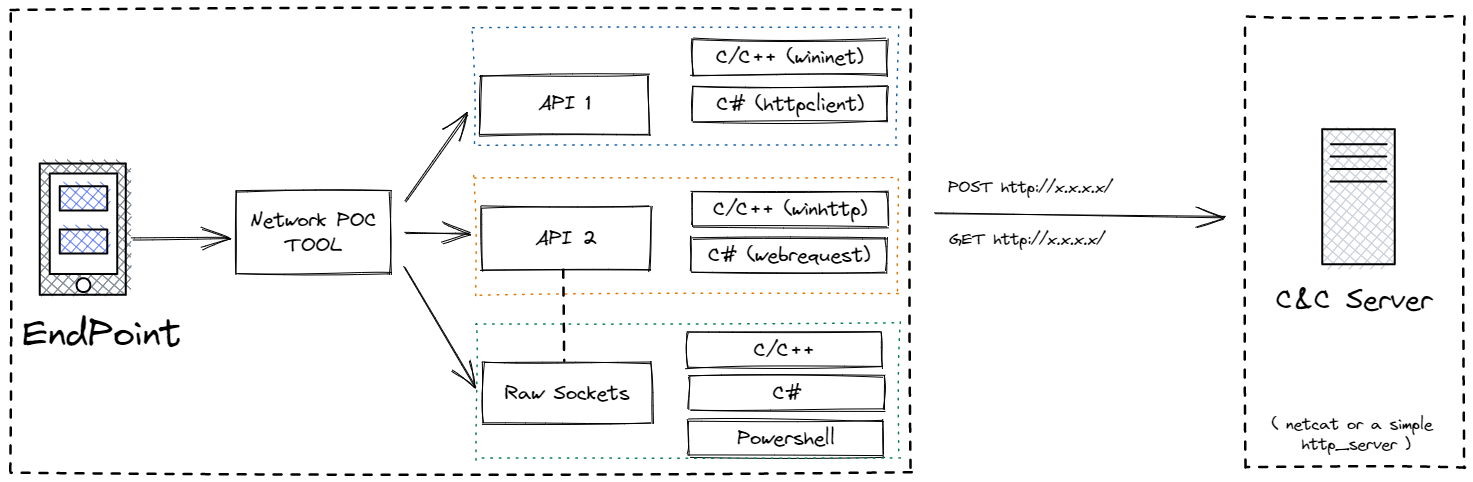
A project created with an aim to emulate and test exfiltration of data over different network protocols. The emulation is performed w/o the usage of native API's. This will help blue teams write correlation rules to detect any type of C2 communication or data exfiltration.
Alt text

Currently, this project can help generate HTTP/HTTPS traffic (both GET and POST) using the below metioned progamming/scripting languages:

  • CNet/WebClient: Developed in CLang to generate network traffic using the well know WIN32 API's (WININET & WINHTTP) and raw socket programming.
  • HashNet/WebClient: A C# binary to generate network traffic using .NET class like HttpClient, WebRequest and raw sockets.
  • PowerNet/WebClient: PowerShell scripts to generate network traffic using socket programming.

Usage:


Download the latest ZIP from realease.

Running the server:

  • With SSl: python3 HTTP-S-EXFIL.py ssl

  • Without SSL: python3 HTTP-S-EXFIL.py

Running the client:

  • CNet - CNet.exe <Server-IP-ADDRESS> - Select any option
  • HashNet - ChashNet.exe <Server-IP-ADDRESS> - Select any option
  • PowerNet - .\PowerHttp.ps1 -ip <Server-IP-ADDRESS> -port <80/443> -method <GET/POST>
Download Tool