 22imer/cve-2014-0160
Dockerized training lab for exploiting Heartbleed (CVE-2014-0160) via TLS heartbeat to leak nginx memory, plus Snort rule to detect attacks.

This repo focuses on building a container to create an environment that can easily exploit nginx using the Heartbleed technique, focusing on:
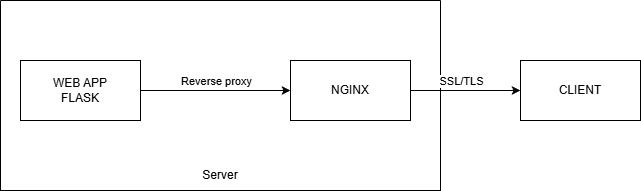
The CVE-2014-0160 vulnerability appears when the OpenSSL library provides TLS heartbeat functionality with a 64KB buffer size, causing an overflow that leaks sensitive information from server memory.
Webapp is processing sensitive messages that are cached by nginx in memory.
We exploit by checking if the environment supports TLS heartbeat.
openssl s_client -connect : -tlsdebug
Note: Modern OpenSSL versions may no longer support the TLS heartbeat protocol; please use a version that supports it.
Heartbleed is an out-of-bounds read vulnerability that is random in nature. The server will return 64KB of adjacent memory.
Header of a heartbeat (RFC6520) 18 03 02 00
Use docker build to build the heartbleed lab
docker build -t heartbleed-lab .
docker run heartbleed-lab -p port:8443
Default port where the webapp is served is 8443
Use the payload heartbleed.py to test We can observe that the payload returns results in hexdump format.
In the example dump, we can see the recently sent request and memory cells mostly filled with 0x00. Because the payload is random, we must run it several times to leak the desired results.
We can try running memory.py to send requests to nginx and store them in memory, and then obtain the leaked results as seen in result.txt.
Since we know that an attacker will use heartbeat requests to leak messages,
alert tcp any any -> any 443 (msg:"Heartbeat request"; content:"|18 03 02 00|"; rawbytes;sid:100000)
Use Snort IDS to detect intrusion.
