 1r0bit/taskhound
Tool to enumerate privileged Scheduled Tasks on Remote Systems

<p align="center">
<img width="350" height="350" alt="TaskHound Logo" src="https://assets.kitploit.com/production/public/readmes/9903/f048c922e3b550dd3bc0880bd2e9ba4bebdfdb710812a9a7eec7249bce3e112e.png" />
</p>
<p align="center">
<strong>Windows Privileged Scheduled Task Discovery Tool</strong> for fun and profit.
</p>
<p align="center">
<a href="https://github.com/1r0BIT/TaskHound/releases">
<img src="https://img.shields.io/github/v/release/1r0BIT/TaskHound?style=flat-square&logo=github&color=blue" alt="Latest Release">
</a>
<a href="https://bloodhound.specterops.io/">
<img src="https://img.shields.io/badge/BloodHound-OpenGraph-red.svg?style=flat-square&logo=neo4j" alt="BloodHound OpenGraph">
</a>
<a href="https://www.python.org/">
<img src="https://img.shields.io/badge/python-3.11+-blue.svg?style=flat-square&logo=python&logoColor=white" alt="Python 3.11+">
</a>
<br>
<a href="https://deepwiki.com/1r0BIT/TaskHound">
<img src="https://deepwiki.com/badge.svg" alt="Ask DeepWiki">
</a>
<a href="https://twitter.com/0xr0BIT">
<img src="https://img.shields.io/badge/Twitter-@0xr0BIT-1DA1F2?style=flat-square&logo=twitter&logoColor=white" alt="Twitter">
</a>
<a href="https://r0bit.io">
<img src="https://img.shields.io/badge/Blog-r0bit.io-orange?style=flat-square&logo=rss&logoColor=white" alt="Blog">
</a>
</p>
<hr />
TaskHound hunts for Windows scheduled tasks that run with privileged accounts and stored credentials. It enumerates tasks over SMB, parses XMLs, and identifies high-value attack opportunities through BloodHound integration.
For backstory/lore and detailed explanations: see the associated Blog Posts - [Part 1](https://r0bit.io/posts/taskhound/part1/index.html) and [Part 2](https://r0bit.io/posts/taskhound/part2/index.html).
## Key Features
| Feature | Description |
|---------|-------------|
| **Tier 0 & High Value Detection** | Automatically identifies tasks running as Domain Admins, Enterprise Admins, and other privileged accounts |
| **BloodHound Integration** | Connect to live BHCE/Legacy instances or ingest exports for high-value user detection |
| **OpenGraph Support** | Visualize scheduled tasks as attack path nodes in BloodHound CE |
| **LAPS Integration** | Auto-retrieve and use LAPS passwords (both Windows LAPS and Legacy) for per-host authentication |
| **DPAPI Credential Extraction** | Collect and decrypt DPAPI blobs containing stored task credentials |
| **Multi-threaded Scanning** | Parallel target processing with rate limiting for large environments |
| **LDAP-based Tier-0 Detection** | Detect privileged accounts via group membership without BloodHound |
| **Credential Validation** | Verify if stored task passwords are still valid via RPC |
| **Offline Analysis** | Process mounted disk images or previously collected XMLs |
| **Multiple Output Formats** | Plain text, JSON, CSV, and HTML security reports with severity scoring |
| **SID Resolution** | Multi-tier resolution via BloodHound → Cache → LSARPC → LDAP → GC |
| **Caching** | SQLite-based persistent cache for SID lookups and LAPS credentials |
## Quick Start
```bash
# Install
git clone https://github.com/1r0BIT/TaskHound.git
cd TaskHound
python3 -m venv .venv && source .venv/bin/activate
pip install -r requirements.txt && pip install .
# Basic usage - single target
taskhound -u homer.simpson -p 'Doh!123' -d thesimpsons.local -t moe.thesimpsons.local
# Multiple targets with threading
taskhound -u homer.simpson -p 'Doh!123' -d thesimpsons.local --targets-file hosts.txt --threads 10
# Auto-discover all domain computers
taskhound -u homer.simpson -p 'Doh!123' -d thesimpsons.local --dc-ip 10.0.0.1 --auto-targets --threads 20
# With LAPS - auto-retrieves per-host local admin passwords
taskhound -u homer.simpson -p 'Doh!123' -d thesimpsons.local --targets-file hosts.txt --laps --threads 10
# Offline analysis of mounted disk image
taskhound --offline-disk /mnt/disk
```
> **Auth Support**: TaskHound supports most major authentication mechanisms including password, NTLM hash, Kerberos (also with ccache), and AES key authentication.
## Configuration File
TaskHound supports TOML configuration files for persistent settings. Create `taskhound.toml` in your working directory or `~/.config/taskhound/`:
```toml
[authentication]
username = "svc_taskhound"
domain = "THESIMPSONS.LOCAL"
[target]
dc_ip = "10.0.0.1"
threads = 10
timeout = 30
[bloodhound]
live = true
connector = "http://127.0.0.1:8080"
api_key = "${BH_API_KEY}" # Use env vars for secrets
api_key_id = "${BH_API_KEY_ID}"
type = "bhce"
[bloodhound.opengraph]
enabled = true
output_dir = "./opengraph"
[laps]
enabled = true
[cache]
enabled = true
ttl = 86400 # 24 hours
```
Priority: CLI args > Environment variables > Local config > User config > Defaults
## AdaptixC2 Integration
TaskHound's BOF is included in the [Adaptix Extension-Kit](https://github.com/Adaptix-Framework/Extension-Kit) under `SAR-BOF/taskhound/`.
## Demo Output
```
TTTTT AAA SSS K K H H OOO U U N N DDDD
T A A S K K H H O O U U NN N D D
T AAAAA SSS KKK HHHHH O O U U N N N D D
T A A S K K H H O O U U N NN D D
T A A SSSS K K H H OOO UUU N N DDDD
by 0xr0BIT
[+] Connecting to BloodHound CE at http://127.0.0.1:8080
[+] BloodHound connection successful (API v2)
[+] High Value target data loaded (42 users)
[+] OpenGraph generation enabled (auto-upload active)
[*] Processing target: moe.thesimpsons.local
[+] moe.thesimpsons.local: Connected via SMB
[+] moe.thesimpsons.local: Local Admin Access confirmed
[*] moe.thesimpsons.local: Enumerating scheduled tasks (skipping \Microsoft)
[+] moe.thesimpsons.local: Found 12 tasks (3 privileged, 2 with stored credentials)
┌──────────────────────────────────────────────────────────────────────────────┐
│ [TIER-0] moe.thesimpsons.local - \DuffBrewery\BackupJob │
├──────────────────────────────────────────────────────────────────────────────┤
│ Enabled │ True │
│ RunAs │ THESIMPSONS\Administrator │
│ What │ C:\Scripts\backup_beer_recipes.ps1 │
│ Author │ THESIMPSONS\burns.monty │
│ Date │ 2025-06-15T02:30:00 │
│ Trigger │ Calendar (starts 2025-06-15 02:30, daily) │
│ Reason │ Tier 0 - Domain Admins membership │
│ Cred Validation │ CONFIRMED_VALID │
│ Pwd Analysis │ Password unchanged AND ran within schedule - confirmed │
└──────────────────────────────────────────────────────────────────────────────┘
┌──────────────────────────────────────────────────────────────────────────────┐
│ [PRIV] moe.thesimpsons.local - \KrustyBurger\InventorySync │
├──────────────────────────────────────────────────────────────────────────────┤
│ Enabled │ True │
│ RunAs │ THESIMPSONS\svc_krusty │
│ What │ C:\KrustyApps\sync.exe --silent │
│ Author │ THESIMPSONS\carlson.carl │
│ Date │ 2025-03-10T08:00:00 │
│ Trigger │ Calendar (starts 2025-03-10 08:00, every 4 hours) │
│ Reason │ High Value match found in BloodHound │
│ Cred Validation │ DEFINITELY_STALE │
│ Pwd Analysis │ Password changed AFTER last run - credentials are stale │
└──────────────────────────────────────────────────────────────────────────────┘
╭─────────────────────────── SCAN COMPLETE ────────────────────────────────────╮
│ [+] Succeeded: 1 │
│ [-] Failed: 0 │
│ Total time: 2.34s │
│ Avg per target: 2340ms │
╰──────────────────────────────────────────────────────────────────────────────╯
╭─────────────────────────── TASK SUMMARY ─────────────────────────────────────╮
│ Hostname Tier-0 Privileged Normal │
│ moe.thesimpsons.local 1 2 9 │
╰──────────────────────────────────────────────────────────────────────────────╯
╭─────────────────────── BLOODHOUND OPENGRAPH ─────────────────────────────────╮
│ [+] Generated 3 nodes, 5 edges │
│ [+] Uploaded to BloodHound successfully │
│ [*] JSON saved to: ./opengraph/taskhound_data.json │
╰──────────────────────────────────────────────────────────────────────────────╯
```
---
## BloodHound Integration
TaskHound supports both **Legacy BloodHound** (Neo4j) and **BloodHound Community Edition (BHCE)** with automatic format detection.
### Live Connection
```bash
# BHCE with API Key (recommended)
taskhound -u homer.simpson -p 'Doh!123' -d thesimpsons.local -t moe.thesimpsons.local \
--bh-live --bhce --bh-connector http://127.0.0.1:8080 \
--bh-api-key "YOUR_API_KEY" --bh-api-key-id "YOUR_KEY_ID"
# BHCE with username/password
taskhound -u homer.simpson -p 'Doh!123' -d thesimpsons.local -t moe.thesimpsons.local \
--bh-live --bhce --bh-connector http://127.0.0.1:8080 \
--bh-user admin --bh-password password
# Legacy BloodHound (Neo4j)
taskhound -u homer.simpson -p 'Doh!123' -d thesimpsons.local -t moe.thesimpsons.local \
--bh-live --legacy --bh-connector bolt://127.0.0.1:7687 \
--bh-user neo4j --bh-password password
```
### Tier 0 Detection Methods
| Source | Detection Method |
|--------|------------------|
| **BHCE** | `isTierZero`, system tags (`admin_tier_0`), AdminSDHolder |
| **Legacy** | AdminSDHolder (`admincount=1`), SID-based detection |
| **LDAP** | Group membership queries (`--ldap-tier0`) |
| **Built-in** | Well-known Tier 0 SIDs (Domain Admins, Enterprise Admins, etc.) |
### Offline Data Ingestion
If live connection isn't possible, export high-value users with these Cypher queries:
**BHCE:**
```cypher
MATCH (n) WHERE coalesce(n.system_tags, "") CONTAINS "admin_tier_0" OR n.highvalue = true
MATCH p = (n)-[:MemberOf*1..]->(g:Group)
RETURN p;
```
**Legacy:**
```cypher
MATCH (u:User {highvalue:true})
OPTIONAL MATCH (u)-[:MemberOf*1..]->(g:Group)
WITH u, properties(u) as all_props, collect(g.name) as groups
RETURN u.samaccountname AS SamAccountName, all_props, groups
```
Then use: `taskhound --bh-data exported_users.json ...`
---
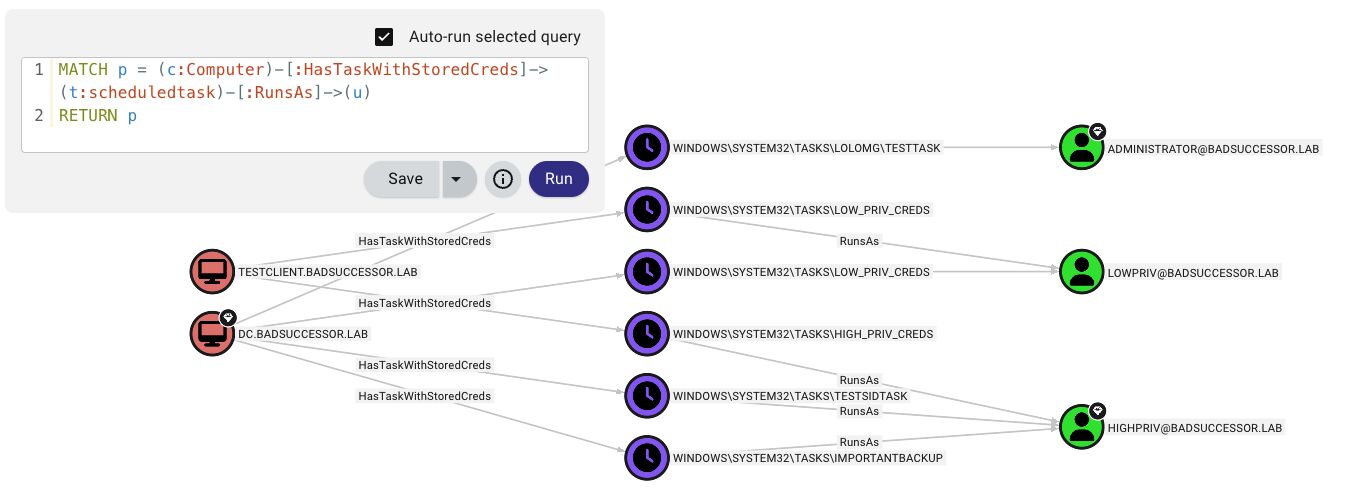
## OpenGraph Attack Path Visualization
<p align="center">
<img src="https://assets.kitploit.com/production/public/readmes/9903/43ec2d44fef6e06a4aee6b0cad113991182e24d877f0d9099cd6b479554b3362.jpg" alt="OpenGraph Attack Path" />
</p>
TaskHound creates custom nodes and edges in BloodHound CE to visualize scheduled task attack paths.
**What You Get:**
- **Custom Nodes**: `ScheduledTask` with 20+ properties (credentials, triggers, password analysis, validation status)
- **Custom Edges**: `HasTask`, `HasTaskWithStoredCreds`, `RunsAs`
- **Attack Paths**: `(Owned) → AdminTo → (Computer) → HasTask → (Task) → RunsAs → (Target)`
```bash
# Collect and auto-upload
taskhound -u homer.simpson -p 'Doh!123' -d thesimpsons.local -t moe.thesimpsons.local --bh-opengraph
# Generate without upload (saves to {output_dir}/opengraph/)
taskhound -u homer.simpson -p 'Doh!123' -d thesimpsons.local -t moe.thesimpsons.local --bh-opengraph --bh-no-upload
```
> **Note**: OpenGraph is BHCE-only. Legacy BloodHound doesn't support custom node types.
---
## LAPS Integration
TaskHound can automatically retrieve and use LAPS passwords for per-host authentication. Supports both Windows LAPS (`msLAPS-Password`) and Legacy LAPS (`ms-Mcs-AdmPwd`), including encrypted passwords via MS-GKDI.
```bash
# Basic LAPS - auto-retrieves passwords per target
taskhound -u homer.simpson -p 'Doh!123' -d thesimpsons.local --targets-file hosts.txt --laps --threads 10
# Custom local admin username
taskhound -u homer.simpson -p 'Doh!123' -d thesimpsons.local -t moe.thesimpsons.local --laps --laps-user localadmin
# LAPS with OPSEC mode (other noisy operations disabled)
taskhound -u homer.simpson -p 'Doh!123' -d thesimpsons.local -t moe.thesimpsons.local --laps --opsec --force-laps
```
**Supported LAPS Types:**
| Type | Attribute | Encrypted |
|------|-----------|-----------|
| Windows LAPS | `msLAPS-Password` | No |
| Windows LAPS | `msLAPS-EncryptedPassword` | Yes (MS-GKDI) |
| Legacy LAPS | `ms-Mcs-AdmPwd` | No |
---
## DPAPI Credential Extraction
TaskHound extracts and decrypts stored task credentials using DPAPI. **DPAPI looting is enabled by default**.
```bash
# Step 1: Get DPAPI_SYSTEM key via LSA dump
nxc smb moe.thesimpsons.local -u homer.simpson -p 'Doh!123' --lsa
# Look for: DPAPI_SYSTEM userkey: 0x51e43225...
# Step 2a: Loot + decrypt immediately (looting is default, just add key)
taskhound -t moe.thesimpsons.local -u homer.simpson -p 'Doh!123' -d thesimpsons.local --dpapi-key 0x51e43225...
# Step 2b: Or collect now (default saves to ./output/raw_backups/), decrypt later
taskhound -t moe.thesimpsons.local -u homer.simpson -p 'Doh!123' -d thesimpsons.local
# Later:
taskhound --offline ./output/raw_backups/moe.thesimpsons.local --dpapi-key 0x51e43225...
# Custom output directory
taskhound -t moe.thesimpsons.local -u homer.simpson -p 'Doh!123' -d thesimpsons.local --output-dir ./collected
# Disable DPAPI looting explicitly
taskhound -t moe.thesimpsons.local -u homer.simpson -p 'Doh!123' -d thesimpsons.local --no-loot
```
> **Important**: Each host has a unique DPAPI_SYSTEM key. For multi-target scans, collect (default), then decrypt each target offline.
---
## Credential Validation
TaskHound assesses if stored task passwords are likely still valid by querying task execution history via RPC and applying heuristics. This is **enabled by default**.
```bash
# Credential validation is on by default, no flag needed
taskhound -u homer.simpson -p 'Doh!123' -d thesimpsons.local -t moe.thesimpsons.local
# Disable validation explicitly
taskhound -u homer.simpson -p 'Doh!123' -d thesimpsons.local -t moe.thesimpsons.local --no-validate-creds
```
### How It Works
Windows Task Scheduler only records **successful** task executions. Authentication failures (wrong password, account locked, etc.) are silently ignored. The task just doesn't run.
**Key insight**: Windows validates credentials at task creation time. If you try to create a task with a wrong password, you get `ERROR_LOGON_FAILURE` and the task isn't created. This means: **if a task with stored credentials exists, the password was valid when the task was created.**
TaskHound uses heuristics to estimate credential validity:
| Status | Meaning |
|--------|---------|
| `CONFIRMED_VALID` | Password unchanged since task creation AND task ran within expected schedule - credentials confirmed working |
| `HIGH_CONFIDENCE_VALID` | Password unchanged since task creation, but trigger timing unknown (e.g., boot trigger) - credentials likely valid |
| `LIKELY_VALID` | Password changed but task ran within schedule (creds updated), OR task ran successfully (RPC-only mode) |
| `POSSIBLY_STALE` | Task should have run but hasn't - may indicate stale credentials |
| `DEFINITELY_STALE` | Password changed after last successful run - credentials are definitely wrong |
| `NEVER_RAN_LIKELY_VALID` | Task never ran, but password unchanged since creation - likely valid (may lack batch logon rights) |
| `NEVER_RAN_POSSIBLY_STALE` | Task never ran, and password changed after creation - likely stale |
| `NEVER_RAN_UNKNOWN` | Task never ran, no AD context - was valid at creation, current status unknown |
| `UNKNOWN` | Cannot determine (account blocked, etc.) |
The key insight: comparing `pwdLastSet` from AD against `LastRunTime` from Task Scheduler tells us if the password changed after the last successful run. For never-run tasks, comparing `pwdLastSet` against `task_creation_date` tells us if the password changed after the task was created with valid credentials.
**Without AD data** (e.g., `--no-ldap` and no BloodHound): TaskHound falls back to RPC-only mode, using just the return code and last run time. A successful execution returns `LIKELY_VALID`; schedule-based staleness detection still applies if trigger interval is known from the task XML.
> **Note**: Disabled when using `--opsec` or `--no-rpc`.
---
## Output Formats
TaskHound supports multiple output formats for different use cases. All outputs use a structured directory layout under `--output-dir` (default: `./output`).
### Available Formats
| Format | Flag | Description | Use Case |
|--------|------|-------------|----------|
| **Plain** | `-o plain` | Human-readable console output (default) | Interactive use, quick review |
| **JSON** | `-o json` | Machine-readable structured export | Automation, data analysis, scripting |
| **CSV** | `-o csv` | Spreadsheet-compatible export | Reporting, filtering, Excel analysis |
| **HTML** | `-o html` | Security report with severity scoring | Blue team audits, stakeholder reports |
### Usage Examples
```bash
# Default - plain text to console + files
taskhound -u homer.simpson -p 'Doh!123' -d thesimpsons.local -t moe.thesimpsons.local
# Multiple output formats
taskhound -u homer.simpson -p 'Doh!123' -d thesimpsons.local --auto-targets -o plain,json,html
# JSON only for automation
taskhound -u homer.simpson -p 'Doh!123' -d thesimpsons.local --auto-targets -o json
# Custom output directory
taskhound -u homer.simpson -p 'Doh!123' -d thesimpsons.local --auto-targets -o html --output-dir ./audit_results
# All formats for comprehensive audit
taskhound -u homer.simpson -p 'Doh!123' -d thesimpsons.local --auto-targets -o plain,json,csv,html --output-dir ./full_audit
```
### Directory Structure
```
./output/ # Base directory (--output-dir)
├── plain/ # Plain text output
│ └── <hostname>/
│ └── tasks.txt
├── json/ # JSON export
│ └── taskhound.json
├── csv/ # CSV export
│ └── taskhound.csv
├── html/ # HTML security reports
│ └── taskhound.html
├── opengraph/ # BloodHound OpenGraph files
│ └── taskhound_data.json
└── raw_backups/ # Raw collection (XML + DPAPI)
└── <hostname>/
├── tasks/ # Task XML files
└── dpapi_loot/ # DPAPI credential blobs
```
### HTML Security Reports
The HTML output generates a comprehensive security report designed for blue team assessments:
- **Severity Scoring**: Tasks rated by risk level based on privilege, stored credentials, and configuration
- **Task Details**: Full metadata including triggers, actions, run-as accounts, and validation status
- **Filtering**: Client-side filtering by host, severity, and credential status
- **Export Ready**: Suitable for management reports and audit documentation
### Backup Collection
By default, TaskHound saves raw XML task files and DPAPI credential blobs for offline analysis:
```bash
# Disable backup collection
taskhound -u homer.simpson -p 'Doh!123' -d thesimpsons.local -t moe.thesimpsons.local --no-backup
# Analyze backups later (offline mode)
taskhound --offline ./output/raw_backups/moe.thesimpsons.local --dpapi-key 0x51e43225...
```
---
## Multi-threaded Scanning
For large environments, use parallel scanning with rate limiting:
```bash
# 20 parallel workers, max 5 targets/second
taskhound -u homer.simpson -p 'Doh!123' -d thesimpsons.local --auto-targets --threads 20 --rate-limit 5
# Auto-discover servers only (uses preset filter)
taskhound -u homer.simpson -p 'Doh!123' -d thesimpsons.local --auto-targets --ldap-filter servers --threads 20
# Include disabled computers and extend stale threshold to 90 days
taskhound -u homer.simpson -p 'Doh!123' -d thesimpsons.local --auto-targets --include-disabled --stale-threshold 90
# Target workstations only, disable stale filtering
taskhound -u homer.simpson -p 'Doh!123' -d thesimpsons.local --auto-targets --ldap-filter workstations --stale-threshold 0
```
### Auto-Target Filtering
By default, `--auto-targets` applies smart filtering to reduce noise and failed connections:
| Filter | Default | Override |
|--------|---------|----------|
| Disabled accounts | Excluded | `--include-disabled` |
| Stale computers (>60 days) | Excluded | `--stale-threshold 0` (disable) |
| Domain Controllers | Excluded | `--include-dcs` |
**Data Source Priority:** BloodHound (if configured) → LDAP fallback
When using BloodHound, TaskHound queries with `include_properties=true` for efficient single-query enumeration. If BloodHound data is older than 7 days, a warning is displayed; over 30 days triggers an urgent warning.
**Filter Presets:**
- `servers` - Windows Server operating systems only
- `workstations` - Non-server operating systems only
- `(raw LDAP)` - Custom LDAP filter (requires LDAP source)
---
## SID Resolution
TaskHound resolves SIDs to readable names using a multi-tier fallback chain:
1. **BloodHound** (if connected) - fastest, no network traffic
2. **Cache** - SQLite persistent cache (default 24h TTL)
3. **LSARPC** - direct target query (most accurate for local accounts)
4. **LDAP** - domain controller query
5. **Global Catalog** - for cross-domain/forest SIDs
```bash
# Separate LDAP credentials for SID resolution
taskhound -u localadmin -p 'L0c4lP@ss!' -d . -t moe.thesimpsons.local \
--ldap-user homer.simpson --ldap-password 'Doh!123' --ldap-domain thesimpsons.local
# Specify Global Catalog for multi-domain
taskhound -u homer.simpson -p 'Doh!123' -d thesimpsons.local -t moe.thesimpsons.local --gc-server 10.0.0.1
# Disable all network-based resolution (OPSEC)
taskhound -u homer.simpson -p 'Doh!123' -d thesimpsons.local -t moe.thesimpsons.local --opsec
```
---
## Offline Analysis
Analyze tasks without network access:
```bash
# Previously collected XML backups
taskhound --offline ./backup/moe.thesimpsons.local
# Mounted disk image
taskhound --offline-disk /mnt/disk
# Mounted image with custom hostname
taskhound --offline-disk /mnt/disk --disk-hostname MOE
```
---
## OPSEC Considerations
TaskHound provides granular control over network operations to balance stealth vs functionality.
### Protocol Impact
| Protocol | Operations | Flag to Disable |
|----------|------------|-----------------|
| SMB | Task enumeration (always used) | N/A |
| LDAP (389/636) | SID resolution, Tier-0 detection, pwdLastSet | `--no-ldap` |
| Global Catalog (3268) | Cross-domain SID resolution | `--no-ldap` |
| LSARPC (SMB pipe) | Fallback SID resolution | `--no-rpc` |
| Remote Registry (SMB pipe) | Credential Guard detection | `--no-credguard` |
| Task Scheduler RPC (SMB pipe) | Credential validation | `--no-validate-creds` |
| DPAPI file collection (SMB) | DPAPI credential blob collection | `--no-loot` |
### SID Resolution Chain
```
Default: BloodHound → Cache → LSARPC → LDAP → GC
--no-ldap: BloodHound → Cache → LSARPC
--no-rpc: BloodHound → Cache → LDAP → GC
--opsec: BloodHound → Cache (only)
```
### Default Behavior
TaskHound is **very noisy by default** - all features are enabled for maximum visibility. This makes it ideal for audits and comprehensive assessments where OPSEC is not a concern:
- **Credential Guard detection** - Enabled by default (disable with `--no-credguard`)
- **Credential validation** - Enabled by default (disable with `--no-validate-creds`)
- **DPAPI looting** - Enabled by default (disable with `--no-loot`)
- **LDAP resolution** - Enabled by default (disable with `--no-ldap`)
- **RPC operations** - Enabled by default (disable with `--no-rpc`)
> [!WARNING]
> **Credential Guard checks are HIGHLY detectable.** Since the Remote Registry service is stopped by default on modern Windows, TaskHound will remotely **start the service** via SCM, perform the checks, then stop it (Just like secretsdump). This will make any decent SOC light up like a Christmas tree. **Definitely use `--no-credguard` if you want to avoid this in engagements!**
Speaking of Engagements: For red team/stealth operations, use `--opsec` to disable all noisy features at once. (Or use the BOF).
### Usage Examples
```bash
# Full OPSEC mode (disables: LDAP, RPC, looting, credguard, validation; forces sequential scanning)
taskhound -u user -p 'pass' -d corp.local -t target --opsec
# OPSEC with jitter (random 0-5 second delays between hosts)
taskhound -u user -p 'pass' -d corp.local --targets-file hosts.txt --opsec --jitter 5
# Disable LDAP only (keep LSARPC for SID resolution)
taskhound -u user -p 'pass' -d corp.local -t target --no-ldap
# Disable RPC only (keep LDAP for SID resolution)
taskhound -u user -p 'pass' -d corp.local -t target --no-rpc
# LAPS with OPSEC (force LAPS LDAP queries despite --opsec)
taskhound -u user -p 'pass' -d corp.local --laps --opsec --force-laps
```
### Best Practices for Stealth
1. **Pre-populate BloodHound data** - Import domain data first with `--bh-live`
2. **Use `--opsec` flag** - Disables all noisy operations at once
3. **Add `--jitter` for timing randomization** - Avoid predictable scan patterns
4. **Collect XMLs via other means** - Analyze offline with `--offline`
5. **Use the BOF implementation** - Available in AdaptixC2
---
## Full CLI Reference
TaskHound uses Rich for formatted console output with colored tables and progress indicators.
```
taskhound --help
```
<details>
<summary>Click to expand full usage</summary>
```
Usage: taskhound [OPTIONS] [TARGETS]
AUTHENTICATION OPTIONS
-u, --username Username (required for online mode)
-p, --password Password (omit with -k for Kerberos/ccache)
-d, --domain Domain (required for online mode)
--hashes NTLM hashes (LM:NT or NT-only)
-k, --kerberos Use Kerberos authentication
--aes-key AES key for Kerberos (32 or 64 hex chars)
TARGET OPTIONS
-t, --target Single target or comma-separated list
--targets-file File with targets, one per line
--dc-ip Domain controller IP
--ns, --nameserver DNS nameserver for lookups
--timeout Connection timeout in seconds (default: 5)
--threads Parallel worker threads (default: 10)
--rate-limit Max targets per second (default: unlimited)
--jitter SECONDS Random delay (0-N seconds) between hosts (OPSEC, sequential only)
--dns-tcp Force DNS over TCP (for SOCKS proxies)
--auto-targets Auto-discover targets (BloodHound first, LDAP fallback)
--ldap-filter Filter for auto-targets: 'servers', 'workstations', or raw LDAP
--include-dcs Include Domain Controllers in auto-targets
--include-disabled Include disabled computer accounts
--stale-threshold Exclude computers inactive >N days (default: 60, 0=disable)
SCANNING OPTIONS
--offline Parse XMLs from directory
--offline-disk Analyze mounted Windows filesystem
--disk-hostname Override hostname for offline-disk
--bh-data BloodHound export file for HV detection
--opsec Stealth mode: --no-ldap --no-rpc --no-loot --no-credguard --no-validate-creds --threads 1
--no-rpc Disable RPC operations (LSARPC, CredGuard, validation)
--include-ms Include \Microsoft tasks
--include-local Include local system accounts
--include-all Include ALL tasks
--unsaved-creds Show tasks without stored credentials
--no-credguard Disable Credential Guard detection (default: enabled)
--no-validate-creds Disable credential validation (default: enabled)
BLOODHOUND OPTIONS
--bh-live Enable live BloodHound connection
--bh-connector BloodHound URI (default: http://127.0.0.1:8080)
--bh-user BloodHound username
--bh-password BloodHound password
--bh-api-key BloodHound API key
--bh-api-key-id BloodHound API key ID
--bh-timeout API query timeout (default: 120)
--bhce Use BHCE (Community Edition)
--legacy Use Legacy BloodHound (Neo4j)
--bh-save Save query results to file
OPENGRAPH OPTIONS (BHCE ONLY)
--bh-opengraph Generate OpenGraph JSON files (saves to {output_dir}/opengraph/)
--bh-no-upload Skip automatic upload
--bh-force-icon Force icon update
--bh-icon Icon name (default: clock)
--bh-color Icon color (default: #8B5CF6)
--bh-allow-orphans Create edges for missing nodes
DPAPI OPTIONS
--no-loot Disable DPAPI credential collection (default: enabled)
--dpapi-key DPAPI_SYSTEM userkey (hex format)
LDAP/SID RESOLUTION
--no-ldap Disable LDAP/GC operations
--ldap-user Alternative LDAP username
--ldap-password Alternative LDAP password
--ldap-hashes Alternative LDAP hashes
--ldap-domain Alternative LDAP domain
--ldap-tier0 Enable LDAP-based Tier-0 detection
--gc-server Global Catalog server IP
LAPS OPTIONS
--laps Enable LAPS authentication
--laps-user Override local admin username
--force-laps Force LAPS in OPSEC mode
CACHE OPTIONS
--cache-ttl Cache TTL in seconds (default: 86400)
--no-cache Disable caching
--clear-cache Clear cache before run
--cache-file Cache file path
OUTPUT OPTIONS
-o, --output Output formats (comma-separated: plain,json,csv,html)
Default: plain
--output-dir Base output directory (default: ./output)
--no-backup Disable raw XML backup collection
--no-summary Disable summary table
Output directory structure:
./output/
├── plain/<host>/tasks.txt # Plain text output
├── json/taskhound.json # JSON export
```
---
[Read more](https://github.com/1r0bit/taskhound)
